
1. Rhagymadrodd
This manual provides essential information for the safe and efficient operation of your Artlii Q Mini Portable Projector. Please read this manual thoroughly before using the product and retain it for future reference.
2. Gwybodaeth Diogelwch
Observe the following safety precautions to prevent damage to the projector and ensure user safety:
- Peidiwch â rhwystro agoriadau awyru. Sicrhewch fod digon o lif aer o amgylch y taflunydd i atal gorboethi.
- Avoid direct exposure to the projector lens light. The bright light can cause eye strain.
- Do not place the projector in unstable locations. Ensure it is on a flat, stable surface.
- Cadwch y taflunydd i ffwrdd o ddŵr neu hylifau eraill.
- Defnyddiwch yr addasydd pŵer a gyflenwir gyda'r taflunydd yn unig.
- Do not attempt to open or repair the projector yourself. Refer all servicing to qualified personnel.
3. Cynnyrch Drosview
The Artlii Q Mini Portable Projector is a compact and versatile device designed for various projection needs. It features a manual focus system, automatic sleep function, and supports a wide range of input sources.

Ffigur 3.1: Blaen a brig view of the Artlii Q Mini Portable Projector, highlighting the lens and control buttons.

Ffigur 3.2: Cefn view of the projector, illustrating the various input and output ports available for connectivity.
3.1 Nodweddion Allweddol
- Dyluniad Symudol: Compact and lightweight, ideal for transport.
- Batri adeiledig: Offers 1-1.5 hours of operation on battery power.
- Ffocws â llaw: Allows for precise image clarity adjustments.
- Cydnawsedd Eang: Connects to various devices including USB sticks, PCs, Macs, and TV sticks.
- Gweithrediad Sŵn Isel: Engineered for quiet performance.

Ffigur 3.3: The projector's internal battery, providing portable power for extended use.

Ffigur 3.4: Demonstrating the projector's portability, easily fitting into a backpack.
4. Gosod
4.1 Pweru Ymlaen/Diffodd
- Connect the power adapter to the projector and a power outlet.
- Press the power button located on the top panel of the projector to turn it on.
- To turn off, press the power button again. The projector also features an automatic sleep function.
4.2 Addasu Ffocws
The projector features a manual focus adjustment to ensure a clear image.
- Trowch y taflunydd ymlaen ac arddangoswch ddelwedd.
- Locate the focus knob near the lens.
- Rotate the focus knob clockwise or counter-clockwise until the projected image appears sharp and clear.

Ffigur 4.1: Diagram showing the focus knob and various projection sizes from 14 to 72 inches at different distances.
4.3 Projection Distance and Size
The projector can display images from 14 to 72 inches, depending on the distance from the projection surface. Refer to Figure 4.1 for approximate distances.
5. Cyfarwyddiadau Gweithredu
5.1 Llywio'r Ddewislen
Use the directional buttons (up, down, left, right) and the 'OK' button on the projector's top panel or remote control to navigate through the on-screen menu. The 'Return' button allows you to go back to the previous menu.
5.2 Dethol Ffynonellau
After powering on, select your desired input source (e.g., HDMI, USB, AV) from the main menu. Ensure your external device is connected before selecting the source.
6. Cysylltedd
The Artlii Q Mini Portable Projector offers a variety of connection options for different devices.
6.1 Dyfeisiau Cydnaws
The projector is compatible with a wide range of devices, including:
- Laptops/PCs
- Gaming Consoles (e.g., Nintendo Switch, PS5)
- Gyriannau USB Flash
- TV Sticks (e.g., Fire TV Stick)
- Chwaraewyr Blu-ray
- Camerâu
- TF Cards (MicroSD)
- U Disks
- Chromecast
- Home Cinema Systems
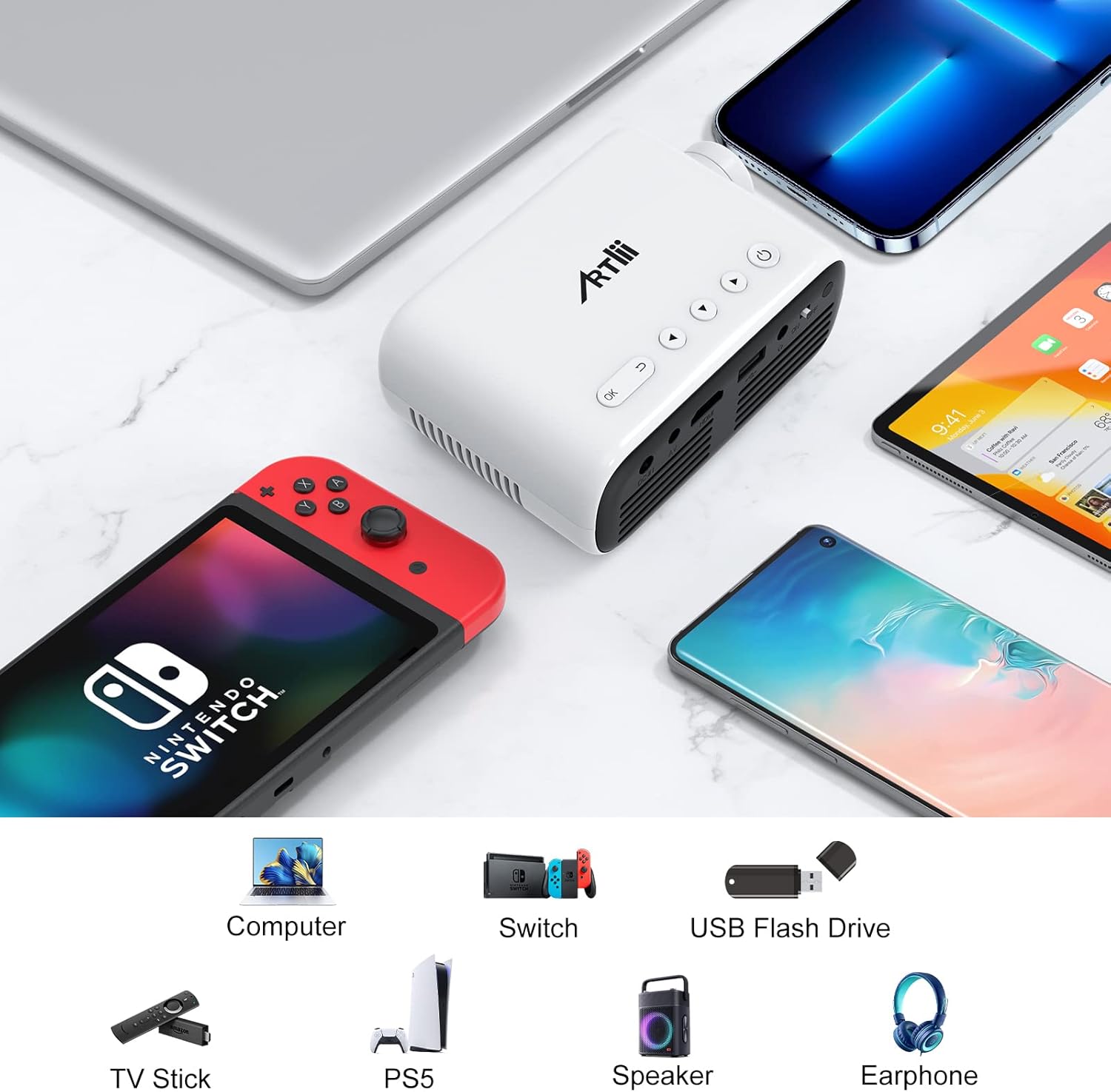
Ffigur 6.1: Examples of devices that can be connected to the Artlii Q Mini Portable Projector.

Ffigur 6.2: Further compatible devices and an illustration of connecting phones/tablets via a separate WiFi display dongle (not included).
6.2 Connecting to Phones/Tablets
To connect your phone or tablet, a separate WiFi display dongle (not included) is required. Connect the dongle to the projector's HDMI port and follow the dongle's instructions for screen mirroring.
7. cynnal
7.1 Glanhau'r Lens
Use a soft, lint-free cloth specifically designed for optical lenses to gently wipe the projector lens. Avoid using abrasive cleaners or excessive force.
7.2 Glanhau Corff y Taflunydd
Wipe the exterior of the projector with a soft, dry cloth. Do not use liquid or aerosol cleaners.
7.3 Storio
Pan nad yw'n cael ei ddefnyddio am gyfnodau hir, storiwch y taflunydd mewn lle oer, sych, i ffwrdd o olau haul uniongyrchol a thymheredd eithafol. Defnyddiwch y pecyn gwreiddiol neu gas amddiffynnol i atal llwch rhag cronni a difrod.
8. Datrys Problemau
Os byddwch chi'n dod ar draws problemau gyda'ch taflunydd, cyfeiriwch at yr atebion cyffredin canlynol:
| Problem | Achos Posibl | Ateb |
|---|---|---|
| Dim delwedd yn cael ei harddangos | Power not connected, incorrect input source, loose cable connection | Check power cable, select correct input source, ensure all cables are securely connected. |
| Mae'r ddelwedd yn aneglur | Focus not adjusted, projector too close/far | Adjust the manual focus knob. Adjust projection distance. |
| Dim sain | Volume too low, external device volume low, audio cable not connected | Increase projector volume. Increase external device volume. Ensure audio cables are connected correctly. |
| Taflunydd yn gorboethi | Blocked ventilation, prolonged use | Ensure ventilation openings are clear. Allow the projector to cool down. |
9. manylebau
| Nodwedd | Manyleb |
|---|---|
| Brand | Artlii |
| Model | HD Videoprojecteur |
| Dimensiynau Cynnyrch | 31 x 24 x 11 cm |
| Pwysau Eitem | 3.34 kg |
| Rhyngwyneb Caledwedd | AV, HDMI, Infrared, MicroSD, USB, VGA |
| Dyfeisiau Cydnaws | Laptop, Gaming Consoles, USB Sticks, TV Sticks, Blu-ray Players, Cameras, Phones/Tablets (with dongle) |
| Nodweddion Ychwanegol | Large projection size, High compatibility, Lightweight and portable, Powerful and clear sound, Clear and fresh image |
| Technoleg Sgrin | LCD |
| Maint Sgrin | Up to 200 Inches (Optimal 14-72 inches) |
| Cymhareb Cyferbyniad Delwedd | 3000:1 |
| Cymhareb Agwedd | 16:9, 4:3 |
| Datrysiad Brodorol | 1280 x 800 |
| Datrysiad Arddangos Uchaf | 1920 x 1080 (1080p supported) |
| Lefel Sŵn | 40 dB |
| Math o Gysylltedd | HDMI, USB, VGA |
| Ffactor Ffurf | Cludadwy |
| Math Mowntio | Nenfwd |
| Disgleirdeb | 3400 lm |
| Lliw | Du |
10. Gwarant a Chefnogaeth
Artlii provides a one-year warranty for this product. Additionally, a 3-month worry-free refund policy is offered. For any defective products or support inquiries, please contact Artlii customer service for a free replacement or a full refund.
Am gymorth pellach, ewch i'r Artlii Store on Amazon.