
PHILIPS DVT4110
PHILIPS DVT4110 VoiceTracer Digital Recorder User Manual
Rhagymadrodd
This manual provides detailed instructions for the PHILIPS DVT4110 VoiceTracer Digital Recorder. The DVT4110 is designed for high-quality audio recording, featuring an intuitive 3-microphone system for outstanding clarity. It is ideal for capturing lectures, seminars, interviews, and personal notes. The device also offers remote control and file sharing capabilities via a smartphone application.
Beth Sydd yn y Bocs
- PHILIPS DVT4110 VoiceTracer Digital Recorder
- Cebl USB (Math-A i Fath-C)
- Canllaw Cychwyn Cyflym
Cynnyrch Drosview
Familiarize yourself with the components of your PHILIPS DVT4110 VoiceTracer.

Ffigur 1: Blaen view of the PHILIPS DVT4110 VoiceTracer, showing the display, control buttons, and microphones.
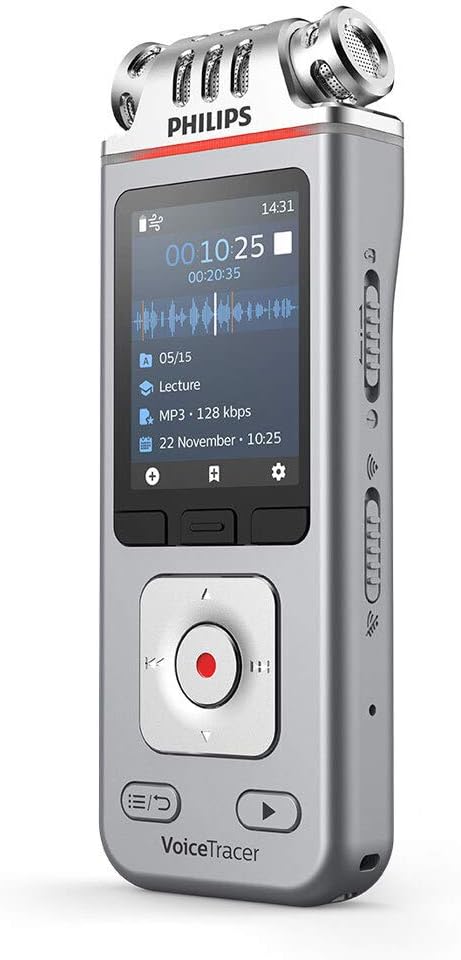
Ffigur 2: Ongl view of the device, emphasizing the three high-fidelity microphones at the top for superior audio capture.

Ffigur 3: Product dimensions of the DVT4110 VoiceTracer: 0.8 inches (depth) x 1.8 inches (width) x 5.1 inches (height).
Gosod
1. Codi Tâl y Dyfais
The DVT4110 is equipped with a powerful Li-Ion rechargeable battery. Before first use, fully charge the device.
- Connect the supplied USB cable to the USB-C port on the VoiceTracer.
- Connect the other end of the USB cable to a powered USB port on a computer or a USB wall adapter.
- The battery indicator on the display will show the charging status. A full charge typically takes approximately 3 hours.
2. Pweru Ymlaen / I ffwrdd
- To power on: Press and hold the Power button until the display illuminates.
- To power off: Press and hold the Power button until the device shuts down.
3. Inserting a Memory Card (Optional)
The device has 8 GB of built-in memory. For extended recording capacity, you can insert a microSD card (up to 32 GB).
- Lleolwch y slot cerdyn cof ar ochr y ddyfais.
- Mewnosodwch y cerdyn microSD gyda'r cysylltiadau aur yn wynebu i lawr nes ei fod yn clicio i'w le.
- I'w dynnu allan, gwthiwch y cerdyn yn ysgafn nes iddo ddod allan.
4. Initial App Connection
The Philips VoiceTracer app allows for remote control and file sharing. Download the app from your smartphone's app store.
- Enable Wi-Fi on your VoiceTracer via the device settings.
- On your smartphone, connect to the VoiceTracer's personal hotspot (Wi-Fi network).
- Open the Philips VoiceTracer app and follow the on-screen instructions to pair your device.
Cyfarwyddiadau Gweithredu
1. Recordio Sain
The DVT4110 features three high-fidelity microphones for stereo recording in MP3 and PCM formats.
- Standard Recording: Gwasgwch y Cofnod button (red circle) to start recording. Press it again to pause/resume, and press the Stopio button to end and save the recording.
- Recordio wedi'i actifadu gan lais: Enable this feature in the device settings. Recording will automatically start when sound is detected and pause during silence.
- Cyn-recordio: The device can capture the last few seconds of audio before you press record, ensuring you don't miss the beginning of an important moment. This can be configured in settings.
- Audio Scenes: Select predefined audio scenes (e.g., Lecture, Meeting, Interview) from the menu to optimize recording settings for specific environments.
2. Chwarae
Listen to your recordings directly on the device or through headphones.
- Llywiwch i'r file list using the directional buttons.
- Dewiswch y recordiad a ddymunir.
- Gwasgwch y Chwarae botwm i ddechrau chwarae.
- Adjust volume using the side buttons.
- Connect headphones to the 3.5 mm jack for private listening.
3. File Rheoli a Rhannu
Manage and transfer your recordings efficiently.
- Transfer to Computer: Connect the VoiceTracer to your computer using the USB cable. The device will appear as a removable drive, allowing you to drag and drop files.
- Sharing via App: Use the Philips VoiceTracer app to wirelessly transfer recordings to your smartphone and share them via email, messaging apps, or cloud services.
- Yn golygu: Recordings can be edited on the device, including overwriting sections or adding new audio at the end.
Cynnal a chadw
To ensure the longevity and optimal performance of your VoiceTracer, follow these guidelines:
- Cadwch y ddyfais yn sych. Osgowch ddod i gysylltiad â dŵr neu leithder gormodol.
- Glanhewch y ddyfais gyda lliain meddal, sych. Peidiwch â defnyddio glanhawyr sgraffiniol na thoddyddion.
- Avoid extreme temperatures. Store the device in a cool, dry place.
- Protect the display from scratches.
- Peidiwch â cheisio dadosod y ddyfais, gan y bydd hyn yn gwneud y warant yn ddi-rym.
Datrys problemau
If you encounter issues with your PHILIPS DVT4110 VoiceTracer, refer to the following common solutions:
- Nid yw'r ddyfais yn troi ymlaen: Gwnewch yn siŵr bod y batri wedi'i wefru. Cysylltwch y ddyfais â ffynhonnell bŵer a rhoi cynnig arall arni.
- Poor recording quality: Check microphone settings (e.g., sensitivity, audio scene). Ensure the microphones are not obstructed. Record in a quiet environment.
- Methu trosglwyddo files i gyfrifiadur: Ensure the USB cable is securely connected. Try a different USB port or cable. Verify the device is recognized as a storage device.
- Problemau cysylltu apiau: Ensure Wi-Fi is enabled on the VoiceTracer and your smartphone is connected to its hotspot. Restart both the device and the app.
- Nid yw'r ddyfais yn ymateb: Perform a soft reset by pressing and holding the Power button for an extended period (e.g., 10-15 seconds) until the device restarts.
Manylebau
| Nodwedd | Manylyn |
|---|---|
| Dimensiynau Cynnyrch | 0.8"D x 1.8"L x 5.1"U (2 x 4.5 x 13 cm) |
| Pwysau Eitem | 5 owns (141 gram) |
| Arddangos | 2" / 6 cm color LCD, 240 x 320 pixels |
| Ffactor Ffurflen Meicroffon | Built-In (3 high-fidelity microphones) |
| Fformatau Recordio | MP3, PCM (WAV) |
| Ansawdd Cofnodi | MP3 (8, 32, 64, 96, 128, 192, 256, 320 kbps), PCM (22 kHz/16 bit, 44.1 kHz/16 bit, 48 kHz/16 bit, 96 kHz/24 bit) |
| Cof Mewnol | 8 GB NAND Flash |
| Slot Cerdyn Cof | MicroSD card support, up to 32 GB |
| Batri | 1 Lithium Polymer (1000 mAh), rechargeable |
| Battery Life (Recording) | Up to 36 hours (MP3, 8 kbps) |
| Amser Codi Tâl | Tua. 3 awr |
| Cysylltedd | USB Type-C, High-speed USB 2.0, Wi-Fi (802.11 b/g/n/e/i 2.4 GHz) |
| Clustffonau Jack | 3.5 milimetrau |
| Dyfeisiau Cydnaws | Earphone, Personal Computer |
| Gofynion y System | Free USB port, Operating System: Windows 10/8/7, macOS, Linux |
Gwarant a Chefnogaeth
For detailed warranty information and technical support, please visit the official PHILIPS websafle neu cysylltwch â'u gwasanaeth cwsmeriaid. Cadwch eich prawf prynu ar gyfer hawliadau gwarant.
Online resources may include FAQs, software updates, and additional user guides.
Ask a question about this manual
Ask about setup, troubleshooting, compatibility, parts, safety, or missing instructions. Manuals+ will review the question and use this page’s manual context to help answer it.