
UEi Test Instruments IRT803
UEi IRT803 Insulation Resistance Tester User Manual
Model: IRT803 | Brand: UEi Test Instruments
1. Rhagymadrodd
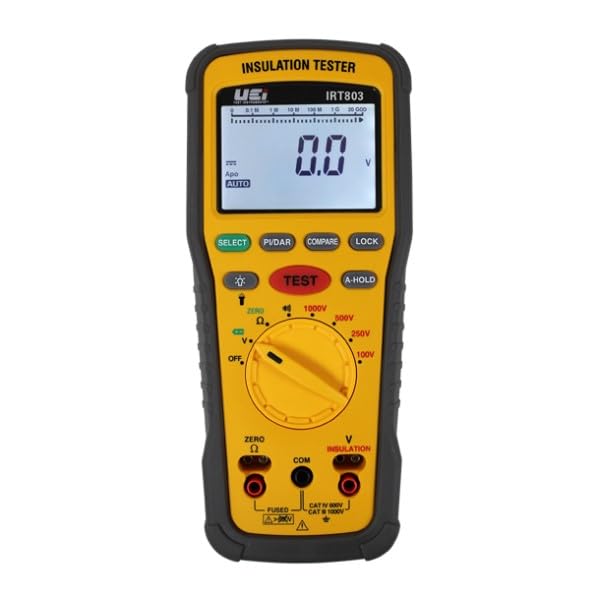
This manual provides essential information for the safe and effective operation of the UEi IRT803 Digital Insulation Resistance Tester. The IRT803 is a versatile instrument designed for measuring insulation resistance, AC/DC voltage, and continuity. It features a 1000V AC/DC measurement capability, auto-ranging, a backlit display, and a DMM rotary style selector. Key functions include Lock, Compare, and Polarization Index (PI)/Dielectric Absorption Ratio (DAR) tests. Please read this manual thoroughly before use to ensure proper handling and to maximize the instrument's performance.
2. Gwybodaeth Diogelwch
Always adhere to safety precautions when using electrical testing equipment. The IRT803 is designed with safety in mind, featuring a CATIV rating up to 600V and CATII up to 1000V, ensuring protection in various jobsite environments. Failure to follow safety instructions can result in electric shock, fire, or damage to the instrument.
- Peidiwch â defnyddio'r profwr os yw'n ymddangos ei fod wedi'i ddifrodi neu os yw'r gwifrau prawf wedi'u peryglu.
- Ensure the correct function and range are selected before making any measurements.
- Always disconnect power to the circuit under test before connecting or disconnecting test leads for resistance measurements.
- Gwisgwch offer amddiffynnol personol (PPE) priodol, fel menig wedi'u hinswleiddio a sbectol ddiogelwch.
- Do not operate the tester in wet conditions or in the presence of explosive gases or dust.
- Amnewidiwch y batris ar unwaith pan fydd y dangosydd batri isel yn ymddangos i sicrhau darlleniadau cywir.
3. Beth sydd yn y Bocs
Wrth ddadbacio, gwiriwch fod yr holl eitemau a restrir isod yn bresennol ac heb eu difrodi:
- UEi IRT803 Insulation Resistance Tester
- Silicone test leads with alligator clips (red and black) (ATL57)
- Insulation test probe with alligator clips (red & black)
- 4 Batris AA
- Llawlyfr Defnyddiwr
- Achos cario meddal

Image 3.1: All components included with the UEi IRT803 Insulation Resistance Tester, including the meter, test leads, probes, batteries, manual, and soft carrying case.
4. Cynnyrch Drosview
The IRT803 is designed for ease of use and durability. It features an easy-to-read LCD display with a backlight for visibility in various lighting conditions, and a work light to illuminate dark environments. The unit is protected by a rugged rubber boot, which also includes convenient test lead holders for compact storage. An auto power-off function helps conserve battery life.
4.1. Nodweddion a Swyddogaethau Allweddol
- 600V AC/DC Measurement: Capable of measuring both alternating and direct current voltages hyd at 600V.
- Gwrthiant Inswleiddio: Measures resistance from 0.01MΩ up to 2GΩ with test voltages of 50V, 100V, 250V, 500V, and 1000V.
- Parhad: For checking circuit continuity.
- Compare Reading Function: Allows for comparison against a set reference value.
- PI/DAR Test: Automatic calculation of Polarization Index and Dielectric Absorption Ratio for advanced insulation diagnostics.
- A-Hold/Hold: Freezes the displayed reading for convenient recording.
- Lock Reading: Locks the test voltage for continuous insulation testing.
- Rotary Dial Selector: Intuitive selection of measurement functions and test voltages.
- Protective Rubber Boot: Enhances durability and provides lead storage.

Delwedd 4.1: Blaen view of the IRT803 showing the LCD display, rotary selector, and function buttons.

Image 4.2: Visual representation highlighting the main functions and features of the IRT803.
5. Gosod
5.1. Gosod Batri
The IRT803 requires four (4) AA batteries for operation. To install or replace batteries:
- Ensure the tester is powered off.
- Lleolwch yr adran batri ar gefn yr uned.
- Defnyddiwch dyrnsgriw i agor y clawr batri compartment.
- Insert the four AA batteries, observing the correct polarity (+/-) as indicated inside the compartment.
- Caewch y gorchudd compartment batri yn ddiogel.
5.2. Cysylltu Gwifrau Prawf
Connect the test leads to the appropriate input jacks on the tester. For most measurements, the red lead connects to the 'V Ω INSULATION' jack and the black lead connects to the 'COM' (common) jack. Ensure connections are firm and secure.

Image 5.1: The IRT803 with test leads properly connected to the input jacks.
6. Cyfarwyddiadau Gweithredu
6.1. Powering On/Off and Display Backlight
- To power on the unit, rotate the selector dial from 'OFF' to any desired measurement function.
- To power off, rotate the selector dial back to 'OFF'. The unit also features auto power-off to save battery life after a period of inactivity.
- Gwasgwch y DETHOL button (often indicated by a light bulb icon) to toggle the display backlight on or off.
6.2. Profion Gwrthiant Inswleiddio
The IRT803 can perform insulation resistance tests at various voltages.
- Select Test Voltage: Rotate the selector dial to the desired insulation test voltage (50V, 100V, 250V, 500V, neu 1000V).
- Cysylltu Arweinwyr Prawf: Connect the red test lead to the circuit under test and the black test lead to the ground or common point. Ensure the circuit is de-energized.
- Dechrau Prawf: Press and hold the large red PRAWF button to begin the insulation test. The test voltage will be applied, and the resistance reading will be displayed.
- Swyddogaeth Clo: For continuous testing, press the LOC button after initiating the test. This will maintain the test voltage without needing to hold the PRAWF botwm. Gwasg PRAWF eto i ddatgloi.
- Compare Function: Defnyddiwch y CYMHARU button to set a reference value and compare subsequent readings against it.
- PI/DAR Test: Select the PI/DAR function on the dial. The meter will automatically perform the Polarization Index and Dielectric Absorption Ratio tests, displaying the calculated values.
- Read and Record: Observe the reading on the LCD. Use the DALWCH button to freeze the display for easier recording.
- Rhyddhau: After completing an insulation test, the circuit under test should be discharged. The IRT803 typically handles this automatically, but always exercise caution.

Image 6.1: The IRT803 being used to measure insulation resistance on electrical wiring.

Delwedd 6.2: Llun agos view of the test leads securely connected to the IRT803's input terminals.
6.3. Cyftage Testing (AC/DC)
I fesur AC neu DC cyftage up to 600V:
- Rotate the selector dial to the 'V' position.
- Connect the red test lead to the positive or live point and the black test lead to the negative or neutral/ground point of the circuit.
- Bydd yr arddangosfa yn dangos y gyfaint a fesurwydtage. The meter will automatically detect AC or DC voltage.
6.4. Profi Parhad
To check for continuity in a circuit:
- Rotate the selector dial to the 'Ω' (Ohms) position, which typically includes continuity.
- Connect the test leads across the component or circuit path you wish to test.
- If there is continuity (low resistance), the meter will typically emit an audible beep and display a low resistance value.
7. cynnal
7.1. Glanhau
To maintain the accuracy and longevity of your IRT803:
- Sychwch y casing gyda hysbysebamp brethyn a glanedydd ysgafn. Peidiwch â defnyddio sgraffinyddion neu doddyddion.
- Gwnewch yn siŵr bod yr uned yn hollol sych cyn ei storio neu ei defnyddio nesaf.
7.2. Amnewid Batri
Replace batteries as described in Section 5.1 when the low battery indicator appears on the display. Always use fresh AA alkaline batteries.
7.3. Storio
When not in use, store the IRT803 in its soft carrying case in a cool, dry environment, away from direct sunlight and extreme temperatures. If storing for extended periods, remove the batteries to prevent leakage.
8. Datrys Problemau
If you encounter issues with your IRT803, refer to the following common problems and solutions:
| Problem | Achos Posibl | Ateb |
|---|---|---|
| Tester does not power on | Batris marw neu wedi'u gosod yn anghywir | Gwiriwch bolaredd y batri; amnewidiwch gyda batris AA newydd. |
| Dim darlleniad ar yr arddangosfa | Incorrect function selected; open circuit; poor test lead connection | Verify selector dial position; ensure test leads are firmly connected to the circuit and the meter; check for breaks in the circuit. |
| Darlleniadau anghywir | Low battery; environmental interference; incorrect range/function | Replace batteries; move away from strong electromagnetic fields; ensure correct function and test voltage are selected. |
| Test leads not working | Damaged leads; poor connection | Inspect leads for damage; ensure they are fully inserted into the jacks. Replace if damaged. |
If the problem persists after attempting these solutions, please contact UEi Test Instruments customer support.
9. manylebau
| Paramedr | Gwerth |
|---|---|
| Rhif Model | IRT803 |
| Brand | Offerynau Prawf UEi |
| Prawf Inswleiddio Cyftages | 50V, 100V, 250V, 500V, 1000V |
| Ystod Gwrthiant Inswleiddio | 0.01MΩ to 2GΩ |
| Insulation Resistance Accuracy | ±1.5-3% + 5 digits (0.01MΩ-500MΩ) |
| Cyftage Mesur | Hyd at 600V AC/DC |
| Ystod Parhad | 20.00 Ω to 20.0 kΩ (as per product description) |
| Sgôr Diogelwch | CATIV 600V, CATII 1000V |
| Ffynhonnell Pwer | 4 x Batris AA |
| Arddangos | LCD gyda Backlight |
| Dimensiynau Cynnyrch | 2.7 x 3.52 x 8.27 modfedd |
| Pwysau Eitem | 1.8 Bunt |
| Lliw | Melyn |
10. Gwybodaeth Gwarant
The UEi IRT803 Insulation Resistance Tester is backed by a Gwarant cyfyngedig 1 mlynedd from the date of purchase. This warranty covers defects in materials and workmanship under normal use. It does not cover damage resulting from misuse, unauthorized modification, accident, or neglect. For specific terms and conditions, please refer to the warranty card included with your product or contact UEi Test Instruments customer support.
Delwedd 10.1: Enghraifftample of a Certificate of Conformity, indicating adherence to quality standards.
11. Cefnogaeth
For technical assistance, troubleshooting beyond this manual, or warranty claims, please contact UEi Test Instruments customer support. You can find more information and contact details by visiting the official UEi Test Instruments website or their Amazon store page.
UEi Test Instruments Store: Ymweld â'r Siop
Ask a question about this manual
Ask about setup, troubleshooting, compatibility, parts, safety, or missing instructions. Manuals+ will review the question and use this page’s manual context to help answer it.