
Rhagymadrodd
The Hotone Jogg is a compact, low-latency 1-in/2-out USB audio interface pedal designed to integrate your pedalboard with computer-based recording setups. It features high-headroom 24-bit conversion and supports 44.1kHz/48kHz sample rates for high-quality audio. Connectivity includes a 1/4-inch hi-Z instrument input, 1/4-inch unbalanced stereo outputs, an auxiliary input, a headphone output, and an XLR balanced output. The Jogg also provides a Gain knob for input level adjustment and an Output knob for overall output control. An activation code for Hotone's VStomp amp modeling software is included.
Nodweddion Cynnyrch
- 1-in/2-out USB Audio Interface Pedal with 24-bit AD/DA conversion.
- Supports 44.1kHz/48kHz Sampling Rates for Mac/PC/iOS/Android devices.
- Compact and durable stompbox design.
- Features a 1/4-inch hi-Z instrument input.
- Includes 1/4-inch unbalanced stereo outputs.
- Dedicated auxiliary input and headphone output.
- XLR balanced output for professional connections.
- Adjustable Gain knob (up to +12dB) and Output level knob.
- Comes with an activation code for Hotone VStomp amp modeling software.
Gosod
1. Connecting the Jogg Pedal
The Hotone Jogg is designed for easy integration into your audio setup. Follow these steps to connect your device:
- Cysylltiad Pwer: Connect the Jogg to a 9V DC power supply (not included) via the DC 9V input. Alternatively, connect the Jogg to your computer using the provided USB-C cable for bus power.
- Mewnbwn Offeryn: Plug your instrument (e.g., guitar) into the 1/4-inch HI-Z input on the front panel.
- Allbwn sain: Connect your monitoring speakers or headphones to the 1/4-inch unbalanced stereo outputs (OUT R, OUT L) or the dedicated headphone output. For balanced output, use the XLR OUT.
- Mewnbwn Ategol: Use the AUX IN to connect external audio sources like a smartphone or media player.
- Cysylltiad USB: Connect the Jogg to your computer (Mac/PC) or mobile device (iOS/Android) using the USB-C port. This enables audio transmission and bus power.

Ffigur 1: Yn gyffredinol view of the Hotone Jogg USB Audio Interface Pedal.
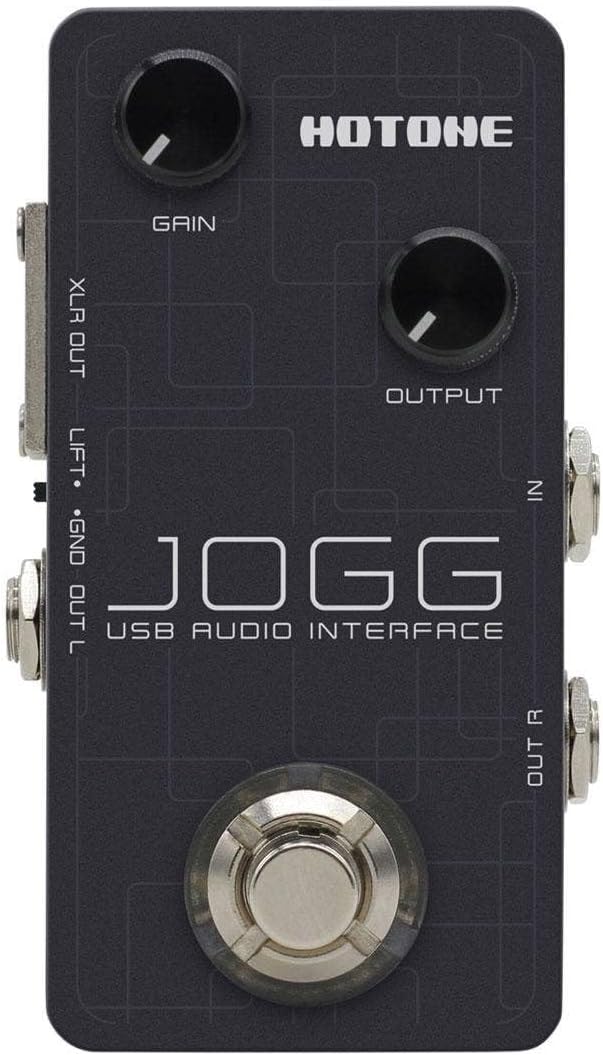
Figure 2: Top panel showing Gain and Output knobs, and input jacks.

Figure 3: Rear panel with USB, DC 9V, AUX IN, and PHONES connections.

Ffigur 4: Ochr view displaying the XLR balanced output.

Ffigur 5: Ochr view showing the 1/4-inch unbalanced stereo outputs (OUT R, OUT L).
2. Gosod Meddalwedd
For optimal performance and access to included features, ensure you install the necessary drivers and software:
- Gyrwyr: Visit the official Hotone website to download and install the latest USB audio drivers for your operating system (Mac, PC, iOS, Android).
- VStomp Software: Use the provided activation code to download and register Hotone's VStomp amp modeling software. Follow the on-screen instructions for installation.
Cyfarwyddiadau Gweithredu
1. Adjusting Input Gain
The Jogg features a Gain knob to control the input level of your instrument. Rotate the knob clockwise to increase gain and counter-clockwise to decrease it. Adjust this to achieve a strong signal without clipping (distortion).
2. Controlling Output Level
The Output knob controls the overall output volume of the Jogg. Adjust this to a comfortable listening level for your speakers or headphones.
3. Monitoring Your Audio
Connect headphones to the PHONES output for direct monitoring of your input signal and playback from your computer. Adjust the Output knob to control the headphone volume.
4. Using VStomp Software
Once VStomp is installed and registered, launch the software on your computer. The Jogg will act as the hardware interface, allowing you to utilize VStomp's amp modeling and effects. Refer to the VStomp user manual for detailed instructions on software operation.
Cynnal a chadw
- Glanhau: Use a soft, dry cloth to clean the exterior of the Jogg. Avoid abrasive cleaners or solvents.
- Storio: Store the pedal in a cool, dry place away from direct sunlight and extreme temperatures when not in use.
- Trin: Handle the pedal with care to prevent damage to knobs, jacks, and internal components.
Datrys problemau
- Dim pŵer: Ensure the USB-C cable is securely connected to both the Jogg and your computer/power source. If using a DC adapter, verify it is the correct voltage (9V) and polarity.
- No Sound Input: Check all instrument and microphone connections. Verify the Gain knob is adjusted appropriately. Ensure the correct input device is selected in your computer's audio settings or DAW.
- Dim allbwn sain: Check speaker/headphone connections. Adjust the Output knob. Verify the correct output device is selected in your computer's audio settings or DAW.
- Materion Cudd: Ensure you have installed the latest drivers from the Hotone website. Adjust buffer size settings in your DAW to a lower value (if your system can handle it).
- Software Not Recognizing Jogg: Reinstall the USB drivers. Ensure the Jogg is connected and powered on before launching your DAW or VStomp software.
Manylebau
| Nodwedd | Manylyn |
|---|---|
| Brand | POETH |
| Model | Jogg |
| Math | Pedal Rhyngwyneb Sain USB |
| Trosi AD / DA | 24-did |
| SampCyfraddau ling | 44.1kHz / 48kHz |
| Mewnbynnau | 1 x 1/4-inch Hi-Z Instrument Input, 1 x Auxiliary Input |
| Allbynnau | 2 x 1/4-inch Unbalanced Stereo Outputs, 1 x Headphone Output, 1 x XLR Balanced Output |
| Technoleg Cysylltedd | USB-C (Bus Powered) |
| Dyfeisiau Cydnaws | Laptop, Personal Computer, iOS, Android |
| Meddalwedd â Chymorth | VStomp amp modeling software |
| Pwysau Eitem | 10.4 owns |
Gwarant a Chefnogaeth
For information regarding product warranty, technical support, and service, please refer to the official Hotone websafle neu cysylltwch â'u gwasanaeth cwsmeriaid yn uniongyrchol. Cadwch eich derbynneb prynu fel prawf o brynu ar gyfer hawliadau gwarant.
Official Hotone Websafle: hotoneaudio.com