
DALI Katch G2
Llawlyfr Defnyddiwr Siaradwr Bluetooth Cludadwy DALI Katch G2
Model: Katch G2
Rhagymadrodd
Thank you for choosing the DALI Katch G2 Portable Bluetooth Speaker. This manual provides essential information for setting up, operating, and maintaining your speaker. Please read it thoroughly before use to ensure optimal performance and longevity of your device.

Delwedd: Blaen view of the DALI Katch G2 Portable Bluetooth Speaker in Caramel White.
Gwybodaeth Diogelwch
- Peidiwch ag amlygu'r siaradwr i ddŵr na lleithder gormodol. Nid yw'r cynnyrch hwn yn dal dŵr.
- Avoid placing the speaker near heat sources or in direct sunlight for extended periods.
- Use only the charger supplied with the product.
- Do not attempt to disassemble or modify the speaker. Refer all servicing to qualified personnel.
- Cadwch allan o gyrraedd plant.
Cynnwys Pecyn
Gwiriwch fod yr holl eitemau yn bresennol yn y pecynnu:
- DALI Katch G2 Portable Bluetooth Speaker
- Addasydd pŵer / gwefrydd
- Canllaw Cychwyn Cyflym (heb ei gynnwys yn y llawlyfr hwn)
- Travel Pouch (may vary by region)
Cynnyrch Drosview
The DALI Katch G2 features a sleek design with intuitive controls and various connectivity options.
Rheolaethau a Dangosyddion

Image: Top panel of the DALI Katch G2 showing power, Bluetooth, volume, and sound mode buttons.
- Botwm Pŵer: Pwyswch i droi'r siaradwr ymlaen neu i ffwrdd.
- Botwm Bluetooth: Pwyswch i fynd i mewn i'r modd paru.
- Botymau Cyfaint (+/-): Addaswch y gyfrol chwarae.
- Botwm Modd Sain: Cycle through available sound profiles.
- Goleuadau Dangosydd Batri: Display current battery level.
Porthladdoedd a Chysylltiadau

Image: Side panel of the DALI Katch G2 showing the charging port and auxiliary input.
- Porth Codi Tâl: Connect the power adapter to the charging port on the speaker.
- Mewnbwn Cynorthwyol 3.5mm: Connect external audio sources via a stereo mini-jack cable.
Cydrannau Mewnol

Delwedd: Ffrwydrodd view illustrating the internal components of the DALI Katch G2 speaker, including drivers and circuit board.
Gosod
1. Codi Tâl y Batri
- Connect the supplied power adapter to the charging port on the speaker.
- Plygiwch yr addasydd pŵer i mewn i allfa wal.
- The battery indicator lights will illuminate to show charging status. A full charge takes approximately 2 hours.
- A fully charged battery provides up to 30 hours of playback.
2. Pweru Ymlaen / I ffwrdd
- I bweru ymlaen, pwyswch a dal y Botwm Pŵer until the indicator lights activate.
- I bweru i ffwrdd, pwyswch a dal y Botwm Pŵer again until the indicator lights turn off.
3. Pâr Bluetooth
- Sicrhewch fod y siaradwr wedi'i bweru ymlaen.
- Gwasgwch y Botwm Bluetooth. The Bluetooth indicator light will flash, indicating pairing mode.
- Ar eich dyfais (ffôn clyfar, tabled, ac ati), galluogwch Bluetooth a chwiliwch am ddyfeisiau sydd ar gael.
- Select "DALI Katch G2" from the list.
- Once connected, the Bluetooth indicator light will glow solid.
4. Analog Connection
- Connect a 3.5mm stereo mini-jack cable from your audio source to the Auxiliary Input port on the speaker.
- The speaker will automatically switch to auxiliary input mode.
5. Paru Stereo Di-wifr Gwir (TWS)
Two DALI Katch G2 speakers can be paired together for a stereo sound experience.
- Ensure both DALI Katch G2 speakers are powered on and not connected to any other Bluetooth device.
- Ar un siaradwr (hwn fydd y prif siaradwr), pwyswch a daliwch y Botwm Bluetooth nes ei fod yn mynd i mewn i'r modd paru.
- Ar yr ail siaradwr, pwyswch y Botwm Bluetooth unwaith.
- The speakers will automatically connect to each other. The primary speaker's Bluetooth indicator will glow solid, and the secondary speaker's indicator will also confirm connection.
- Now, connect your audio source to the primary speaker via Bluetooth as described in step 3.
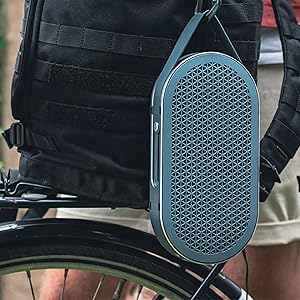
Image: Two DALI Katch G2 speakers set up for True Wireless Stereo pairing in a home environment.
Gweithredu y Llefarydd
1. Chwarae Sain
- Once connected via Bluetooth or auxiliary input, start playback from your audio source.
- Defnyddiwch y Botymau Cyfaint (+/-) on the speaker or your connected device to adjust the volume.
2. Moddau Sain
The DALI Katch G2 offers different sound profiles to suit your listening preference or environment.
- Gwasgwch y Botwm Modd Sain to cycle through the available sound modes (e.g., "Clear" and "Warm").
- Each mode provides a distinct audio characteristic.
3. Gwirio Lefel Batri
- Pwyswch yn fyr y Botwm Pŵer when the speaker is on to illuminate the battery indicator lights, showing the current charge level.
Cynnal a chadw
1. Glanhau
- Sychwch y siaradwr gyda lliain meddal, sych.
- Peidiwch â defnyddio glanhawyr sgraffiniol, cwyrau na thoddyddion.
2. Storio
- Pan nad yw'n cael ei ddefnyddio am gyfnodau hir, storiwch y siaradwr mewn lle oer, sych.
- Osgoi tymereddau eithafol.
3. Gofal Batri
- Er mwyn ymestyn oes y batri, osgoi rhyddhau'r batri'n llwyr yn aml.
- Charge the speaker regularly, even if not in frequent use.
Datrys problemau
| Problem | Achos Posibl | Ateb |
|---|---|---|
| Nid yw'r siaradwr yn troi ymlaen. | Mae batri wedi'i ddisbyddu. | Cysylltwch y siaradwr â'r addasydd pŵer a'i wefru. |
| Dim sain o'r siaradwr. | Mae'r sain yn rhy isel neu wedi'i mud. Ffynhonnell mewnbwn anghywir wedi'i dewis. Device not paired correctly. | Increase volume on speaker and connected device. Ensure correct input (Bluetooth/Aux) is active. Ail-bariwch y ddyfais Bluetooth. |
| Mae paru Bluetooth yn methu. | Nid yw'r siaradwr mewn modd paru. Mae'r ddyfais yn rhy bell o'r siaradwr. Ymyrraeth. | Press the Bluetooth button to enter pairing mode. Symudwch y ddyfais yn agosach at y siaradwr. Symud i ffwrdd o ddyfeisiau diwifr eraill. |
| True Wireless Stereo (TWS) pairing fails. | Speakers not in TWS pairing mode. One speaker already connected to a device. | Ensure both speakers are disconnected from other devices and follow TWS pairing steps. |
Manylebau
| Enw Model | DALI Katch G2 |
| Brand | DALI |
| Math o Siaradwr | Siaradwr Bluetooth cludadwy |
| Technoleg Cysylltedd | Bluetooth 5.0 (apt-X, apt-X HD, AAC) |
| Modd Allbwn Sain | Stereo |
| Llefarydd Uchafswm Pŵer Allbwn | 25 Wat |
| Gallu Batri | 3300 mAh |
| Bywyd Batri | Hyd at 30 awr |
| Amser Codi Tâl | Tua 2 awr |
| Diamedr Woofer | 3.5 modfedd |
| Diamedr y Trydarwr | 21 Milimetrau |
| Dimensiynau Cynnyrch (D x W x H) | 1.8" x 10.5" x 5.4" |
| Pwysau Eitem | 2.42 pwys (1.1 cilogram) |
| Dull Rheoli | Cyffwrdd |
| Dal dwr | Nac ydw |
Gwybodaeth Gwarant
The DALI Katch G2 Portable Bluetooth Speaker comes with a Gwarant Cyfyngedig. Specific terms and conditions of the warranty may vary by region and retailer. Please retain your proof of purchase for warranty claims. For detailed warranty information, refer to the documentation provided with your purchase or visit the official DALI websafle.
Cefnogaeth i Gwsmeriaid
If you encounter any issues not covered in this manual or require further assistance, please contact DALI customer support.
- Visit the official DALI websafle ar gyfer adnoddau cymorth, Cwestiynau Cyffredin, a gwybodaeth gyswllt.
- Refer to your product packaging or purchase documentation for specific regional support contacts.
Ask a question about this manual
Ask about setup, troubleshooting, compatibility, parts, safety, or missing instructions. Manuals+ will review the question and use this page’s manual context to help answer it.