
1. Rhagymadrodd
The MASTECH MS8260E is a versatile 2000-count digital multimeter designed for a wide range of electrical and electronic measurements. It features a large LCD display, non-contact voltage (NCV) detection, and capabilities for measuring AC/DC voltage, AC/DC current, resistance, capacitance, and inductance. This manual provides essential information for the safe and effective operation, maintenance, and troubleshooting of your device.
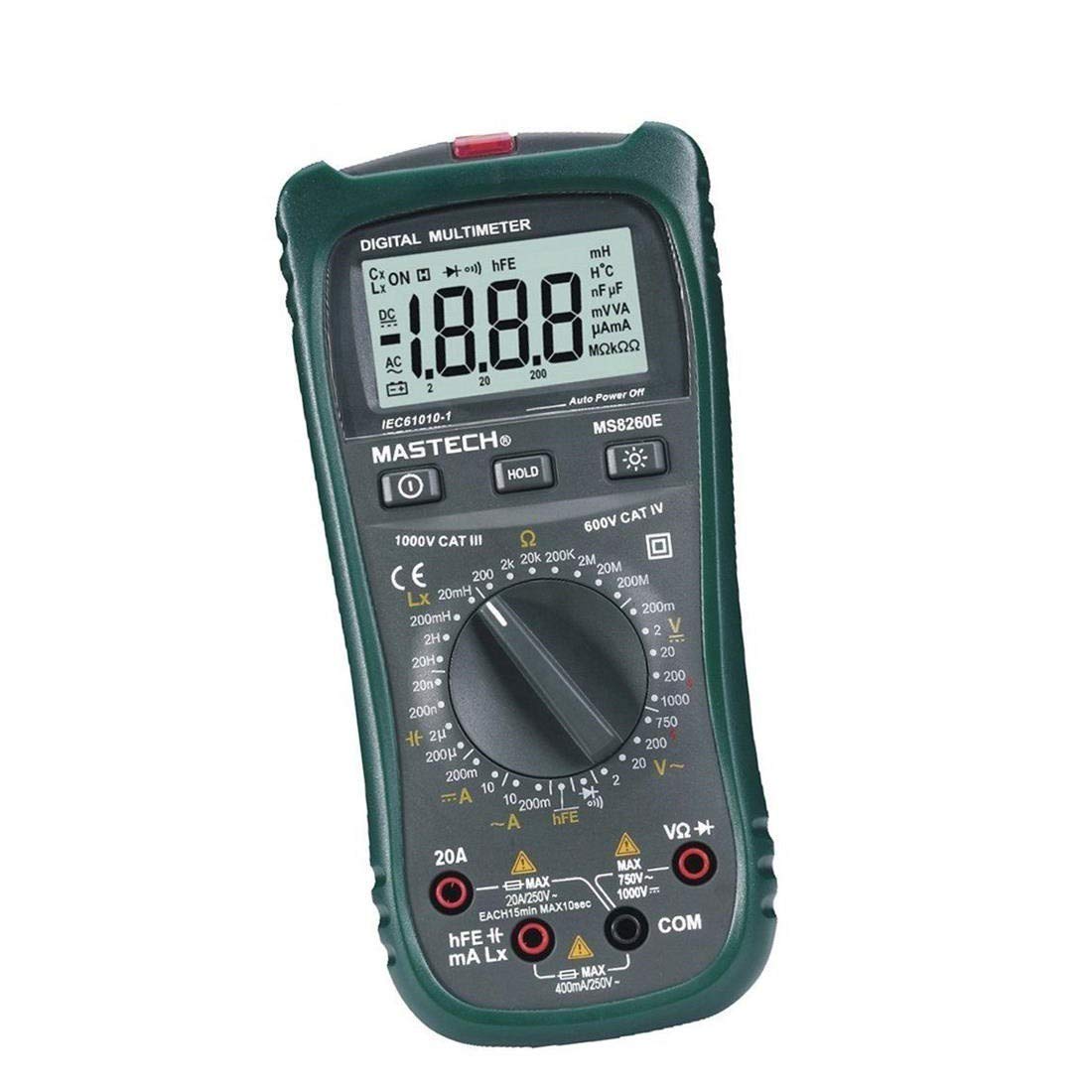
Ffigur 1: Blaen view of the MASTECH MS8260E Digital Multimeter, showing the LCD display, function rotary switch, and input jacks.
2. Gwybodaeth Diogelwch
To ensure safe operation and service of the meter, follow these safety guidelines:
- Read and understand all instructions in this manual before using the meter.
- Cadw at godau diogelwch lleol a chenedlaethol bob amser.
- Peidiwch â defnyddio'r mesurydd os yw'n ymddangos ei fod wedi'i ddifrodi neu os yw'r inswleiddio ar y gwifrau prawf wedi'i beryglu.
- Observe the input limits for each measurement range to prevent electrical shock or damage to the meter. This meter is rated for CAT.IV 600V.
- Byddwch yn ofalus wrth weithio gyda chyftaguwchlaw 30V AC RMS, 42V brig, neu 60V DC. Mae'r cyfrolau hyntages yn peri perygl sioc.
- Datgysylltwch y pŵer i'r gylched bob amser a rhyddhewch yr holl foltedd ucheltage capacitors before making resistance, continuity, diode, or capacitance measurements.
- Amnewidiwch y batri ar unwaith pan fydd y dangosydd batri isel yn ymddangos i sicrhau darlleniadau cywir.
- Peidiwch â gweithredu'r mesurydd mewn amgylcheddau nwy, anwedd neu lwch ffrwydrol.
3. Cynnyrch Drosview
The MS8260E multimeter is equipped with several features to facilitate accurate and convenient measurements:
- Large 2000 Counts LCD Display: Provides clear digital readings.
- Cyfrol Di-gyswllt Built-intage (NCV) Detector: Yn canfod AC cyftage greater than 110V without physical contact, indicated by a flash warning.
- Swyddogaeth Dal Data: Yn rhewi'r darlleniad a ddangosir er mwyn ei gofnodi'n hawdd.
- Arddangos Backlight: Improves visibility in dimly lit conditions.
- Pŵer Auto i ffwrdd: Conserves battery life by automatically turning off the meter after a period of inactivity.
- Arwydd Batri Isel: Alerts the user when the battery needs replacement.
- Dynodiad Polaredd: Automatically displays negative polarity.
- 30-Range Rotary Switch: Selects various measurement functions including AC/DC voltage, AC/DC current, resistance, capacitance, inductance, diode check, continuity test, and transistor (hFE) check.
4. Gosod
4.1 Gosod Batri
The MS8260E requires one 9V battery (NEDA 1604/6F22). To install or replace the battery:
- Ensure the meter is turned off and disconnect all test leads from the input terminals.
- Lleolwch glawr adran y batri ar gefn y mesurydd.
- Dadsgriwiwch y sgriw(iau) cadw a thynnwch y gorchudd.
- Insert the 9V battery, observing the correct polarity.
- Rhowch glawr adran y batri yn ôl a'i sicrhau gyda'r sgriw(iau).
4.2 Cysylltu Gwifrau Prawf
Always connect the black test lead to the "COM" (common) input jack. Connect the red test lead to the appropriate input jack based on the desired measurement:
- Am Voltage, Resistance, Capacitance, Inductance, Diode, Continuity, and hFE measurements: Connect the red lead to the "VΩCAPHz" jack.
- For Current measurements up to 200mA: Connect the red lead to the "mA" jack.
- For Current measurements up to 10A: Connect the red lead to the "10A" jack.
Ensure test leads are fully inserted into the jacks before taking measurements.
5. Cyfarwyddiadau Gweithredu
Turn the rotary switch to the desired function. The meter will display "OL" (Overload) if no input is present or if the input exceeds the range.
5.1 DC Cyfroltage Mesur (DCV)
- Set the rotary switch to the desired DCV range (200mV, 2V, 20V, 200V, 1000V).
- Connect the black test lead to the "COM" jack and the red test lead to the "VΩCAPHz" jack.
- Cysylltwch y gwifrau prawf ar draws y gydran neu'r gylched i'w mesur, gan arsylwi polaredd.
- Darllenwch y cyftage gwerth ar yr arddangosfa LCD.
5.2 AC Cyftage Mesur (ACV)
- Set the rotary switch to the desired ACV range (2V, 20V, 200V, 750V).
- Connect the black test lead to the "COM" jack and the red test lead to the "VΩCAPHz" jack.
- Cysylltwch y gwifrau prawf ar draws y cyfaint ACtage ffynhonnell.
- Darllenwch y cyftage gwerth ar yr arddangosfa LCD.
5.3 DC Current Measurement (DCA)
- Set the rotary switch to the desired DCA range (200mA, 10A).
- For measurements up to 200mA, connect the red lead to the "mA" jack. For measurements up to 10A, connect the red lead to the "10A" jack. The black lead connects to "COM".
- Agorwch y gylched lle mae'r cerrynt i'w fesur a chysylltwch y mesurydd mewn cyfres â'r llwyth.
- Darllenwch y gwerth cyfredol ar yr arddangosfa LCD.
5.4 AC Current Measurement (ACA)
- Set the rotary switch to the desired ACA range (200mA, 10A).
- For measurements up to 200mA, connect the red lead to the "mA" jack. For measurements up to 10A, connect the red lead to the "10A" jack. The black lead connects to "COM".
- Agorwch y gylched lle mae'r cerrynt i'w fesur a chysylltwch y mesurydd mewn cyfres â'r llwyth.
- Darllenwch y gwerth cyfredol ar yr arddangosfa LCD.
5.5 Mesur Gwrthiant (Ω)
- Set the rotary switch to the desired Ω range (200Ω, 2kΩ, 20kΩ, 200kΩ, 2MΩ, 20MΩ, 200MΩ).
- Connect the black test lead to "COM" and the red test lead to "VΩCAPHz".
- Sicrhewch fod y gylched wedi'i dad-egnïo a bod yr holl gynwysyddion wedi'u rhyddhau.
- Connect the test leads across the resistor or component.
- Darllenwch y gwerth gwrthiant ar yr arddangosfa LCD.
5.6 Capacitance Measurement (CAP)
- Set the rotary switch to the desired CAP range (20nF, 200nF, 2uF, 200uF).
- Connect the black test lead to "COM" and the red test lead to "VΩCAPHz".
- Ensure the capacitor is fully discharged before connecting the test leads.
- Cysylltwch y gwifrau prawf ar draws y cynhwysydd.
- Darllenwch y gwerth cynhwysedd ar yr arddangosfa LCD.
5.7 Inductance Measurement (L)
- Set the rotary switch to the desired Inductance range (20mH, 200mH, 2H, 20H).
- Connect the black test lead to "COM" and the red test lead to "VΩCAPHz".
- Connect the test leads across the inductor.
- Read the inductance value on the LCD display.
5.8 Prawf Deuod
- Gosodwch y switsh cylchdro i'r symbol Deuod.
- Connect the black test lead to "COM" and the red test lead to "VΩCAPHz".
- Cysylltwch y plwm coch â'r anod a'r plwm du â chatod y deuod. Cyfaint ymlaentagBydd y gostyngiad e (fel arfer 0.5V i 0.8V ar gyfer deuodau silicon) yn cael ei arddangos.
- Reverse the leads. The display should show "OL" for a good diode.
5.9 Prawf Parhad
- Gosodwch y switsh cylchdro i'r symbol Parhad.
- Connect the black test lead to "COM" and the red test lead to "VΩCAPHz".
- Cysylltwch y gwifrau prawf ar draws y gylched neu'r gydran.
- Os yw'r gwrthiant yn is na thua 30Ω, bydd y swnyn yn swnio, gan nodi parhad.
5.10 Prawf Transistor (hFE)
- Gosodwch y switsh cylchdro i'r safle hFE.
- Identify the type (NPN or PNP) and pinout (Emitter, Base, Collector) of the transistor.
- Insert the transistor leads into the corresponding sockets in the hFE test socket on the meter.
- Read the hFE (DC current gain) value on the LCD display.
5.11 Cyfrol Di-gyswllttage (NCV) Canfod
- Gosodwch y switsh cylchdro i'r safle NCV.
- Hold the top front part of the meter near the AC voltage source (e.g., an electrical outlet or insulated wire).
- Os yw AC cyftage greater than 110V is detected, the NCV indicator light will flash, and the buzzer may sound.
6. cynnal
6.1 Glanhau
Sychwch y mesurydd gydag hysbysebamp cloth and a mild detergent. Do not use abrasives or solvents. Ensure the meter is dry before use.
6.2 Batri Newydd
When the "BAT" symbol appears on the display, the battery needs to be replaced. Refer to Section 4.1 for battery installation instructions.
6.3 Amnewid Ffiws
If the current measurement function fails, the fuse may need replacement. This operation should only be performed by qualified personnel. Refer to the service manual or contact customer support for fuse specifications and replacement procedures.
6.4 Storio
If the meter is not to be used for an extended period, remove the battery to prevent leakage and damage to the meter. Store the meter in a cool, dry place away from direct sunlight.
7. Datrys Problemau
| Problem | Achos Posibl | Ateb |
|---|---|---|
| Dim arddangosfa neu arddangosfa wan | Low battery; Meter off | Replace battery; Turn on meter |
| "OL" displayed | Input exceeds range; Open circuit (for resistance/continuity) | Select higher range; Check circuit connection |
| Darlleniadau anghywir | Low battery; Incorrect range selected; Poor test lead contact | Replace battery; Select appropriate range; Ensure good contact |
| Mesuriad cerrynt ddim yn gweithio | Ffiws wedi'i chwythu | Replace fuse (by qualified personnel) |
8. manylebau
| Swyddogaeth Mesur | Amrediad | Cywirdeb |
|---|---|---|
| DC Cyftage (DCV) | 200mV, 2V, 20V, 200V, 1000V | ±0.5% (200mV-200V), ±0.8% (1000V) |
| AC Cyftage (ACV) | 2V, 20V, 200V, 750V | ±0.8% (2V-200V), ±1.2% (750V) |
| DC Cyfredol (DCA) | 200mA, 10A | ±1.5% (200mA), ±2.0% (10A) |
| AC Cyfredol (ACA) | 200mA, 10A | ±1.8% (200mA), ±3.0% (10A) |
| Gwrthiant (Ω) | 200Ω, 2kΩ, 20kΩ, 200kΩ, 2MΩ, 20MΩ, 200MΩ | ±0.8% (200Ω-2MΩ), ±1.0% (20MΩ), ±5.0% (200MΩ) |
| Cynhwysedd (CAP) | 20nF, 200nF, 2uF, 200uF | ±4.0% (20nF-2uF), ±5.0% (200uF) |
| anwythiad (L) | 20mH, 200mH, 2H, 20H | ±3.0% |
| Parhad Clywadwy | Buzzer sounds at <30Ω | Amh |
| Prawf Deuod | 1mA, 2.8V | Amh |
| Transistor (hFE) | 0 - 1,000 | Amh |
Manylebau Cyffredinol:
- Arddangos: 2000 yn cyfrif LCD
- Sgôr diogelwch: CAT.IV 600V
- Pwer: 9V battery (NEDA 1604/6F22)
- Pwysau: Approximately 1 kg (including battery)
9. Gwarant a Chefnogaeth
For warranty information, technical support, or service inquiries, please refer to the warranty card included with your product or visit the official Mastech website. Do not attempt to repair the meter yourself, as this may void the warranty and pose safety risks.


