
1. Rhagymadrodd
Diolch am brynuasing the UHAPPY U18 Portable Mini HD LED Projector. This manual provides essential information for the safe and efficient operation of your device. Please read it thoroughly before use and retain it for future reference.
Rhagofalon Diogelwch
- Peidiwch ag edrych yn uniongyrchol i lens y taflunydd pan fydd y lamp yn ymlaen.
- Sicrhewch awyru priodol o amgylch y taflunydd i atal gorboethi.
- Peidiwch ag amlygu'r taflunydd i law na lleithder.
- Defnyddiwch yr addasydd pŵer a gyflenwir gyda'r taflunydd yn unig.
- Do not attempt to open or repair the projector yourself. Refer all servicing to qualified personnel.
2. Cynnyrch Drosview
Familiarize yourself with the components and ports of your UHAPPY U18 projector.
Cynnwys Pecyn
The following items are included in your projector package:

Image: Contents of the UHAPPY U18 projector package, including the projector, power adapter, AV cable, remote control, and user manual.
- UHAPPY U18 Mini LED Projector
- Addasydd Pŵer
- Cable AV
- Rheolaeth Anghysbell
- Llawlyfr Defnyddiwr (y ddogfen hon)
Projector Components and Ports

Image: Angled top-down view of the UHAPPY U18 projector, highlighting the lens, focus adjustment, and control panel.

Delwedd: Top view of the UHAPPY U18 projector, showing the integrated control buttons.

Delwedd: Blaen view of the UHAPPY U18 projector, focusing on the projection lens.
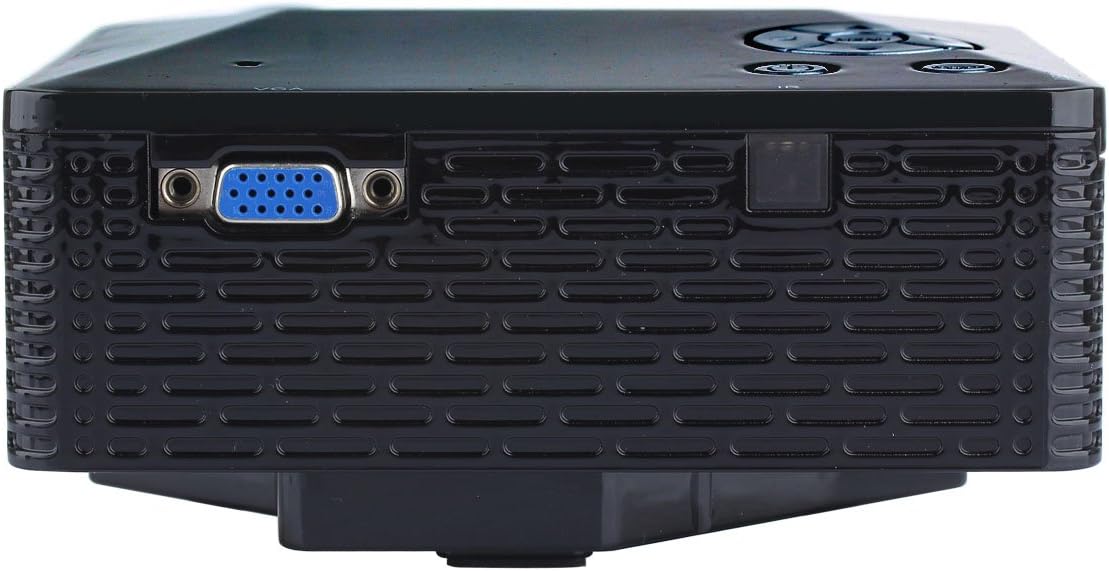
Delwedd: Ochr view of the UHAPPY U18 projector, illustrating the VGA input port.
The projector features various input ports for connectivity:
- Mewnbwn HDMI: For connecting devices like laptops, gaming consoles, or media players.
- Porth USB: For connecting USB storage devices to play media directly.
- Slot Cerdyn SD: For inserting SD memory cards to play media directly.
- Mewnbwn AV: For connecting older devices using the included AV cable.
- Mewnbwn VGA: For connecting computers or laptops with a VGA output.
- DC-IN: Porthladd mewnbwn pŵer.
- Allbwn clustffon: Ar gyfer cysylltu dyfeisiau sain allanol neu glustffonau.
- Knob Ffocws: Located near the lens for adjusting image clarity.
3. Gosod
3.1 Lleoliad
Place the projector on a stable, flat surface. Ensure there is adequate space around the projector for ventilation. The ideal projection distance is between 1 to 4 meters, yielding an image size of 20 to 80 inches.
3.2 Cysylltiad Pwer
- Connect the power adapter to the DC-IN port on the projector.
- Plygiwch yr addasydd pŵer i mewn i allfa drydanol addas.
3.3 Cysylltu Dyfeisiau Mewnbwn
Choose the appropriate cable and port based on your source device:
- HDMI: Connect an HDMI cable from your device (e.g., laptop, DVD player) to the projector's HDMI port.
- VGA: Connect a VGA cable from your computer to the projector's VGA port.
- O: Use the provided AV cable to connect devices with AV output (e.g., older DVD players, set-top boxes) to the projector's AV port.
- Cerdyn USB / SD: Insert a USB drive into the USB port or an SD card into the SD card slot.
4. Cyfarwyddiadau Gweithredu
4.1 Pweru Ymlaen/Diffodd
- I Bweru Ymlaen: Press the power button on the projector or the remote control. The LED indicator will light up.
- I Bweru i ffwrdd: Press the power button again. It is recommended to allow the projector to cool down for a few minutes before unplugging it.
4.2 Dethol Ffynonellau
After powering on, you may need to select the input source:
- Press the 'Source' button on the projector or the remote control.
- Use the navigation buttons to select the desired input (HDMI, VGA, AV, USB, SD) and press 'OK' or 'Enter'.
4.3 Addasiad Ffocws
If the projected image appears blurry:
- Rotate the focus knob located near the projector lens until the image becomes clear and sharp.
4.4 Llywio Dewislen
Use the 'Menu' button on the projector or remote to access settings. Use the navigation arrows to move through options and 'OK' or 'Enter' to confirm selections. The projector supports multiple languages including English, Czech, Slovak, Danish, German, Spanish, French, Croatian, Italian, Hungarian, Dutch, Norwegian, Polish, Portuguese, Romanian, Slovene, Serbian, Finnish, Swedish, Bulgarian, Greek, Russian, and Chinese.
4.5 Fformatau Cyfryngau â Chymorth
When playing media directly from USB or SD card, the projector supports the following formats:
- Delwedd: BMP, JPEG, PNG
- Fideo: MPEG1, MPEG2, MPEG4, RM, RMVB, AVI, FLV, WMV
5. cynnal
5.1 Glanhau'r Lens
Use a soft, lint-free cloth specifically designed for optical lenses to gently wipe the projector lens. Avoid using abrasive materials or harsh chemicals.
5.2 Glanhau Cyffredinol
Wipe the projector's exterior with a soft, dry cloth. Do not use liquid cleaners directly on the device. Ensure ventilation openings are free from dust and obstructions.
5.3 Storio
When not in use, store the projector in a cool, dry place, away from direct sunlight and extreme temperatures. It is advisable to cover the lens to protect it from dust.
6. Datrys Problemau
Os byddwch chi'n dod ar draws problemau gyda'ch taflunydd, cyfeiriwch at y problemau a'r atebion cyffredin canlynol:
| Problem | Achos Posibl | Ateb |
|---|---|---|
| Dim delwedd ar y sgrin | Ffynhonnell mewnbwn anghywir wedi'i dewis Cysylltiad cebl rhydd Source device not powered on | Dewiswch y ffynhonnell fewnbwn gywir. Gwiriwch yr holl gysylltiadau cebl. Sicrhewch fod y ddyfais ffynhonnell wedi'i phweru ymlaen ac yn allbynnu signal. |
| Mae'r ddelwedd yn aneglur | Ffocws heb ei addasu | Rotate the focus knob until the image is clear. |
| Dim sain | Cyfaint yn rhy isel External audio device not connected Source device audio settings | Increase projector volume. Connect external speakers/headphones to the audio output. Check audio settings on your source device. |
| Mae'r taflunydd yn gorboethi ac yn diffodd | Awyru wedi'i rwystro Prolonged use in hot environment | Sicrhewch fod agoriadau awyru yn glir. Allow the projector to cool down. Operate in a well-ventilated area. |
7. manylebau
Technical specifications for the UHAPPY U18 Portable Mini HD LED Projector:
- System Delwedd: LCD
- Datrysiad Brodorol: 320x240
- Lamp: LED
- Bywyd LED: 20,000 awr
- Disgleirdeb: 60 LM
- Cyferbyniad: 300:1
- Lens: F=125
- Maint y Delwedd: 20-80 modfedd
- Pellter Rhagamcaniad: 1-4 metr
- Modd Rhagamcanu: Tafluniad blaen
- Modd Gweithredu: Rheolaeth â llaw/o bell
- Terfynellau Mewnbwn: AV, VGA, USB, SD, HDMI
- Allbwn: Clustffon
- Pwer: 24W
- Lliw: 16.77 miliwn o liwiau
- Siaradwr: 1.0W*2
- Tymheredd Gweithio: 10-35°C
- Dimensiynau: 135 x 132 x 52 mm
- Pwysau: 0.44 kg
8. Gwarant a Chefnogaeth
This product is manufactured by Generic. For warranty information and technical support, please refer to the documentation provided at the time of purchase or contact your retailer. Keep your purchase receipt as proof of purchase.