
BTECH BL-5L Extended Li-ion Battery Pack
Pecyn Batri Li-ion BTECH BL-5L 3800mAh
Llawlyfr Defnyddiwr
Rhagymadrodd
Thank you for choosing the BTECH BL-5L 3800mAh USB-C Charging Li-ion Battery Pack. This high-capacity extended battery is designed to significantly enhance the operational time of your compatible two-way radios. It features advanced USB-C charging capabilities and robust built-in protections to ensure reliable and safe performance. This manual provides essential information for the proper installation, operation, and maintenance of your new battery pack.
Nodweddion Allweddol
- Advanced USB-C Charging: The BL-5L features a USB-C charging port for convenient and efficient charging. It maintains backward compatibility with all existing charging docks for versatility.
- Genuine OEM BTECH Battery: Designed with built-in protection against over-charging, over-heating, and short-circuiting, ensuring safety and longevity.
- Oes batri estynedig: Doubles the battery life of your UV-5R series radio compared to the standard BL-5, providing extended usage time.
- Ergonomeg Gwell: Adds 1.5 inches of length and 3 additional ounces, providing a more solid and comfortable feel in hand.
Cydweddoldeb
The BTECH BL-5L Extended Li-ion Battery Pack is specifically designed for seamless integration with the following radio models:
- BF-F8HP
- UV-5X3
- BaoFeng UV-5R Series Radios
- Any other radios that use the BL-5 accessory standard.

Image: The BL-5L battery shown alongside compatible radio models: BF-F8HP, UV-5X3, and UV-5R, illustrating its fit and design.
Beth Sydd yn y Bocs
Your BTECH BL-5L Battery Pack package includes:
- 1 x BL-5L Baofeng Battery
Gosod (Gosod)
Follow these steps to install the BL-5L battery pack onto your compatible radio:
- Ensure your radio is powered off before attempting to install or remove the battery.
- Align the battery pack with the battery compartment on the back of your radio. The BL-5L is designed to fit snugly.
- Slide the battery upwards until it clicks securely into place. Ensure there is no gap between the battery and the radio body.
- To remove, locate the battery release latch (usually at the bottom of the radio or battery) and slide it to unlock, then pull the battery downwards to detach.
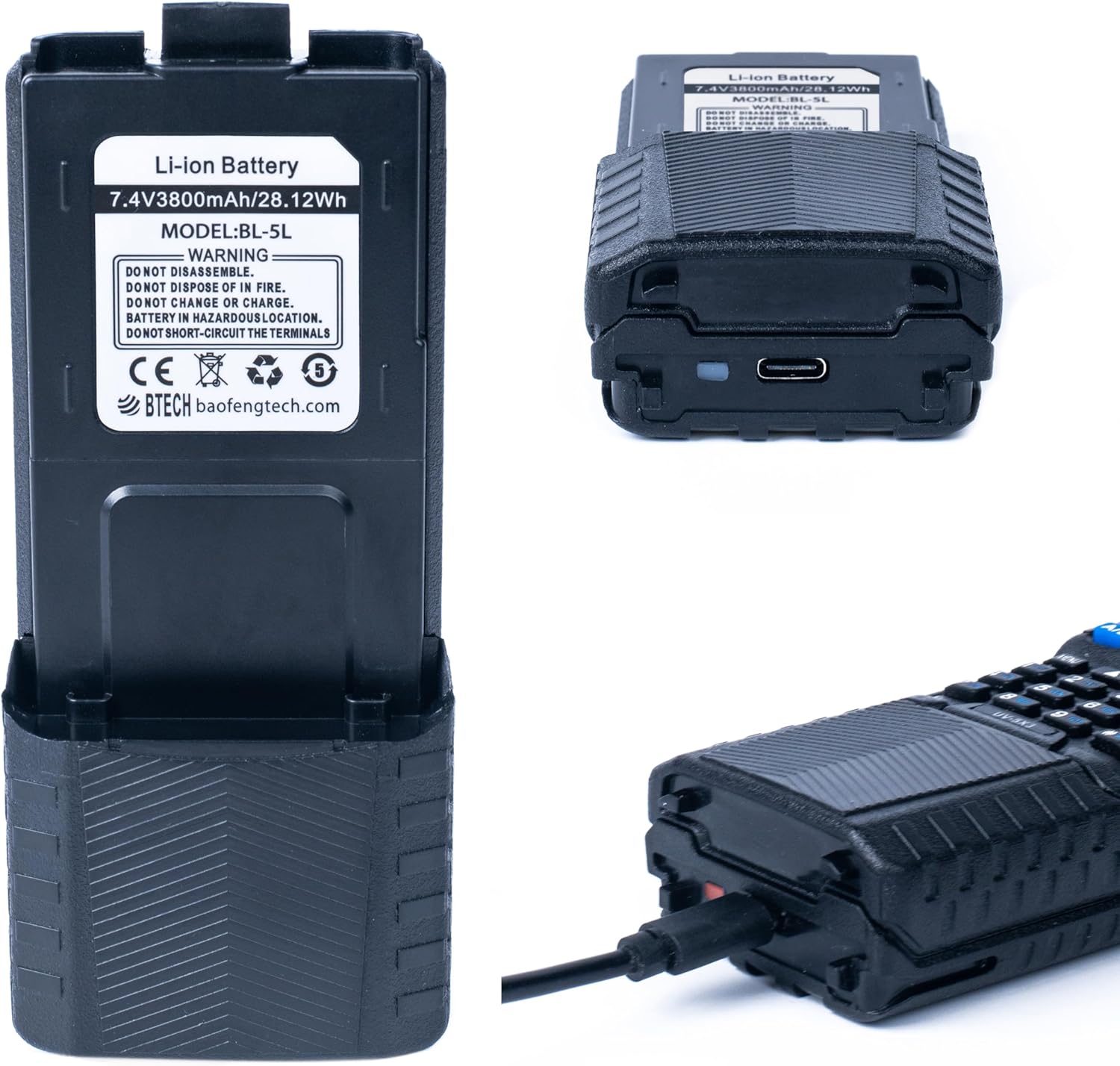
Image: The BL-5L battery pack shown attached to a radio, highlighting its extended form factor and the USB-C charging port at the bottom.
Gweithredu (Tâl)
The BL-5L battery offers flexible charging options:
- Codi tâl USB-C: Connect any standard USB-C cable to the port located at the bottom of the battery pack. You can use a wall adapter, power bank, or computer USB port.
- Dangosydd Codi Tâl: A small LED indicator near the USB-C port will illuminate coch when the battery is charging and turn gwyrdd pan gaiff ei wefru'n llawn.
- Cradle Charging: The BL-5L is backward compatible with existing BL-5 series charging cradles. Simply place the radio with the battery attached into the charging cradle.

Image: The BL-5L battery illustrating its charging status with a red light indicating charging and a green light indicating a full charge.

Delwedd: Manwl view of the BL-5L battery, highlighting both the USB-C charging port and the traditional CH-5 charging contacts for cradle compatibility.
Cynnal a chadw
To ensure the longevity and optimal performance of your BL-5L battery pack:
- Avoid fully discharging the battery regularly. Recharge it before it completely runs out of power.
- Storiwch y batri mewn lle oer, sych i ffwrdd o olau haul uniongyrchol a thymheredd eithafol.
- Clean the battery contacts periodically with a dry, soft cloth to ensure good connection with the radio and charging cradle.
- Do not disassemble, puncture, or expose the battery to water or fire.
- If the battery will not be used for an extended period, charge it to about 50% before storing.

Image: An illustrative diagram of the BL-5L battery's internal structure, highlighting its built-in over-charge, over-heat, and short-circuit protection mechanisms.
Datrys problemau
If you encounter issues with your BL-5L battery, consider the following:
- Batri Ddim yn Codi Tâl:
- Ensure the USB-C cable is fully inserted and functional. Try a different cable or power source.
- If using a cradle, ensure the battery is properly seated and the cradle's power adapter is connected.
- Check for any debris or corrosion on the battery contacts and clean if necessary.
- Bywyd batri byr:
- Verify the battery is fully charged (green indicator light).
- High power transmission or continuous scanning can deplete the battery faster. Adjust radio usage if possible.
- Gall tymereddau eithafol effeithio ar berfformiad batri.
- Batri Ddim yn Ffitio'n Ddiogel:
- Ensure the battery is correctly aligned with the radio's compartment and pushed firmly until it clicks.
- Chwiliwch am unrhyw rwystrau yn adran y batri neu ar y batri ei hun.
Manylebau
| Model | BL-5L (BL-5 Series) |
| Math Batri | Ion Lithiwm |
| Gallu | 3800mAh / 28.12Wh |
| Cyftage | 7.4 folt |
| Porthladd Codi Tâl | USB-C |
| Dimensiynau (L x W x H) | 5 x 2.25 x 1.2 modfedd |
| Pwysau | 3.1 owns |
| Gwneuthurwr | BTECH |

Image: The BL-5L battery shown with its physical dimensions (length, width, height) indicated, providing a clear understanding of its size.
Gwarant a Chefnogaeth
The BTECH BL-5L 3800mAh USB-C Charging Li-ion Battery Pack comes with a Gwarant 1 mlynedd. This warranty is provided exclusively through "BaoFeng Tech". For warranty claims, technical support, or any inquiries regarding your product, please contact BaoFeng Tech directly through their official support channels.
For further assistance, please visit the official BTECH store or contact their customer service department.
BTECH Official Store: Visit BTECH Store on Amazon