
1. Rhagymadrodd
Thank you for choosing the Targus W620 Wireless Optical Mouse. This manual provides detailed instructions for setting up, operating, and maintaining your mouse to ensure optimal performance and longevity. The Targus W620 offers reliable 2.4 GHz wireless connectivity, a precise 1600 DPI optical sensor, and a compact design suitable for both office and mobile use.
2. Cynnwys Pecyn
Gwiriwch y pecyn am yr eitemau canlynol:
- Targus W620 Wireless Optical Mouse
- Derbynnydd USB
- 2 x Batris AAA
3. Cynnyrch Drosview
Familiarize yourself with the components of your Targus W620 Wireless Optical Mouse.
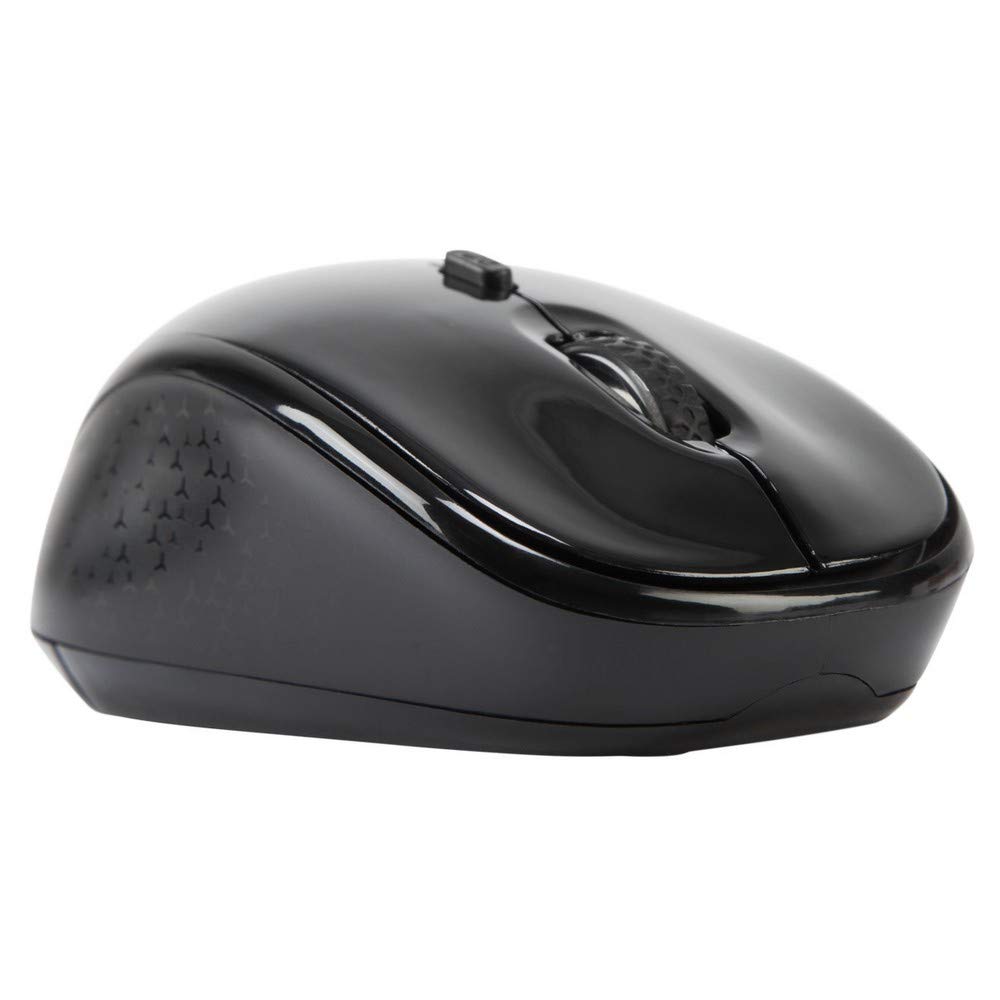
Delwedd 3.1: Brig view of the Targus W620 Wireless Optical Mouse. This image displays the primary buttons and scroll wheel.
- Botwm Clic Chwith: Swyddogaeth clicio sylfaenol safonol.
- Botwm Clic Dde: Swyddogaeth clicio eilaidd safonol.
- Olwyn Sgroliwch: Ar gyfer sgrolio fertigol a swyddogaeth clic canol.
- Botwm DPI: Yn addasu sensitifrwydd y llygoden (DPI).
- Synhwyrydd Optegol: Located on the bottom, detects mouse movement.
- Adran Batri: Located on the bottom, holds two AAA batteries.
- Storio Derbynnydd USB: A dedicated slot on the bottom for storing the USB receiver when not in use.

Delwedd 3.2: Gwaelod view of the mouse, highlighting the battery compartment and optical sensor.
4. Cyfarwyddiadau Gosod
Follow these steps to set up your Targus W620 Wireless Optical Mouse:
- Gosod Batris:
- Locate the battery compartment cover on the bottom of the mouse.
- Sleidwch y clawr yn agored.
- Mewnosodwch y ddau fatri AAA, gan sicrhau'r polaredd cywir (+/-).
- Caewch y clawr adran batri yn ddiogel.
- Cysylltu Derbynnydd USB:
- The USB receiver is typically stored in a slot on the bottom of the mouse for transport. Gently remove it.
- Plygiwch y derbynnydd USB i mewn i borth USB sydd ar gael ar eich cyfrifiadur.

Delwedd 4.1: The mouse with its USB receiver, ready for connection.
- Pŵer Ymlaen:
- There is no explicit power switch on this model; the mouse activates upon movement and connection.
- Dylai eich cyfrifiadur ganfod a gosod y gyrwyr angenrheidiol yn awtomatig. Gall hyn gymryd ychydig eiliadau.
- Once drivers are installed, the mouse is ready for use.
5. Cyfarwyddiadau Gweithredu
The Targus W620 Wireless Optical Mouse is designed for intuitive use. Here are its primary functions:
- Mordwyo Sylfaenol: Symudwch y llygoden ar arwyneb gwastad i reoli'r cyrchwr ar eich sgrin.
- Cliciwch ar y chwith: Defnyddiwch ar gyfer dewis eitemau, agor files, or activating functions.
- Cliciwch ar y dde: Use for accessing context menus or secondary functions.
- Olwyn Sgroliwch: Rotate the wheel to scroll vertically through documents and web pages. Press the scroll wheel for a middle-click function, often used for opening links in new tabs or auto-scrolling.
- Addasiad DPI: Press the DPI button (located behind the scroll wheel) to cycle through the available DPI settings (800, 1200, 1600 DPI). This changes the sensitivity of the mouse cursor. A higher DPI means the cursor moves further with less physical mouse movement.
6. cynnal
Proper maintenance ensures the longevity and performance of your mouse.
- Glanhau: Use a soft, dry, lint-free cloth to clean the exterior of the mouse. For stubborn dirt, slightly dampgolchwch y lliain gyda dŵr. Osgowch ddefnyddio cemegau llym neu lanhawyr sgraffiniol.
- Synhwyrydd Optegol: Cadwch yr ardal synhwyrydd optegol ar waelod y llygoden yn lân ac yn rhydd o lwch neu falurion i sicrhau olrhain cywir.
- Amnewid Batri: When the mouse performance degrades or stops responding, it is likely time to replace the batteries. Follow the steps in Section 4.1 to replace the two AAA batteries.
- Storio: When transporting or storing the mouse, always place the USB receiver back into its dedicated storage slot on the bottom of the mouse to prevent loss.
7. Datrys Problemau
If you encounter issues with your Targus W620 mouse, try the following solutions:
| Problem | Ateb Posibl |
|---|---|
| Mouse not responding or cursor not moving. |
|
| Mae symudiad y cyrchwr yn afreolaidd neu'n neidio. |
|
| Nid yw'r botwm DPI yn newid sensitifrwydd. |
|
| Problemau cysylltiad diwifr. |
|
8. manylebau
| Brand | Targus |
| Rhif Model | AMW620AP |
| Technoleg Cysylltedd | 2.4 GHz Wireless (Radio Frequency) |
| Technoleg Canfod Symudiad | Optical (BlueTrace Technology) |
| Lefelau DPI | 800 / 1200 / 1600 DPI (Addasadwy) |
| Nifer y Botymau | 4 (Left, Right, Scroll Wheel, DPI) |
| Cyfeiriadedd Llaw | Right (Comfortable for ambidextrous use) |
| Ffynhonnell Pwer | 2 x batris AAA (wedi'u cynnwys) |
| Pwysau Eitem | 26 gram |
| Cydweddoldeb System Weithredu | Linux, Windows XP (Compatible with modern Windows and macOS) |
| Llwyfan Caledwedd | Mac, PC |
| Lliw | Du |
9. Gwarant a Chefnogaeth
Gwybodaeth Gwarant: The Targus W620 Wireless Optical Mouse comes with a Gwarant gwneuthurwr 3 flynedd o ddyddiad y pryniant. Mae'r warant hon yn cwmpasu diffygion mewn deunyddiau a chrefftwaith o dan ddefnydd arferol. Cadwch eich prawf prynu ar gyfer hawliadau gwarant.
Cefnogaeth i Gwsmeriaid: For technical assistance, troubleshooting beyond this manual, or warranty inquiries, please visit the official Targus website or contact their customer support service. Refer to the contact information provided with your product packaging or on the Targus official websafle.