
1. Rhagymadrodd
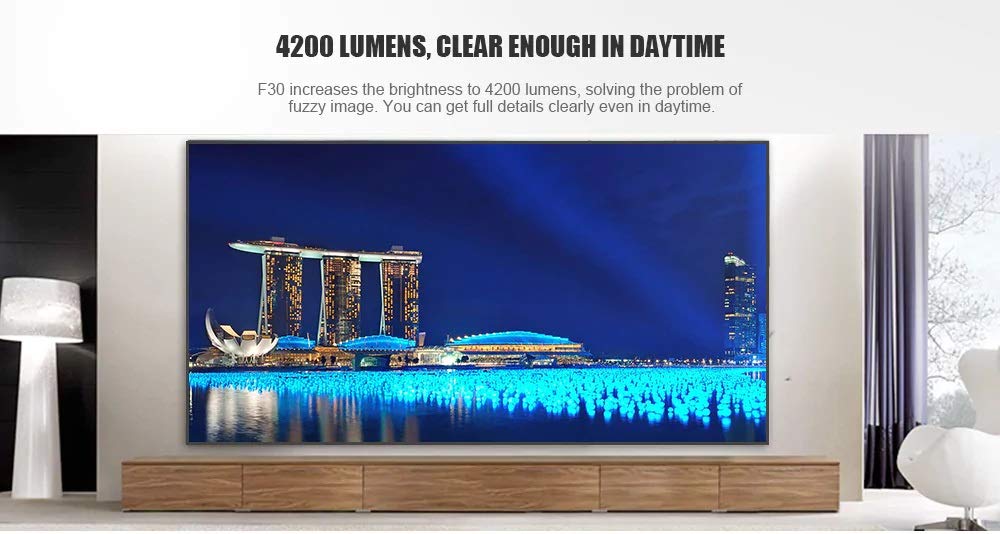
This manual provides essential instructions for the safe and efficient use of your Vivibright F30 Projector. Please read this manual thoroughly before operating the device and retain it for future reference. The Vivibright F30 is a Full HD 1080p LED projector designed for home theater, education, and business presentations, offering 4200 lumens brightness and multiple connectivity options.
2. Gwybodaeth Diogelwch
- Cyflenwad Pŵer: Defnyddiwch yr addasydd pŵer penodedig yn unig. Sicrhewch fod y cyfainttagmae e yn cyd-fynd â gofynion y taflunydd.
- Awyru: Peidiwch â rhwystro agoriadau awyru. Sicrhewch fod digon o le o amgylch y taflunydd ar gyfer llif aer priodol i atal gorboethi.
- Gwres: Y taflunydd lamp generates heat. Avoid touching the lens or vents immediately after use.
- Amddiffyn Llygaid: Peidiwch ag edrych yn uniongyrchol i lens y taflunydd pan fydd y lamp is on. The bright light can cause eye strain or damage.
- Lleoliad: Rhowch y taflunydd ar arwyneb sefydlog, gwastad. Osgowch ei osod mewn golau haul uniongyrchol, ger ffynonellau gwres, neu mewn amgylcheddau â lleithder uchel neu lwch.
- Glanhau: Datgysylltwch y pŵer cyn glanhau. Defnyddiwch frethyn meddal, sych. Peidiwch â defnyddio glanhawyr hylif na glanhawyr aerosol.
- Gwasanaethu: Peidiwch â cheisio cynnal a chadw'r taflunydd eich hun. Cyfeiriwch bob gwaith cynnal a chadw at bersonél cymwys.
3. Cynnwys Pecyn
Gwiriwch fod yr holl eitemau yn bresennol yn y pecyn:
- Vivibright F30 Projector
- Cebl Pŵer
- Rheolaeth Anghysbell
- Llawlyfr Defnyddiwr (y ddogfen hon)
- HDMI Cable (may vary by region/package)
4. Cynnyrch Drosview
Familiarize yourself with the projector's components and interfaces.
Ffigur 4.1: Blaen view of the Vivibright F30 Projector, showing the lens and ventilation.

Ffigur 4.2: Ochr view of the Vivibright F30 Projector, highlighting the various input ports.
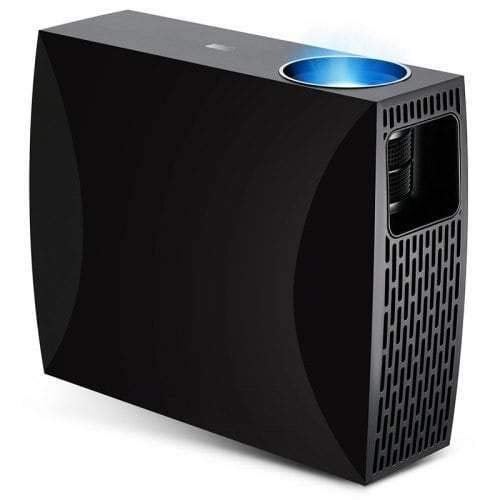
Ffigur 4.3: Top or rear view of the Vivibright F30 Projector, showing control buttons or additional vents.
4.1. Rhyngwynebau
- Porthladdoedd HDMI: For connecting devices like laptops, gaming consoles, Blu-ray players, and media players.
- Porthladd VGA: For connecting older computers or other VGA-compatible devices.
- Porthladdoedd USB: For connecting USB storage devices to play media directly.
- Sain Allan: Ar gyfer cysylltu siaradwyr allanol neu glustffonau.
- Mewnbwn pŵer: Ar gyfer cysylltu'r cebl pŵer.
5. Gosod
5.1. Lleoliad
Position the projector on a stable surface or mount it appropriately. Ensure the projector is perpendicular to the projection screen for optimal image geometry. The projection distance can range from 1.2 to 6.8 meters, depending on the desired screen size.
5.2. Cysylltiad Pwer
- Cysylltwch y cebl pŵer â phorthladd mewnbwn pŵer y taflunydd.
- Plygiwch ben arall y cebl pŵer i mewn i soced drydanol wedi'i seilio.
5.3. Cysylltu Dyfeisiau Mewnbwn
Connect your desired source device (e.g., laptop, media player) to the projector using an appropriate cable (HDMI, VGA, USB). Ensure the cable is securely connected to both the projector and the source device.
5.4. Addasiad Ffocws a Chyfraddiad Clo
- Ffocws: Trowch y cylch ffocws ar lens y taflunydd nes bod y ddelwedd yn ymddangos yn finiog ac yn glir ar y sgrin.
- Carreg allwedd: If the projected image is trapezoidal (wider at the top or bottom), use the keystone correction feature (manual or digital, depending on model) to adjust the image to a rectangular shape.
6. Cyfarwyddiadau Gweithredu
6.1. Pweru Ymlaen / I ffwrdd
- Pŵer Ymlaen: Press the power button on the projector or the remote control. The indicator light will change, and the lamp bydd goleuo.
- Pwer i ffwrdd: Press the power button again. Confirm shutdown if prompted. Allow the projector to cool down before unplugging it.
6.2. Dewis Ffynhonnell Mewnbwn
Press the "Source" button on the remote control or the projector's control panel to cycle through available input sources (HDMI1, HDMI2, VGA, USB). Select the input corresponding to your connected device.
6.3. Llywio Dewislen
Use the arrow buttons on the remote control or projector to navigate through the on-screen display (OSD) menu. Press "OK" or "Enter" to select an option and "Exit" or "Menu" to go back or close the menu.
6.4. Gosodiadau Llun a Sain
Adjust picture settings such as brightness, contrast, color, and aspect ratio via the OSD menu to optimize image quality. Adjust volume levels for the built-in speaker or connected external audio devices.
7. cynnal
7.1. Glanhau'r Lens
Gently wipe the projector lens with a soft, lint-free cloth specifically designed for optical surfaces. Do not use abrasive materials or harsh chemicals.
7.2. Glanhau Corff y Taflunydd
Use a soft, dry cloth to clean the exterior of the projector. For stubborn marks, a slightly damp cloth can be used, followed by a dry cloth. Ensure no liquid enters the ventilation openings.
7.3. Lamp Bywyd
The Vivibright F30 Projector utilizes an LED lamp with an estimated lifespan of up to 50,000 hours, requiring no regular replacement under normal usage conditions.
8. Datrys Problemau
| Problem | Achos Posibl | Ateb |
|---|---|---|
| Dim delwedd yn cael ei harddangos |
|
|
| Mae'r ddelwedd yn aneglur |
|
|
| Mae'r ddelwedd yn drapesoidaidd (effaith clofaen) |
|
|
| Dim sain |
|
|
| Mae'r taflunydd yn gorboethi neu'n diffodd |
|
|
9. manylebau
| Nodwedd | Manylyn |
|---|---|
| Brand | Vivibright |
| Model | F30 |
| Datrysiad Brodorol | 1920 x 1080 (HD Llawn) |
| Datrys a Gefnogir | Hyd at 4K |
| Disgleirdeb | 4200 Lumens (LED Luminous) |
| Cymhareb Cyferbyniad | 2200:1 |
| Technoleg Arddangos | LCD |
| Lamp Math | LED |
| Lamp Bywyd | Hyd at 50,000 awr |
| Pellter Tafluniad | 1.2 i 6.8 metr |
| Lefel Sŵn | 29 Desibel |
| Cysylltedd | HDMI, VGA, USB |
| Nodweddion Arbennig | Portable, Built-in Speaker |
| Pwysau Eitem | 3 kg |
| Math Mowntio | Mynydd Pen bwrdd |
10. Gwarant a Chefnogaeth
10.1. Gwybodaeth Gwarant
The Vivibright F30 Projector comes with a Gwarant 1 Flwyddyn o ddyddiad y pryniant. Mae'r warant hon yn cwmpasu diffygion gweithgynhyrchu a chamweithrediadau o dan ddefnydd arferol. Cadwch eich prawf prynu ar gyfer hawliadau gwarant.
Nid yw'r warant yn cwmpasu difrod a achosir gan gamddefnydd, damweiniau, atgyweiriadau heb awdurdod, na thraul a rhwyg arferol.
10.2. Cefnogaeth i Gwsmeriaid
For technical assistance, warranty claims, or further inquiries, please contact Vivibright customer support through their official website or the contact information provided with your purchase documentation. When contacting support, please have your product model (F30) and purchase details ready.