
Honor BKK-LX2
Honor 8C User Manual
Model: BKK-LX2
1. Cynnyrch Drosview
The Honor 8C is a versatile smartphone designed for everyday communication and multimedia. It features a large display, capable cameras, and a long-lasting battery, making it suitable for various user needs. This manual provides essential information for setting up, operating, maintaining, and troubleshooting your device.

Ffigur 1: Blaen view of the Honor 8C smartphone, showcasing ei arddangosfa a'i ddyluniad cain.
2. Canllaw Gosod
2.1 Mewnosod Cardiau SIM a microSD
Your Honor 8C supports Dual SIM functionality and a microSD card for expandable storage. Use the provided SIM ejector tool to open the SIM card tray located on the side of the device.
- Locate the small hole on the SIM card tray on the left side of the phone.
- Insert the SIM ejector tool into the hole and gently push until the tray pops out.
- Place your Nano-SIM cards and/or microSD card into the designated slots on the tray, ensuring the gold contacts face downwards.
- Gwthiwch y hambwrdd yn ôl i'r ffôn yn ofalus nes ei fod yn wastad â'r ochr.
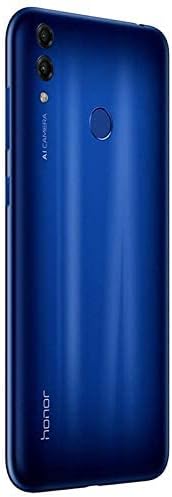
Ffigur 2: Ochr view illustrating the location of the SIM card tray.
2.2 Pŵer Ymlaen a Chyflunio Cychwynnol
I droi eich dyfais ymlaen am y tro cyntaf:
- Press and hold the Power button (located on the right side) until the Honor logo appears.
- Dilynwch yr awgrymiadau ar y sgrin i ddewis eich iaith, cysylltu â rhwydwaith Wi-Fi, a sefydlu eich cyfrif Google.
- Cwblhewch y dewin gosod i bersonoli gosodiadau eich dyfais.
3. Cyfarwyddiadau Gweithredu
3.1 Mordwyo Sylfaenol
The Honor 8C operates on Android 8.1 and uses a touchscreen interface for navigation.
- Tap: Touch the screen once to open apps, select items, or activate buttons.
- Swipe: Drag your finger across the screen to scroll through lists or switch between home screens.
- Pinsio i chwyddo: Place two fingers on the screen and move them apart to zoom in, or together to zoom out.
3.2 Defnyddio'r Camera
The Honor 8C is equipped with a dual rear camera (13MP + 2MP) and an 8MP front camera for capturing photos and videos.
- Agorwch yr ap Camera o'ch sgrin gartref neu drôr yr apiau.
- Select your desired mode (Photo, Video, Portrait, etc.) by swiping across the bottom of the screen.
- Tapiwch y botwm caead i dynnu llun neu ddechrau/stopio recordio fideo.
- Use the toggle icon to switch between the front and rear cameras.

Ffigur 3: Cefn view highlighting the dual camera system and fingerprint sensor.
3.3 Cysylltedd
Mae'r ddyfais yn cefnogi amryw o opsiynau cysylltedd:
- Wi-Fi: Cysylltwch â rhwydweithiau diwifr i gael mynediad i'r rhyngrwyd. Ewch i Gosodiadau > Di-wifr a rhwydweithiau > Wi-Fi.
- Bluetooth: Pair with other Bluetooth-enabled devices like headphones or speakers. Go to Gosodiadau > Cysylltiad dyfais > Bluetooth.
- 4G LTE: Utilize high-speed mobile data through your SIM card. Ensure your mobile data is enabled in Gosodiadau > Di-wifr a rhwydweithiau > Rhwydwaith symudol.
4. Cynnal a Chadw a Gofal
4.1 Gofal Batri
The Honor 8C is equipped with a 4000mAh battery. To maximize battery life:
- Osgowch dymheredd eithafol, gan y gallant ddirywio perfformiad y batri.
- Defnyddiwch y gwefrydd a'r cebl gwreiddiol a ddarparwyd gyda'ch dyfais.
- Avoid completely draining the battery frequently. Charge it before it reaches very low levels.
- Close unused applications running in the background to conserve power.
4.2 Glanhau Eich Dyfais
To keep your Honor 8C clean and functional:
- Defnyddiwch frethyn meddal, di-lint i sychu'r sgrin a'r panel cefn.
- Osgowch ddefnyddio cemegau llym, glanhawyr sgraffiniol, neu chwistrellau aerosol.
- Ar gyfer smwtshis ystyfnig, ychydig yn dampen y brethyn â dwfr.
4.3 Diweddariadau Meddalwedd
Chwiliwch am ddiweddariadau meddalwedd a'u gosod yn rheolaidd i sicrhau bod gan eich dyfais y nodweddion, y clytiau diogelwch a'r gwelliannau perfformiad diweddaraf. Ewch i Gosodiadau > System > Diweddariad Meddalwedd.
5. Datrys Problemau
5.1 Dyfais Ddim yn Troi Ymlaen
- Ensure the battery is charged. Connect the device to its charger and wait a few minutes before attempting to power it on again.
- Pwyswch a daliwch y botwm Pŵer am o leiaf 10-15 eiliad i gyflawni ailgychwyn gorfodol.
5.2 Problemau Cysylltedd Rhwydwaith
- Dim Signal/Signal Gwael: Check if your SIM card is properly inserted. Try restarting the device. If the issue persists, contact your network provider.
- Problemau Cysylltiad Wi-Fi: Ensure Wi-Fi is enabled on your device and the router is working. Try forgetting the network and reconnecting.
5.3 Apiau'n Chwalu neu'n Rhewi
- Caewch ac ailagor yr ap.
- Clirio storfa a data'r ap (Gosodiadau > Apiau > [Enw'r Ap] > Storio > Clirio'r storfa/Clirio data).
- Gwnewch yn siŵr bod yr ap wedi'i ddiweddaru i'w fersiwn ddiweddaraf o Google Play Store.
6. Manylebau Technegol
| Nodwedd | Manyleb |
|---|---|
| Rhif Model | BKK-LX2 |
| System Weithredu | Android 8.1 |
| Prosesydd | Snapdragon 632 Octa-Core 8x1.8 GHz |
| HWRDD | 3 GB |
| Storio Mewnol | 32 GB |
| Arddangos | 6.26 Inch Notch in-cell Full View Display (1520 x 720 resolution) |
| Camera Cefn | 13MP + 2MP |
| Camera blaen | 8MP |
| Batri | 4000mAh (Typical value) |
| Cysylltedd | 4G LTE, Wi-Fi, Bluetooth, GPS (GLONASS) |
| Dimensiynau | 18.6 x 9.2 x 5.2 cm |
| Pwysau | 431 g |
| Lliw | Glas |
7. Gwarant a Chefnogaeth
Your Honor 8C device comes with a standard manufacturer's warranty. Please refer to the warranty card included in your product packaging for specific terms and conditions, including warranty period and coverage details.
For technical support, service, or further inquiries, please visit the official Honor support website or contact their customer service hotline. Keep your proof of purchase handy when seeking support.
Cymorth Ar-lein: Visit the official Honor websafle ar gyfer Cwestiynau Cyffredin, lawrlwythiadau meddalwedd, ac opsiynau cysylltu.
Gwasanaeth Cwsmer: Refer to your regional Honor support contact information for phone or email assistance.
Ask a question about this manual
Ask about setup, troubleshooting, compatibility, parts, safety, or missing instructions. Manuals+ will review the question and use this page’s manual context to help answer it.