
1. Rhagymadrodd
This manual provides detailed instructions for the installation, operation, maintenance, and troubleshooting of the SEAFRONT SKI780 VFD Inverter Frequency Converter. This device is designed for precise motor speed control in various industrial and commercial applications. Please read this manual thoroughly before installation and operation to ensure safe and efficient use of the product.

Ffigur 1: Cyffredinol view of the SEAFRONT SKI780 VFD Inverter Frequency Converter.
2. Gwybodaeth Diogelwch
Dilynwch y rhagofalon diogelwch canlynol bob amser i atal anaf personol neu ddifrod i'r offer:
- Ensure that installation and wiring are performed by qualified personnel only.
- Disconnect all power sources before performing any wiring, maintenance, or inspection.
- Gwiriwch fod y mewnbwn cyftage yn cyfateb i fanylebau'r gwrthdröydd.
- Do not touch electrical components immediately after power-off, as residual voltage may be present. Wait at least 5 minutes.
- Install the inverter in a clean, dry, and well-ventilated environment, away from direct sunlight, corrosive gases, and flammable materials.
- Sicrhau sylfaen gywir ar gyfer yr offer.
3. Cynnyrch Drosview
The SEAFRONT SKI780 VFD Inverter is a versatile device offering advanced control features for various motor applications.
Nodweddion Allweddol:
- Integrated synchronous control and proportional timing control.
- Six speed control modes for automatic operation.
- Ability to lock all or part of the keys (analog potentiometer unlocked).
- Normally open relay and two high configuration outputs with 100 optional channels.
- Integrated user-defined counter/meter.
- 0-100% adjustable torque output at zero speed, with zero-speed brake function.
- V/F control and output torsion control.
- Integrated communication interface.
- Equipped with a speed potentiometer and an external panel.
- Five opto-isolated digital inputs, 100 optional channels.
- One analog input, two analog output channels.
- Textile pendulum frequency function, suitable for textile equipment.

Ffigur 2: Blaen view of the inverter showing the control panel and terminals.
4. manylebau
| Manyleb | Gwerth |
|---|---|
| Rhif Model | SKI780-0D75G-1 |
| Brand | SEAFRONT |
| Mewnbwn Voltage | 220 folt (AC) |
| Allbwn Voltage | 220 folt (AC) |
| Pŵer Allbwn | 750 Wat |
| Pŵer Allbwn Brig | 1500 Wat |
| Inverter Power (VA) | 2200 VA |
| Tonffurf Allbwn | Ton Sine Addasedig |
| Dimensiynau (L x W x H) | 14.2L x 11W x 8.5H centimetrau (5.6 x 4.3 x 3.3 modfedd) |
| Nifer yr Allfeydd Pŵer | 1 |
| Ffynhonnell Pwer | Vehicle DC Power Socket (Note: Product description indicates AC input) |
| Gwlad Tarddiad | Tsieina |
| GTIN/UPC | 736342831933 |

Figure 3: Dimensions of the SKI780 VFD Inverter.
5. Gosod
Careful installation and wiring are crucial for the proper functioning of the VFD inverter.
5.1 Mowntio
- Mount the inverter vertically on a stable, non-flammable surface.
- Ensure adequate clearance around the unit for proper ventilation and heat dissipation.
- Avoid mounting in areas with excessive vibration, dust, or moisture.
5.2 Gwifrau
Refer to the wiring diagram provided with your specific unit for detailed connections. General wiring steps include:
- Power Input (L, N): Connect the main AC power supply to the L and N terminals. Ensure correct voltage (220V AC).
- Allbwn Modur (U, V, W): Connect the three-phase motor leads to the U, V, and W terminals.
- Sefydlu (PE): Connect the ground wire to the PE terminal for safety.
- Brake Resistor (P+, PB): If a brake resistor is used, connect it to the P+ and PB terminals.
- Terfynellau Rheoli: Connect external control signals (digital inputs, analog inputs, relay outputs) to the respective terminals as per your application requirements.

Figure 4: Close-up of the inverter's terminal block for wiring connections.
5.3 External Panel Compatibility
If using an external control panel, ensure it is compatible with the inverter. The new panel design is specifically for new inverter models.

Figure 5: Correct connection of a new external panel to the inverter.
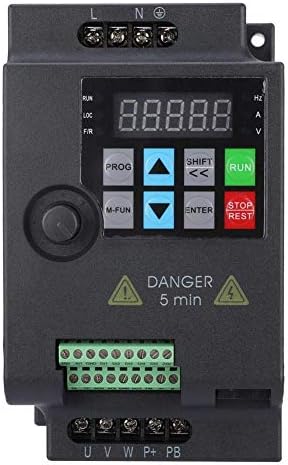
Figure 6: Incorrect connection of an old external panel to the inverter. Ensure panel compatibility.
6. Cyfarwyddiadau Gweithredu
The inverter features a control panel for setting parameters and operating the motor.
6.1 Panel Rheoli Drosview
Mae'r panel rheoli fel arfer yn cynnwys:
- Arddangos: Shows frequency, voltage, paramedrau cyfredol, a pharamedrau eraill.
- Botwm PROG: Yn mynd i mewn/gadael y modd gosod paramedr.
- M-FUN Button: Multi-function button, often used for quick access to common functions.
- Saethau i Fyny/I Lawr: Navigate through menus and adjust parameter values.
- SHIFT/Left/Right Arrows: Move cursor or change digits during parameter entry.
- ENTER Botwm: Confirms selections and saves parameter changes.
- Botwm Rhedeg: Yn cychwyn y modur.
- Botwm STOPIO/AILOSOD: Yn atal y modur neu'n ailosod amodau nam.
6.2 Gweithrediad Sylfaenol
- Pŵer Ymlaen: Apply power to the inverter. The display will light up.
- Amlder Gosod: Use the Up/Down arrows or the external potentiometer to set the desired output frequency.
- Cychwyn Modur: Gwasgwch y RHEDEG button to start the motor. The motor will accelerate to the set frequency.
- Stopio Modur: Gwasgwch y STOP / AILOSOD button to stop the motor. The motor will decelerate and stop.
6.3 Gosod Paramedr
To configure advanced settings:
- Gwasgwch y PROG botwm i fynd i mewn i'r modd gosod paramedr.
- Use the Up/Down arrows to navigate through parameter groups and individual parameters.
- Gwasgwch ENWCH i ddewis paramedr.
- Use the Up/Down arrows and SHIFT buttons to adjust the parameter value.
- Gwasgwch ENWCH i arbed y gwerth newydd.
- Gwasgwch PROG to exit parameter setting mode.
7. cynnal
Regular maintenance ensures the longevity and reliable operation of your VFD inverter.
- Glanhau: Periodically clean the inverter's exterior and ventilation openings to prevent dust accumulation. Use a soft, dry cloth. Do not use liquid cleaners.
- Arolygiad: Regularly inspect wiring connections for tightness and signs of damage or corrosion. Check for any unusual noises or odors during operation.
- Cefnogwyr Oeri: Ensure cooling fans are operating correctly and are free from obstructions. Replace noisy or faulty fans.
- Amodau Amgylcheddol: Gwiriwch fod yr amgylchedd gweithredu yn aros o fewn yr ystodau tymheredd a lleithder penodedig.
- Bywyd y Cynhwysydd: Electrolytic capacitors have a finite lifespan. Consider professional inspection and replacement after several years of continuous operation.
8. Datrys Problemau
Mae'r adran hon yn darparu atebion i broblemau cyffredin y gallech ddod ar eu traws.
| Problem | Achos Posibl | Ateb |
|---|---|---|
| Nid yw'r gwrthdröydd yn troi ymlaen | No input power; Blown fuse; Faulty wiring | Check power supply; Replace fuse; Verify wiring connections. |
| Nid yw modur yn rhedeg | Incorrect parameters; Motor wiring error; Overload | Check frequency and control parameters; Verify motor wiring (U, V, W); Reduce motor load. |
| Overcurrent fault (OC) | Sudden load change; Short circuit in motor; Acceleration/deceleration time too short | Check motor and load; Increase acceleration/deceleration time parameters. |
| Overvoltagfai e (OV) | Mewnbwn cyftage too high; Regeneration during deceleration | Gwirio mewnbwn cyftage; Increase deceleration time; Install a brake resistor if necessary. |
| Danddaeartagfai e (UV) | Mewnbwn cyftage too low; Power supply instability | Gwirio mewnbwn cyftage; Ensure stable power supply. |
| Overheat fault (OH) | Poor ventilation; Ambient temperature too high; Fan failure | Improve ventilation; Reduce ambient temperature; Check and replace cooling fan. |
For persistent issues or faults not listed, please contact technical support.
9. Cefnogaeth
For technical assistance, product inquiries, or service requests, please contact SEAFRONT customer support through your purchase channel or the official SEAFRONT website. Please have your model number (SKI780-0D75G-1) and serial number ready when contacting support.