
Vivanco 25175
Vivanco MOOOVE AIR 25175 Bluetooth HiFi On-Ear Foldable Headphones User Manual
1. Rhagymadrodd
Thank you for choosing the Vivanco MOOOVE AIR 25175 Bluetooth HiFi On-Ear Foldable Headphones. This manual provides essential information for the proper setup, operation, and maintenance of your new headphones. Please read it carefully before use and retain it for future reference.
2. Cynnwys Pecyn
Sicrhewch fod yr holl eitemau yn bresennol yn y pecyn:
- Vivanco MOOOVE AIR 25175 Bluetooth Headphones (1 piece)
- Cebl Gwefru (USB)
- Cebl Sain (Jac 3.5mm) (Assumed based on connectivity specifications)
- Llawlyfr Defnyddiwr (Y ddogfen hon)
3. Cynnyrch Drosview
Familiarize yourself with the components of your Vivanco MOOOVE AIR 25175 headphones.
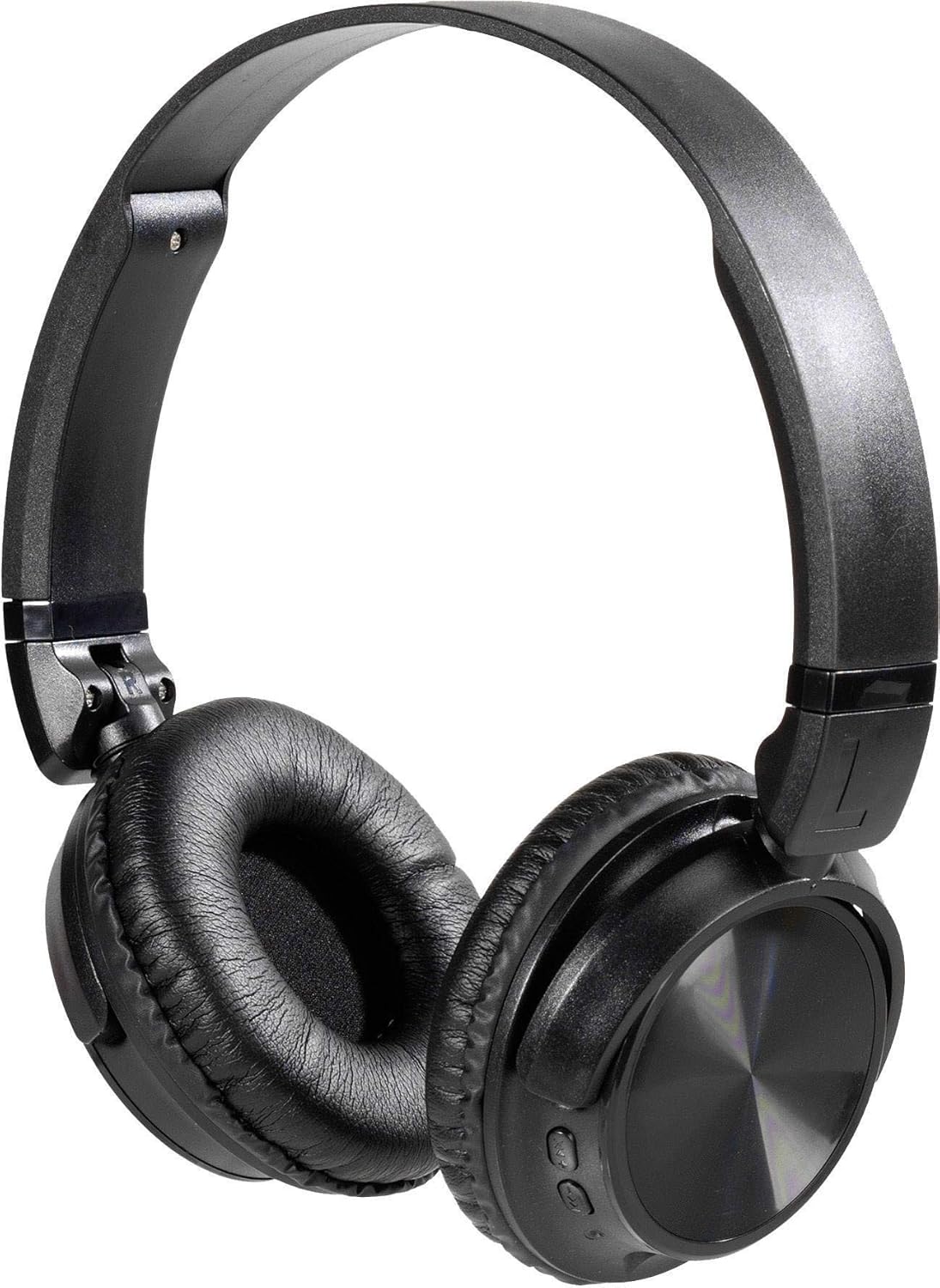
Disgrifiad o'r Delwedd: A pair of black Vivanco MOOOVE AIR 25175 headphones, featuring an adjustable headband, soft cushioned earcups, and control buttons visible on the right earcup. The headphones are shown in an unfolded, ready-to-use position.
Cydrannau Allweddol:
- Band pen addasadwy: Am ffit cyfforddus.
- Cushioned Earcups: Provide comfort for extended listening.
- Botymau Rheoli: Typically located on one earcup for power, volume, playback, and call management.
- Meicroffon: Ar gyfer galwadau di-law.
- Charging Port (USB): Ar gyfer ailwefru'r batri mewnol.
- Audio Input Port (3.5mm/2.5mm Jack): Ar gyfer cysylltiad â gwifrau.
4. Gosod
4.1. Codi Tâl y Clustffonau
- Cysylltwch ben bach y cebl gwefru USB â'r porthladd gwefru ar y clustffonau.
- Cysylltwch ben mwy y cebl gwefru USB ag addasydd pŵer USB (heb ei gynnwys) neu borthladd USB cyfrifiadur.
- The LED indicator on the headphones will illuminate, typically red, to show that charging is in progress.
- Once fully charged, the LED indicator will change color (e.g., turn blue or off). A full charge usually takes approximately 2-3 hours.
Nodyn: For optimal battery life, fully charge the headphones before first use.
4.2. Pweru Ymlaen / I ffwrdd
- I Bweru Ymlaen: Press and hold the Power button (usually marked with a power symbol) for approximately 3-5 seconds until the LED indicator flashes and you hear an audible prompt.
- I Bweru i ffwrdd: Press and hold the Power button for approximately 3-5 seconds until the LED indicator turns off and you hear an audible prompt.
5. Cysylltedd
5.1. Pâr Bluetooth
- Gwnewch yn siŵr bod y clustffonau wedi'u gwefru'n llawn ac wedi'u diffodd.
- Pwyswch a daliwch y botwm Pŵer am tua 5-7 eiliad nes bod y dangosydd LED yn fflachio'n goch a glas yn ail, gan nodi modd paru.
- Ar eich dyfais sydd wedi'i galluogi gan Bluetooth (ffôn clyfar, tabled, cyfrifiadur), ewch i'r gosodiadau Bluetooth.
- Chwiliwch am available devices. The headphones should appear as "Vivanco MOOOVE AIR" or a similar name.
- Select the headphones from the list to connect. Once connected, the LED indicator will typically flash blue slowly or remain solid blue, and you may hear a confirmation tone.
- Os gofynnir am gyfrinair, nodwch "0000" (pedwar sero).
Nodyn: Bydd y clustffonau'n ceisio ailgysylltu â'r ddyfais a barwyd ddiwethaf yn awtomatig pan gânt eu troi ymlaen, os yw Bluetooth y ddyfais honno'n weithredol ac o fewn cyrraedd.
5.2. Cysylltiad â Gwifrau (Dewisol)
The Vivanco MOOOVE AIR 25175 headphones can also be used with a wired connection, even if the battery is depleted.
- Connect one end of the 3.5mm audio cable (or 2.5mm if applicable) to the audio input jack on the headphones.
- Connect the other end of the audio cable to the audio output jack of your device (e.g., smartphone, MP3 player, computer).
- The headphones will operate in passive mode, meaning Bluetooth functions and built-in controls may be disabled, and audio will be controlled directly from your connected device.
6. Gweithredu'r Clustffonau
6.1. Chwarae Cerdd
- Chwarae/Seibiant: Press the Multi-function button (often the Power button or a dedicated Play/Pause button) once.
- Trac Nesaf: Press and hold the Volume Up button or a dedicated "Next" button. (Specific button functions may vary; refer to device markings).
- Trac Blaenorol: Press and hold the Volume Down button or a dedicated "Previous" button. (Specific button functions may vary; refer to device markings).
6.2. Rheoli Cyfrol
- Cynyddu Cyfrol: Pwyswch y botwm Cyfaint i Fyny (+).
- Gostwng y Gyfrol: Pwyswch y botwm Cyfaint i Lawr (-).
6.3. Rheoli Galwadau
- Ateb / Diwedd Galwad: Press the Multi-function button once during an incoming call or an active call.
- Gwrthod Galwad: Pwyswch a daliwch y botwm Aml-swyddogaeth am tua 2 eiliad yn ystod galwad sy'n dod i mewn.
- Ail-redeg Rhif Diwethaf: Double-press the Multi-function button when no call is active.
7. cynnal
- Glanhau: Sychwch y clustffonau gyda lliain meddal, sych, heb lint. Peidiwch â defnyddio glanhawyr sgraffiniol, alcohol na thoddyddion cemegol.
- Storio: Pan nad ydynt yn cael eu defnyddio, storiwch y clustffonau mewn lle oer, sych, i ffwrdd o olau haul uniongyrchol a thymheredd eithafol. Mae'r dyluniad plygadwy yn caniatáu storio cryno.
- Gwrthiant Dŵr: The headphones are rated as waterproof. However, avoid prolonged submersion or exposure to high-pressure water jets. Ensure charging ports are dry before connecting cables.
8. Datrys Problemau
| Problem | Achos Posibl | Ateb |
|---|---|---|
| Nid yw clustffonau'n troi ymlaen. | Batri isel. | Gwefrwch y clustffonau'n llawn. |
| Methu paru drwy Bluetooth. | Headphones not in pairing mode; device Bluetooth off; too far apart. | Ensure headphones are in pairing mode (flashing red/blue). Turn on Bluetooth on your device. Keep devices within 1 meter during pairing. Forget previous pairings on your device and try again. |
| Dim sain. | Cyfaint yn rhy isel; clustffonau heb eu cysylltu; ffynhonnell sain anghywir. | Increase volume on both headphones and connected device. Verify Bluetooth connection or wired connection. Check audio output settings on your device. |
| Ansawdd sain gwael. | Weak Bluetooth signal; interference; low-quality audio source. | Move closer to the connected device. Avoid obstacles. Try a different audio source. |
9. manylebau
| Brand | Vivanco |
| Enw Model | 25175 |
| Technoleg Cysylltedd | Wireless (Bluetooth), Wired |
| Ffactor Ffurf | Supra-aural (On-Ear) |
| Lleoliad Clust | Extra-aural |
| rhwystriant | 32 Ohms |
| Nodweddion Arbennig | Ysgafn, plygadwy |
| Deunydd | Plastig |
| Math o Reoli | Addasiad cyfaint |
| Swyddogaeth Cebl | Ôl-dynadwy (Refers to included audio cable) |
| Lefel Gwrthsefyll Dŵr | Dal dwr |
| Jack clustffon | USB, 3.5mm Jack, 2.5mm Jack (USB primarily for charging, 3.5mm/2.5mm for audio input) |
| Cydrannau wedi'u Cynnwys | 1 piece (headphones) |
10. Gwarant a Chefnogaeth
Information regarding specific warranty terms and customer support for the Vivanco MOOOVE AIR 25175 headphones is not available in this document. Please refer to the product packaging or the Vivanco official websafle am wybodaeth fanwl am warant a chysylltiadau cymorth.
Ask a question about this manual
Ask about setup, troubleshooting, compatibility, parts, safety, or missing instructions. Manuals+ will review the question and use this page’s manual context to help answer it.