
Rhagymadrodd
This manual provides comprehensive instructions for the Hoco ES20 Original Series Wireless V5.0 Earphones. Please read this manual carefully before using the product to ensure proper operation and to maximize your user experience. Keep this manual for future reference.
Cynnyrch Drosview
The Hoco ES20 earphones are designed for wireless audio playback and hands-free communication. The package includes two wireless earphones and a portable charging case.

Delwedd 1: Hoco ES20 Wireless Earphones. This image displays both the left and right earphones, highlighting their in-ear design and compact form factor.
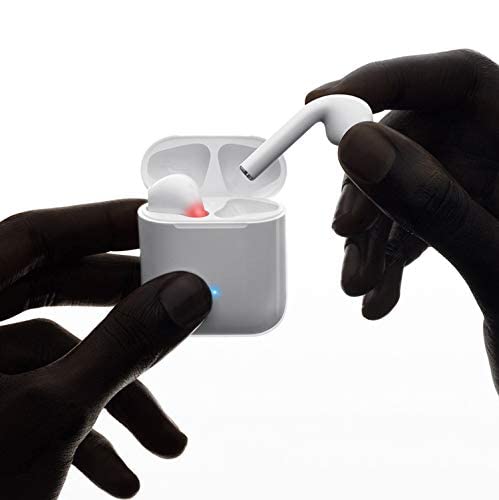
Delwedd 2: Hoco ES20 Earphones in Charging Case. The earphones are shown placed inside their charging case, indicating the charging status with an illuminated LED.
Manylebau
| Nodwedd | Manylyn |
|---|---|
| Fersiwn Di-wifr | v5.0 |
| Protocolau â Chymorth | Headset, Hands-free, A2DP, Avrcp |
| Amlder Trosglwyddo | 2.4GHz |
| Ystod Trosglwyddo | 10 metr |
| Codi Tâl Voltage | DC5V |
| Amser Gwefru (Clustffonau) | Tua 1 awr |
| Amser Siarad | 2 awr |
| Amser Chwarae Cerdd | 2 awr |
| Capasiti Batri Achos Codi Tâl | 400mAh |
| Earphone Battery Capacity (Each) | 40mAh |
| Amser Wrth Gefn | 200 awr |
| Cyfanswm Pwysau (gyda chas) | 44.8g |
| Pwysau Clustffon Sengl | 3.8g |
| Cydrannau wedi'u Cynnwys | Bluetooth Headphones, 1 Charging Cable |
Gosod
1. Gwefru'r Clustffonau a'r Cas
- Place both earphones into the charging case. Ensure they are correctly seated.
- Connect the charging cable to the charging port on the case and to a DC5V power source (e.g., USB wall adapter, computer USB port).
- The indicator light on the charging case will show charging status. A full charge for the earphones takes approximately 1 hour. The charging case itself has a 400mAh battery capacity.
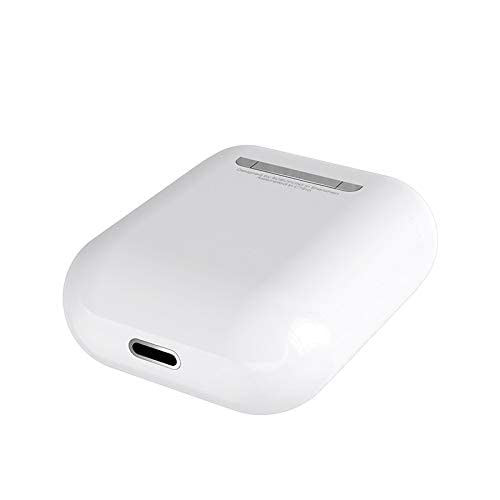
Delwedd 3: Hoco ES20 Charging Case Port. This image shows the charging port located at the bottom of the charging case, where the charging cable is connected.
2. Paru â Dyfais
- Sicrhewch fod y ffonau clust yn cael eu gwefru.
- Agorwch y cas gwefru. Bydd y clustffonau'n mynd i mewn i'r modd paru yn awtomatig.
- Ar eich ffôn clyfar neu ddyfais arall sydd â Bluetooth, ewch i'r gosodiadau Bluetooth.
- Chwiliwch am available devices and select "Hoco ES20" (or similar name) from the list.
- Once connected, the earphones will indicate successful pairing (e.g., an audio prompt or LED change).
- For Apple phones and some Android phones, the battery level of the earphones may be displayed on your device.
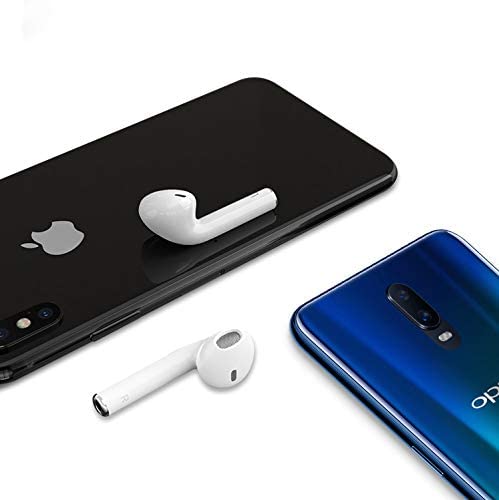
Delwedd 4: Hoco ES20 Earphones with Smartphones. This image illustrates the earphones positioned near two different smartphones, demonstrating their compatibility with various mobile devices.
Cyfarwyddiadau Gweithredu
Swyddogaethau Sylfaenol (Rheolaeth Gyffwrdd)
- Pŵer Ymlaen: Earphones power on automatically when removed from the charging case.
- Pwer i ffwrdd: Earphones power off automatically when placed back into the charging case.
- Chwarae/Seibiant: Tap the touch area on either earphone once.
- Ateb / Diwedd Galwad: Tap the touch area on either earphone once during an incoming call or an active call.
- Gwrthod Galwad: Press and hold the touch area on either earphone for approximately 2 seconds during an incoming call.
- Trac Nesaf: Tapiwch ddwywaith yr ardal gyffwrdd ar y ffôn clust dde.
- Trac Blaenorol: Tapiwch ddwywaith yr ardal gyffwrdd ar y ffôn clust chwith.
- Ysgogi Cynorthwyydd Llais: Triple-tap the touch area on either earphone.
Cynnal a chadw
- Cadwch y clustffonau a'r cas gwefru yn lân ac yn sych.
- Avoid exposing the product to extreme temperatures, humidity, or corrosive substances.
- Do not attempt to disassemble or modify the earphones or charging case, as this will void the warranty and may cause damage.
- Use a soft, dry cloth to clean the earphones and charging contacts.
- Storiwch y clustffonau yn eu cas gwefru pan nad ydynt yn cael eu defnyddio i'w hamddiffyn a'u cadw'n wefredig.
Datrys problemau
Materion Cyffredin ac Atebion
- Clustffonau ddim yn paru:
- Gwnewch yn siŵr bod y ddau glustffon wedi'u gwefru.
- Place earphones back in the case, close it, then open it again.
- Diffoddwch ac ymlaen Bluetooth ar eich dyfais.
- Delete "Hoco ES20" from your device's Bluetooth list and try pairing again.
- Dim ond un clustffon sy'n gweithio:
- Gwnewch yn siŵr bod y ddau glustffon wedi'u gwefru.
- Place both earphones back in the charging case, close the lid, wait a few seconds, then open the lid and remove them together.
- If the issue persists, try resetting the earphones (refer to manufacturer's website if a specific reset procedure is not in this manual).
- Dim sain neu gyfaint isel:
- Gwiriwch lefel y gyfrol ar eich dyfais a'r clustffonau.
- Gwnewch yn siŵr bod y clustffonau wedi'u cysylltu'n iawn â'ch dyfais.
- Rhowch gynnig ar chwarae sain o raglen neu ffynhonnell wahanol.
- Materion codi tâl:
- Gwnewch yn siŵr bod y cebl gwefru wedi'i gysylltu'n ddiogel â'r cas a'r ffynhonnell bŵer.
- Gwiriwch a yw'r porthladd gwefru ar y cas yn lân ac yn rhydd o falurion.
- Ceisiwch ddefnyddio cebl gwefru gwahanol neu addasydd pŵer.
- Poor connection/intermittent audio:
- Ensure your device is within the 10-meter transmission range.
- Avoid obstacles between your device and the earphones.
- Lleihau ymyrraeth gan ddyfeisiau diwifr eraill.
Gwarant a Chefnogaeth
The Hoco ES20 Wireless Earphones come with a Gwarant 6 mis o ddyddiad y pryniant. Mae'r warant hon yn cwmpasu diffygion gweithgynhyrchu. Cadwch eich prawf prynu ar gyfer hawliadau gwarant.
For technical support or warranty inquiries, please contact your retailer or the official Hoco support channels. Refer to the product packaging or Hoco's official websafle ar gyfer gwybodaeth cyswllt.


