
1. Rhagymadrodd
Diolch am brynuasing the Infocus 24-inch 720p LED TV, model IM24ED800. This manual provides essential information for setting up, operating, and maintaining your television. Please read this manual thoroughly before using the product and retain it for future reference.
Gwybodaeth Diogelwch
- Peidiwch â gwneud y teledu yn agored i law neu leithder.
- Peidiwch â rhwystro agoriadau awyru.
- Sicrhau cyflenwad pŵer priodol cyftage.
- Amddiffynnwch y llinyn pŵer rhag cael ei gerdded ymlaen neu ei binsio.
- Cyfeirio pob gwasanaeth i bersonél gwasanaeth cymwys.
- Cadwch y teledu i ffwrdd o olau haul uniongyrchol, ffynonellau gwres, a meysydd magnetig cryf.
2. Cynnwys Pecyn
Ticiwch y blwch ar gyfer yr eitemau canlynol:
- Infocus 24-inch 720p LED TV (IM24ED800)
- Remote Control (with batteries, if included)
- Cord Pŵer
- Stand Teledu (2 ddarn)
- Sgriwiau ar gyfer Stand Teledu
- Llawlyfr Defnyddiwr (y ddogfen hon)
3. Gosod
3.1 Cysylltu'r Stand Teledu
To attach the stand to your Infocus TV:
- Rhowch y teledu yn ofalus gyda sgrin i lawr ar arwyneb meddal, glân i atal crafiadau.
- Aliniwch bob darn stondin â'r slotiau cyfatebol ar waelod y teledu.
- Secure each stand piece using the provided screws. Ensure they are tightened firmly.
- Codwch y teledu yn ofalus a'i osod ar arwyneb sefydlog, gwastad.
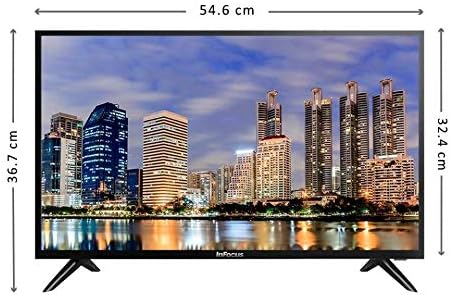
Delwedd: Blaen view of the Infocus 24-inch LED TV with dimensions indicated. The TV measures approximately 54.6 cm in width and 36.7 cm in height with the stand.
3.2 Cysylltu Dyfeisiau
Your Infocus TV features multiple input ports for connecting external devices.

Delwedd: Cefn view of the Infocus 24-inch LED TV, highlighting the location of various input ports including HDMI and USB.
- Cysylltiadau HDMI: Connect Blu-ray players, game consoles, or cable/satellite boxes to the HDMI ports. The TV has 2 HDMI inputs.
- Cysylltiadau USB: Connect USB flash drives for media playback to the USB ports. The TV has 2 USB inputs.
- Antena/Cable: Connect an antenna or cable TV signal to the RF input (if available, not explicitly listed but standard for TVs).
- Pwer: Cysylltwch y llinyn pŵer â mewnbwn pŵer y teledu ac yna ag allfa wal.
3.3 Pŵer Cychwynnol Ymlaen
Ar ôl cysylltu'r holl geblau angenrheidiol:
- Ensure the power cord is securely plugged into both the TV and a power outlet.
- Pwyswch y botwm Pŵer ar y teclyn rheoli o bell neu ar y teledu ei hun.
- Follow the on-screen instructions for initial setup, which may include language selection, time zone, and channel scanning.
4. Gweithredu Eich Teledu
4.1 Rheolaeth o Bell Drosview
The remote control allows you to access all TV functions. While specific button layouts may vary, common functions include:
- Pwer: Yn troi'r teledu ymlaen neu i ffwrdd.
- Mewnbwn/Ffynhonnell: Selects the input source (HDMI 1, HDMI 2, USB, TV).
- Cyfrol i fyny/i lawr: Yn addasu'r lefel sain.
- Sianel i fyny/i lawr: Yn newid sianeli teledu.
- Tewi: Yn tawelu sain y teledu.
- Dewislen: Yn agor y brif ddewislen ar gyfer addasiadau gosodiadau.
- Botymau Llywio (I Fyny/I Lawr/Chwith/Dde/Iawn): Fe'i defnyddir i lywio bwydlenni a chadarnhau dewisiadau.
- Allanfa/Yn ôl: Yn dychwelyd i'r sgrin flaenorol neu'n gadael y ddewislen.
4.2 Swyddogaethau Sylfaenol
- Newid Ffynhonnell Mewnbwn: Gwasgwch y Mewnbwn or Ffynhonnell button on your remote control. Use the navigation buttons to select the desired input (e.g., HDMI 1, USB) and press OK.
- Addasu cyfaint: Defnyddiwch y Cyfrol i Fyny (+) or Cyfrol Down (-) botymau.
- Newid Sianeli: Defnyddiwch y Channel Up (CH+) or Channel Down (CH-) botymau.
4.3 Chwarae Cyfryngau USB
I chwarae cyfryngau files from a USB flash drive:
- Insert a USB flash drive into one of the TV's USB ports.
- Gwasgwch y Mewnbwn or Ffynhonnell botwm ar eich teclyn rheoli o bell a dewis USB.
- The TV's media browser should appear. Navigate through your files (photos, music, videos) using the remote control.
- Dewiswch a file a gwasg OK i'w chwarae.
5. cynnal
5.1 Glanhau'r Sgrin
- Turn off the TV and unplug the power cord before cleaning.
- Defnyddiwch frethyn meddal, di-lint (e.e., brethyn microffibr) i sychu'r sgrin yn ysgafn.
- Ar gyfer marciau ystyfnig, rhwbiwch yn ysgafnampgolchwch y lliain gyda dŵr neu lanhawr sgrin arbenigol. Peidiwch byth â chwistrellu glanhawr yn uniongyrchol ar y sgrin.
- Avoid using abrasive cleaners, alcohol, benzene, or thinners, as these can damage the screen.
5.2 Gofal Cyffredinol
- Keep the TV in a well-ventilated area.
- Ceisiwch osgoi gosod gwrthrychau trwm ar ben y teledu.
- Datgysylltwch y teledu yn ystod stormydd mellt a fellten neu pan na fydd yn cael ei ddefnyddio am gyfnodau hir.
6. Datrys Problemau
Os byddwch chi'n dod ar draws problemau gyda'ch teledu, cyfeiriwch at y problemau a'r atebion cyffredin canlynol:
| Problem | Achos Posibl | Ateb |
|---|---|---|
| Dim pŵer | Llinyn pŵer heb ei gysylltu; problem gyda'r soced pŵer | Gwnewch yn siŵr bod y llinyn pŵer wedi'i blygio'n ddiogel i mewn. Profwch y soced gyda dyfais arall. |
| Dim llun, ond mae sain yn bresennol | Incorrect input source selected; loose video cable | Gwasgwch y Mewnbwn/Ffynhonnell button to select the correct input. Check video cable connections. |
| Dim sain, ond mae llun yn bresennol | Volume muted or too low; audio cable issue | Gwasgwch y Tewi botwm neu gynyddu'r gyfrol. Gwiriwch gysylltiadau cebl sain. |
| Rheolaeth bell ddim yn gweithio | Batteries depleted; obstruction; remote sensor blocked | Replace batteries. Remove any obstructions between the remote and TV. Ensure the TV's remote sensor is clear. |
| Neges "Dim Signal" | Incorrect input source; device not powered on; cable issue | Verify the correct input source is selected. Ensure the connected device is powered on. Check all cable connections. |
7. manylebau
The following are the technical specifications for the Infocus 24-inch 720p LED TV model IM24ED800:
| Nodwedd | Manylyn |
|---|---|
| Rhif Model | IM24ED800 |
| Maint Sgrin | 24 modfedd (61 cm) |
| Technoleg Arddangos | LED |
| Datrysiad | 1366 x 768 (720p HD) |
| Cyfradd Adnewyddu | 60 Hz |
| Mewnbynnau HDMI | 2 |
| Mewnbynnau USB | 2 |
| Cysylltedd | HDMI, USB |
| Math Mowntio | Stondin Bwrdd |
| Dimensiynau Pecyn | 60.8 x 37.8 x 12 cm |
| Pwysau Pecyn | 5 kg |
8. Gwarant a Chefnogaeth
This Infocus TV is sold as a renewed product, which typically comes with a limited warranty provided by the seller or refurbisher. Please refer to your purchase documentation or contact your retailer for specific warranty terms and conditions.
For technical support or service inquiries, please contact the customer support channel provided by your retailer or the Infocus support websafle.