
1. Rhagymadrodd
This manual provides instructions for the installation, operation, and maintenance of the Cisco CP-68KEM-3PCC Expansion Module. This module is designed to enhance the functionality of your Cisco IP Phone 6851 by providing additional programmable keys.
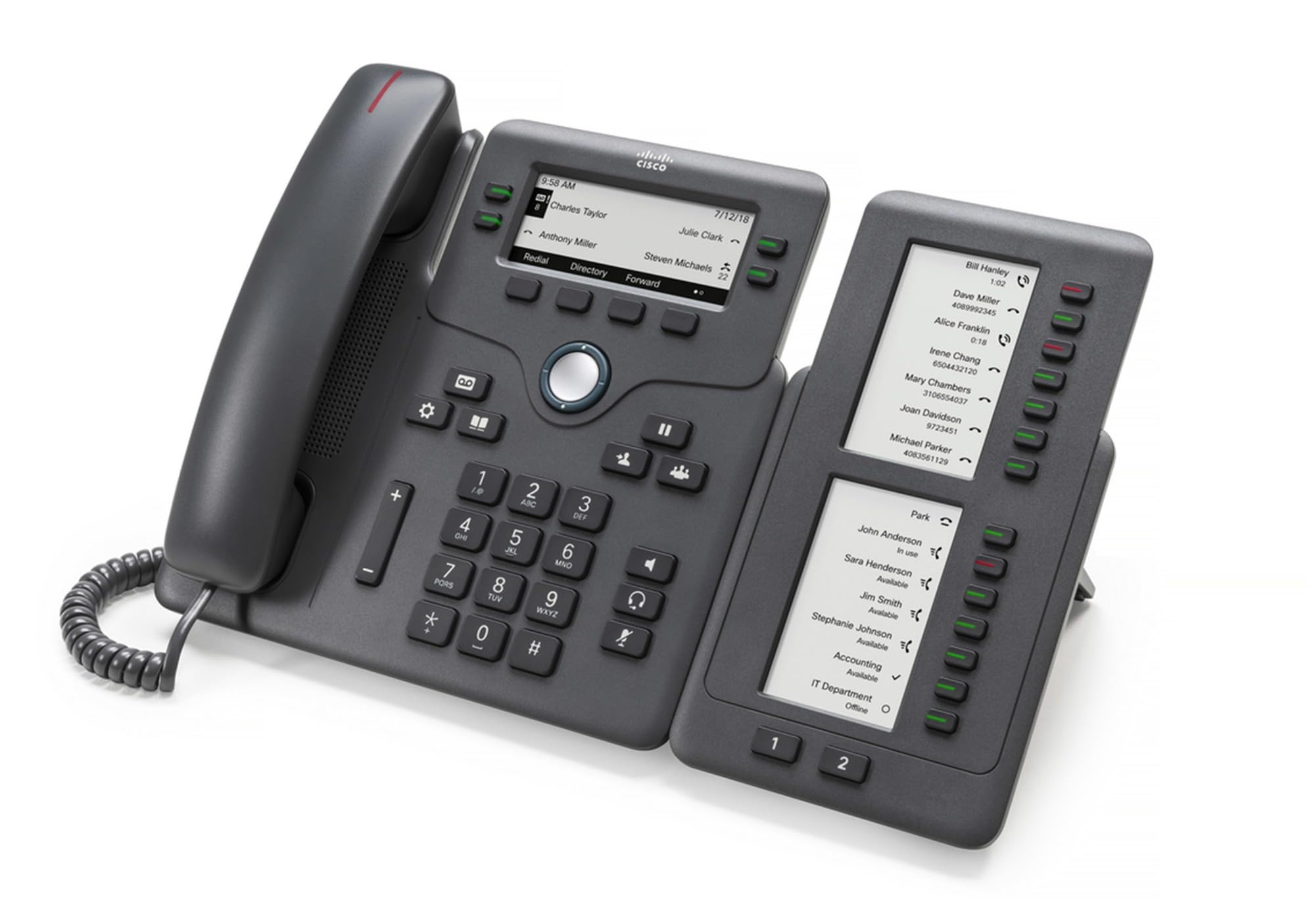
Figure 1: Cisco CP-68KEM-3PCC Expansion Module. This image shows the front view of the expansion module with its grayscale LCD screen and programmable keys.
The Cisco CP-68KEM-3PCC Expansion Module adds 14-line keys and 2-page keys, totaling 28 additional keys, with an easy-to-read grayscale LCD screen. It is ideal for monitoring and managing call status, directory numbers, and speed dial functions.
2. Beth sydd yn y Bocs
Dadbacio'r blwch yn ofalus a sicrhau bod yr holl eitemau yn bresennol:
- Cisco CP-68KEM-3PCC Phone Expansion Module
- Connecting Cable (typically included for linking to the phone)
- Documentation (this user manual, safety information)
If any items are missing or damaged, please contact your vendor or Cisco support immediately.
3. Cyfarwyddiadau Gosod
Follow these steps to connect your Cisco CP-68KEM-3PCC Expansion Module to your Cisco IP Phone 6851.
- Prepare the IP Phone: Ensure your Cisco IP Phone 6851 is powered off and disconnected from the network.
- Connect the Expansion Module: Locate the expansion port on the back or side of your Cisco IP Phone 6851. Connect the provided connecting cable from the expansion module to this port.
- Diogelu'r Cysylltiad: Ensure the cable is securely fastened to prevent accidental disconnection.
- Pŵer Ymlaen: Reconnect your Cisco IP Phone 6851 to the network and power it on. The expansion module should be detected automatically.
- Gwirio Ymarferoldeb: Once the phone has booted, check the expansion module's display and keys to ensure they are responsive.
For detailed visual instructions, refer to the official Cisco documentation or support websafle.
4. Operating the Expansion Module
The expansion module provides additional keys for various functions, enhancing your call management capabilities.
4.1 Allwedd Rhaglenadwy
The 28 programmable keys (14 keys across 2 pages) can be configured for:
- Directory Numbers (DNs): Assign specific phone lines or extensions.
- Deialu cyflymder: Program frequently called numbers for quick access.
- Allweddi Nodwedd: Assign functions like call transfer, conference, or call park.
- Call Status Monitoring: Monitor the status of other lines (e.g., busy, ringing).
4.2 Page Navigation
Use the dedicated page keys (usually located near the display) to switch between the two pages of programmable keys. The grayscale LCD screen will update to show the labels for the currently active page.
4.3 Cyfluniad
Configuration of the programmable keys is typically managed through your organization's phone system administrator or via the web interface of the Cisco IP Phone 6851. Consult your IT department for specific configuration instructions.
5. cynnal
To ensure the longevity and optimal performance of your Cisco CP-68KEM-3PCC Expansion Module, follow these maintenance guidelines:
- Glanhau: Use a soft, dry, lint-free cloth to clean the exterior surfaces. For stubborn marks, slightly dampen the cloth with water. Avoid using harsh chemicals, abrasive cleaners, or solvents, as these can damage the finish and electronic components.
- Amgylchedd: Keep the module in a clean, dry environment, away from direct sunlight, excessive heat, and moisture.
- Trin: Handle the module with care. Avoid dropping it or subjecting it to strong impacts.
- Rheoli Ceblau: Ensure connecting cables are not kinked, pinched, or under strain.
There are no user-serviceable parts inside the expansion module. Do not attempt to open or repair the device yourself.
6. Datrys Problemau
If you encounter issues with your expansion module, try the following troubleshooting steps:
| Problem | Achos Posibl | Ateb |
|---|---|---|
| Module not recognized by phone | Loose cable connection, phone not restarted, incompatible phone model. |
|
| Nid yw allweddi yn ymateb | Software glitch, configuration issue. |
|
| Display is blank or flickering | Power issue, internal fault. |
|
If these steps do not resolve the issue, please contact Cisco technical support or your authorized reseller.
7. manylebau
| Nodwedd | Manylyn |
|---|---|
| Rhif Model | CP-68KEM-3PCC |
| Brand | Cisco |
| Dyfeisiau Cydnaws | Ffôn IP Cisco 6851 |
| Lliw | Du |
| Deunydd | Metel |
| Dimensiynau Eitem (LxWxH) | 5.1 x 10.2 x 20.3 cm |
| Ffynhonnell Pwer | Corded (powered via host IP Phone) |
| Nifer yr Allweddi | 28 (14 keys across 2 pages) |
| Arddangos | Grayscale LCD |
| GTIN/UPC | 889728068383 |
8. Gwybodaeth Gwarant
The Cisco CP-68KEM-3PCC Expansion Module comes with a Gwarant cynnyrch 2 mlynedd o ddyddiad y pryniant. Mae'r warant hon yn cwmpasu diffygion mewn deunyddiau a chrefftwaith o dan ddefnydd arferol. Nid yw'n cwmpasu difrod a achosir gan gamddefnydd, damweiniau, addasiadau heb awdurdod, neu achosion allanol.
For warranty claims or detailed terms and conditions, please refer to the official Cisco warranty policy available on their websafle neu cysylltwch â'ch man prynu.
9. Cefnogaeth
For technical assistance, product information, or to report issues, please contact Cisco support:
- Cefnogaeth Cisco Websafle: Ymweld â'r swyddog Cefnogaeth Cisco websafle for documentation, downloads, and contact options.
- Authorized Reseller: Contact the reseller from whom you purchased the product.
When contacting support, please have your product model (CP-68KEM-3PCC) and serial number ready.