
1. Rhagymadrodd
The EPEVER TRIRON 1206N is a modular Maximum Power Point Tracking (MPPT) solar charge controller designed for efficient and reliable power management in off-grid solar systems. This controller automatically detects 12V or 24V DC system voltages and features a modular design for flexible configuration. It ensures optimal charging of various battery types, including Sealed, Gel, Flooded, LiFePO4, and Li-NiCoMn, while protecting against common electrical faults.
2. Nodweddion Allweddol
- Modular design with optional LCD and LED displays for varied requirements.
- Supports hot-swapping functionality for certain modules.
- Real-time power statistics recording function.
- Comprehensive protection functions: PV over current, PV short circuit, Lithium battery low temperature, night reverse charging, battery reverse polarity, PV reverse polarity, battery over discharge, battery over heat, battery over voltage, load short circuit, load overload, and controller overheating.
- Peak conversion efficiency of 98% and tracking efficiency of ≥99.5%.
- System awtomatig voltage identification and wide MPP operating voltage amrediad.
- Multiple load work modes: manual control, light ON/OFF, light ON + timer.
3. Cyfarwyddiadau Diogelwch
Please read all instructions and warnings in this manual before installation and operation.
- Diogelwch Trydanol: Always disconnect power from the solar array and battery before installing or adjusting the controller. Use appropriate circuit breakers or fuses for all connections.
- Trin Batri: Batteries can produce explosive gases. Ensure adequate ventilation. Wear eye protection and gloves when working with batteries. Do not short-circuit battery terminals.
- Amgylchedd Gosod: Install the controller in a well-ventilated area, away from direct sunlight, high temperatures, and moisture. Ensure sufficient clearance around the controller for heat dissipation.
- Gwifrau: Use correctly sized cables for all connections to prevent overheating and ensure efficient power transfer. Ensure all connections are tight and secure.
- Personél Cymwys: Installation and maintenance should be performed by qualified personnel familiar with solar power systems and electrical safety procedures.
- Sylfaen: The controller features negative ground. Ensure proper grounding according to local electrical codes.
4. Cynnyrch Drosview
The TRIRON 1206N controller is designed with a modular structure, allowing for customization and easy maintenance.

Ffigur 4.1: EPEVER TRIRON 1206N Solar Charge Controller showing overall dimensions (135mm x 177mm x 48mm).
The controller's modular design allows for different display and interface modules to be integrated.

Ffigur 4.2: Ffrwydrodd view showing the modular components of the TRIRON 1206N, including the main unit, display module, and interface module.
The rear of the controller features a heat sink for efficient thermal management.
Ffigur 4.3: Cefn view of the TRIRON 1206N, highlighting the integrated heat sink fins for cooling.
The product label provides essential model and specification details.

Ffigur 4.4: Product label displaying model number (TRIRON1206N), type (DS2/UCS), voltage (12/24V), current (10A), max PV voltage (60V), and max PV input power (130W/12V, 260W/24V).
5. Gosod a Gosod
Follow these steps for safe and correct installation of your TRIRON 1206N solar charge controller.
- Mowntio: Choose a suitable location for mounting the controller. It should be indoors, protected from direct sunlight, high temperatures, and water. Ensure good ventilation. Mount the controller vertically on a wall or panel using the provided mounting holes.
- Dilyniant gwifrau: Cysylltwch y cydrannau yn y drefn ganlynol i atal difrod:
- Step 1: Connect the Battery: Connect the battery to the controller's battery terminals (BATT+/-). Ensure correct polarity. The controller will detect the system voltage.
- Step 2: Connect the Load: Cysylltwch y llwyth DC â therfynellau llwyth y rheolydd (LLWYTH+/-). Sicrhewch y polaredd cywir.
- Step 3: Connect the Solar Panel: Cysylltwch y panel solar â therfynellau PV y rheolydd (PV+/-). Sicrhewch fod y polaredd yn gywir.
RHYBUDD: Always connect the battery first, then the load, and finally the solar panel. Disconnect in the reverse order: solar panel, then load, then battery. Incorrect wiring sequence can damage the controller and other components.
- Temperature Sensor (RT-S): Connect the optional remote temperature sensor to the designated port. This improves battery charging accuracy by compensating for temperature variations.
- Porthladdoedd Cyfathrebu: If using external communication modules (e.g., MT50, eBox-WIFI-01), connect them to the RS485 SLAVE port. The controller also features dual USB ports (5V, 2.2A max) for charging small devices.

Ffigur 5.1: Wiring diagram for the TRIRON 1206N, showing connections for solar panel, battery, DC load, remote temperature sensor, and communication accessories (MT50, eBox-WIFI-01, PC/Laptop, Smartphone).
6. Cyfarwyddiadau Gweithredu
Once installed, the TRIRON 1206N operates automatically. The optional display module provides real-time system status and allows for parameter adjustments.
6.1. Arddangos a Botymau
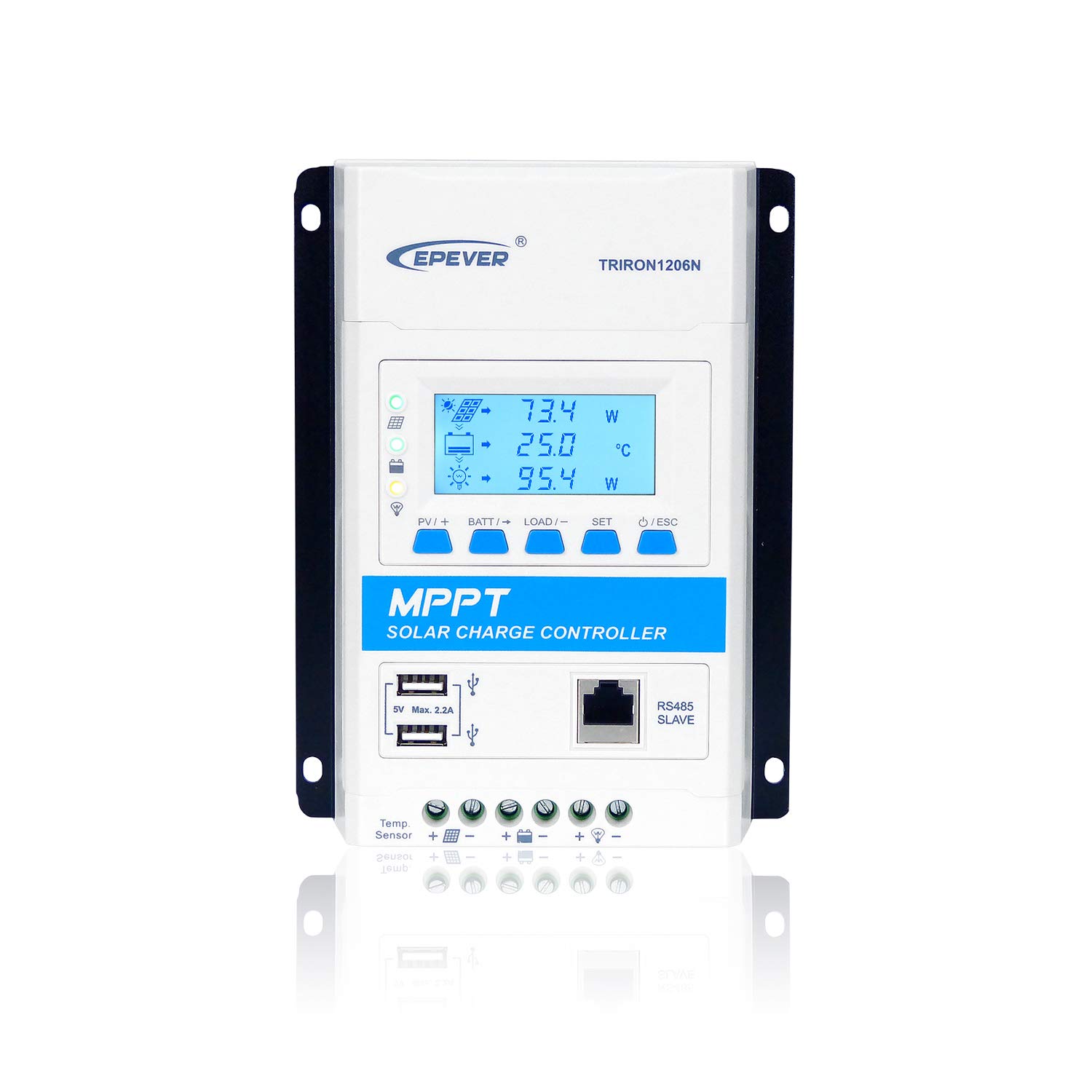
The display module (if installed) shows various parameters such as PV voltage, batri voltage, charging current, load current, and system status. Buttons are typically used for navigating menus and adjusting settings. Refer to the specific display module manual for detailed operation.

Ffigur 6.1: Blaen view of the TRIRON 1206N with the LCD display module showing system parameters.
6.2. Gosod Math o Fatri
The controller supports various battery types. It is crucial to set the correct battery type for optimal charging and battery longevity.
- Supported types include: Sealed, Gel, Flooded, LiFePO4, Li-NiCoMn, and User-defined Lithium battery.
- Consult the display module manual or communication software for instructions on how to select and configure the battery type.
6.3. Load Work Modes
The controller offers multiple load control modes:
- Rheoli Llawlyfr: The load can be turned ON/OFF manually via the controller's buttons or communication software.
- Golau ymlaen / i ffwrdd: The load automatically turns ON at dusk and OFF at dawn.
- Light ON + Timer: The load turns ON at dusk and stays ON for a set duration (e.g., 2 hours, 4 hours).
These modes can be configured through the display module or external communication tools.
7. cynnal
Mae cynnal a chadw rheolaidd yn sicrhau hirhoedledd a pherfformiad gorau posibl eich rheolydd gwefr solar.
- Gwirio Cysylltiadau: Periodically inspect all wiring connections for tightness and corrosion. Loose connections can cause voltagdiferion e a gorboethi.
- Rheolydd Glân: Keep the controller clean and free from dust and debris. Ensure the heat sink fins are not obstructed to allow for proper cooling. Use a dry cloth for cleaning.
- Archwiliad batri: Regularly check battery terminals for corrosion and ensure battery fluid levels (for flooded batteries) are adequate.
- Perfformiad System: Monitor the system's performance through the display or monitoring software. Note any unusual readings or behavior.
- Gwiriad Amgylcheddol: Ensure the installation environment remains within the recommended temperature and humidity ranges.
8. Datrys Problemau
This section provides guidance for common issues. For more complex problems, contact EPEVER technical support.
| Problem | Achos Posibl | Ateb |
|---|---|---|
| Dim arddangosfa/Rheolydd ddim yn troi ymlaen | Batri heb ei gysylltu neu gyfaint iseltage; reversed battery polarity; loose connections. | Gwiriwch y cysylltiadau batri a chyftage. Ensure correct polarity. Tighten all terminals. |
| Dim gwefru o banel solar | PV array disconnected; reversed PV polarity; PV voltage too low/high; shading on panels. | Check PV connections and polarity. Ensure PV voltage is within controller's operating range. Clear any shading. |
| Llwyth ddim yn gweithio | Load disconnected; reversed load polarity; load overcurrent; battery low voltage datgysylltu. | Check load connections and polarity. Reduce load. Allow battery to charge. Check load mode settings. |
| Rheolydd yn gorboethi | Poor ventilation; excessive ambient temperature; overloaded system. | Ensure adequate airflow around the controller. Relocate to a cooler area if necessary. Reduce system load. |
9. manylebau
Technical specifications for the EPEVER TRIRON 1206N Solar Charge Controller.
| Paramedr | Gwerth |
|---|---|
| Model | TRIRON 1206N (DS2/UCS) |
| System Enwol Voltage | 12V/24VDC Auto Work |
| Tâl Cyfredol | 10A |
| Cyfredol Rhyddhau Cyfradd | 10A |
| Mewnbwn Batri Cyftage Ystod | 8V ~ 32V |
| Max. Cylchdaith Agored PV Voltage | 60V (at min operating environment temp); 46V (at 25℃ environment temp) |
| MPP Cyftage Ystod | (Vbat + 2V) ~ 36V |
| Max. Pŵer Mewnbwn PV | 130W / 12V; 260W / 24V |
| Math Batri | Sealed / Gel / Flooded; LiFePO4 / Li-NiCoMn / User Lithium battery |
| Dimensiynau Cynnyrch | 135 x 180.8 x 47.3 mm |
| Pwysau Net | 0.56 kg |
| Gwneuthurwr | ERIOED |
| ASIN | B07N2RN28C |
| UPC | 791280364974 |
10. Gwarant a Chefnogaeth
EPEVER products are manufactured to high-quality standards. For warranty information, please refer to the warranty card included with your product or visit the official EPEVER websafle.
For technical support, troubleshooting assistance, or inquiries regarding your TRIRON 1206N controller, please contact EPEVER customer service.
- Gwneuthurwr: ERIOED
- Cefnogaeth: Please refer to the contact information provided in your product packaging or on the official EPEVER websafle ar gyfer y sianeli cymorth mwyaf cyfredol.