
Rhagymadrodd
This manual provides detailed instructions for the safe and efficient operation, maintenance, and troubleshooting of your SPT SR-34BWC 3400W Commercial Counter-top Induction Range. This advanced commercial induction equipment is designed for food service facilities, offering features ideal for demonstration cooking, suite service, catering, and buffets. It incorporates SmartScan technology for voltage, pan size, and type recognition, along with dedicated COOK and TEMP modes for precise control.
Cyfarwyddiadau Diogelwch Pwysig
To reduce the risk of fire, electric shock, injury to persons, or damage to the appliance when using the induction range, follow these basic precautions:
- Darllenwch yr holl gyfarwyddiadau cyn gweithredu'r teclyn.
- Ensure the appliance is connected to a properly grounded 220V electrical outlet. Do not use extension cords or adapters.
- Place the induction range on a stable, level, heat-resistant surface, away from flammable materials.
- Maintain adequate ventilation around the unit. Do not block air vents.
- Defnyddiwch offer coginio sy'n gydnaws ag anwythiad yn unig. Ni fydd offer coginio nad ydynt yn anwythiad yn cynhesu.
- Do not touch the cooktop surface immediately after use, as residual heat may be present.
- Cadwch blant ac anifeiliaid anwes i ffwrdd o'r teclyn yn ystod y llawdriniaeth.
- Peidiwch byth â throchi'r teclyn, y llinyn, na'r plygio i mewn dŵr neu hylifau eraill.
- Tynnwch y plwg o'r uned o'r allfa pan nad yw'n cael ei defnyddio a chyn glanhau.
- Do not operate the appliance if it has a damaged cord or plug, or if it malfunctions or has been damaged in any manner. Contact qualified service personnel.
- Avoid placing metallic objects such as knives, forks, spoons, and lids on the induction cooktop, as they can become hot.
Cyfarwyddiadau Gosod
- Dadbacio: Carefully remove the induction range from its packaging. Retain packaging materials for future transport or storage.
- Lleoliad: Place the unit on a flat, stable, and heat-resistant countertop. Ensure there is sufficient space (at least 4 inches) around all sides for proper ventilation. Do not place it near heat sources or water.
- Cysylltiad Pwer: Connect the power cord to a dedicated 220V, 3400W electrical outlet. Verify that the electrical supply matches the requirements of the appliance.
- Glanhau Cychwynnol: Before first use, wipe the tempered glass cooktop and stainless steel body with a damp cloth to remove any dust or residue from manufacturing. Ensure the unit is completely dry before plugging it in.

Figure 1: SPT SR-34BWC Induction Range with labeled dimensions (20"D x 14.8"W x 7"H).

Ffigur 2: Cefn view of the SPT SR-34BWC, illustrating the power cord connection point.
Cyfarwyddiadau Gweithredu
The SPT SR-34BWC features touch-sensitive controls and a simple knob-set thermostat for precise cooking. Ensure suitable induction-compatible cookware is placed on the cooktop before operation.

Ffigur 3: Blaen view of the SPT SR-34BWC control panel, showing touch-sensitive buttons and the control knob.
- Pŵer Ymlaen: Gwasgwch y YMLAEN / I FFWRDD touch pad. The indicator light will illuminate, and the display will show the default setting.
- Cookware Detection (SmartScan Technology): The unit will automatically detect if induction-compatible cookware is present and of an appropriate size. If no suitable cookware is detected, an error message may appear, and the unit will not heat.
- Dewis Modd:
- Gwasgwch y COGYDD button to enter Power Mode.
- Gwasgwch y TEMP button to enter Temperature Mode.
- Addasu Gosodiadau:
- In Modd Pwer (COOK), use the central knob to adjust power levels from 1 to 20 (1300W to 3400W).
- In Modd Tymheredd (TEMP), use the central knob to set the desired temperature from 90°F to 440°F (32°C to 226°C).
- Dewis Uned Tymheredd: Gwasgwch y C / F. button to switch the temperature display between Celsius (°C) and Fahrenheit (°F).
- Coginio: The unit will begin heating once the mode and settings are selected. Monitor your cooking process.
- Pwer i ffwrdd: After cooking, turn the central knob to the "OFF" position or press the YMLAEN / I FFWRDD touch pad to turn off the unit. The fan may continue to run for a short period to cool internal components.
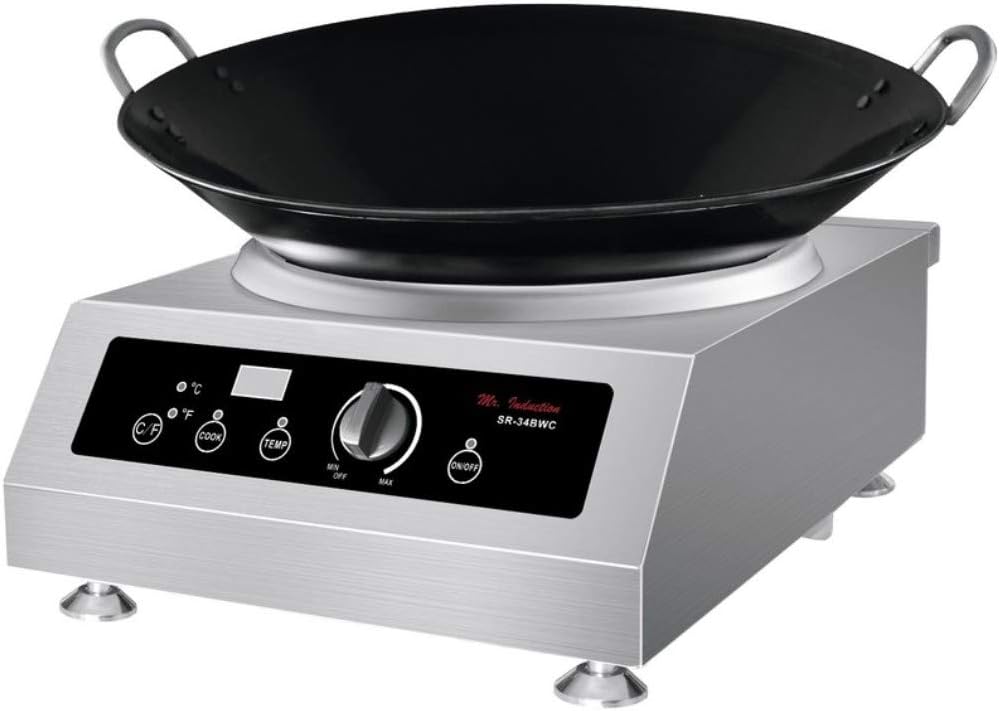
Figure 4: The SPT SR-34BWC in use with an induction-compatible wok, demonstrating its commercial application.
Cynnal a Chadw a Glanhau
Regular cleaning and maintenance will ensure the longevity and optimal performance of your induction range.
- Cyn glanhau: Datgysylltwch yr uned o'r soced pŵer bob amser a gadewch iddi oeri'n llwyr cyn ei glanhau.
- Arwyneb Coginio: The 5mm thick tempered glass cooktop can be cleaned with a damp cloth and a mild detergent. For stubborn stains, use a non-abrasive ceramic cooktop cleaner. Wipe dry with a clean cloth. Do not use abrasive pads or harsh chemicals.
- Corff dur di-staen: Wipe the stainless steel body with a soft, damp cloth. For best results, use a stainless steel cleaner and polish. Avoid getting water into the control panel area or ventilation openings.
- Agoriadau Awyru: Periodically check and clean the ventilation openings to ensure they are free from dust and debris, which can impede airflow and cause overheating. Use a soft brush or vacuum cleaner.
- Storio: If storing the unit for an extended period, ensure it is clean and dry. Store it in a cool, dry place, preferably in its original packaging.
Canllaw Datrys Problemau
Cyn cysylltu â gwasanaeth cwsmeriaid, cyfeiriwch at y problemau a'r atebion cyffredin canlynol:
| Problem | Achos Posibl | Ateb |
|---|---|---|
| Nid yw'r uned yn troi ymlaen. | Dim cyflenwad pŵer; cebl pŵer heb ei gysylltu'n iawn. | Check if the unit is plugged into a live 220V outlet. Ensure the power cord is securely connected. Check circuit breaker. |
| Nid yw'r hob yn cynhesu. | Cookware is not induction-compatible or not properly placed; SmartScan detection issue. | Use only induction-compatible cookware (magnetic bottom). Ensure the cookware is centered on the cooktop. |
| Display shows an error code (e.g., E0, E1). | Overheating, pan detection error, or internal malfunction. | Refer to the specific error code in the full manual (if available) or unplug the unit, let it cool, and try again. Ensure ventilation is not blocked. |
| Unit suddenly stops operating. | Dros neu o dan cyftage amddiffyniad wedi'i actifadu. | Unplug the unit and check the power supply. Ensure stable voltage. If the issue persists, contact service. |
If the problem persists after attempting these solutions, please contact SPT customer support for assistance.
Manylebau Cynnyrch
| Brand | APS |
| Rhif Model | SR-34BWC |
| Math | Commercial Counter-top Induction Range |
| Ffynhonnell Pwer | Electric (Induction) |
| Cyftage | 220 folt |
| Wattage | 3400 Wat |
| Elfennau Gwresogi | 1 |
| Math o Llosgwr | Ceramig |
| Deunydd Coginio | 5mm thick tempered glass |
| Deunydd Corff | Dur Di-staen |
| Math o Reoli | Knob, Touch-sensitive controls |
| Dimensiynau Cynnyrch (D x W x H) | 20"D x 14.8"W x 7"H |
| Modd Pwer | 1-20 levels (1300-3400W) |
| Modd Tymheredd | 90-440°F (32-226°C) |
| Nodweddion Arbennig | SmartScan technology (voltage, pan size, type recognition), COOK and TEMP modes, Over/under voltage amddiffyn |
| Ardystiadau | CETL / ETL-Sanitation to NSF-4 |
| Cydrannau wedi'u Cynnwys | Coginio |
Gwarant a Chymorth i Gwsmeriaid
Gwybodaeth Gwarant: The SPT SR-34BWC Commercial Counter-top Induction Range comes with a 1-year limited warranty covering parts and labor. Shipping costs are not included under this warranty.
For warranty claims or technical assistance, please contact SPT customer support. Have your model number (SR-34BWC) and purchase date available when contacting support.
Gwneuthurwr: APS
Websafle: www.spt-usa.com