
AuKing M8-F
Llawlyfr Defnyddiwr Taflunydd AuKing
Model: M8-F
Rhagymadrodd
This manual provides essential information for the safe and efficient operation of your AuKing Mini Projector. Please read it thoroughly before use and retain it for future reference.
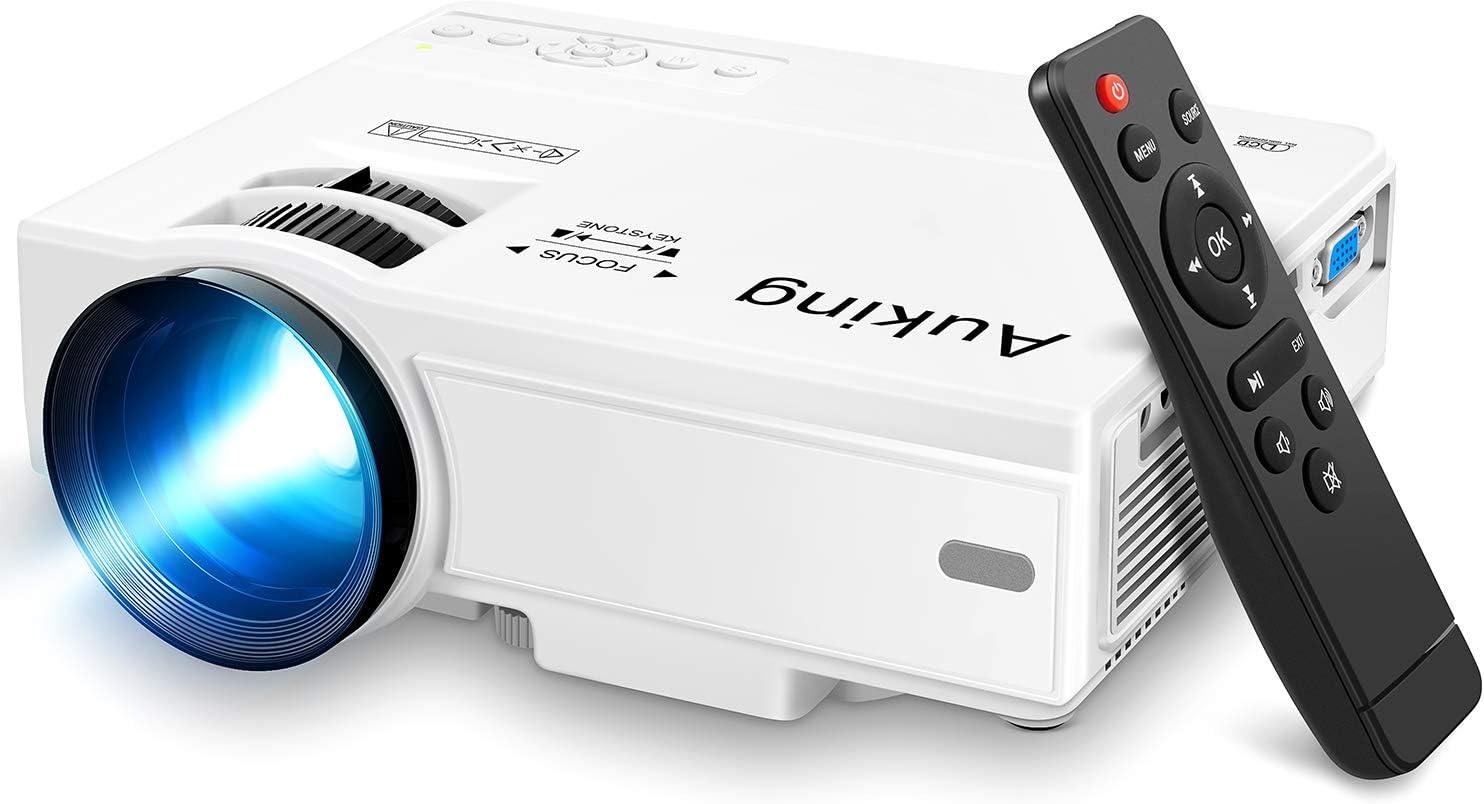
Image: The AuKing Mini Projector, a compact white device, is shown alongside its black remote control. The projector features a prominent lens and control buttons on its top surface.
Nodweddion Cynnyrch
- Full HD 1080P Support: Experience clear and sharp detailed images with the latest color reproduction technology for a vibrant viewing effaith.
- Large Projection Screen: Mwynhewch ymgolli viewing experience with a projection size ranging from 35 to 200 inches, suitable for distances between 3.6ft and 16.4ft.
- Bywyd Bylbiau Hir: The powerful cooling system effectively dissipates heat, extending the lamp's life up to 55,000 hours for over 15 years of use.
- Low Noise & Dual Stereo Speakers: Advanced noise reduction technology reduces fan noise by 80%. Built-in dual stereo speakers provide clear sound quality. External speakers can be connected for enhanced audio.
- Cysylltiad Dyfais Lluosog: Equipped with HDMI, VGA, AV, and USB interfaces, compatible with smartphones, laptops, pads, USB drives, and TV boxes. (Note: An extra HDMI adapter may be needed for phone connection, and copyrighted apps like Netflix, Prime Video, Hulu require a TV Stick or Roku.)

Image: A split image demonstrating the AuKing projector's superior color reproduction and 1080P support compared to a generic projector.
Beth Sydd yn y Bocs
Your AuKing Projector package includes:
- AuKing Mini Projector
- Rheolaeth Anghysbell
- Cebl Pŵer
- Cable AV
- Cebl HDMI
- Llawlyfr Defnyddiwr
Canllaw Gosod
1. Lleoliad
Choose a suitable location for your projector. It can be placed on a table, mounted on a tripod, or ceiling-mounted. Ensure the projection surface is flat and clear.

Image: Demonstrates various placement options for the AuKing projector, including tripod installation, ceiling mount, and simple table placement.
2. Cysylltiad Pwer
Cysylltwch y cebl pŵer â'r taflunydd ac yna ag allfa bŵer.
3. Cysylltiad Dyfais
Connect your desired input device (e.g., laptop, USB drive, smartphone) to the projector using the appropriate cable (HDMI, USB, AV, VGA). For smartphone connections, an additional HDMI adapter may be required (sold separately).

Image: Illustrates the projector's compatibility with multiple devices, showing connections for smartphones, laptops/PCs, PS4, DVD players, memory cards, and USB drives.
4. Addasiad Ffocws a Chyfraddiad Clo
Use the FOCUS and KEYSTONE rings on the projector to adjust the image clarity and shape until it appears rectangular and sharp on your screen.
Cyfarwyddiadau Gweithredu
1. Pŵer Ymlaen / I ffwrdd
Pwyswch y botwm pŵer ar y taflunydd neu'r teclyn rheoli o bell i droi'r ddyfais ymlaen neu i ffwrdd.
2. Dewis Ffynhonnell Mewnbwn
Use the "Source" button on the remote or projector to select the correct input source (HDMI, USB, AV, VGA) corresponding to your connected device.
3. Chwarae Cyfryngau
Llywio drwy eich cyfryngau files using the remote control. For streaming services like Netflix, Prime Video, or Hulu, ensure you are using a compatible TV Stick or Roku device connected to the projector due to copyright restrictions.

Image: A living room setup showcasing the projector's ability to create a large 200-inch projection, providing an immersive home theater experience.
4. Allbwn Sain
The projector has built-in dual stereo speakers. For a higher sound quality, connect external speakers via the audio output port.
Cynnal a chadw
To ensure optimal performance and longevity of your AuKing projector:
- Glanhau Llwch: Regularly clean the lens with a soft, lint-free cloth. Avoid abrasive cleaners.
- Awyru: Ensure the projector's ventilation ports are not blocked to allow proper airflow and prevent overheating. The advanced cooling system is designed to manage heat effectively.
- Storio: Pan nad yw'n cael ei ddefnyddio am gyfnodau hir, storiwch y taflunydd mewn lle oer, sych, i ffwrdd o olau haul uniongyrchol a thymheredd eithafol.

Image: An illustration highlighting the projector's advanced cooling system, showing arrows indicating airflow to prevent overheating and extend lamp bywyd.
Datrys problemau
| Problem | Achos Posibl | Ateb |
|---|---|---|
| No image or "No Signal" | Ffynhonnell fewnbwn anghywir wedi'i dewis; Cysylltiad cebl rhydd; Dyfais heb ei throi ymlaen. | Select the correct input source. Check all cable connections. Ensure the input device is powered on. |
| Delwedd aneglur | Allan o ffocws; Addasiad clostone anghywir. | Adjust the FOCUS ring until the image is clear. Adjust the KEYSTONE ring to correct image distortion. |
| Dim sain | Volume too low; Muted; External speakers not connected properly. | Increase volume. Unmute the projector. Check external speaker connections. |
| Taflunydd yn gorboethi | Awyru wedi'i rwystro; Defnydd hirfaith mewn amgylchedd poeth. | Ensure vents are clear. Turn off and allow to cool. Use in a well-ventilated area. |
Manylebau
| Nodwedd | Manylyn |
|---|---|
| Brand | AuKing |
| Rhif Model | M8-F |
| Cydraniad Arddangos | 1920 x 1080 (Full HD supported) |
| Maint Tafluniad | 35-200 modfedd |
| Pellter Tafluniad | 3.6ft to 16.4ft |
| Lamp Bywyd | Hyd at 55,000 awr |
| Technoleg Cysylltedd | VGA, USB, HDMI, AV |
| Math o Siaradwr | Built-In Dual Stereo Speakers |
| Pwysau Eitem | 2.87 pwys |
| Dimensiynau Cynnyrch | 7.95 x 6.3 x 2.91 modfedd |
Gwarant a Chefnogaeth
AuKing offers a Gwarant amnewid cynnyrch 2 mlynedd and lifetime after-sales service for your projector. If you encounter any issues or have questions, please do not hesitate to contact our support team. We are committed to providing 100% customer satisfaction.
Am gefnogaeth, ewch i'r AuKing Store on Amazon neu cyfeiriwch at y wybodaeth gyswllt a ddarperir yn eich pecyn cynnyrch.
Ask a question about this manual
Ask about setup, troubleshooting, compatibility, parts, safety, or missing instructions. Manuals+ will review the question and use this page’s manual context to help answer it.