
Rhagymadrodd
This user manual provides comprehensive instructions for the setup, operation, maintenance, and troubleshooting of your Alienware M15 Gaming Laptop. Please read this manual thoroughly to ensure optimal performance and longevity of your device. For additional support, refer to the official Alienware support resources.
Cynnyrch Drosview
Nodweddion Allweddol
- 8th Generation Intel Core i7-8750H (6-Core, 9MB Cache, up to 4.1GHz w/ Turbo Boost)
- 15.6" FHD (1920 x 1080) 60Hz Anti-glare IPS, 300-nits 72% Color gamut, narrow-border Display
- 16GB, 2x8GB, DDR4, 2666MHz RAM
- 128GB PCIe M.2 SSD + 1TB (+8GB SSHD) Hybrid Drive
- Nvidia GeForce GTX 1060 with 6GB GDDR5 Graphics Card
- System Weithredu Windows 10 Home
Cydrannau Ffisegol

Ffigur 1: Blaen view of the Alienware M15 laptop, showcasing the display with the Alienware logo.

Ffigur 2: O'r brig i lawr view of the open Alienware M15 laptop, highlighting the keyboard layout and touchpad.

Ffigur 3: Yr ochr chwith view of the Alienware M15 laptop, showing various ports such as USB 3.0.
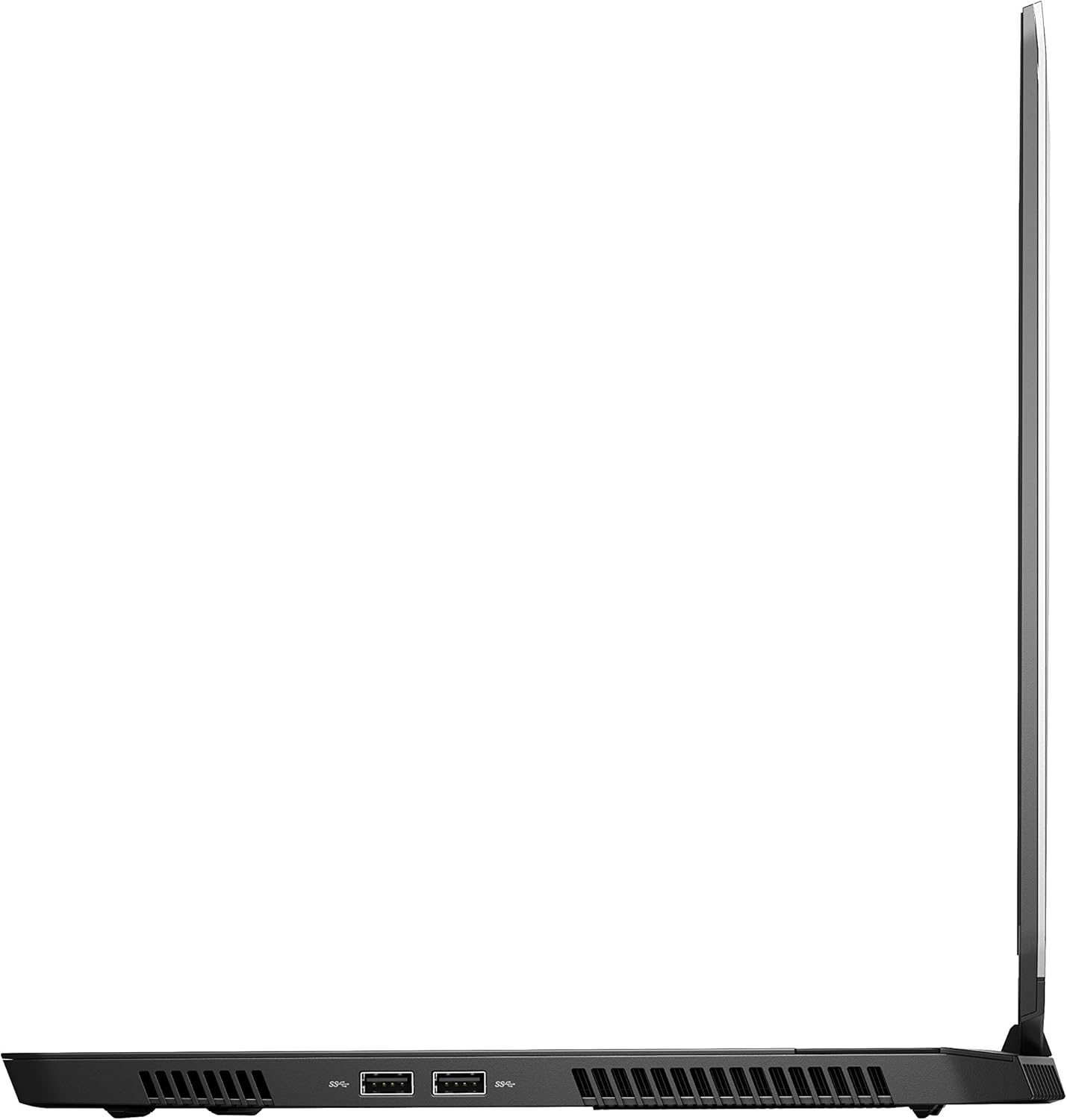
Ffigur 4: Ochr dde view of the Alienware M15 laptop, displaying additional ports and ventilation.

Ffigur 5: Ffrwydrodd view illustrating the internal cooling system of the Alienware M15 laptop, including fans and heat sinks.
Gosod
Dadbacio
Tynnwch yr holl gydrannau o'r pecynnu yn ofalus. Gwnewch yn siŵr bod yr eitemau canlynol yn bresennol:
- Alienware M15 Gaming Laptop
- Cord Pŵer
- Addasydd Pwer 180W
Pŵer Cychwynnol-Ar
- Cysylltwch yr addasydd pŵer â phorthladd mewnbwn pŵer y gliniadur.
- Plygiwch y llinyn pŵer i mewn i allfa wal.
- Open the laptop lid and press the power button, typically located on the top right of the keyboard deck or a dedicated button on the chassis.
- Dilynwch y cyfarwyddiadau ar y sgrin i gwblhau'r broses sefydlu Windows 10 Home, gan gynnwys dewis iaith, cysylltiad rhwydwaith, a chreu cyfrif defnyddiwr.
Cyfarwyddiadau Gweithredu
Gweithrediad Sylfaenol
Your Alienware M15 laptop runs on Windows 10 Home. Familiarize yourself with the operating system's interface. The keyboard features customizable backlighting via Alienware's software. The touchpad supports multi-touch gestures for navigation.
Perfformiad Hapchwarae
The Alienware M15 is designed for high-performance gaming. For optimal gaming experience, ensure the laptop is connected to the power adapter. This allows the system to utilize its full power capabilities for the CPU and GPU. While gaming, the laptop may generate significant heat; this is normal for high-performance hardware. Consider using a cooling pad for extended gaming sessions to enhance thermal management.
Cynnal a chadw
Glanhau
- Sgrin: Defnyddiwch frethyn meddal, di-lint ychydig dampwedi'i olchi â dŵr neu lanhawr sgrin. Osgowch gemegau llym.
- Bysellfwrdd a Siasi: Use a soft brush or compressed air to remove dust from keys and vents. Wipe surfaces with a microfiber cloth.
- Porthladdoedd: Use compressed air to clear dust from USB, HDMI, and other ports.
Diweddariadau Meddalwedd
Regularly update your Windows operating system, graphics drivers (NVIDIA GeForce), and Alienware software. Updates often include performance improvements, security patches, and bug fixes. Access Windows updates through Settings > Update & Security. Graphics drivers can be updated via the NVIDIA GeForce Experience application.
Gofal Batri
To maximize battery lifespan, avoid consistently discharging the battery completely. For prolonged use while plugged in, consider using battery management features (if available in Alienware Command Center) to limit charging to 80-90% capacity.
Datrys problemau
This section addresses common issues you might encounter with your Alienware M15 laptop.
| Problem | Achos / Ateb Posibl |
|---|---|
| Laptop gets excessively hot during use. | High-performance components generate heat. Ensure ventilation vents are clear. Use a cooling pad. Update graphics drivers. |
| "No media present" error or SSD/HDD not detected. | This can sometimes be a temporary software glitch. Try restarting the laptop. If persistent, ensure the power cable is securely connected and try a hard reboot (unplug power, hold power button for 15 seconds, then reconnect and power on). If the issue persists, contact support. |
| Wi-Fi connection drops frequently. | Ensure Wi-Fi drivers are up to date. Check for interference from other devices. Restart your router and the laptop. If the issue persists, consider reinstalling Wi-Fi drivers or contacting support. |
| System performance is slow or lagging. | Ensure the laptop is plugged into power for full performance. Close unnecessary background applications. Check for malware. Ensure sufficient free space on the SSD/HDD. |
Manylebau
Detailed technical specifications for the Alienware M15 Gaming Laptop (Model: AWM15-7830SLV-PUS).
| Nodwedd | Manylyn |
|---|---|
| Maint arddangos sgrin sefydlog | 15.6 modfedd |
| Cydraniad Sgrin | 1920 x 1080 picsel |
| Cydraniad Sgrin Max | Picseli 1920x1080 |
| Prosesydd | 4.1 GHz core_i7_8750h |
| HWRDD | 16 GB DDR4 |
| Cyflymder Cof | 2666 MHz |
| Gyriant Caled | 1000 GB 128GB PCIe M.2 SSD + 1TB (+8GB SSHD) Hybrid Drive |
| Cydbrosesydd graffeg | NVIDIA GeForce GTX 1060 |
| Brand Chipset | NVIDIA |
| Disgrifiad o'r Cerdyn | Ymroddedig |
| Cerdyn Graffeg Maint Ram | 6 GB |
| Math Di-wifr | 802.11a/b/g/n |
| Nifer y Porthladdoedd USB 3.0 | 3 |
| Brand | Llestri estron |
| Cyfres | AWm15-7830SLV-PUS |
| Rhif model yr eitem | AWM15-7830SLV-PUS |
| System Weithredu | Windows 10 Cartref |
| Pwysau Eitem | 4.8 pwys |
| Dimensiynau Cynnyrch | 10.8 x 14.3 x 0.8 modfedd |
| Lliw | Du |
| Brand prosesydd | Intel |
| Nifer y Proseswyr | 6 |
| Math Cof Cyfrifiadur | DDR4 SDRAM |
| Maint Cof Flash | 16 |
| Rhyngwyneb gyriant caled | Cyflwr Solet |
| Cyflymder Cylchdro Gyriant Caled | 5400 RPM |
| Math Drive Optegol | No Optical Drive |
| Cyftage | 240 folt |
| Batris | Mae angen 1 batris metel Lithiwm. (wedi'i gynnwys) |
| Dyddiad Ar Gael Cyntaf | Ionawr 5, 2019 |
| Enw Model | AWm15-7830SLV-PUS |
| Maint Sgrin | 15.6 modfedd |
| Maint y ddisg galed | 1000 GB |
| Model CPU | Craidd i7 8750H |
| Maint Cof Hwrdd Wedi'i Gosod | 16 GB |
| Nodwedd Arbennig | Gorchudd gwrth-lacharedd |
Gwarant a Chefnogaeth
For detailed warranty information, please refer to the documentation included with your purchase or visit the official Alienware support website. For technical assistance, driver downloads, and further resources, please visit the Alienware support portal.
Mae Llawlyfr Defnyddiwr swyddogol (PDF) hefyd ar gael i'w lawrlwytho: Lawrlwytho Llawlyfr Defnyddiwr PDF