
miniog
Llawlyfr Cyfarwyddiadau Cloc Atomig Sharp
Model: 8541848315
Rhagymadrodd
The Sharp Atomic Clock provides precise timekeeping and temperature monitoring for your home or office. Featuring a large, easy-to-read display, this clock automatically synchronizes with the atomic time signal (WWVB) broadcast from Fort Collins, Colorado, ensuring accuracy without manual adjustments. It also includes a wireless outdoor sensor to display both indoor and outdoor temperatures.
Nodweddion Cynnyrch
- Atomic Time Accuracy: Automatically synchronizes with the WWVB atomic time signal for precise timekeeping.
- Jumbo 3" Easy-to-Read Numbers: Large digital display for clear visibility of time, date, and temperature.
- Indoor/Outdoor Temperature Display: Monitors both indoor ambient temperature and outdoor temperature via a wireless sensor.
- Synhwyrydd Awyr Agored Di-wifr: Transmits outdoor temperature data to the main unit.
- Wedi'i Bweru â Batri: Operates on batteries for flexible placement (batteries not included).
- Addasiad Amser Arbed Golau Haf (DST) Awtomatig: Automatically adjusts for daylight saving time changes.
- Parthau Amser Detholadwy: Allows selection of various US time zones.
- Fformat 12/24 Awr: Option to display time in either 12-hour or 24-hour format.
- Celsius/Fahrenheit Display: Switch between Celsius and Fahrenheit temperature units.
Cynnwys Pecyn
Gwnewch yn siŵr bod yr holl eitemau yn bresennol cyn bwrw ymlaen â'r gosodiad.
- Sharp Atomic Clock Main Unit
- Synhwyrydd Awyr Agored Di-wifr
- Llawlyfr Cyfarwyddiadau
Note: Batteries are not included. The main unit requires 2 AA batteries, and the outdoor sensor requires 2 AA batteries.
Gosod
1. Gosod Batri
- Open the battery compartment on the back of the main clock unit.
- Insert 2 AA batteries, observing the correct polarity (+ and -).
- Caewch y clawr adran batri.
- Open the battery compartment on the wireless outdoor sensor.
- Insert 2 AA batteries into the outdoor sensor, observing the correct polarity.
- Close the outdoor sensor's battery compartment cover.
2. Initial Synchronization and Settings
After battery installation, the clock will attempt to receive the WWVB atomic time signal and connect to the outdoor sensor. This process may take several minutes or up to 24 hours depending on your location and environmental interference.
- Cylchfa Amser: Press the "TIME ZONE" button (often labeled "UP TIME ZONE") on the back of the clock to cycle through available time zones (PST, MST, CST, EST). Select your desired time zone.
- Fformat 12/24 Awr: Press the "12/24" button to switch between 12-hour and 24-hour display.
- Celsius / Fahrenheit: Press the "°C/°F" button to toggle between Celsius and Fahrenheit temperature display.
- Outdoor Sensor Pairing: If the outdoor temperature does not appear, press the "CHANNEL" button on the main unit to search for the sensor signal. Ensure the outdoor sensor is within range and not obstructed.
For optimal signal reception, place the clock away from large metal objects, electronic devices, and areas with heavy concrete or brick walls. The outdoor sensor should be placed in a shaded, dry location, protected from direct sunlight and precipitation, for accurate readings.
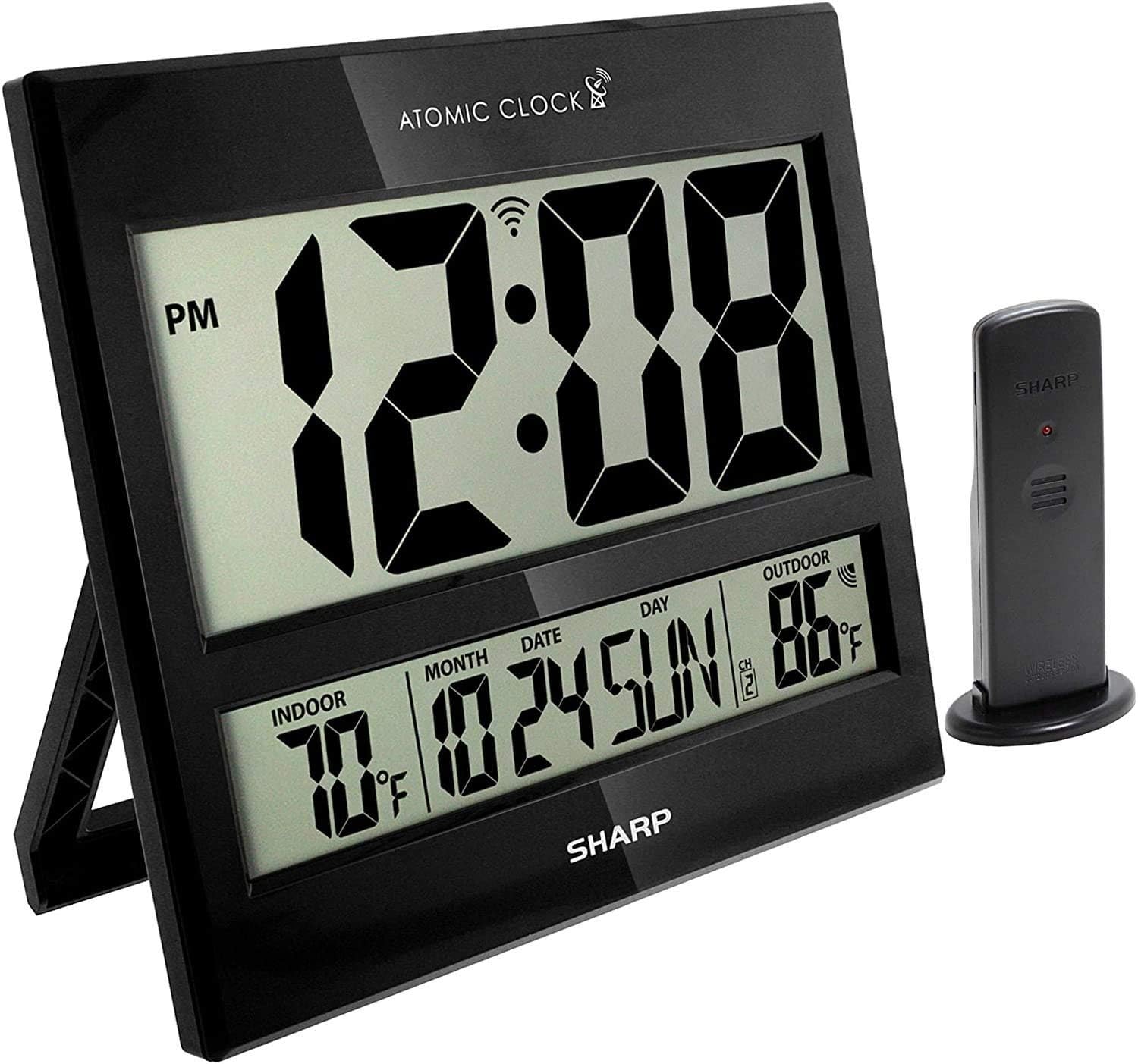
Image: The Sharp Atomic Clock main unit displaying time, indoor temperature, date, and outdoor temperature, alongside its wireless outdoor sensor.
Gweithrediad
Gwybodaeth Arddangos
The clock's large LCD screen displays the following information:
- Amser: Current time in selected 12-hour or 24-hour format.
- Dangosydd PM: Displays "PM" for afternoon hours in 12-hour format.
- Dangosydd Signal Atomig: Shows the status of the WWVB atomic time signal reception.
- Tymheredd Dan Do: Tymheredd cyfredol wedi'i fesur gan y prif uned.
- Month/Date/Day: Gwybodaeth calendr gyfredol.
- Tymheredd Awyr Agored: Current temperature measured by the wireless outdoor sensor.
- Outdoor Sensor Channel: Indicates the channel the outdoor sensor is transmitting on.
- Dangosydd Batri Isel: An icon will appear when batteries are low and need replacement.
Button Functions (Rear Panel)
| Botwm | Swyddogaeth |
|---|---|
| CALENDR | Press and hold for 2 seconds to manually set calendar (Year, Month, Date, Language). Use UP/DOWN buttons to change values. |
| AMSER | Press and hold for 2 seconds to manually set time (DST ON/OFF, Hour, Minute). Use UP/DOWN buttons to change values. |
| 12/24 | Switches between 12-hour and 24-hour time display. |
| SIANEL | Press to switch between outdoor sensor channels (1, 2, 3). Press and hold for 2 seconds to pair with the outdoor sensor. |
| ° C / ° F. | Yn newid rhwng arddangosfa tymheredd Celsius a Fahrenheit. |
| TONAU | Initiates a manual search for the WWVB atomic time signal. |
| AILOSOD | Resets the clock to factory default settings. Requires a pointed object (e.g., paperclip). |
| UP / TIME ZONE | Increases values during manual setting. Press to cycle through time zones. |
| I LAWR | Decreases values during manual setting. |
Cynnal a chadw
- Amnewid Batri: Replace batteries in both the main unit and outdoor sensor when the low battery indicator appears on the display. Always replace all batteries at the same time with new ones.
- Glanhau: Clean the clock and sensor with a soft, dry cloth. Do not use abrasive cleaners or solvents.
- Lleoliad Synhwyrydd Awyr Agored: Periodically check the outdoor sensor's location to ensure it remains protected from extreme weather conditions, direct sunlight, and moisture.
Datrys problemau
- Clock not syncing with atomic time:
- Ensure the clock is placed away from electronic interference (TVs, computers, microwaves).
- Try placing the clock near a window facing Fort Collins, Colorado (if applicable to your region).
- Press the "WAVE" button to initiate a manual signal search.
- Allow up to 24 hours for initial synchronization.
- Outdoor temperature not displaying or incorrect:
- Check batteries in the outdoor sensor.
- Ensure the outdoor sensor is within the effective transmission range (typically up to 100 feet, line of sight).
- Press the "CHANNEL" button on the main unit to re-establish connection.
- Verify the outdoor sensor is placed in a location protected from direct sunlight and rain, which can affect readings.
- Mae'r arddangosfa'n dywyll neu'n wag:
- Replace all batteries in the main unit with fresh ones.
- Gwnewch yn siŵr bod batris yn cael eu mewnosod gyda'r polaredd cywir.
- Amser neu ddyddiad anghywir:
- Verify the correct time zone is selected.
- Check if Daylight Saving Time (DST) setting is correct for your region.
- If atomic signal is not received, manually set the time and date using the "TIME" and "CALENDAR" buttons.
Manylebau
| Nodwedd | Manylyn |
|---|---|
| Brand | miniog |
| Rhif Model | 8541848315 |
| UPC | 049353998732 |
| Lliw | Sglein Du |
| Math Arddangos | LCD digidol |
| Nodwedd Arbennig | Atomic Time Synchronization (WWVB), Indoor/Outdoor Temperature |
| Dimensiynau Cynnyrch | 13"L x 1.5"U (Prif Uned) |
| Ffynhonnell Pwer | Wedi'i Bweru â Batri |
| Nifer y Batris Angenrheidiol | Main Unit: 2 AA; Outdoor Sensor: 2 AA |
| Deunydd | Plastig |
| Math Mowntio | Wall Mount / Tabletop Stand |
| Defnydd Dan Do / Awyr Agored | Indoor (Main Unit), Outdoor (Sensor) |
Gwarant a Chefnogaeth
Sharp products are manufactured to high-quality standards. For warranty information, technical support, or service inquiries, please refer to the contact information provided with your product packaging or visit the official Sharp websafle. Cadwch eich derbynneb prynu fel prawf o brynu ar gyfer hawliadau gwarant.
Ask a question about this manual
Ask about setup, troubleshooting, compatibility, parts, safety, or missing instructions. Manuals+ will review the question and use this page’s manual context to help answer it.