
havit HV-MS1001
havit HV-MS1001 Gamer Mouse User Manual
Model: HV-MS1001
1. Cynnyrch Drosview
The havit HV-MS1001 Gamer Mouse is a high-performance gaming peripheral designed for precision and customization. Featuring 7 programmable buttons, adjustable DPI settings, and vibrant RGB lighting, this mouse offers an immersive gaming experience. Its ergonomic design ensures comfort during extended use, making it an ideal choice for serious gamers.
Nodweddion Allweddol:
- Ergonomic Design with Non-slip Base: Engineered to fit comfortably in your hand, reducing fatigue during long gaming sessions.
- Dedicated Software for Key and Macro Settings: Customize button functions and create complex macros for a personalized gaming experience.
- 16 Million Lighting Effects: Personalize the mouse's RGB lighting with a wide spectrum of colors through the dedicated software.
- 6 Speed Levels DPI: Adjust sensitivity on the fly with a dedicated DPI button, indicated by different illumination colors for each level.

Image 1.1: The havit HV-MS1001 Gamer Mouse, showcasing its ergonomic shape and vibrant RGB lighting along the sides and scroll wheel.
2. Beth sydd yn y Bocs
Your havit HV-MS1001 Gamer Mouse package should contain the following items:
- havit HV-MS1001 Gamer Mouse
- Llawlyfr Defnyddiwr (y ddogfen hon)
- Information regarding dedicated software for key and macro settings (often available via download link or included on a mini-CD/USB drive, check packaging for details).
3. Canllaw Gosod
3.1. Cysylltu'r Llygoden
- Dewch o hyd i borth USB sydd ar gael ar eich cyfrifiadur.
- Plug the USB connector of the havit HV-MS1001 Gamer Mouse into the USB port.
- Your operating system (e.g., Windows) will automatically detect and install the necessary basic drivers. The mouse should be ready for basic use within a few moments.
3.2. Software Installation (Optional, Recommended for Full Functionality)
To unlock the full potential of your HV-MS1001 mouse, including macro programming, advanced DPI settings, and RGB lighting customization, it is highly recommended to install the dedicated havit software.
- Visit the official havit website or refer to the product packaging for the software download link.
- Download the software installer compatible with your operating system (Windows is supported).
- Rhedeg y gosodwr a dilynwch y cyfarwyddiadau ar y sgrin i gwblhau'r gosodiad.
- Ar ôl ei osod, lansiwch y feddalwedd i ffurfweddu gosodiadau eich llygoden.

Image 3.1: A screenshot of the havit dedicated software interface, showing options for button assignment, DPI settings, and lighting customization.
4. Cyfarwyddiadau Gweithredu
4.1. Swyddogaethau Botwm
The havit HV-MS1001 mouse features 7 buttons, each with a default function that can be customized using the dedicated software:
- Botwm Clic Chwith: Camau gweithredu sylfaenol.
- Botwm Clic Dde: Dewislen gweithredu/cyd-destun eilaidd.
- Middle Button (Scroll Wheel Click): Default for universal scroll or specific application functions.
- Botwm Ymlaen: Yn llywio ymlaen yn web porwyr neu file fforwyr.
- Botwm Cefn: Yn llywio yn ôl i mewn web porwyr neu file fforwyr.
- Botwm DPI: Yn cylchdroi trwy lefelau sensitifrwydd DPI.
- Botwm Effaith Golau: Cycles through different RGB lighting effects or turns lights on/off.
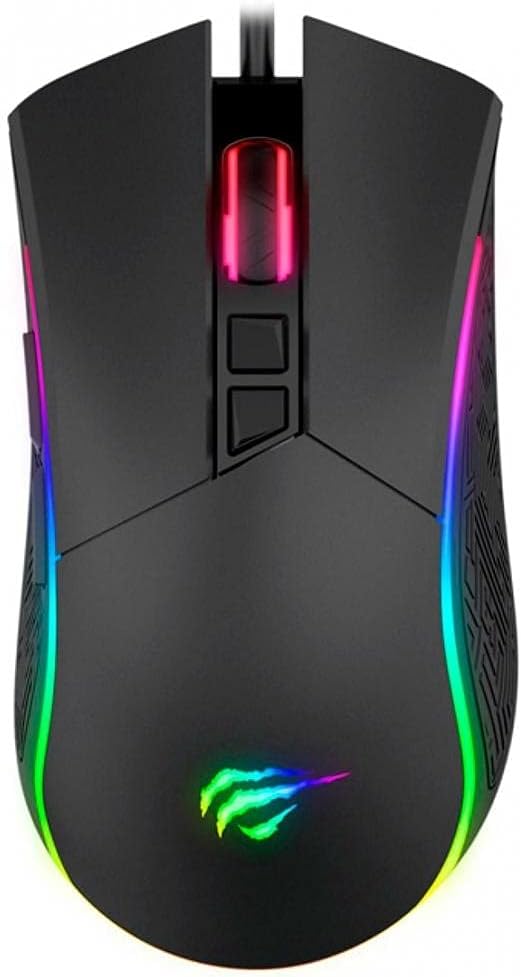
Delwedd 4.1: Top view of the havit HV-MS1001 mouse, highlighting the left, right, middle, DPI, and light effect buttons.

Delwedd 4.2: Ochr view of the havit HV-MS1001 mouse, illustrating the ergonomic grip and the placement of the forward and back buttons.
4.2. Addasiad DPI
The mouse supports 6 adjustable DPI levels (800 / 1600 / 2400 / 3200 / 4000 / 4800 DPI). Press the dedicated Botwm DPI (located behind the scroll wheel) to cycle through these levels. Each DPI level is indicated by a different illumination color on the mouse, allowing for quick visual confirmation of your current sensitivity setting.
4.3. Addasu Goleuadau RGB
The HV-MS1001 features 16 million customizable lighting effects. Use the dedicated software to:
- Select static colors.
- Choose from various dynamic lighting modes (e.g., breathing, wave, reactive).
- Adjust brightness and speed of effects.
- Turn the lighting on or off.
Mae corfforol Botwm Effaith Ysgafn is also present on the mouse to cycle through preset lighting modes or turn the lights off without software.
4.4. Macro Settings
The dedicated software allows you to record and assign complex sequences of keystrokes and mouse clicks (macros) to any of the programmable buttons. This feature is particularly useful for automating repetitive tasks or executing complex commands in games with a single click.
5. Gofal a Chynnal a Chadw
To ensure the longevity and optimal performance of your havit HV-MS1001 Gamer Mouse, follow these simple maintenance guidelines:
- Glanhau: Use a soft, dry, lint-free cloth to wipe the surface of the mouse. For stubborn dirt, slightly dampgolchwch y brethyn gyda dŵr neu lanhawr ysgafn, nad yw'n sgraffiniol. Osgowch ddefnyddio cemegau llym neu ddeunyddiau sgraffiniol.
- Gofal Synhwyrydd: Cadwch y synhwyrydd optegol ar ochr isaf y llygoden yn lân ac yn rhydd o lwch neu falurion i sicrhau olrhain cywir.
- Rheoli Ceblau: Osgowch blygiadau miniog neu dynnu gormodol ar y cebl USB i atal difrod.
- Storio: Pan nad yw'n cael ei ddefnyddio, storiwch y llygoden mewn amgylchedd glân, sych i ffwrdd o dymheredd eithafol.
6. Datrys Problemau
If you encounter any issues with your havit HV-MS1001 Gamer Mouse, please refer to the following common problems and solutions:
| Problem | Ateb Posibl |
|---|---|
| Nid yw'r llygoden yn ymateb. |
|
| DPI button does not change sensitivity. |
|
| Nid yw goleuadau RGB yn gweithio neu maen nhw wedi sownd. |
|
| Macros are not executing. |
|
7. Manylebau Technegol
| Nodwedd | Manylyn |
|---|---|
| Brand | havit |
| Rhif Model | MS1001 |
| Rhyngwyneb | USB |
| Allweddi | 7 |
| Resolutions (DPI) | 800/1600/2400/3200/4000/4800 |
| Cyfredol | 100mA |
| Bywyd Gwasanaeth | 3,000 Clic |
| Hyd Cebl | 1.8m |
| Approximate Mouse Weight | 120g (4.23 owns) |
| Dimensiynau Cynnyrch (LxWxH) | 132 x 68 x 42.5mm (5.2 x 2.6 x 2.01 modfedd) |
| Llwyfan Caledwedd | PC |
| System Weithredu | Ffenestri |
| Lliw | Du |
| Technoleg Cysylltedd | Wired |
| Technoleg Canfod Symudiad | Optegol |
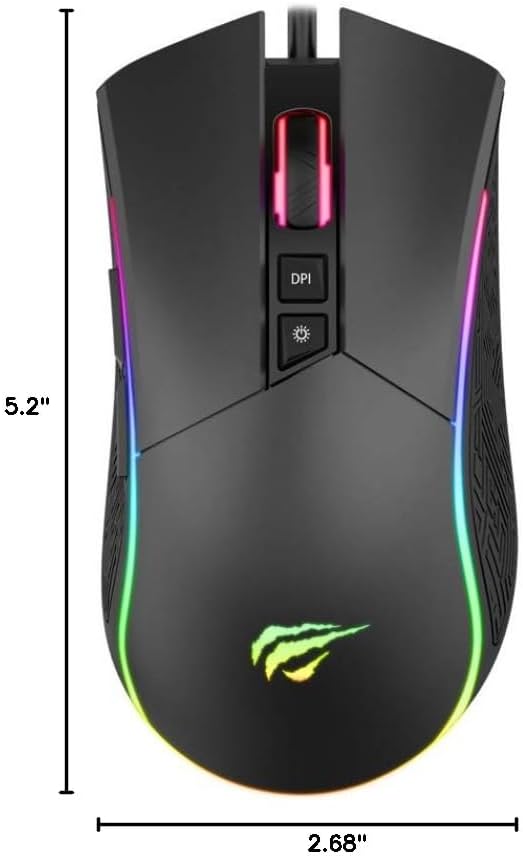
Image 7.1: Diagram showing the dimensions of the havit HV-MS1001 Gamer Mouse (5.2 inches length, 2.68 inches width).
8. Gwarant a Chefnogaeth
For warranty information and customer support, please refer to the documentation included with your product or visit the official havit websafle. Gallwch hefyd ddod o hyd i ragor o wybodaeth a manylion cyswllt ar y Siop havit ar Amazon.
Ask a question about this manual
Ask about setup, troubleshooting, compatibility, parts, safety, or missing instructions. Manuals+ will review the question and use this page’s manual context to help answer it.