
1. Rhagymadrodd
Thank you for choosing the LECLSTAR Motion Sensor Closet Light. This manual provides essential information for the safe and effective use of your new lighting product. Please read these instructions carefully before installation and operation, and retain them for future reference.
This wireless, battery-operated light features 51 LEDs, motion sensing capabilities, and is designed for various indoor applications such as closets, cabinets, kitchens, and stairs.
2. Gwybodaeth Diogelwch
- Peidiwch ag amlygu'r ddyfais i ddŵr na lleithder gormodol.
- Do not attempt to disassemble, repair, or modify the light. This will void the warranty and may cause damage or injury.
- Defnyddiwch y cebl USB a ddarperir yn unig ar gyfer codi tâl.
- Osgowch amlygiad uniongyrchol i'r llygaid i olau LED, gan y gall fod yn llachar iawn.
- Cadwch allan o gyrraedd plant.
3. Cynnwys Pecyn
Gwiriwch y pecyn i sicrhau bod yr holl eitemau yn bresennol:
- 1 x LECLSTAR Motion Sensor Closet Light
- 1 x Magnetic Plastic Bracket
- 2 x 3M Adhesive Pads
- 4 x Sgriwiau Mowntio
- 1 x Cebl Codi Tâl USB
- 1 x Llawlyfr Defnyddiwr
4. Cynnyrch Drosview
Familiarize yourself with the components of your LECLSTAR Motion Sensor Closet Light.

Ffigur 1: Product Components. This diagram illustrates the various parts of the light, including the USB charging port, magnetic strip for mounting, LED light board, durable aluminum alloy casing, ON/OFF switch, infrared motion sensor receiver, and protective ABS cover.
- Porth USB: Ar gyfer gwefru'r batri mewnol.
- Magnetic Strip: Allows for easy attachment to magnetic surfaces or the included bracket.
- LED Light Board: Contains 51 bright LEDs for illumination.
- Aluminum Alloy Material: Provides a durable and lightweight housing.
- Botwm YMLAEN/DIFFODD: Controls the power and operating modes.
- Derbynnydd isgoch: Detects signals from the remote control (if applicable).
- ABS Cover: Protects the LEDs and diffuses light.
5. Gosod a Gosod
The LECLSTAR Motion Sensor Closet Light offers flexible installation options.
5.1 Charging Before First Use
Before installation, fully charge the light. Refer to Section 6 for detailed charging instructions.
5.2 Opsiynau Mowntio
You can install the light using the magnetic plastic bracket with 3M adhesive or screws.
- Magnetic Adhesion: Peel off the protective film from the 3M adhesive pads and attach them to the magnetic plastic bracket. Press the bracket firmly onto a clean, dry surface where you wish to install the light. The light can then be magnetically attached to the bracket.
- Mowntio Sgriw: Use the provided screws to secure the magnetic plastic bracket to a desired surface. Once the bracket is securely mounted, attach the light magnetically.

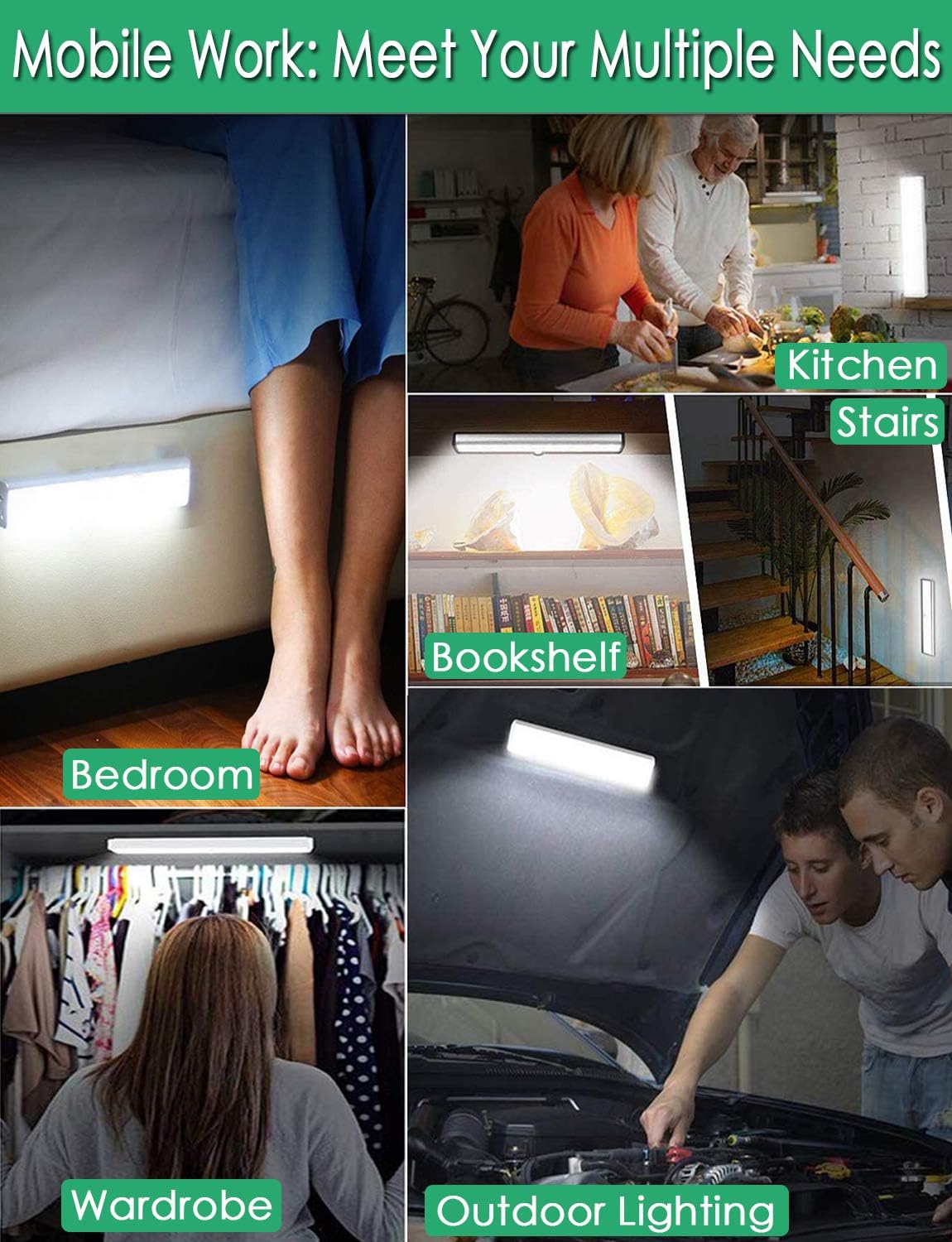
Ffigur 2: Versatile Installation. This image illustrates the light's adaptability, showing it mounted under a bed, in a kitchen, on a bookshelf, along stairs, inside a wardrobe, and providing illumination for outdoor tasks, highlighting its ease of placement in diverse environments.
5.3 Ystyriaethau Lleoli
- For optimal motion detection, position the sensor ball to face the direction of expected movement.
- When using multiple motion sensor lights, avoid placing them too close together in motion-sensing mode, as they may interfere with each other's sensitivity.
- Ensure the installation surface is clean and dry for secure adhesion.
6. Cyfarwyddiadau Codi Tâl
The LECLSTAR Motion Sensor Closet Light is equipped with a built-in 2400mAh lithium battery.
- Connect the provided USB charging cable to the light's USB port.
- Plug the other end of the USB cable into a standard USB power adapter (not included) or a computer's USB port.
- During charging, the indicator light on the device will be glas.
- Ar ôl ei wefru'n llawn, bydd y golau dangosydd yn troi coch.
- Mae gwefr lawn fel arfer yn cymryd tua 4 awr.
Ffigur 3: Charging Status. This image demonstrates the charging process, showing the light connected to a power source. The indicator light is red when charging and turns blue when the battery is fully charged, indicating its status clearly.
7. Cyfarwyddiadau Gweithredu
The light features multiple operating modes and can be controlled via its ON/OFF button or an optional remote control.
7.1 Mode Selection (ON/OFF Button)
Locate the ON/OFF button on the side of the light. Toggle the switch to select the desired mode:
- I FFWRDD: The light is completely off.
- AR: The light stays on continuously.
- AUTO (Motion Sensor Mode): The light will automatically turn on when motion is detected in a dark environment. It will turn off approximately 30 seconds after no motion is detected.

Ffigur 4: Motion Sensor Operation. This image demonstrates how the motion sensor works: the light remains off in bright environments, automatically turns on when movement is detected in the dark within a 3-meter, 120-degree range, and then automatically turns off after 30 seconds of inactivity.
7.2 Motion Sensor Details
- Canfod Ongl: 120 gradd.
- Canfod Pellter: Up to 3 meters (approximately 10 feet).
- The sensor is designed to activate only in low-light conditions to conserve battery life.
7.3 Remote Control Functions (Optional)
If your model includes a remote control, you can access additional features:

Ffigur 5: Remote Control Functions. This image displays the remote control, highlighting its various buttons: ON/OFF for power, 'S' for sensor mode, '1', '2', '3' for different light modes or brightness levels, '+' and '-' for adjusting brightness, and '15', '30', '60', '120' for setting a timer.
- YMLAEN / I FFWRDD: Yn troi'r golau ymlaen neu i ffwrdd.
- S (Sensor Mode): Activates the motion sensor mode.
- 1, 2, 3 (Light Modes): Selects different light modes or brightness levels.
- 50%, 100%, +, - (Adjustable Brightness): Yn addasu dwyster y golau.
- 15, 30, 60, 120 (Timer Function): Sets the light to turn off automatically after a specified duration.
8. cynnal
- Glanhau: Sychwch y golau gyda lliain meddal, sych. Peidiwch â defnyddio glanhawyr sgraffiniol na thoddyddion.
- Gofal Batri: To prolong battery life, avoid fully discharging the battery frequently. Charge the light regularly, especially if it will not be used for an extended period.
9. Datrys Problemau
- Golau ddim yn troi ymlaen:
- Sicrhewch fod y batri wedi'i wefru.
- Check that the light is switched to the 'ON' or 'AUTO' mode.
- Synhwyrydd symudiad ddim yn gweithio:
- Ensure the light is in 'AUTO' mode.
- Verify that the ambient light is dark enough for the sensor to activate.
- Check that the sensor is not obstructed and is facing the area of expected movement.
- If multiple motion sensor lights are nearby, they might interfere with each other. Try repositioning them.
- Mae golau'n fflachio neu'n pylu'n annisgwyl:
- The battery level may be low. Recharge the light.
10. manylebau
| Model | B07JRBSJDR |
| Lliw Golau | Gwyn pur (6000K) |
| Meintiau LED | 51 LED |
| Allbwn Lumen | 240lm |
| Motion Detecting Angle | 120 gradd |
| Motion Detecting Distance | Hyd at 3 metr (10 troedfedd) |
| Amser Bywyd LED | Mwy na 80,000 o oriau |
| Math Batri | Batri Lithiwm 2400mAh |
| Amser Codi Tâl USB | Tua 4 awr |
| Vol Gweithredutage | 4.2V |
| Wattage | 3W |
| Dimensiynau | 15.3 x 0.8 x 0.8 modfedd |
| Deunydd | Metel, Plastig |
| Ffynhonnell Pwer | Wedi'i Bweru â Batri |
| Nodweddion Arbennig | Instant On |
11. Gwarant a Chefnogaeth
LECLSTAR provides a lifetime warranty for this product. If you encounter any issues or have questions regarding your Motion Sensor Closet Light, please contact the LECLSTAR service team for assistance. Our dedicated support team is ready to help you.
For warranty claims or technical support, please refer to the contact information provided on the product packaging or the official LECLSTAR websafle.