
Rhagymadrodd
Thank you for choosing the MIFA A3 Soundbox Bluetooth Portable Speaker. This manual provides essential information for the safe and efficient use of your device. Please read it thoroughly before operating the speaker and retain it for future reference.
Gwybodaeth Diogelwch
- Peidiwch ag amlygu'r siaradwr i dymheredd eithafol, golau haul uniongyrchol, na lleithder uchel.
- Osgoi gollwng neu orfodi'r siaradwr i effeithiau cryf.
- Do not disassemble or attempt to repair the speaker yourself. Contact qualified service personnel.
- Keep the speaker away from water and liquids, despite its waterproof rating, to prevent damage to charging ports or internal components.
- Use only the specified charging cable and adapter.
Cynnwys Pecyn
Gwiriwch y pecyn am yr eitemau canlynol:
- MIFA A3 Bluetooth Portable Speaker
- Cebl Codi Tâl USB
- Cebl Sain AUX
- Llawlyfr Defnyddiwr (y ddogfen hon)
Cynnyrch Drosview
The MIFA A3 speaker features intuitive touch controls and multiple connectivity options. Familiarize yourself with the speaker's layout:
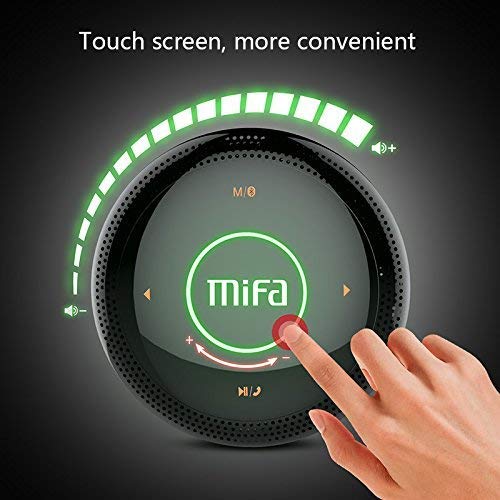
Ffigur 1: Brig view of the MIFA A3 speaker, highlighting the touch-sensitive control panel. The panel displays volume indicators, play/pause, and track navigation buttons. A central 'Mifa' logo is also visible.
- Panel Rheoli Cyffwrdd: Located on the top surface for volume adjustment, playback control, and mode selection.
- Meicroffon: Ar gyfer galwadau di-ddwylo.
- Porth Codi Tâl: Porthladd micro USB ar gyfer gwefru.
- Mewnbwn AUX: 3.5mm audio jack for wired connection.
- Slot Cerdyn Micro SD: Ar gyfer chwarae cerddoriaeth yn uniongyrchol o gerdyn cof.
Gosod
1. Codi Tâl ar y Llefarydd
Cyn ei ddefnyddio gyntaf, gwefrwch y siaradwr yn llawn. Cysylltwch y cebl gwefru USB a ddarperir â phorthladd gwefru'r siaradwr a'r pen arall ag addasydd pŵer USB (heb ei gynnwys) neu borthladd USB cyfrifiadur.
- Bydd y golau dangosydd gwefru yn goleuo yn ystod gwefru.
- The indicator will turn off or change color once fully charged.
- A full charge provides approximately 8 hours of continuous playtime.
2. Pŵer Ymlaen / I ffwrdd
- I Bweru Ymlaen: Press and hold the Power button (usually integrated into the touch panel or a dedicated button) for 2-3 seconds until you hear an audible prompt or see an indicator light.
- I Bweru i ffwrdd: Press and hold the Power button again for 2-3 seconds.
Cyfarwyddiadau Gweithredu
1. Pâr Bluetooth
- Ensure the speaker is powered on and in Bluetooth pairing mode (indicated by a flashing blue light or audible prompt).
- Ar eich dyfais (ffôn clyfar, tabled, cyfrifiadur personol), galluogwch Bluetooth a chwiliwch am ddyfeisiau sydd ar gael.
- Select "MIFA A3" from the list of devices.
- Once paired, the speaker will provide an audible confirmation, and the indicator light will become solid blue.
- The speaker will automatically connect to the last-paired device when powered on, if that device's Bluetooth is active and within range.
2. Cysylltiad AUX
For devices without Bluetooth, use the provided 3.5mm AUX audio cable:
- Connect one end of the AUX cable to the speaker's AUX input port.
- Cysylltwch y pen arall â jack clustffon eich dyfais sain.
- Bydd y siaradwr yn newid yn awtomatig i fodd AUX.
3. Chwarae Cerdyn Micro SD
Insert a Micro SD card (up to 32GB, FAT32 format) with music files into the designated slot. The speaker will automatically detect the card and begin playback.
4. Touch Control Operations
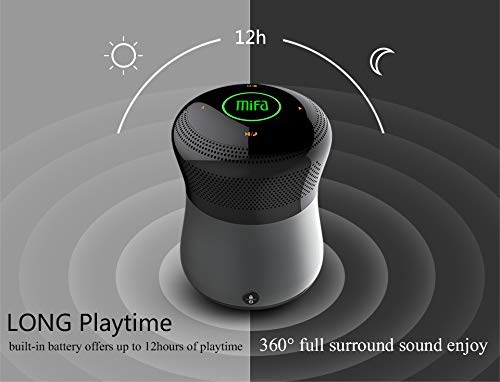
Ffigur 2: The MIFA A3 speaker shown with an overlay indicating "LONG Playtime" (up to 12 hours) and "360° full surround sound enjoy." This image emphasizes the speaker's battery life and audio dispersion.
- Rheoli cyfaint: Slide your finger clockwise on the touch panel to increase volume, counter-clockwise to decrease.
- Chwarae/Seibiant: Tap the central Play/Pause icon.
- Trac Nesaf: Tap the "Next" arrow icon.
- Trac Blaenorol: Tap the "Previous" arrow icon.
- Newid Modd: Tap the "M/O" icon to cycle between Bluetooth, AUX, and Micro SD card modes.
- Botwm Clo: Press the lock icon to prevent accidental touch inputs.
5. Call Handling (Bluetooth Mode)
- Ateb Galwad: Tap the Play/Pause icon when a call comes in.
- Galwad Diwedd: Tap the Play/Pause icon again.
- Gwrthod Galwad: Press and hold the Play/Pause icon for 2 seconds.
Cynnal a chadw
- Glanhewch y siaradwr gyda lliain meddal, sych. Peidiwch â defnyddio glanhawyr sgraffiniol na thoddyddion.
- Storiwch y siaradwr mewn lle oer, sych pan nad yw'n cael ei ddefnyddio am gyfnodau hir.
- Charge the battery at least once every three months to maintain battery health.
Datrys problemau
| Problem | Ateb Posibl |
|---|---|
| Nid yw'r siaradwr yn troi ymlaen. | Gwnewch yn siŵr bod y batri wedi'i wefru. Cysylltwch â ffynhonnell bŵer a rhoi cynnig arall arni. |
| Methu paru drwy Bluetooth. |
|
| Dim sain. |
|
| Ansawdd sain gwael. |
|
Manylebau
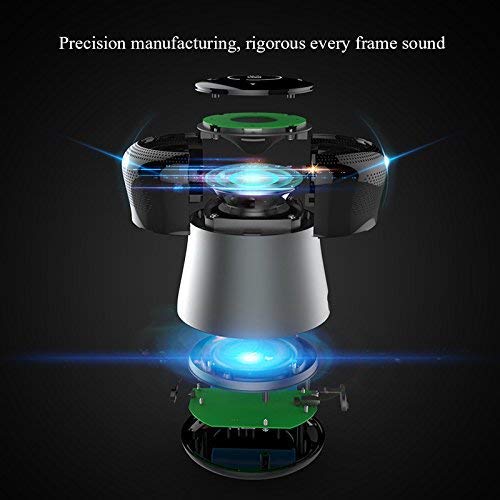
Ffigur 3: An exploded diagram of the MIFA A3 speaker, illustrating its internal components and structural design, emphasizing precision manufacturing.
| Model | MIFA A3 |
| Pŵer Allbwn | 10W |
| Cysylltedd | Bluetooth 4.2, AUX, Micro SD Card |
| Batri | 1800 mAh Li-ion |
| Amser chwarae | Hyd at 8 awr (cyfaint o 60%) |
| Amser Codi Tâl | Tua 3-4 awr |
| Meicroffon | Wedi'i gynnwys ar gyfer galwadau di-dwylo |
| Dal dwr | Yes (as per product specifications, but general caution advised for ports) |
| Dull Rheoli | Cyffwrdd |
| Dyfeisiau Cydnaws | Gliniadur, Cyfrifiadur Personol, Ffôn Clyfar, Tabled |
Gwarant a Chefnogaeth
MIFA products are designed to provide reliable performance. For warranty information or technical support, please refer to the warranty card included with your purchase or visit the official MIFA websafle. Cadwch eich prawf prynu ar gyfer hawliadau gwarant.
For further assistance, you may contact MIFA customer support through their official channels.