
AWEI T5
AWEI T5 True Wireless Earbuds User Manual
Rhagymadrodd
This manual provides detailed instructions for the AWEI T5 True Wireless Earbuds. Please read this guide carefully before using the product to ensure proper operation and to maximize your listening experience.
Cynnwys Pecyn
Gwiriwch fod yr holl eitemau a restrir isod yn bresennol yn eich pecyn:
- AWEI T5 True Wireless Earbuds (Left and Right)
- Achos Codi Tâl
- Cebl Codi Tâl USB
- Llawlyfr Defnyddiwr
- Meintiau lluosog o awgrymiadau clust

Image: AWEI T5 True Wireless Earbuds retail packaging, showing the brand logo and product model.
Cynnyrch Drosview
Familiarize yourself with the components of your AWEI T5 True Wireless Earbuds and charging case.

Image: The AWEI T5 True Wireless Earbuds inside their charging case, with an additional image showing an earbud being worn by a user.

Delwedd: Llun agos view of the AWEI T5 True Wireless Earbuds and their charging case resting on a laptop keyboard.
The earbuds are designed for a secure and comfortable fit, and the charging case provides both protection and power on the go.
Gosod
1. Gwefru Cychwynnol
Cyn ei ddefnyddio gyntaf, gwefrwch y clustffonau a'r cas gwefru yn llawn.
- Rhowch y ddau earbuds yn yr achos gwefru.
- Connect the USB charging cable to the charging case and a power source.
- The indicator lights on the case and earbuds will show charging status.
- Ar ôl ei wefru'n llawn, datgysylltwch y cebl.
2. Paru â Dyfais
To connect your AWEI T5 earbuds to a Bluetooth-enabled device:
- Sicrhewch fod y clustffonau wedi'u gwefru.
- Agorwch y cas gwefru a thynnwch y ddau glustffon allan. Byddant yn mynd i mewn i'r modd paru yn awtomatig.
- Ar eich dyfais (ffôn clyfar, tabled, ac ati), ewch i osodiadau Bluetooth a galluogi Bluetooth.
- Chwiliwch am dyfeisiau sydd ar gael a dewis "AWEI T5" o'r rhestr.
- Once connected, you will hear a confirmation tone, and the indicator lights on the earbuds will change.
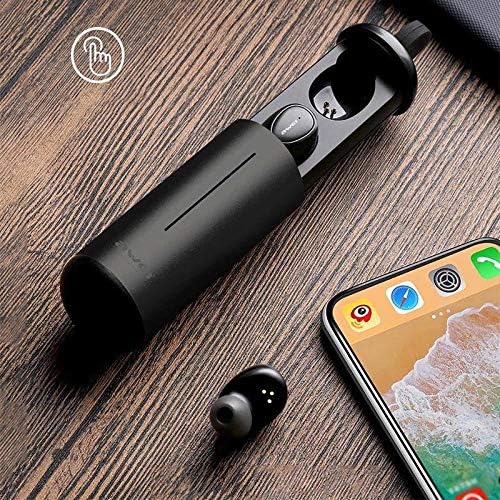
Image: AWEI T5 Earbuds in their charging case, positioned next to a smartphone, illustrating the pairing process.
Cyfarwyddiadau Gweithredu
Rheolaethau Sylfaenol
The AWEI T5 earbuds feature touch controls for various functions:
- Chwarae/Seibiant: Tap unwaith ar y naill earbud.
- Trac Nesaf: Tapiwch ddwywaith y glustffon dde.
- Trac Blaenorol: Tapiwch ddwywaith y glustffon chwith.
- Ateb / Diwedd Galwad: Tap once on either earbud during an incoming call.
- Gwrthod Galwad: Pwyswch a daliwch y naill glustffon neu'r llall am 2 eiliad yn ystod galwad sy'n dod i mewn.
- Ysgogi Cynorthwyydd Llais: Tap triphlyg naill ai earbud.
Modd Earbud Sengl
You can use either the left or right earbud independently:
- Remove one earbud from the charging case. It will automatically connect to the last paired device.
- The other earbud can remain in the case or be turned off.
Modd Earbud Deuol
For a stereo audio experience, use both earbuds:
- Remove both earbuds from the charging case. They will automatically connect to each other and then to the last paired device.
Cynnal a Chadw a Gofal
To ensure the longevity and optimal performance of your AWEI T5 earbuds:
- Glanhau: Glanhewch y clustffonau a'r cas gwefru yn rheolaidd gyda lliain meddal, sych, heb lint. Peidiwch â defnyddio cemegau llym na deunyddiau sgraffiniol.
- Storio: Pan nad ydynt yn cael eu defnyddio, storiwch y clustffonau yn eu cas gwefru i'w hamddiffyn rhag llwch a difrod.
- Gofal Batri: Avoid fully discharging the battery frequently. Charge the earbuds and case regularly, even if not used for extended periods.
- Gwrthiant Dŵr: The earbuds are rated IPX4, meaning they are resistant to splashing water from any direction. Do not submerge them in water or expose them to heavy rain.

Image: AWEI T5 Earbuds with water droplets, indicating their IPX4 splash-resistant rating.
Datrys problemau
If you encounter issues with your AWEI T5 earbuds, refer to the following common problems and solutions:
| Problem | Ateb |
|---|---|
| Nid yw'r clustffonau'n paru â'r ddyfais. | Ensure earbuds are charged. Turn off and on Bluetooth on your device. Forget "AWEI T5" from your device's Bluetooth list and re-pair. |
| Dim ond un earbud sy'n gweithio. | Place both earbuds back into the charging case, close the lid, then open and remove them together. Ensure both are charged. |
| Dim sain na chyfaint isel. | Gwiriwch lefelau'r sain ar eich dyfais a'r clustffonau. Gwnewch yn siŵr bod y clustffonau wedi'u cysylltu'n iawn. |
| Nid yw'r cas gwefru yn gwefru. | Verify the USB cable is securely connected to both the case and the power source. Try a different cable or power adapter. |
Manylebau
Technical details for the AWEI T5 True Wireless Earbuds:
| Nodwedd | Manylyn |
|---|---|
| Rhif Model | T5 |
| Cysylltedd | Bluetooth |
| Ffactor Ffurf | Yn-Glust |
| Deunydd | Plastig |
| Lliw | Du |
| Dimensiynau (Cynnyrch) | 4 x 10 x 16.5 cm |
| Pwysau (Cynnyrch) | 4.54 g |
| Math Batri | 1 Lithium Ion (per earbud, typically) |
| Graddfa Gwrthiant Dŵr | IPX4 (Gwrth-sblasio) |
Gwarant a Chefnogaeth
Am wybodaeth am warant a chymorth i gwsmeriaid, cyfeiriwch at y ddogfennaeth a ddarparwyd gyda'ch pryniant neu cysylltwch â'r manwerthwr. Cadwch eich prawf prynu ar gyfer unrhyw hawliadau gwarant.
Ask a question about this manual
Ask about setup, troubleshooting, compatibility, parts, safety, or missing instructions. Manuals+ will review the question and use this page’s manual context to help answer it.