
1. Rhagymadrodd
Thank you for choosing the MAJORITY Snowdon Bluetooth Soundbar. This manual provides essential information for the safe and efficient operation of your device. Please read it thoroughly before use and retain it for future reference.

Image: The MAJORITY Snowdon Soundbar, a sleek black unit, is shown with its remote control. Key features like Bluetooth connectivity, 120 Watts power output, and 2.1 audio channels are highlighted.
2. Gwybodaeth Diogelwch
Cofiwch gadw at y rhagofalon diogelwch canlynol:
- Peidiwch ag amlygu'r uned i law, lleithder, na thymheredd eithafol.
- Sicrhewch awyru priodol; peidiwch â rhwystro unrhyw agoriadau awyru.
- Defnyddiwch yr addasydd pŵer a gyflenwir gyda'r uned yn unig.
- Peidiwch â cheisio agor na thrwsio'r uned eich hun. Cyfeiriwch yr holl waith cynnal a chadw at bersonél cymwys.
- Cadwch yr uned i ffwrdd o ffynonellau gwres fel rheiddiaduron, cofrestri gwres, stofiau, neu offer arall sy'n cynhyrchu gwres.
3. Cynnwys Pecyn
Gwiriwch fod yr holl eitemau yn bresennol yn y pecyn:
- MAJORITY Snowdon Soundbar
- Rheolaeth Anghysbell
- Addasydd Pŵer
- Cebl Sain 3.5mm (Cable AUX)
- RCA Cable
- Llawlyfr Defnyddiwr
- Wall Mounting Screws and Plugs (for optional wall installation)

Image: A clear layout of the MAJORITY Snowdon Soundbar and its accessories. The soundbar is positioned at the top, with the remote control, RCA cable, AUX cable, power adapter, and user manual arranged below it.
4. Cynnyrch Drosview
4.1 Rheolyddion y Panel Blaen a'r Panel Uchaf
- PŴER: Pwyswch i droi'r uned ymlaen neu i ffwrdd.
- FFYNHONNELL: Press to cycle through input modes (Bluetooth, Optical, AUX, RCA).
- VOL+: Cynyddu cyfaint.
- VOL-: Lleihau cyfaint.
- Pâr: Press and hold to initiate Bluetooth pairing.
- LLINELL YN: 3.5mm AUX input port.
4.2 Cysylltiadau Panel Cefn
- DEWISOL YN: For connecting to devices via optical cable.
- DC 18V: Porthladd mewnbwn pŵer.
- L/R RCA: For connecting to devices via RCA cables.

Image: A close-up of the rear panel of the soundbar, clearly displaying the various input ports including AUX, Optical, and RCA connections, along with the DC 18V power input.
5. Gosod
5.1 Lleoliad
The soundbar can be placed on a flat surface in front of your TV or wall-mounted.
- Lleoliad Pen bwrdd: Position the soundbar on a stable, flat surface directly below your television.
- Mowntio Wal: Use the provided screws and plugs to securely mount the soundbar to a wall. Ensure the wall can support the weight of the soundbar.

Image: The MAJORITY Snowdon Soundbar is shown mounted on a wall directly beneath a television, demonstrating its wall-mountable capability in a home environment.
5.2 Cysylltu â Phwer
- Connect the power adapter to the DC 18V input port on the rear of the soundbar.
- Plygiwch yr addasydd pŵer i mewn i allfa wal.
5.3 Cysylltiadau Sain
Dewiswch un o'r dulliau canlynol i gysylltu eich ffynhonnell sain:
5.3.1 Cysylltiad Bluetooth
- Gwasgwch y GRYM button on the soundbar or remote to turn it on.
- Gwasgwch y FFYNHONNELL button repeatedly until 'BT' (Bluetooth) mode is selected. The indicator light will flash.
- On your device (e.g., smartphone, tablet), enable Bluetooth and search for 'MAJORITY Snowdon'.
- Select 'MAJORITY Snowdon' to pair. Once connected, the indicator light will stop flashing.

Image: The MAJORITY Snowdon Soundbar is depicted alongside a smartphone, which shows a music player interface and a prominent 'Bluetooth 5.0' graphic, illustrating wireless connectivity.
5.3.2 Cysylltiad Optegol
- Connect one end of an optical cable to the OPTICAL OUT port on your TV or audio device.
- Cysylltwch y pen arall â'r DEWISOL YN porthladd ar y bar sain.
- Gwasgwch y FFYNHONNELL button on the soundbar or remote until 'OPT' (Optical) mode is selected.
5.3.3 Cysylltiad AUX
- Connect one end of the 3.5mm audio cable to the headphone jack or AUX OUT port on your device.
- Cysylltwch y pen arall â'r LLINELL YN porthladd ar y bar sain.
- Gwasgwch y FFYNHONNELL button on the soundbar or remote until 'AUX' mode is selected.
5.3.4 RCA Connection
- Connect the red and white plugs of the RCA cable to the corresponding audio output ports on your TV or audio device.
- Connect the other end of the RCA cable to the L/R RCA input ports on the soundbar.
- Gwasgwch y FFYNHONNELL button on the soundbar or remote until 'RCA' mode is selected.
6. Cyfarwyddiadau Gweithredu
6.1 Pŵer Ymlaen/Diffodd
Gwasgwch y GRYM botwm ar y bar sain neu'r teclyn rheoli o bell i droi'r uned ymlaen neu i ffwrdd.
6.2 Dethol Ffynonellau
Gwasgwch y FFYNHONNELL button on the soundbar or remote control to switch between input modes: Bluetooth, Optical, AUX, and RCA.
6.3 Rheoli Cyfaint
Defnyddiwch y VOL+ a VOL- buttons on the soundbar or the volume buttons on the remote control to adjust the audio level.
6.4 Swyddogaethau Rheoli o Bell
The included remote control provides convenient access to all soundbar functions:
- Pwer: Trowch y bar sain ymlaen neu i ffwrdd.
- Ffynhonnell: Select input mode.
- Cyfrol i fyny/i lawr: Addasu lefel cyfaint.
- Tewi: Treiglo neu ddatgymalu'r sain.
- Chwarae/Seibiant: Control media playback in Bluetooth mode.
- Trac Blaenorol/Nesaf: Skip tracks in Bluetooth mode.
- Dulliau EQ: Select preset equalizer settings (e.g., Music, Movie, News).
7. cynnal
Er mwyn sicrhau hirhoedledd a pherfformiad gorau posibl eich bar sain:
- Glanhau: Defnyddiwch frethyn meddal, sych i lanhau tu allan y bar sain. Peidiwch â defnyddio glanhawyr hylif na deunyddiau sgraffiniol.
- Storio: Os ydych chi'n storio'r bar sain am gyfnod hir, datgysylltwch ef o'r pŵer a'i storio mewn lle oer, sych.
- Osgoi Rhwystrau: Ensure no objects block the speaker grilles or ventilation openings.
8. Datrys Problemau
Os byddwch chi'n dod ar draws problemau gyda'ch bar sain, cyfeiriwch at y problemau a'r atebion cyffredin canlynol:
| Problem | Achos Posibl | Ateb |
|---|---|---|
| Dim pŵer | Cebl pŵer heb ei gysylltu; Allfa bŵer heb ei gweithredu | Gwiriwch gysylltiad y cebl pŵer; Rhowch gynnig ar soced pŵer gwahanol |
| Dim sain | Incorrect input source selected; Volume too low; Audio cable not connected properly | Select correct input source; Increase volume; Reconnect audio cables securely |
| Mae paru Bluetooth yn methu | Nid yw'r bar sain yn y modd paru; Dyfais yn rhy bell; Ymyrraeth | Ensure soundbar is in BT pairing mode; Move device closer; Turn off other Bluetooth devices |
| Sain gwyrgam | Volume too high; Poor audio source quality; Loose cable connection | Reduce volume; Try a different audio source; Check cable connections |
9. manylebau
| Nodwedd | Manylyn |
|---|---|
| Enw Model | Snowdon |
| Brand | MWYAF |
| Allbwn Pwer | 120 Wat |
| Sianeli Sain | 2.1 (with integrated subwoofer) |
| Technoleg Cysylltedd | Bluetooth, AUX, Optical, RCA |
| Fersiwn Bluetooth | 5.0 |
| Dimensiynau (L x D x H) | 81 cm x 8.3 cm x 8.3 cm |
| Pwysau | 1.2 Cilogram |
| Ymateb Amlder | 18 KHz |
| Dull Rheoli | Rheolaeth Anghysbell |
| Deunydd | Plastig |
| Lliw | Du |
| Math Mowntio | Wal Gosodadwy |
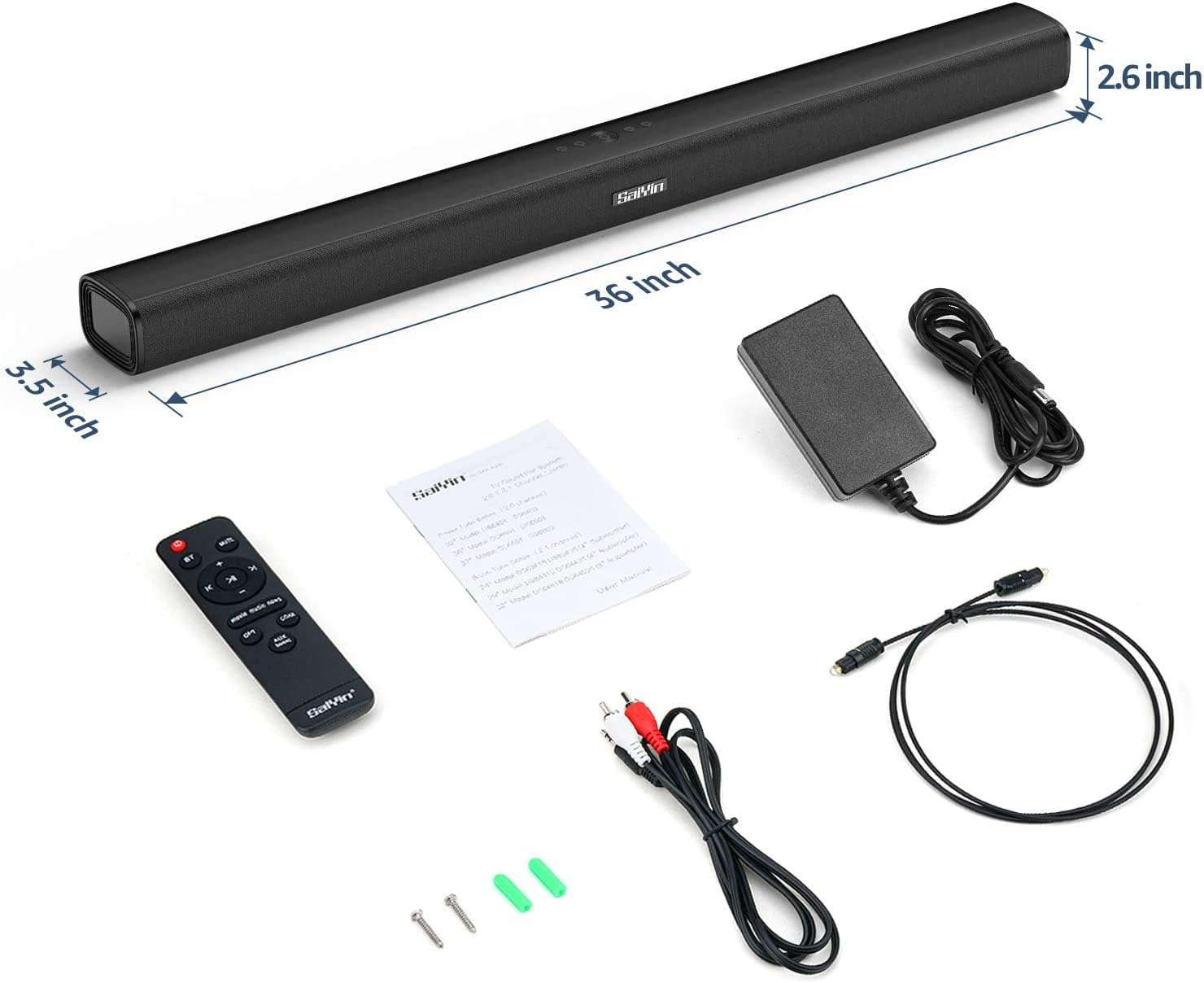
Image: The MAJORITY Snowdon Soundbar is displayed with its accessories, including the remote, power adapter, and various cables. Dimensions are overlaid on the image, showing the soundbar's length as 36 inches (approximately 91.4 cm), depth as 3.5 inches (approximately 8.9 cm), and height as 2.6 inches (approximately 6.6 cm).

Delwedd: Manwl view of the soundbar's internal speaker component, emphasizing its 120W power output and Xtra Bass technology for enhanced low-frequency audio.
10. Gwarant a Chefnogaeth
10.1 Gwybodaeth Gwarant
The MAJORITY Snowdon Soundbar comes with a Gwarant estynedig 3 mlynedd. Please retain your proof of purchase for warranty claims. For specific terms and conditions, refer to the warranty card included in your package or visit the official MAJORITY websafle.
10.2 Cefnogaeth i Gwsmeriaid
For technical assistance, troubleshooting beyond this manual, or warranty inquiries, please contact MAJORITY customer support through their official websafle neu'r wybodaeth gyswllt a ddarperir yn nogfennaeth eich cynnyrch.