
1. Rhagymadrodd
The UNI-T UT251A is a high-accuracy, high-sensitivity leakage current clamp meter designed for precise testing of AC leakage current. This high-resolution meter is suitable for various applications, including checking leakage current in motors, home appliances, and other electrical equipment up to 600A. It features a 4-digit LCD digital display with 10000 display count, auto-ranging capabilities, a 2/s sampling rate, peak hold function, and the ability to store 99 sets of data. The device also includes an RS-232 interface for data transmission, data hold, auto power-off, overload indication, and low battery indication.
2. Gwybodaeth Diogelwch
Darllenwch a deallwch yr holl gyfarwyddiadau diogelwch cyn defnyddio'r ddyfais. Gall methu â dilyn y cyfarwyddiadau hyn arwain at sioc drydanol, tân neu anaf difrifol.
- Gwisgwch offer amddiffynnol personol (PPE) priodol bob amser wrth weithio gyda systemau trydanol.
- Peidiwch â defnyddio'r mesurydd os yw'n ymddangos ei fod wedi'i ddifrodi neu os yw'n gweithredu'n annormal.
- Ensure the battery compartment is securely closed before use.
- Peidiwch â rhagori ar y sgoriau mewnbwn uchaf ar gyfer unrhyw swyddogaeth.
- Avoid touching live circuits with bare hands or conductive materials.
- Cadwch y ddyfais yn sych ac yn lân.
- Refer to local and national safety codes for proper electrical work procedures.
3. Cynnyrch Drosview
The UNI-T UT251A is a compact and robust leakage current clamp meter. Key features include:
- 4-digit LCD Digital Display: Provides clear readings with a 10000 display count.
- Ystod Auto: Yn dewis yr ystod fesur briodol yn awtomatig.
- 2/s SampCyfradd ling: Ensures quick and responsive measurements.
- Daliad Brig: Captures and displays the maximum measured value.
- Logio Data: Stores up to 99 sets of data for later analysis.
- Rhyngwyneb RS-232: Allows connection to a PC for data transfer and analysis.
- Daliad Data: Yn rhewi'r darlleniad cyfredol ar yr arddangosfa.
- Pŵer Auto i ffwrdd: Yn arbed bywyd batri trwy gau i lawr yn awtomatig ar ôl cyfnod o anweithgarwch.
- Arwydd gorlwytho: Alerts the user when the measurement exceeds the range.
- Arwydd Batri Isel: Notifies the user when the battery needs replacement.

Ffigur 3.1: Blaen view of the UNI-T UT251A Leakage Current Clamp Meter, showing the display, clamp jaw, and control buttons.
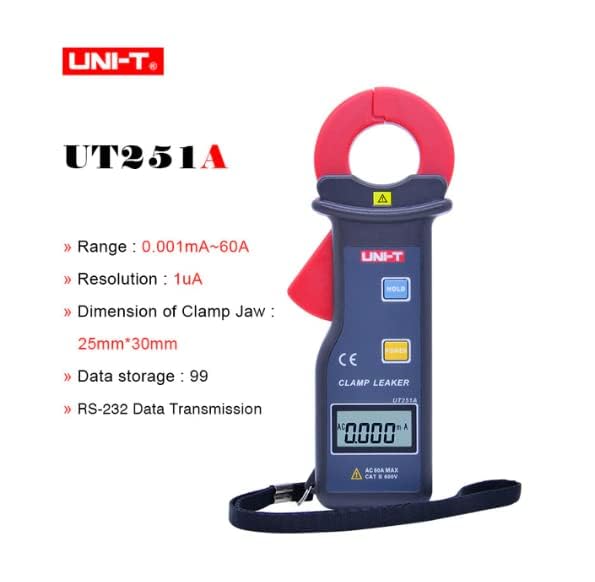
Figure 3.2: The UNI-T UT251A Clamp Meter highlighting its range, resolution, clamp jaw dimension, data storage, and RS-232 data transmission capabilities.
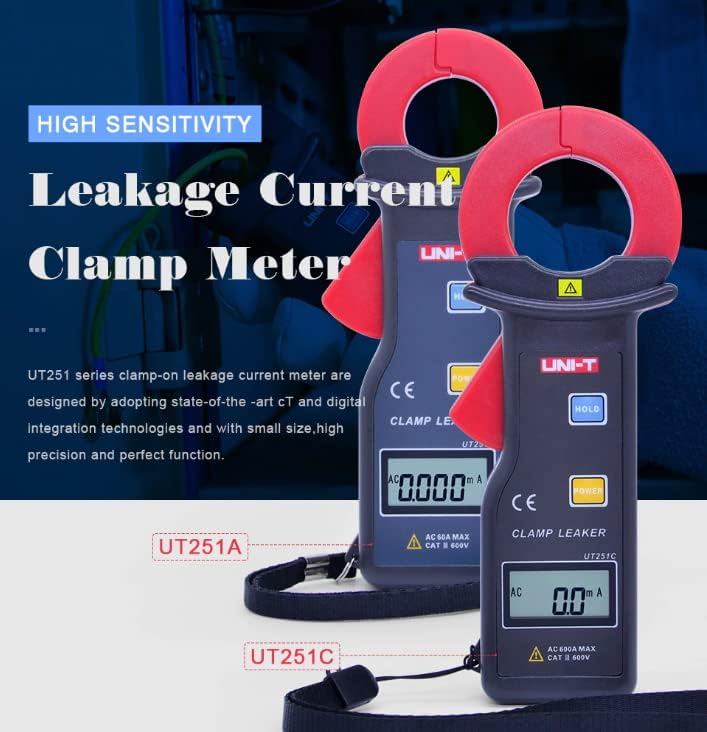
Figure 3.3: Comparison of UT251A and UT251C models, emphasizing their high sensitivity for leakage current measurement.
4. Gosod
4.1 Gosod Batri
- Lleolwch glawr adran y batri ar gefn y mesurydd.
- Defnyddiwch sgriwdreifer i lacio'r sgriw(iau) a thynnu'r gorchudd.
- Insert the 9V battery (6F22) into the compartment, observing correct polarity.
- Replace the battery compartment cover and tighten the screw(s).
4.2 Gwiriad Cychwynnol
- Press the POWER button to turn on the meter.
- Verify that the LCD display shows "0.000mA" or a similar low reading in a stable environment.
- If a low battery indicator appears, replace the battery before use.
5. Cyfarwyddiadau Gweithredu
5.1 Measuring AC Leakage Current
- Turn on the meter by pressing the GRYM botwm.
- Agorwch y clamp gên trwy wasgu'r sbardun.
- Yn ofalus clamp the meter around a single conductor (live, neutral, or ground wire) of the circuit you wish to measure. Ensure the jaw is completely closed.
- Read the leakage current value displayed on the LCD. The meter will automatically select the appropriate range.
- For accurate readings, ensure no other conductors are within the clamp gên.
5.2 Swyddogaeth Dal Data
- Yn ystod mesuriad, pwyswch y DALWCH botwm i rewi'r darlleniad cyfredol ar yr arddangosfa.
- Gwasgwch y DALWCH button again to release the data hold and resume live measurement.
5.3 Peak Hold Function
- The meter automatically captures peak values. Refer to the specific manual for detailed instructions on accessing and clearing peak hold readings.

Figure 5.1: The UNI-T UT251A Clamp Meter in use, measuring current on an electrical wire.

Figure 5.2: A user wearing protective gloves operating the UNI-T UT251A Clamp Meter within an electrical panel, demonstrating a typical application.
6. Data Logging and RS-232 Interface
The UT251A can store up to 99 sets of measurement data. This data can be retrieved and analyzed using the RS-232 interface and the provided PC software.
6.1 Storing Data
- During a measurement, press the appropriate button (refer to the specific manual for button identification, often labeled "MEM" or similar) to save the current reading.
- The meter will indicate successful data storage, often by displaying a memory location number.
6.2 Connecting to PC via RS-232
- Install the PC software from the provided CD onto your computer.
- Connect the RS-232 interface cable to the meter's RS-232 port and to your computer's serial port (or a USB-to-serial adapter).
- Launch the PC software.
- Follow the software's instructions to establish communication with the meter and download the stored data.
Video 6.1: An official product video demonstrating the features and usage of the UNI-T UT251A/UT251C clamp meters, including a comparison of the two models and their accessories.
7. cynnal
7.1 Glanhau
- Sychwch c y mesuryddasing gyda hysbysebamp brethyn a glanedydd ysgafn. Peidiwch â defnyddio sgraffinyddion neu doddyddion.
- Cadwch y clamp jaw clean and free of debris to ensure accurate measurements.
7.2 Batri Newydd
- When the low battery indicator appears, replace the 9V battery as described in the "Battery Installation" section.
- Remove the battery if the meter will not be used for an extended period to prevent leakage.
7.3 Storio
- Storiwch y mesurydd mewn lle oer, sych, i ffwrdd o olau haul uniongyrchol a thymheredd eithafol.
- Defnyddiwch y bag cario a ddarperir i'w amddiffyn yn ystod storio a chludo.
8. Datrys Problemau
| Problem | Achos Posibl | Ateb |
|---|---|---|
| Nid yw'r mesurydd yn troi ymlaen. | Batri marw neu wedi'i osod yn anghywir. | Check battery polarity or replace the 9V battery. |
| Darlleniadau anghywir. | cl budramp jaw; external magnetic fields; multiple conductors in jaw. | Glanhewch y clamp jaw; move away from strong magnetic fields; ensure only one conductor is clampgol. |
| "OL" (Gorlwytho) yn cael ei arddangos. | Measured current exceeds the meter's range. | Ensure the current is within the meter's specified range (up to 60A for UT251A). |
| Methu cysylltu â chyfrifiadur personol. | Incorrect cable connection; software not installed or configured properly. | Verify RS-232 cable connection; reinstall PC software; check software communication settings. |
9. manylebau
| Nodweddiadol | Manylyn |
|---|---|
| Model | UT251A |
| Range (Leakage Current) | 0.001mA ~ 60A |
| Datrysiad | 1µA |
| Cyfrif Arddangos | 10000 |
| SampCyfradd ling | 2 gwaith / eiliad |
| Clamp Jaw Dimension | 25mm x 30mm |
| Storio Data | 99 set |
| Rhyngwyneb | RS-232 |
| Grym | Batri 9V (6F22) |
| Maint Arddangos | 32mm x 15mm |
| Pwysau Net Cynnyrch | 120g |
| Maint Cynnyrch | 175mm x 70mm x 38mm |
| Sgôr Diogelwch | CAT III 600V |
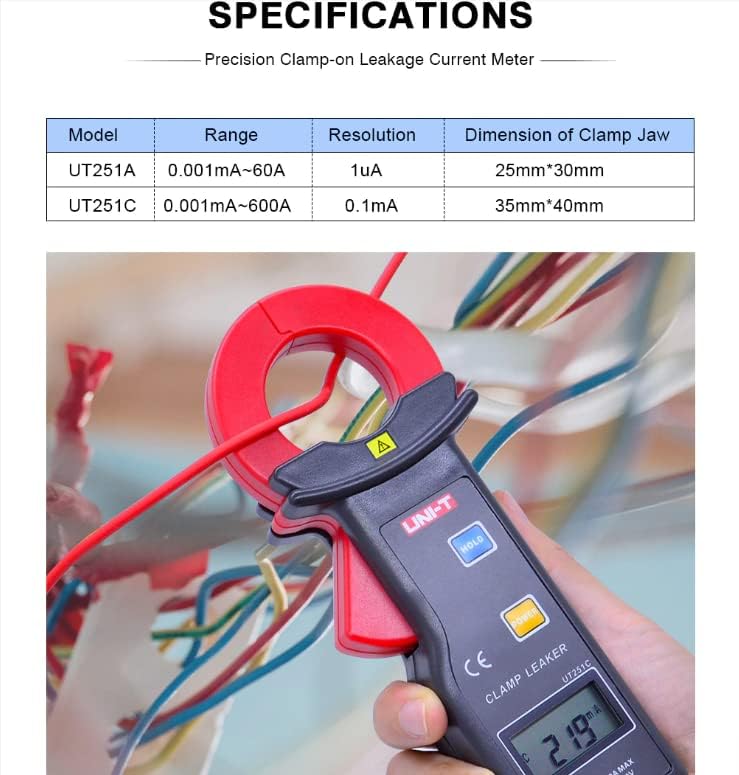
Figure 9.1: Detailed specifications table comparing the UT251A and UT251C models, including range, resolution, and clamp maint.
10. Beth sydd yn y Bocs
The standard package for the UNI-T UT251A includes:
- UNI-T UT251A Leakage Current Clamp Mesurydd
- 9V Battery (6F22)
- RS-232 Interface Cable
- PC Software CD
- Blwch Rhodd
- Bag Cario
- Llawlyfr Saesneg
- Blwch Offer

Figure 10.1: The UNI-T UT251A Clamp Meter shown with its packaging and included accessories, such as the RS-232 cable and software CD.
11. Gwarant a Chefnogaeth
For warranty information and technical support, please refer to the documentation included with your product or contact UNI-T customer service directly. Details can typically be found on the official UNI-T websafle neu drwy eich man prynu.