
BIGFUN 630B1
Bigfun 61 Keys Piano Keyboard Toy User Manual
Model: 630B1
Brand: BIGFUN
1. Rhagymadrodd
Diolch am brynuasing the Bigfun 61 Keys Piano Keyboard Toy. This manual provides essential information for the safe and effective operation, maintenance, and troubleshooting of your new musical instrument. Please read this manual thoroughly before use and retain it for future reference.
2. Gwybodaeth Diogelwch
- Peidiwch ag amlygu'r bysellfwrdd i ddŵr na lleithder gormodol.
- Avoid placing the keyboard in direct sunlight or near heat sources.
- Defnyddiwch yr addasydd pŵer neu'r batris penodedig yn unig.
- Keep out of reach of small children due to small parts and electrical components.
- Do not attempt to disassemble or repair the keyboard yourself. Refer all servicing to qualified personnel.
3. Cynnwys Pecyn
Gwiriwch fod yr holl eitemau yn bresennol yn y pecyn:
- Bigfun 61 Keys Piano Keyboard Toy
- Meicroffon
- USB Power Cable (for mobile charger option)
- Power Adapter (if included, check product description)

Image: The Bigfun 61 Keys Piano Keyboard Toy, showing the main unit, included microphone, and USB power cable.

Image: The retail packaging box for the Bigfun 61 Keys Piano Keyboard Toy, displaying product features and branding.
4. Cynnyrch Drosview
The Bigfun 61 Keys Piano Keyboard Toy features a standard 61-key layout, various tones and rhythms, and recording capabilities. It is designed for beginner to intermediate skill levels.
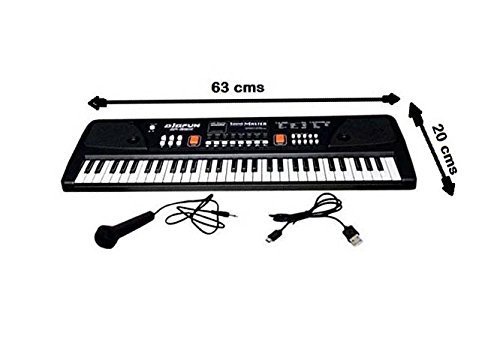
Delwedd: O'r brig i lawr view of the Bigfun 61 Keys Piano Keyboard Toy, indicating approximate dimensions of 63 cm length and 20 cm width.

Delwedd: Ongl view of the Bigfun 61 Keys Piano Keyboard Toy, highlighting the keyboard layout and control panel.
Nodweddion Allweddol:
- 61 Allwedd
- Chwaraewr MP3 USB
- 16 Tonau
- 5 Rhythmau
- Rheoli Cyfaint
- Swyddogaeth Recordio
- Rheoli Tempo
- Microphone Input (3.5mm Jack)
5. Gosod
5.1 Pweru'r Bysellfwrdd
The keyboard can be powered in two ways:
- Using the Power Adapter/USB Cable: Connect the provided USB power cable to the keyboard's power input port. Connect the other end to a suitable USB power source (e.g., a mobile charger adapter, not included, or a computer USB port).
- Defnyddio batris: The keyboard can also be operated with 4 "AA" size normal batteries (not included). Open the battery compartment on the underside of the keyboard, insert the batteries observing the correct polarity (+/-), and close the compartment securely.
5.2 Cysylltu'r Meicroffon
Plug the microphone's 3.5mm jack into the dedicated microphone input port on the keyboard.
5.3 Defnyddio'r Chwaraewr MP3 USB
To use the MP3 playback function:
- Insert an external USB flash drive (containing MP3 audio files) into the USB port located on the back side of the keyboard.
- The USB playback should start automatically by default.
- Use the volume keys on the keyboard to control the USB playback volume.
6. Cyfarwyddiadau Gweithredu
6.1 Pŵer Ymlaen/Diffodd
Locate the Power button on the keyboard and press it to turn the unit on or off.
6.2 Addasu'r Sain
Use the dedicated Volume Up and Volume Down buttons to adjust the overall sound output of the keyboard and the connected microphone.
6.3 Dewis Tonau
The keyboard features 16 different tones. Press the "Tone" button and then use the number keys or arrow keys (if available) to select your desired instrument sound.
6.4 Selecting Rhythms
There are 5 built-in rhythms. Press the "Rhythm" button and then use the number keys or arrow keys to select a rhythm. You can adjust the tempo of the rhythm using the Tempo control buttons.
6.5 Swyddogaeth Recordio
To record your performance:
- Press the "Record" button to start recording.
- Play your desired melody on the keyboard.
- Press the "Play" button to listen to your recorded performance.
7. cynnal
- Glanhau: Wipe the keyboard surface with a soft, dry cloth. For stubborn dirt, slightly dampen the cloth with water and mild soap, then wipe dry immediately. Do not use abrasive cleaners or solvents.
- Storio: When not in use for extended periods, store the keyboard in a cool, dry place away from direct sunlight and extreme temperatures. If using batteries, remove them before storage to prevent leakage.
- Trin: Osgowch ollwng y bysellfwrdd neu ei roi dan ergydion cryf, gan y gall hyn niweidio cydrannau mewnol.
8. Datrys Problemau
| Problem | Achos Posibl | Ateb |
|---|---|---|
| Keyboard does not power on. | No power supply; batteries are dead or incorrectly inserted; power adapter faulty. | Ensure power adapter is securely connected or replace batteries. Check battery polarity. |
| Dim sain gan siaradwyr. | Volume is too low; Mute function activated; internal fault. | Increase volume. Check if any mute button is pressed. If problem persists, contact support. |
| Meicroffon ddim yn gweithio. | Microphone not properly connected; microphone faulty. | Ensure microphone is fully plugged into the correct port. Test with another microphone if available. |
| USB MP3 player not working. | USB drive not inserted correctly; unsupported file fformat; gyriant USB yn ddiffygiol. | Re-insert USB drive. Ensure files are in MP3 format. Try a different USB drive. |
9. manylebau
| Nodwedd | Manylyn |
|---|---|
| Enw Model | 630B1 |
| Brand | MAWRHYDI |
| Nifer yr Allweddi | 61 |
| Technoleg Cysylltedd | USB |
| Ffynhonnell Pwer | Battery Powered (4 "AA" batteries, not included) / USB Power |
| Clustffonau Jack | 3.5mm Jack (for microphone) |
| Nodweddion Arbennig | Recording, Tempo Control, USB MP3 Player |
| Lefel Sgil | Beginner to Intermediate |
| Gwneuthurwr | QUANZHOU AIQIAN ELECTRONIC TECHNOLOGY CO., LTD |
| ASIN | B07DYYR5MV |
10. Gwarant a Chefnogaeth
Am wybodaeth am warant neu gymorth technegol, cyfeiriwch at y manylion cyswllt a ddarparwyd gan eich manwerthwr neu swyddog y gwneuthurwr. websafle. Cadwch eich derbynneb prynu fel prawf o brynu.
Ar gyfer ymholiadau cyffredinol, gallwch ymweld â'r BIGFUN brand page on Amazon.