
Retevis RT3S
Retevis RT3S DMR Amateur Radio Transceiver with GPS and APRS User Manual
Model: RT3S
Rhagymadrodd
This manual provides comprehensive instructions for the Retevis RT3S DMR Amateur Radio Transceiver. The RT3S is a versatile dual-band radio supporting both Digital Mobile Radio (DMR) and analog communication modes, compatible with Mototrbo Tier I & II digital systems. It features an integrated GPS for location services and APRS, a durable 2000 mAh lithium battery for extended operation, and a recording function to capture important conversations. Designed for ease of use, it includes a two-color LED, CTCSS/DCS, channel scanning, priority scanning, and a full DTMF keyboard for accessing its powerful features.
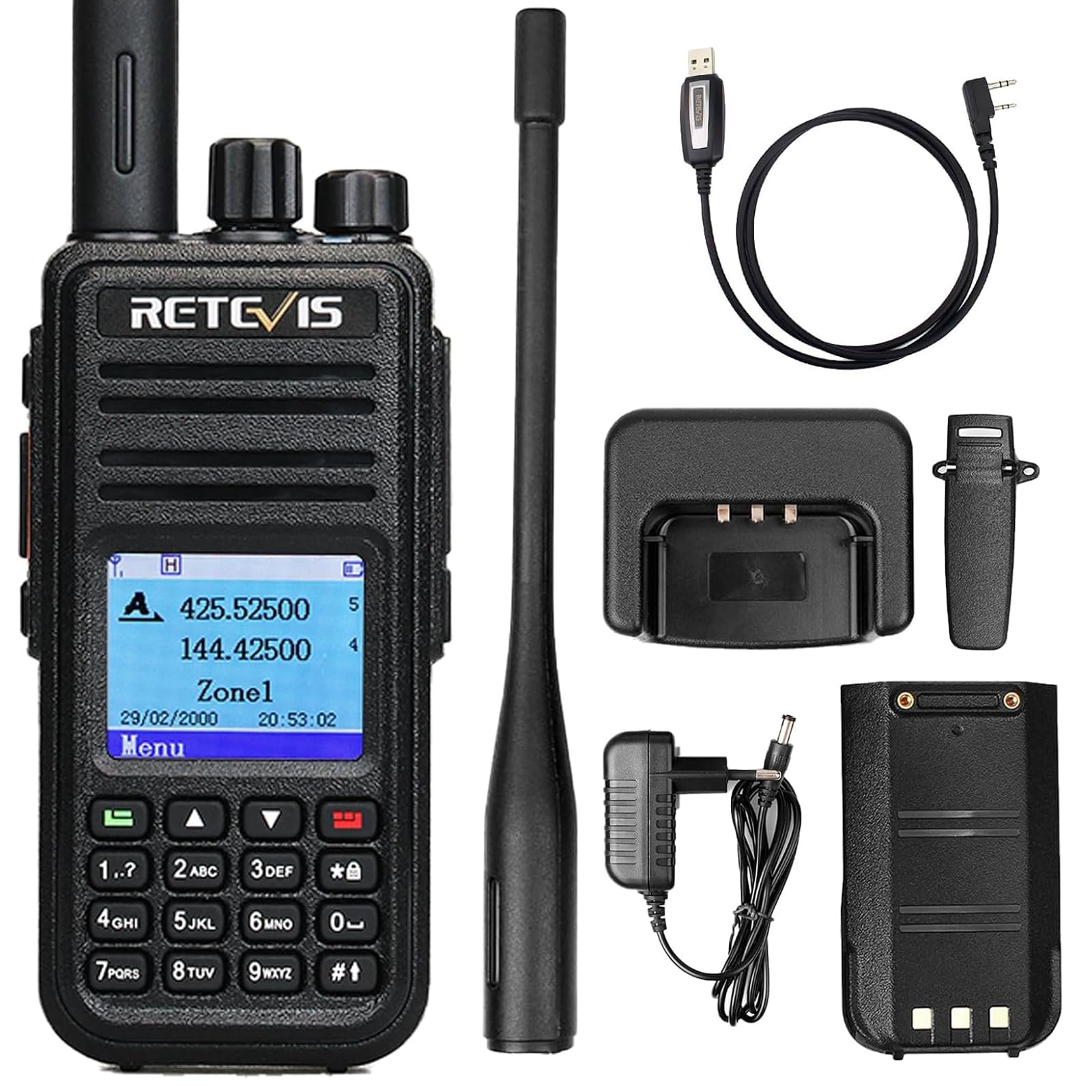
Image: The Retevis RT3S DMR Amateur Radio Transceiver, showcasing its compact design and display.
Cynnwys Pecyn
Gwiriwch y pecyn yn ofalus i sicrhau bod yr holl eitemau yn bresennol ac mewn cyflwr da:
- 1 x Retevis RT3S Walkie Talkie
- 1 x Battery (Lithium-ion, 2000 mAh)
- 1 x Antena
- 1 x Addasydd
- 1 x Gwefrydd
- 1 x Clip Belt
- 1 x strap llaw
- 1 x Llawlyfr Defnyddiwr

Image: All components included in the Retevis RT3S package: radio, battery, antenna, adapter, charger, belt clip, hand strap, and user manual.
Nodweddion Cynnyrch
- Gweithrediad Band Deuol: Supports both VHF (144-146 MHz) and UHF (430-440 MHz) frequency bands.
- DMR and Analog Modes: Seamlessly switch between digital and analog communication.
- Mototrbo Compatibility: Works with Mototrbo Tier I & II digital systems.
- 3000 sianel: Capasiti sianel helaeth ar gyfer anghenion cyfathrebu amrywiol.
- GPS integredig: Provides location tracking and APRS functionality for enhanced safety and coordination.
- 2000 mAh Lithium Battery: Offers up to 16 hours of continuous operation and 48 hours of standby time.
- Swyddogaeth recordio: Up to 8 hours of audio recording to review important conversations.
- Two-Color LED: Visual indicators for various radio states.
- CTCSS/DCS: Tonau is-glywadwy ar gyfer dileu ymyrraeth.
- Channel and Priority Scanning: Efficiently monitor active channels.
- DTMF Keyboard: Full keypad for direct frequency input and menu navigation.
- Gellir uwchraddio cadarnwedd: Supports alternative firmware like OpenGD-77 for advanced customization.

Image: A visual summary of the Retevis RT3S key features, including GPS, TDMA, 3000 channels, and recording.
Gosod
1. Gosod a Gwefru Batri
- Align the battery with the grooves on the back of the radio and slide it into place until it clicks.
- To charge, connect the charger adapter to a power outlet and place the radio (with battery installed) into the charging dock.
- The LED indicator on the charger will show charging status (typically red for charging, green for fully charged).
- Caniatewch tua 4-5 awr ar gyfer gwefr lawn.

Image: The Retevis RT3S radio placed in its charging dock, with the power adapter connected.
2. Ymlyniad yr Antena
- Screw the antenna clockwise onto the connector on the top of the radio until it is finger-tight. Do not overtighten.
3. Belt Clip and Hand Strap
- Atodwch y clip gwregys i gefn y radio gan ddefnyddio'r sgriwiau a ddarperir.
- Edauwch y strap llaw drwy'r ddolen ar ochr uchaf y radio i'w gario'n ddiogel.
Cyfarwyddiadau Gweithredu
1. Pŵer Ymlaen/Diffodd a Rheoli Cyfaint
- I droi’r pŵer ymlaen, trowch y Clymiad Pŵer / Cyfrol clocwedd nes i chi glywed clic.
- To power off, rotate the Clymiad Pŵer / Cyfrol wrthglocwedd nes i chi glywed clic.
- Addaswch y gyfrol trwy gylchdroi'r un botwm.
2. Channel Selection and Mode Switching
- Defnyddiwch y Cwlwm Dewiswr Sianel on top to change channels.
- The RT3S supports both DMR digital and analog FM modes. The mode can be switched via the menu or a programmable side key. Refer to the on-screen menu for specific settings.

Image: The Retevis RT3S display showing both DMR Digital and Analog FM modes, highlighting its dual-mode capability.
3. GPS and APRS Functionality
- The integrated GPS module allows the radio to determine its location.
- APRS (Automatic Packet Reporting System) can be configured to transmit your location data to other APRS-enabled devices or networks.
- Access GPS and APRS settings through the radio's menu. Ensure GPS is enabled for location services.

Image: The Retevis RT3S displaying GPS functionality, showing location pins on a map overlay, indicating its ability to track and share location.
4. Recordio Sain
- The RT3S can record up to 8 hours of audio.
- To start/stop recording, navigate to the recording option in the menu or use a pre-programmed shortcut key.
- Recorded audio can be reviewed directly on the radio.

Image: The Retevis RT3S display indicating the 8-hour recording capability, with a microphone icon.
5. Menu Navigation and Programming
- Use the arrow keys and the BWYDLEN button to navigate through the radio's settings.
- The DTMF keyboard allows for direct frequency input and quick access to certain functions.
- For advanced programming, connect the radio to a computer using the programming cable and use the appropriate software (e.g., Chirp or the official Retevis CPS).

Image: The Retevis RT3S display showing a clear and simple menu for editing channel parameters like Rx Frequency and Tx Frequency.

Image: A Retevis RT3S radio next to a laptop running Chirp software, illustrating how to program the radio using an open-source tool compatible with macOS, Windows, and Linux.

Image: Comparison of the Retevis RT3S with its original firmware and with OpenGD-77 firmware, demonstrating its compatibility with various firmware options.
Cynnal a chadw
- Glanhau: Defnyddiwch feddal, damp lliain i lanhau tu allan y radio. Osgowch gemegau llym neu lanhawyr sgraffiniol.
- Gofal Batri:
- Peidiwch ag amlygu'r batri i dymheredd eithafol.
- Charge the battery fully before first use and periodically if stored for long periods.
- Replace the battery if its performance significantly degrades.
- Gofal Antena: Gwnewch yn siŵr bod yr antena wedi'i gosod yn ddiogel. Peidiwch â phlygu na gorfodi'r antena, gan y gall hyn niweidio'r cysylltydd.
- Storio: Store the radio in a cool, dry place away from direct sunlight and moisture when not in use.
Datrys problemau
| Problem | Achos Posibl | Ateb |
|---|---|---|
| Nid yw'r radio yn troi ymlaen. | Mae'r batri'n isel neu heb ei osod yn gywir. | Gwefrwch y batri yn llawn. Ail-osodwch y batri, gan sicrhau ei fod yn clicio i'w le. |
| Dim sain neu sain wan. | Volume too low, squelch level too high, or incorrect frequency/channel. | Increase volume. Adjust squelch level. Verify correct frequency and channel settings. |
| Ni all drosglwyddo na derbyn. | Incorrect frequency/channel, antenna not connected, or radio in wrong mode (DMR/Analog). | Check frequency and channel. Ensure antenna is securely attached. Verify the radio is in the correct operating mode. |
| GPS ddim yn derbyn signal. | Gweithredu dan do neu mewn ardal lle mae gwelededd lloeren yn wael. | Symudwch i ardal awyr agored agored gyda lle clir view of the sky. Allow several minutes for satellite acquisition. |
| Programming software does not recognize the radio. | Driver issues, incorrect cable, or software version mismatch. | Install the correct USB driver for the programming cable. Ensure the cable is fully connected. Use the latest version of the programming software (CPS) or Chirp. |
Manylebau
| Nodwedd | Manylyn |
|---|---|
| Brand | Retevis |
| Rhif Model | EUA9110F |
| Lliw | Du |
| Nifer y Sianeli | 3000 |
| Amrediad Amrediad | VHF: 144-146 MHz; UHF: 430-440 MHz |
| Ystod Siarad Uchaf | 5 Cilomedr |
| Math Batri | Lithiwm-ion (2000 mAh) |
| Bywyd Batri Cyfartalog | 16 Hours (operation), 48 Hours (standby) |
| Cyftage | 7.4 folt (DC) |
| Lefel Gwrthsefyll Dŵr | Ddim yn Wrthsefyll Dŵr |
| Dimensiynau Cynnyrch (DxWxH) | 10.9 x 17.5 x 22.3 cm |
| Pwysau Eitem | 258 gram |
| Protocol Cysylltedd | TDMA |
| Dyfeisiau Cydnaws | MOTOTRBO Tier I & II, other DMR radios, analog walkie talkies |
Gwarant a Chefnogaeth
Retevis provides a Gwarant 2 mlynedd for the radio body and a Gwarant 1 mlynedd for accessories from the date of purchase. Additionally, a 30-day return policy is offered for any reason.
For support beyond the warranty period, maintenance services are available, with buyers responsible for associated costs. For any inquiries or assistance, please contact Retevis customer support via Amazon. Responses are typically provided within 12 hours.
For further information and resources, including firmware updates and programming software, please visit the official Retevis website or relevant amateur radio forums.
Ask a question about this manual
Ask about setup, troubleshooting, compatibility, parts, safety, or missing instructions. Manuals+ will review the question and use this page’s manual context to help answer it.