
1. Rhagymadrodd a Throsoddview
The Dio DiOCAMRI01 is an advanced 360° HD WiFi camera designed for indoor surveillance, offering comprehensive monitoring while prioritizing user privacy. This camera features a motorized lens, 1080p resolution, and infrared night vision, ensuring clear visuals day and night. Its unique geo-fencing capability automatically activates a privacy mode when you are home, retracting the lens to ensure your personal space remains private. The camera also includes motion and noise detection, two-way audio communication, and local recording options via a Micro SD card.
This manual provides essential information for the proper installation, operation, and maintenance of your DiOCAMRI01 camera.
2. Gwybodaeth Diogelwch
- Darllenwch yr holl gyfarwyddiadau yn ofalus cyn eu defnyddio.
- Defnyddiwch yr addasydd pŵer a gyflenwir gyda'r ddyfais yn unig.
- Do not expose the camera to water, moisture, or extreme temperatures.
- Osgowch osod y camera ger ffynonellau gwres neu mewn golau haul uniongyrchol.
- Do not attempt to disassemble or repair the camera yourself. Refer all servicing to qualified personnel.
- Ensure the camera is securely mounted if using wall or ceiling installation.
3. Cynnwys Pecyn
Gwiriwch fod yr holl gydrannau yn bresennol yn eich pecyn:
- DiOCAMRI01 HD WiFi Camera
- Addasydd Pŵer
- Mounting Kit (screws, wall plugs, mounting bracket)
- Llawlyfr Defnyddiwr (y ddogfen hon)
4. Nodweddion Cynnyrch
- Monitro o Bell: Day and night vision (infrared night vision up to 10m).
- Wide-Angle Motorized Lens: Offers 360° horizontal and 150° vertical rotation for comprehensive coverage.
- Diogelu Preifatrwydd: Geo-fencing feature automatically puts the camera in standby mode and closes the lens when the owner is present. Manual standby mode is also available via the app.
- Motion and Noise Detection: Adjustable sensitivity with 3 levels. Sends direct notifications to your smartphone.
- Sain Dwyffordd: Built-in microphone and intercom function allow you to hear and speak through the camera.
- Recordio Lleol: Supports Micro SD card (up to 128GB, not included) for manual or automatic recording upon detection. Remote viewing of recordings is available via the smartphone app.
- Gosodiad Hawdd: Quick and intuitive installation via the DiO Cam+ mobile application.
- Mowntio Hyblyg: Designed for discreet integration, can be mounted on a wall, ceiling, or placed on a shelf.
5. Gosod
5.1 Gosodiad Cychwynnol
- Cysylltiad Pwer: Connect the camera to a power outlet using the provided power adapter. The camera will power on.
- Download DiO Cam+ App: Chwiliwch am "DiO Cam+" in your smartphone's app store (iOS or Android) and download the application.
- Cofrestru/Mewngofnodi: Open the app and follow the on-screen instructions to create an account or log in if you already have one.
- Ychwanegu Camera: Within the DiO Cam+ app, select the option to add a new device. Follow the in-app wizard to connect your camera to your Wi-Fi network. This typically involves scanning a QR code on the camera or entering Wi-Fi credentials.
- Lleoliad: Position the camera in your desired location. It can be placed on a flat surface, or mounted on a wall or ceiling using the included mounting kit. Ensure the camera has a clear line of sight to the area you wish to monitor.
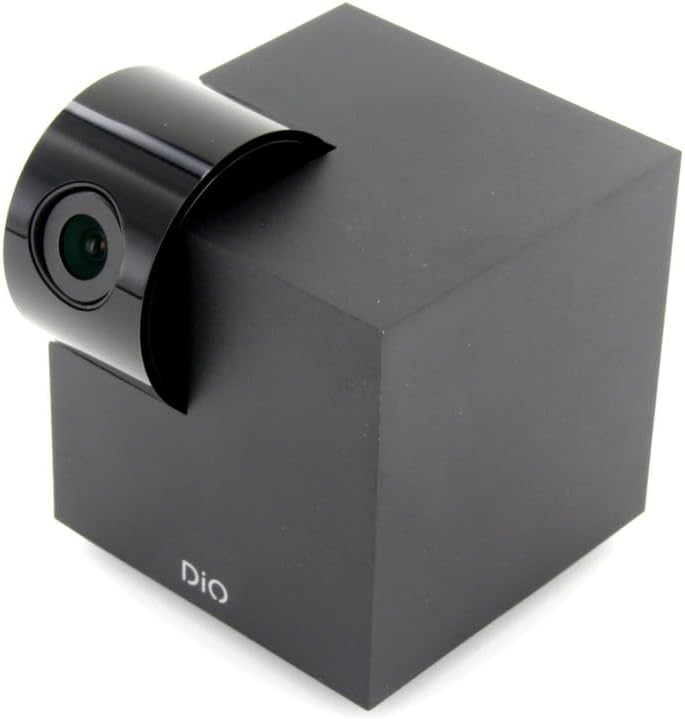
Figure 5.1: The DiOCAMRI01 camera in its standard upright position.

Figure 5.2: Camera placed on a shelf, demonstrating discreet integration.

Figure 5.3: Camera mounted on a ceiling for overhead surveillance.
5.2 Micro SD Card Installation (Optional)
To enable local video recording, insert a Micro SD card (up to 128GB, not included) into the designated slot on the camera. Ensure the camera is powered off before inserting or removing the card.
5.3 Sharing Camera Access
The DiO Cam+ app allows you to easily share access to your camera with family members or trusted friends. Navigate to the camera settings within the app and select the sharing option to invite others to view the live feed and recordings.
6. Cyfarwyddiadau Gweithredu
6.1 Byw View a Rheoli o Bell
Once connected, open the DiO Cam+ app to access the live video feed from your camera. From the live view screen, you can:
- Addasu View Ongl: Use the on-screen controls to remotely rotate the camera lens up to 350° horizontally and 150° vertically to cover all corners of your room.
- Sain Dwyffordd: Tap the microphone icon to speak through the camera's speaker, and listen to audio from the camera's microphone.
- Take Snapshots/Record Video: Capture still images or start manual video recordings directly from the live view.

Figure 6.1: Camera interacting with the DiO Cam+ smartphone application.

Ffigur 6.2: Ochr view of the camera, highlighting the rotating lens mechanism.
6.2 Privacy Features (Geo-Fencing and Manual Standby)
The DiOCAMRI01 camera offers advanced privacy protection:
- Geo-ffensio: Configure geo-fencing in the app to automatically switch the camera to privacy mode when your smartphone enters a predefined home zone. In privacy mode, the camera lens will retract, ensuring no recording or live viewing yn digwydd.
- Manual Standby: You can manually activate or deactivate the camera's standby mode (privacy mode) at any time through the DiO Cam+ app.
- Scheduled Standby: Set a schedule within the app for the camera to automatically enter or exit standby mode at specific times.

Figure 6.3: Camera with lens retracted, indicating privacy mode.
6.3 Motion and Noise Detection
The camera can detect motion and noise within its field of view. When triggered, it will send a notification to your smartphone and can automatically begin recording to the Micro SD card.
- Addasiad Sensitifrwydd: Adjust the detection sensitivity (3 levels) in the app settings to minimize false alarms.
- Dewisiadau Cofnodi: Configure recording duration (1, 3, or 5 minutes per clip) or continuous recording if a Micro SD card is installed.
7. cynnal
- Glanhau: Defnyddiwch frethyn meddal, sych i lanhau corff y camera a'r lens. Peidiwch â defnyddio glanhawyr hylif na deunyddiau sgraffiniol.
- Diweddariadau Meddalwedd: Regularly check the DiO Cam+ app for firmware updates to ensure optimal performance and security. Follow the in-app instructions for any available updates.
- Micro SD Card Management: Yn achlysurol parthedview and manage recordings on your Micro SD card. Format the card through the app if necessary to maintain performance.
8. Datrys Problemau
- Camera All-lein: Ensure the camera is powered on and connected to your Wi-Fi network. Check your Wi-Fi router and internet connection. Try restarting the camera and your router.
- Methu Cysylltu â'r Ap: Verify your Wi-Fi password. Ensure your smartphone is connected to a 2.4GHz Wi-Fi network during initial setup, as the camera may not support 5GHz networks.
- Ansawdd Fideo Gwael: Check your internet connection speed. Ensure the camera lens is clean and free from obstructions. Adjust camera placement for optimal lighting.
- Motion/Noise Detection Not Working: Check the sensitivity settings in the app. Ensure the detection zones are correctly configured.
- No Recording to SD Card: Ensure the Micro SD card is correctly inserted and formatted. Check if the card is full. The camera supports up to 128GB.
- Privacy Mode Not Activating: Verify that geo-fencing is enabled and configured correctly in the app, and that your smartphone's location services are active.
9. manylebau
| Nodwedd | Manyleb |
|---|---|
| Rhif Model | DIOCAM-RI01 |
| Math Mowntio | Wal Mount |
| Datrysiad Dal Fideo | 1080p |
| Lliw | Gwyn |
| Nifer yr Eitemau | 1 |
| Cydrannau wedi'u Cynnwys | DiOCAMRI01 WiFi HD 360° Rotating 1080P 2MP Camera with Geo-Fencing |
| Technoleg Cyfathrebu Di-wifr | Wi-Fi |
| Ffactor Ffurf | Dome (Cube with rotating lens) |
| Datrysiad Fideo Effeithiol | 1080 |
| Viewongl ing | 360 Gradd (llorweddol) |
| Ystod Golwg Nos | 10 o Fesurau |
| Deunydd | Metel |
| Cyftage | 5 folt |
| Wattage | 5 wat |
| Dimensiynau Eitem (L x W x H) | 9.4 x 4.9 x 31.9 centimetr |
| Gwneuthurwr | CHACON |
| Nodweddion Arbennig | Local Recording, Night Vision |
| Batris wedi'u Cynnwys | Nac ydw |
| Batris Angenrheidiol | Nac ydw |
| Defnyddiau a Argymhellir | Motion Detection, Night Vision |
| Technoleg Cysylltedd | Di-wifr |
| Defnydd Dan Do / Awyr Agored | Dan do |
| Dyfeisiau Cydnaws | Ffôn clyfar |
| Ffynhonnell Pwer | Battery Powered (Note: Product specs indicate 'No batteries required', implying external power) |
| Protocol Cysylltedd | Wi-Fi |
| Math o Reolwr | Android |
10. Gwarant a Chefnogaeth
For information regarding warranty coverage, technical support, or service, please refer to the official Dio websafle neu cysylltwch â'ch man prynu. Cadwch eich prawf prynu ar gyfer hawliadau gwarant.
Gwneuthurwr: CHACON