
1. Cynnyrch Drosview
The THINKWARE F70 is a compact Full HD 1080p dash camera designed to record driving footage. It features a 140-degree wide-angle lens and records at 30 frames per second. The device incorporates Wide Dynamic Range (WDR) for improved video quality in varying light conditions. Advanced features include an integrated thermal protection system with a super capacitor and thermal sensor, anti-file corruption technology, and various recording modes.
Mae nodweddion allweddol yn cynnwys:
- Full HD 1080p Recording: Captures video at 1080p resolution and 30 frames per second with a 140-degree wide-angle view.
- Integrated Thermal Protection: Features a built-in thermal sensor and super capacitors for enhanced safety in extreme temperatures.
- gwrth-File Corruption Technology: Designed to prevent data corruption and improve the reliability of the MicroSD card.
- Dulliau Recordio Lluosog: Supports Continuous, Incident, Manual, Motion Detection, and Energy Saving recording modes with Smart File Rheolaeth.
- Optional GPS: An external GPS antenna (sold separately) enables speed and red-light camera alerts, and embeds speed and location data into video recordings.
Video: THINKWARE F70 Dash Cam Product OverviewMae'r fideo hwn yn rhoi trosolwg cyffredinolview of the F70 dash cam's features and capabilities.
2. Cynnwys Pecyn
Gwiriwch fod yr holl eitemau yn bresennol ym mhecynnu'r cynnyrch:
- F70 Main Dash Cam Unit
- Mount with Extra 3M Adhesive Tape
- Cigarette Power Cable
- Adhesive Cable Clips (3ea)
- THINKWARE 8GB MicroSD Card with SD Card Adapter
- Canllaw Cychwyn Cyflym / Gwarant
- CS Information

Image: The THINKWARE F70 dash cam main unit, an 8GB MicroSD card, and the cigarette power cable. These are the primary components included in the standard package.
3. Gosod
Proper installation ensures optimal performance and discreet placement of the dash cam.
3.1 Gosod y Camera Dangosfwrdd
- Glanhewch y ffenestr flaen: Ensure the area on the windshield where the dash cam will be mounted is clean and dry.
- Atodwch y Mownt: Secure the adhesive mount to the windshield, typically behind the rearview mirror for a discreet installation. Press firmly for at least 30 seconds.
- Atodwch y Dash Cam: Slide the F70 main unit onto the mounted bracket until it clicks into place.

Image: The rear of the F70 dash cam showing its connection to the adhesive mount, ready for windshield attachment.
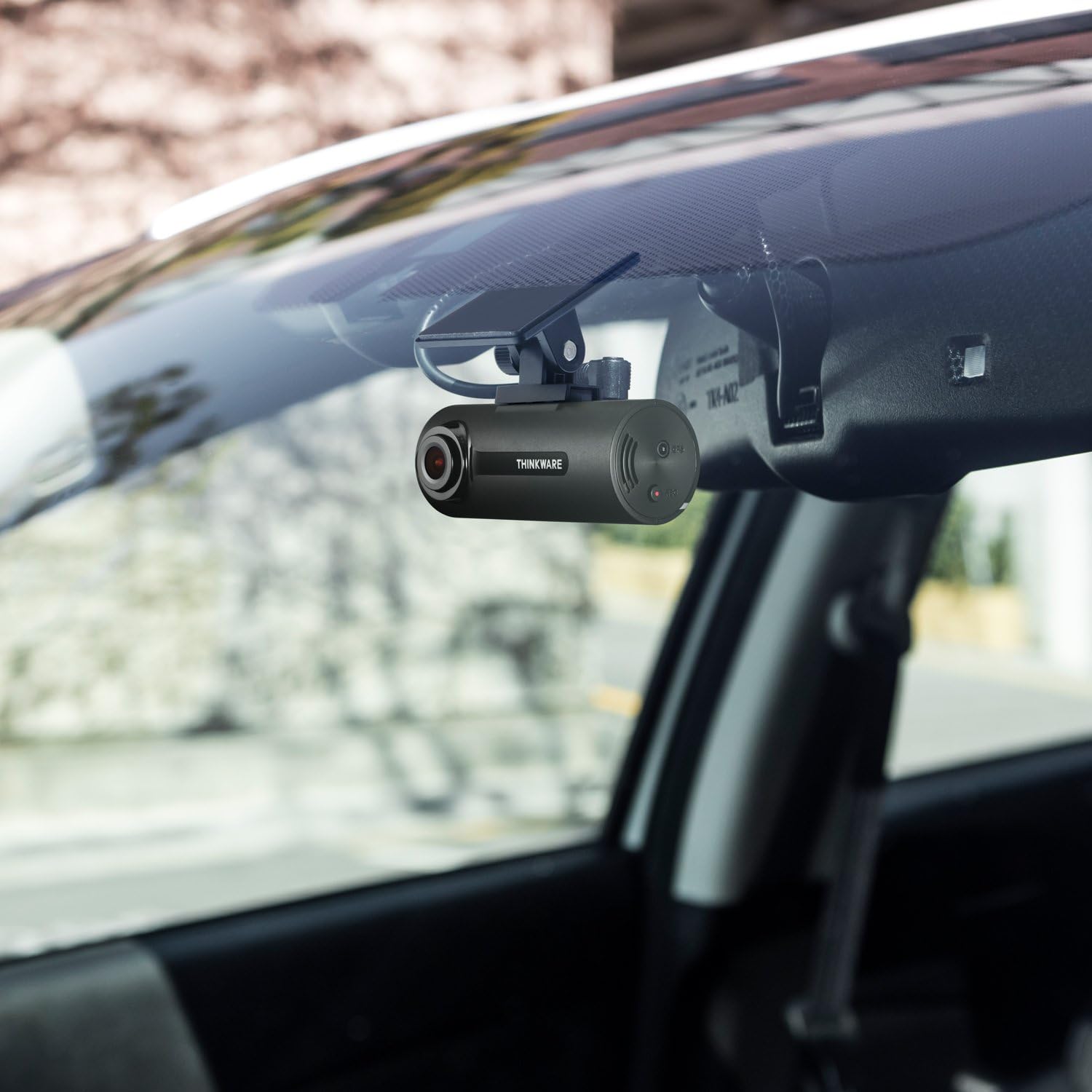
Image: The F70 dash cam mounted on the car's windshield, positioned discreetly behind the rearview drych.
3.2 Cysylltiad Pwer
- Cysylltu cebl pŵer: Insert the small end of the cigarette power cable into the DC-IN port on the dash cam.
- Cebl Llwybr: Carefully route the power cable along the edge of the windshield and dashboard to the vehicle's cigarette lighter socket. Use the provided adhesive cable clips to secure the cable and prevent obstruction.
- Plygiwch i mewn i Bwer: Plug the cigarette lighter adapter into your vehicle's 12V power outlet. The dash cam will power on automatically when the vehicle starts.
3.3 Mewnosod Cerdyn MicroSD
Insert the provided 8GB MicroSD card into the MicroSD card slot on the dash cam. Ensure it is inserted correctly until it clicks into place.
Video: Thinkware F70 Dash Cam Bundle with Hardwiring Cable & GPS. This video demonstrates the components of the F70 bundle, including the hardwiring cable and GPS antenna, which are optional accessories for advanced installation.
4. Operating the Dash Cam
The F70 dash cam is designed for simple, automatic operation once installed.
4.1 Cofnodi Awtomatig
The dash cam automatically begins continuous recording when the vehicle's ignition is turned on. It will stop recording shortly after the ignition is turned off.
4.2 Moddau Recordio
- Cofnodi Parhaus: Standard recording during driving.
- Cofnodi Digwyddiad: Automatically triggered by impacts or sudden braking/acceleration (G-sensor detection). These files are saved separately to prevent overwriting.
- Recordio â Llaw: Press the REC button on the side of the unit to manually save a recording segment.
- Parking Surveillance Mode: Requires the optional hardwiring cable (TWA-SH). This mode includes:
- Canfod Cynnig: Records when motion is detected around the parked vehicle.
- Canfod Effaith: Records when an impact is detected while parked.
- Hepgor Amser: Yn recordio'n barhaus ar gyfradd ffrâm isel i arbed lle storio.
- Arbed Ynni: Reduces power consumption by entering sleep mode and waking up to record impacts.
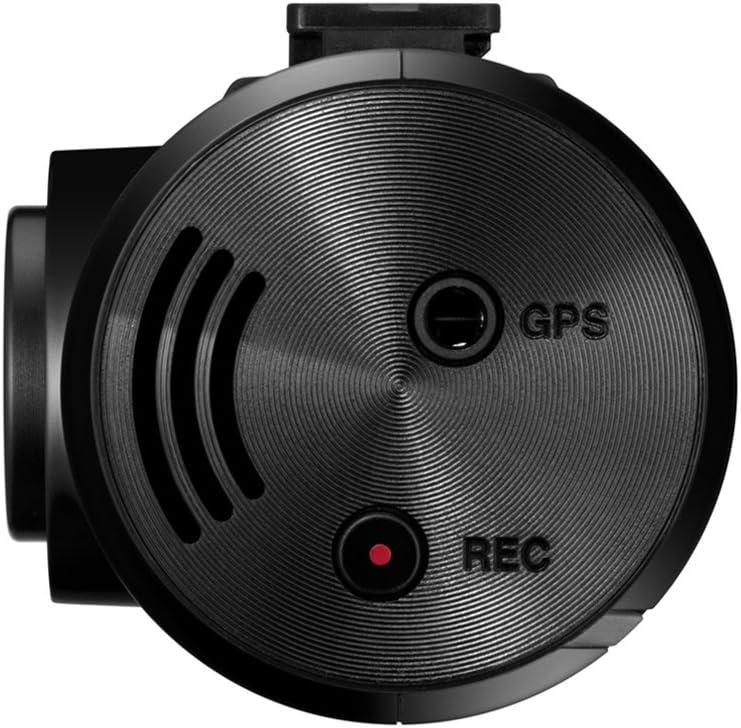
Image: A close-up of the F70 dash cam's side, highlighting the 'REC' button for manual recording and the MicroSD card slot.
5. Memory Card Management
The F70 utilizes a MicroSD card for storing all recorded footage. Regular maintenance of the memory card is crucial for reliable operation.
5.1 Fformatio'r Cerdyn MicroSD
It is recommended to format the MicroSD card regularly (e.g., once a month) to maintain optimal recording performance and prevent potential file errors. This can be done via the PC Viewer software or directly on the device if supported by a long press of the REC button.
5.2 Anti-File Corruption Technology
The F70 incorporates technology to minimize data corruption and enhance the lifespan and reliability of the MicroSD card, even with frequent overwriting.
6. Ategolion Dewisol
Enhance the functionality of your THINKWARE F70 with these optional accessories:
- THINKWARE TWA-SH Hardwiring Cable: Required for enabling Parking Surveillance Mode, which includes motion and impact detection, time lapse, and energy saving features. This cable connects the dash cam directly to your vehicle's fuse box.
- THINKWARE TWA-SGM GPS Antenna: Connects to the dash cam to embed speed, time, and location data into video recordings. It also enables red light camera and speed camera alerts.
- MicroSD Cards (16GB, 32GB, 64GB): For increased storage capacity.
7. manylebau
| Nodwedd | Manylyn |
|---|---|
| Dimensiynau Cynnyrch | 3.07 x 1.4 x 1.24 modfedd |
| Pwysau Eitem | 4.4 owns |
| Rhif Model yr Eitem | TW-F70 |
| Datrysiad Dal Fideo | 1080p |
| Maes Of View | 140 Gradd |
| Nodweddion Arbennig | Automatic Incident Detection, Built-In Microphone, G-Sensor, Motion Sensing |
| Technoleg Cysylltedd | Ategol |
| Math Mowntio | Mount Gludiog |
| Maximum MicroSD Card Capacity | 64GB |
| Lliw | Du |
8. Datrys Problemau
If you encounter issues with your F70 dash cam, refer to the following common solutions:
- Camera Dangosfwrdd Ddim yn Troi Ymlaen: Check the power cable connection to both the dash cam and the vehicle's 12V outlet. Ensure the vehicle's ignition is on.
- Recording Errors/Skipped Frames: Format the MicroSD card regularly. Ensure you are using a high-endurance MicroSD card. Replace the MicroSD card if issues persist.
- Sensitifrwydd G-Synhwyrydd: If incident recordings are triggered too frequently by minor bumps, adjust the G-sensor sensitivity settings using the PC Viewer meddalwedd.
- No GPS Data (if optional GPS antenna is used): Ensure the GPS antenna is securely connected and has a clear view o'r awyr.
9. Gwarant a Chefnogaeth
The THINKWARE F70 Dash Cam comes with a one-year manufacturer's warranty. This warranty covers units sold at authorized retailers only.
For technical support, firmware updates, or additional information, please visit the official THINKWARE website or contact their customer service. Device firmware and GPS data are specific for use within the US only; proper device operation cannot be guaranteed outside of the US.