
Rhagymadrodd
This manual provides comprehensive instructions for the Sharp EN2A27S TV Remote Control. It covers essential information regarding setup, operation, maintenance, and troubleshooting to ensure optimal performance with your compatible Sharp Smart LCD HDTV Television.
Cynnwys Pecyn
- Sharp EN2A27S TV Remote Control
Note: Batteries are not included and must be purchased separately. Two AAA batteries are required.
Gosod
Gosod Batri
- Lleolwch y compartment batri ar gefn y teclyn rheoli o bell.
- Llithrwch glawr adran y batri i lawr i'w agor.
- Mewnosodwch ddau fatri AAA, gan sicrhau bod y terfynellau positif (+) a negatif (-) yn alinio'n gywir â'r marciau y tu mewn i'r adran.
- Llithrwch glawr adran y batri yn ôl i'w le nes ei fod yn clicio'n ddiogel.
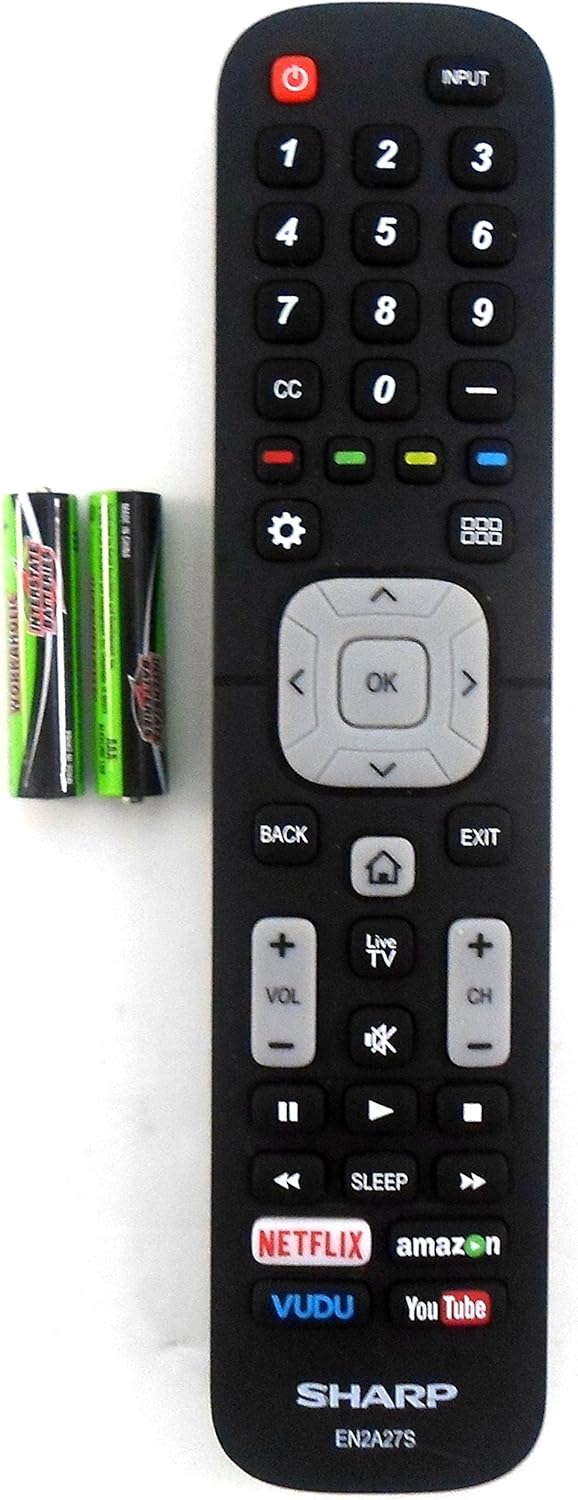
Image: The Sharp EN2A27S remote control shown alongside two AAA batteries, indicating where batteries are inserted for operation.
The remote control is now ready for use with your compatible Sharp TV. No programming is typically required for original Sharp remote controls.
Cyfarwyddiadau Gweithredu
The Sharp EN2A27S remote control provides direct access to various functions of your Sharp Smart LCD HDTV. Familiarize yourself with the button layout for efficient operation.

Delwedd: Manwl view of the lower portion of the Sharp EN2A27S remote, showcasing dedicated buttons for Netflix, Amazon, Vudu, and YouTube.
Swyddogaethau Allweddol:
- Pŵer (Botwm Coch): Yn troi'r teledu ymlaen neu i ffwrdd.
- Mewnbwn: Selects the video input source (e.g., HDMI 1, HDMI 2, AV).
- Botymau Rhif (0-9): Dewiswch sianeli teledu yn uniongyrchol.
- CC (Closed Caption): Toggles closed captions on or off.
- Botymau Lliw (Coch, Gwyrdd, Melyn, Glas): Used for specific functions within menus or applications, as indicated on the TV screen.
- Gosodiadau (Eicon Gear): Yn cyrchu prif ddewislen gosodiadau'r teledu.
- Grid Icon: Opens the TV's smart hub or app launcher.
- Pad Llywio (I Fyny, I Lawr, Chwith, Dde, Iawn): Yn llywio trwy ddewislenni ac yn cadarnhau dewisiadau.
- Yn ôl: Yn dychwelyd i'r sgrin neu'r ddewislen flaenorol.
- Gadael: Yn gadael y ddewislen neu'r rhaglen gyfredol.
- Home (House Icon): Returns to the TV's home screen.
- Teledu byw: Switches to live television broadcast.
- Cyfrol Up / Down (VOL +/-): Adjusts the TV's volume level.
- Mute (Speaker Icon): Mutes or unmutes the TV's audio.
- Sianel i Fyny/I Lawr (CH +/-): Yn newid sianeli teledu.
- Playback Controls (Play, Pause, Fast Forward, Rewind, Stop): Yn rheoli chwarae cyfryngau.
- Cwsg: Sets a timer for the TV to automatically turn off.
- Dedicated App Buttons (Netflix, Amazon, Vudu, YouTube): Provides direct access to these streaming applications.
Cydweddoldeb
The Sharp EN2A27S TV Remote Control is compatible with the following Sharp Smart LCD HDTV Television models:
55H6B, 50H7GB, 50H6B, N6200U, LC-60N6200U, LC-60N7000U, LC-65N7000U, LC-43N7000U, LC-50N7000U, LC-55N7000U, LC-40N5000U, LC-43N5000U, LC-43N6100U, LC-50N5000U, LC-50N6000U, LC-55N620CU, LC-55N5300U, LC-55N6000U, LC-60N5100U, LC-65N5200U, LC-65N6200U, LC-65N9000U, LC-75N620U, LC-75N8000U.
Cynnal a chadw
Glanhau:
- Sychwch y teclyn rheoli o bell gyda lliain meddal, sych.
- Do not use liquid cleaners, sprays, or abrasive materials, as these may damage the remote's surface or internal components.
Gofal Batri:
- Replace batteries when the remote's responsiveness decreases.
- Tynnwch y batris os na fydd y teclyn rheoli o bell yn cael ei ddefnyddio am gyfnod hir er mwyn atal gollyngiadau.
- Gwaredwch batris ail-law yn unol â rheoliadau lleol.
Datrys problemau
Ddim yn Ymateb o Bell:
- Gwirio Batris: Ensure batteries are inserted correctly with the correct polarity (+/-). Replace old or depleted batteries with new ones.
- Llinell Golwg: Ensure there is a clear line of sight between the remote control and the TV's infrared sensor. Obstructions can block the signal.
- Synhwyrydd o Bell: Verify that the TV's remote sensor is not blocked or dirty.
- Pŵer Teledu: Confirm that the TV is powered on and not in standby mode.
Botymau Ddim yn Gweithio:
- Individual Button Test: If only specific buttons are not working, try pressing them firmly. If the issue persists, the remote may require replacement.
- Glanhau o Bell: Dust or debris under buttons can sometimes cause issues. Refer to the cleaning instructions in the Maintenance section.
Manylebau
| Rhif Model | EN2A27S |
| Internal Item Number | 8541714996 |
| Brand | miniog |
| Dimensiynau Cynnyrch | 8 x 2 x 0.5 modfedd |
| Pwysau Eitem | 2.89 owns |
| Lliw | Du |
| Uchafswm Nifer y Dyfeisiau â Chymorth | 1 |
| Dyfeisiau Cydnaws | Teledu |
| Gwneuthurwr | OEM Sharp |
Cefnogaeth
For further assistance or inquiries regarding your Sharp EN2A27S TV Remote Control, please refer to the support resources provided by Sharp or your television's original documentation. You may also visit the official Sharp website for product information and customer service contacts.