
1. Rhagymadrodd a Throsoddview
This manual provides essential information for the proper setup, operation, and maintenance of your LG OLED55E8PUA 55-Inch 4K Ultra HD Smart OLED TV. The LG OLED55E8PUA features a unique glass design, AI ThinQ with Intelligent Voice control, and is powered by the α9 (Alpha9) Intelligent Processor for enhanced picture quality. It supports major 4K high dynamic range formats including Dolby Vision, HDR10, and HLG, and delivers immersive Dolby Atmos audio.
For optimal performance and longevity, please read these instructions carefully before using your television.
2. Beth sydd yn y Bocs
Wrth ddadbacio, gwnewch yn siŵr bod yr holl gydrannau canlynol yn bresennol:
- LG OLED55E8PUA 55-Inch 4K Ultra HD Smart OLED TV
- Rheolaeth Anghysbell Hud
- Cydrannau stondin deledu
- Cebl Pŵer
- Documentation (Quick Start Guide, Regulatory Information)
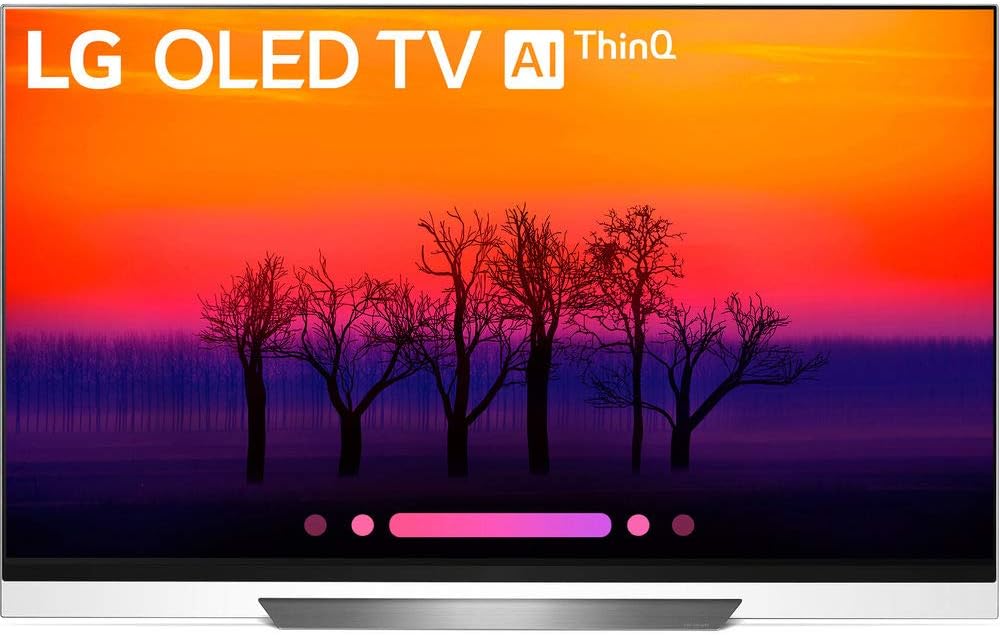
Delwedd: Blaen view of the LG OLED55E8PUA 55-inch TV, showcasing its sleek design and the 'LG OLED TV AI ThinQ' branding on the screen.
3. Cyfarwyddiadau Gosod
3.1 TV Placement and Stand Assembly
Choose a stable, level surface for your TV. Ensure adequate ventilation around the unit. If using the included stand, carefully follow the assembly instructions provided in the separate Quick Start Guide. For wall mounting, consult a professional installer and use a VESA-compliant mount.

Image: Technical diagram illustrating the dimensions of the LG OLED55E8PUA TV, including width, height, and depth, both with and without the stand.
3.2 Cysylltiad Pwer
Connect the power cable securely to the TV's power input and then to a grounded electrical outlet.
3.3 Gosod Cychwynnol a Chysylltedd
- Trowch y teledu ymlaen gan ddefnyddio'r teclyn rheoli o bell.
- Follow the on-screen prompts to select your language, country, and time zone.
- Connect to your home network via Wi-Fi or Ethernet. The TV supports Wi-Fi and has an Ethernet port.
- Perform a channel scan if you are connecting an antenna or cable.
- Pair the LG Magic Remote as instructed on screen to enable voice control and pointer functions.
3.4 Cysylltu Dyfeisiau Allanol
Your TV is equipped with multiple input ports:
- HDMI: 4 ports for devices like Blu-ray players, game consoles, and set-top boxes.
- USB: 3 ports for connecting USB storage devices.
- RF: 1 port for antenna/cable connection.
- Mewnbwn Cyfansawdd: 1 port for older video devices.
- Ethernet: 1 porthladd ar gyfer cysylltiad rhwydwaith gwifrau.
- Optegol: 1 port for digital audio output.
- RS232C (Mini Jack): 1 port for service or control systems.
Ensure Audio Return Channel (ARC) is supported via HDMI for compatible sound systems.
4. Cyfarwyddiadau Gweithredu
4.1 Using the LG Magic Remote
The Magic Remote allows for intuitive control with its pointer, scroll wheel, and voice recognition features. Point the remote at the screen to move the cursor, use the scroll wheel to navigate menus, and press the microphone button to activate voice commands for searching content or controlling smart home devices.
Image: The LG Magic Remote, highlighting its ergonomic design and key buttons for navigation and voice control.
4.2 Smart TV Features (AI ThinQ)
Your LG OLED TV with AI ThinQ integrates the Google Assistant and is compatible with Amazon Alexa devices. Use voice commands through the Magic Remote to:
- Chwiliwch am movies, shows, or information.
- Control compatible smart home devices (e.g., lights, thermostats).
- Check weather, calendar, and other personal information.
4.3 Gosodiadau Llun a Sain
Access the TV's settings menu to customize your viewing and listening experience:
- Modd Llun: Select from various presets (e.g., Standard, Cinema, Game) or customize settings like brightness, contrast, and color. The α9 Intelligent Processor optimizes sharpness, depth, and color accuracy.
- Gosodiadau HDR: The TV supports 4K Cinema HDR, including Dolby Vision, HDR10, and HLG, with advanced tone-mapping for scene-by-scene optimization.
- Modd Sain: Choose audio presets or adjust equalizer settings. Experience immersive sound with built-in Dolby Atmos technology.
4.4 Accessing Apps and LG Channels
From the home screen, you can access a wide range of streaming applications and LG Channels, which offers free live and on-demand content. Navigate using the Magic Remote to browse and select your desired content.
5. Nodweddion Allweddol
- AI ThinQ: Integrated Google Assistant and Amazon Alexa compatibility for voice control of the TV and smart home devices.
- α9 Intelligent Processor: LG's most powerful processor, designed exclusively for OLED TVs, enhancing sharpness, depth, and color accuracy.
- Pylu Lefel Picsel: Each of the 8.3 million self-illuminating pixels can brighten, dim, or turn off completely, achieving perfect black and exceptional detail.
- 4K Cinema HDR: Comprehensive support for Dolby Vision, HDR10, and HLG, with LG's advanced tone-mapping for optimized picture quality.
- Dolby Atmos: Immersive audio technology that creates a three-dimensional sound experience.
- LG OLED Display: Features the latest panels with brighter, self-illuminating pixels for perfect black and intense color, bringing content to life.
- Cysylltedd: Equipped with 4 HDMI ports, 3 USB ports, 1 RF input, 1 Composite input, 1 Ethernet port, 1 Optical output, 1 RS232C (Mini Jack), and Bluetooth 4.2.
6. cynnal
6.1 Glanhau'r Sgrin
Sychwch y sgrin yn ysgafn gyda lliain microffibr meddal, sych. Ar gyfer marciau ystyfnig, sychwch yn ysgafnampgolchwch y brethyn gyda dŵr distyll. Osgowch ddefnyddio cemegau llym, glanhawyr sgraffiniol, neu chwistrellu hylifau'n uniongyrchol ar y sgrin.
6.2 Gofal Cyffredinol
Keep the TV free from dust by regularly wiping the cabinet and vents with a soft, dry cloth. Ensure the ventilation openings are not blocked to prevent overheating. Avoid placing the TV in direct sunlight or near heat sources.
7. Datrys Problemau
Os byddwch chi'n dod ar draws problemau gyda'ch teledu, cyfeiriwch at yr atebion cyffredin canlynol:
- Dim pŵer: Check if the power cable is securely connected to both the TV and the electrical outlet. Ensure the outlet is functioning.
- Dim Llun/Sain: Verify that the correct input source is selected. Check all cable connections to external devices. Try restarting the TV and connected devices.
- Ddim yn Gweithio o Bell: Replace the batteries in the Magic Remote. Ensure there are no obstructions between the remote and the TV. Re-pair the remote if necessary.
- Problemau Cysylltiad Rhwydwaith: Check your router and modem. Restart network equipment. Ensure Wi-Fi password is correct. Try connecting via Ethernet if Wi-Fi is unstable.
- Image Retention/Burn-in: While LG OLED TVs have features to mitigate image retention, prolonged display of static images can cause temporary or permanent effects. Use screen saver functions and avoid leaving static images on screen for extended periods.
For more detailed troubleshooting, consult the full electronic manual available on the LG support websafle.
8. manylebau
| Nodwedd | Manyleb |
|---|---|
| Brand | LG |
| Rhif Model | OLED55E8PUA |
| Maint Sgrin | 55 modfedd |
| Technoleg Arddangos | OLED |
| Datrysiad | 4K Ultra HD (3840 x 2160) |
| Cyfradd Adnewyddu | 120 Hz |
| Nodwedd Arbennig | Sgrin Fflat |
| Technoleg Cysylltedd | HDMI, Wi-Fi, Bluetooth (4.2) |
| Mewnbynnau HDMI | 4 |
| Porthladdoedd USB | 3 |
| Dimensiynau'r Cynnyrch (gyda stondin) | 8.7"D x 48.3"W x 30.9"H |
| Pwysau Eitem | 64.6 Bunt |
9. Gwarant a Chefnogaeth
9.1 Gwybodaeth Gwarant
Warranty terms and conditions for your LG OLED55E8PUA TV are typically provided with the product documentation or can be found on the official LG websafle. Cadwch eich prawf prynu ar gyfer hawliadau gwarant.
9.2 Cefnogaeth i Gwsmeriaid
For technical assistance, service requests, or further inquiries, please visit the official LG support website or contact LG customer service directly. Contact information can usually be found in your product documentation or on the LG websafle.