
1. Rhagymadrodd
Thank you for choosing the Hanwha Techwin Wisenet QND-6020R 2 Megapixel Network Camera. This manual provides essential information for the safe and efficient installation, operation, and maintenance of your new surveillance camera. Please read this manual thoroughly before using the product and retain it for future reference.
2. Gwybodaeth Diogelwch
Dilynwch y rhagofalon diogelwch canlynol i atal anaf neu ddifrod i'r cynnyrch:
- Ffynhonnell Pwer: Use only the specified power adapter (AC/DC) for this device. Incorrect voltage gall achosi tân neu sioc drydan.
- Gosod: Ensure the camera is securely mounted to prevent it from falling. Wall mounting is recommended.
- Dŵr a lleithder: This camera has an IP65 waterproof rating, meaning it is protected against dust and low-pressure water jets. However, avoid submerging the camera in water or exposing it to high-pressure water.
- Glanhau: Datgysylltwch y pŵer cyn glanhau. Defnyddiwch frethyn meddal, sych. Peidiwch â defnyddio glanhawyr hylif na glanhawyr aerosol.
- Tymheredd Gweithredu: Do not operate the camera outside its specified temperature range.
- Gwasanaethu: Peidiwch â cheisio gwasanaethu'r cynnyrch hwn eich hun. Cyfeiriwch yr holl wasanaethu at bersonél gwasanaeth cymwys.
3. Cynnwys Pecyn
Gwiriwch fod yr holl eitemau yn bresennol yn y pecyn:
- Hanwha Techwin Wisenet QND-6020R Network Camera
- Sgriwiau Mowntio ac Angorau
- Canllaw Gosod
- Addasydd Pŵer (AC/DC)
4. Cynnyrch Drosview
The Hanwha Techwin Wisenet QND-6020R is a 2-megapixel network dome camera designed for reliable surveillance. It features advanced video compression (H.264, H.265, Motion JPEG), 1080p video capture, and a 3.60 mm lens. Key features include night vision up to 65.62 ft and motion detection capabilities.
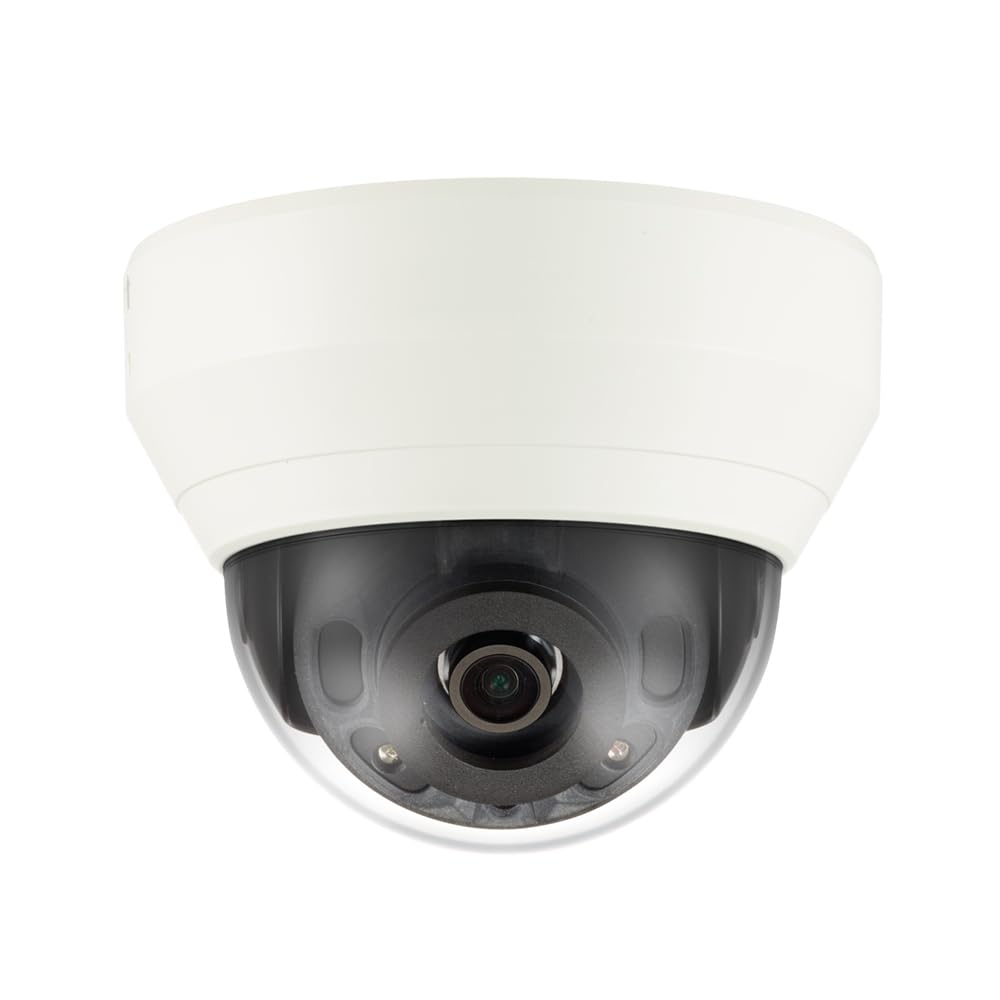
Ffigur 4.1: Blaen view of the Hanwha Techwin Wisenet QND-6020R 2 Megapixel Network Dome Camera. This image shows the compact dome design, suitable for discreet surveillance installations. The camera features a dark housing and a clear dome covering the lens, indicating its robust construction for various environments.
5. Gosod
5.1 Mowntio'r Camera
- Dewiswch leoliad: Choose a suitable wall location for optimal surveillance coverage. Ensure the surface is strong enough to support the camera.
- Tyllau Dril: Use the provided mounting template (if applicable) to mark and drill pilot holes for the mounting screws.
- Sicrhewch y Mynydd: Attach the camera's mounting base to the wall using the screws and anchors.
- Addasu Ongl: Once mounted, adjust the camera's viewing ongl yn ôl yr angen.
5.2 Cysylltiad Pŵer a Rhwydwaith
- Cysylltiad Pwer: Connect the supplied AC/DC power adapter to the camera's power input port and then to a power outlet.
- Cysylltiad Rhwydwaith (Wired): For a wired connection, connect an Ethernet cable from the camera's network port to your network router or switch.
- Network Connection (Wi-Fi): For Wi-Fi connectivity, refer to the camera's initial setup wizard or the dedicated network configuration section in the full digital manual for pairing instructions. The camera supports Wi-Fi connectivity.
5.3 Ffurfweddiad Cychwynnol
After connecting power and network, the camera will boot up. Access the camera's web interface via a browser using its IP address (refer to your network's DHCP client list or use the manufacturer's discovery tool). Follow the on-screen prompts to set up administrator credentials, network settings, and initial video configurations.
6. Cyfarwyddiadau Gweithredu
6.1 Byw View a Chofnodi
Access the camera's live view through its web interface or a compatible network video recorder (NVR) / surveillance software. Configure recording schedules, motion-triggered recording, and continuous recording settings as desired. Video is captured at 1080p resolution in MP4 format.
6.2 Canfod Cynnig
The camera features a motion sensor. Configure motion detection zones and sensitivity settings within the camera's web interface. You can set up alerts (e.g., email notifications) to be triggered upon motion detection.
6.3 Gweledigaeth Nos
The QND-6020R is equipped with night vision capabilities, providing clear images in low-light conditions up to 65.62 ft. The camera automatically switches between day and night modes based on ambient light levels. Night vision is in color.
7. cynnal
7.1 Glanhau
Regularly clean the camera's lens and housing with a soft, dry cloth to ensure optimal image quality. Avoid using harsh chemicals or abrasive materials.
7.2 Diweddariadau Firmware
Periodically check the Hanwha Techwin website for firmware updates. Keeping your camera's firmware up-to-date ensures optimal performance, security, and access to new features.
8. Datrys Problemau
- Dim pŵer: Ensure the power adapter is securely connected to both the camera and a working power outlet. Verify the outlet has power.
- Dim Fideo/All-lein: Check network cable connections (if wired) or Wi-Fi signal strength (if wireless). Verify the camera's IP address and network settings. Restart the camera and your network router.
- Ansawdd Delwedd Gwael: Glanhewch lens y camera. Gwnewch yn siŵr nad oes unrhyw rwystrau ym maes y camera. view. Check lighting conditions.
- Canfod Cynnig Ddim yn Gweithio: Review motion detection zone settings and sensitivity in the camera's web interface. Ensure the feature is enabled.
- Methu Mynediad Web Rhyngwyneb: Verify the camera's IP address. Ensure your computer is on the same network segment as the camera. Try a different web porwr.
9. manylebau
| Nodwedd | Disgrifiad |
|---|---|
| Rhif Model | QND-6020R |
| Brand | HANWHA |
| Defnyddiau a Argymhellir | Gwyliadwriaeth |
| Nodweddion Arbennig | Synhwyrydd Symudiad, Gweledigaeth Nos |
| Ffynhonnell Pwer | AC/DC |
| Protocol Cysylltedd | Wi-Fi |
| Math o Reolwr | H.264 |
| Math Mount | Wal Mount |
| Math Rhybudd | Cynnig yn Unig |
| Graddfa dal dwr | IP65 |
| Technoleg Di-wifr | Wi-Fi |
| Technoleg Synhwyrydd Ffotograffau | CMOS |
| Datrysiad Dal Fideo | 1080p |
| Fformat Dal Fideo | MP4 |
| Gweledigaeth y Nos | Lliw Nos |
| Gwneuthurwr | Hanwha Group |
10. Gwarant a Chefnogaeth
This Hanwha Techwin product is covered by a manufacturer's warranty provided by Hanwha Group. For detailed warranty terms and conditions, please refer to the warranty card included with your product or visit the official Hanwha Techwin website. For technical support, troubleshooting assistance, or service inquiries, please contact Hanwha Techwin customer support through their official channels.


