
1. Rhagymadrodd
Diolch am brynuasing the Capello Play it All Bluetooth Wireless Home Stereo Speaker CI302. This device offers versatile audio playback options including Bluetooth wireless streaming, CD player functionality, and FM digital radio. This manual provides detailed instructions for setup, operation, maintenance, and troubleshooting to ensure optimal performance and longevity of your speaker system.
2. Gwybodaeth Bwysig am Ddiogelwch
- Darllenwch yr holl gyfarwyddiadau cyn gweithredu'r ddyfais.
- Cadwch y llawlyfr hwn er mwyn cyfeirio ato yn y dyfodol.
- Peidiwch â gwneud yr uned yn agored i law neu leithder i atal peryglon tân neu sioc.
- Sicrhewch awyru priodol; peidiwch â rhwystro unrhyw agoriadau awyru.
- Rhowch yr uned ar arwyneb sefydlog, gwastad.
- Defnyddiwch atodiadau/ategolion a nodir gan y gwneuthurwr yn unig.
- Datgysylltwch yr uned yn ystod stormydd mellt neu pan na chaiff ei defnyddio am gyfnodau hir.
- Cyfeirio pob gwasanaeth i bersonél gwasanaeth cymwys.
3. Cynnwys Pecyn
Gwiriwch fod yr holl eitemau yn bresennol:
- Capello Play it All Bluetooth Wireless Home Stereo Speaker CI302
- Rheolaeth Anghysbell
- Addasydd Pwer AC
- Llawlyfr Defnyddiwr (y ddogfen hon)
4. Cynnyrch Drosview
Familiarize yourself with the main components and controls of your Capello Play it All speaker.
Blaen View

Ffigur 4.1: Blaen view of the Capello Play it All speaker, showing the speaker grille, digital clock display, and subtle branding.
Rheolaethau Panel Uchaf

Ffigur 4.2: Top panel of the Capello Play it All speaker, illustrating the CD compartment, 'capello' logo, and various control buttons including PRESET, MODE, PAIRING, PROGRAM/CLOCK SET, SKIP, PLAY/PAUSE, STOP, REPEAT, and VOLUME.
- RAGOSODIAD +/-: Navigate through saved FM radio stations.
- CYFARWYDDIADAU: Switch between Bluetooth, CD, FM Radio, and Line-In modes.
- PARU: Initiate Bluetooth pairing mode.
- PROGRAM/CLOCK SET: Program CD tracks or set the clock.
- SKIP ◀◀ / ▶▶: Skip tracks on CD or adjust FM frequency.
- PLAY/PAUSE ▶▶: Play or pause CD playback.
- STOP ■: Stop CD playback.
- AILDDARPARU: Repeat current track or all tracks on CD.
- VOL +/-: Addasu lefel cyfaint.
- AGOR/CAU: Agor neu gau'r adran CD.
- SAFON: Power on/off the unit.
Rear Panel (Typical)
The rear panel typically includes the AC power input, FM antenna connection, and Line-In jack.
5. Gosod
5.1 Cysylltiad Pwer
- Connect the AC power adapter to the DC IN jack on the rear of the speaker.
- Plygiwch ben arall yr addasydd i mewn i allfa wal safonol.
- The unit will enter standby mode, and the digital clock display will illuminate.
5.2 Gosod Antena FM
For optimal FM radio reception, extend the FM wire antenna fully and position it for the best signal. Avoid placing it near other electronic devices that may cause interference.
5.3 Gosod y Cloc
- Yn y modd segur, gwasgwch a dal y PROGRAM/CLOCK SET botwm.
- The hour digits will begin to flash. Use the SKIP ◀◀ / ▶▶ botymau i addasu'r awr.
- Gwasgwch PROGRAM/CLOCK SET eto i gadarnhau'r awr.
- Bydd y digidau munud yn fflachio. Defnyddiwch y SKIP ◀◀ / ▶▶ botymau i addasu'r cofnodion.
- Gwasgwch PROGRAM/CLOCK SET one last time to save the setting.
6. Cyfarwyddiadau Gweithredu
6.1 Pŵer Ymlaen/Diffodd a Dewis Modd
- Gwasgwch y SAFON button on the unit or the remote control to turn the speaker on or off.
- Gwasgwch y MODD button repeatedly to cycle through available modes: Bluetooth, CD, FM Radio, and Line-In.
6.2 Bluetooth Wireless Streaming
- Trowch y siaradwr ymlaen a dewiswch y modd Bluetooth gan ddefnyddio'r MODD button. The display will show 'BT' and flash, indicating it's in pairing mode.
- On your Bluetooth-enabled device (smartphone, tablet, computer), enable Bluetooth and search for available devices.
- Select 'Capello CI302' (or similar) from the list of devices.
- Once paired, the speaker will emit a confirmation tone, and 'BT' on the display will stop flashing.
- You can now play audio from your device through the speaker. Use your device or the speaker's controls for volume and track navigation.
6.3 Chwarae CD
- Gwasgwch y AGOR/CAU button to open the CD compartment.
- Carefully place an audio CD (CD, CD-R/-RW) with the label side facing up into the compartment.
- Close the CD compartment. The unit will read the disc.
- If not already in CD mode, press the MODD botwm i ddewis modd CD.
- Gwasgwch y CHWARAE/SEIBIANT botwm i ddechrau chwarae.
- Defnydd SKIP ◀◀ / ▶▶ to skip tracks, AROS ■ i stopio, a AILDDANGOS to cycle through repeat options.
6.4 FM Digital Radio
- Gwasgwch y MODD button to select FM radio mode. The current frequency will be displayed.
- Sgan Auto: Pwyswch a dal y CHWARAE/SEIBIANT button to automatically scan and save available FM stations as presets.
- Tiwnio â Llaw: Gwasgwch SKIP ◀◀ / ▶▶ briefly to fine-tune the frequency. Press and hold to scan for the next strong station.
- Accessing Presets: Defnyddiwch y RAGOSODIAD +/- botymau i gylchu trwy orsafoedd sydd wedi'u cadw.
6.5 Line-In Operation
- Connect an audio cable (not included) from the headphone jack or line-out of an external audio device to the LLINELL I MEWN jack on the speaker.
- Gwasgwch y MODD button to select Line-In mode.
- Play audio from your connected device. Volume can be controlled via the speaker or the external device.
6.6 Codi Tâl USB
The speaker features a USB port for charging compatible devices (e.g., smartphones, tablets). Connect your device's USB charging cable (not included) to the USB port on the speaker. The speaker does not need to be in a specific mode for USB charging to function.
6.7 Defnydd Rheoli o Bell
The included remote control provides convenient access to all functions. Ensure the remote has working batteries and is pointed towards the front of the speaker.
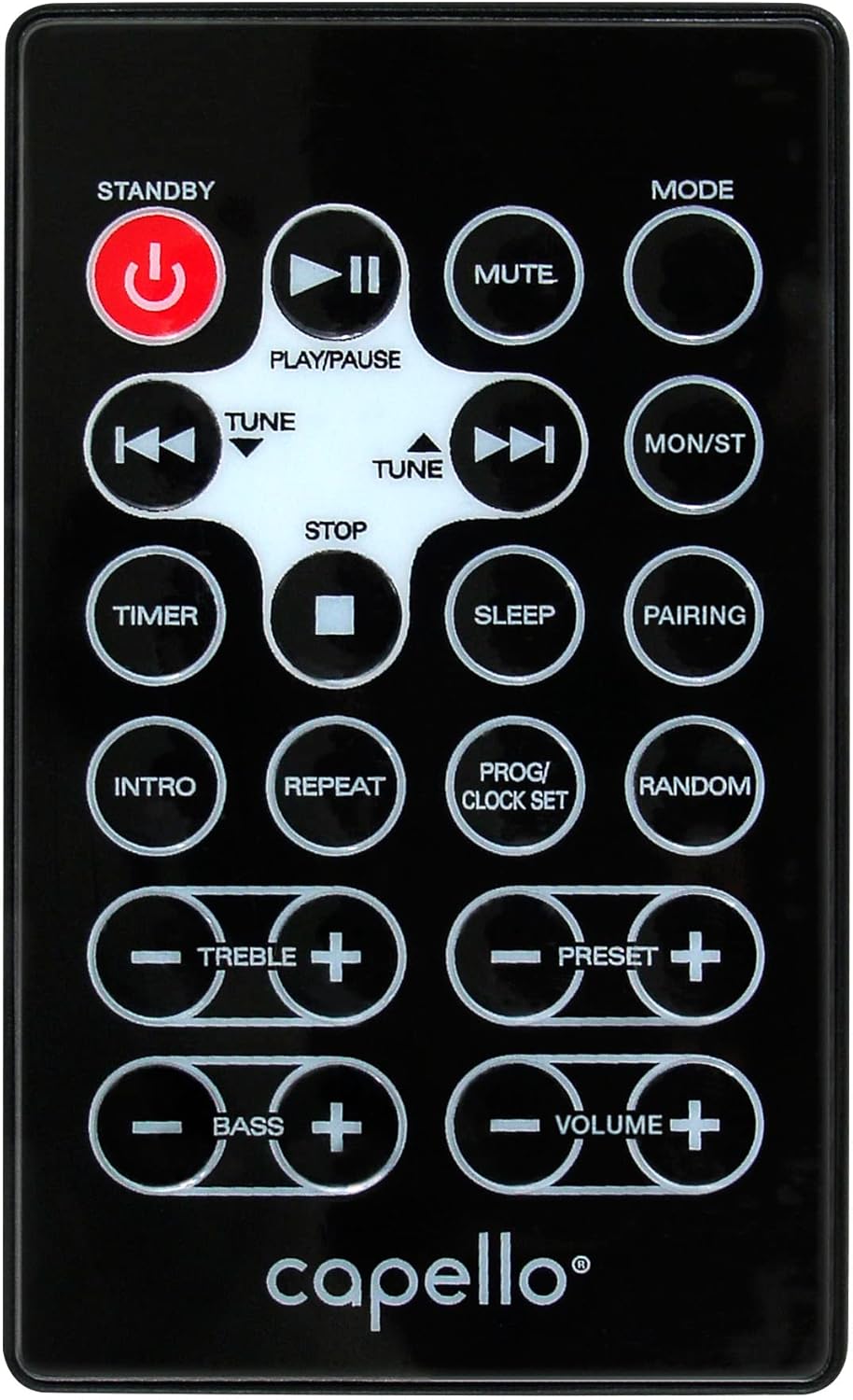
Ffigur 6.1: Layout of the remote control for the Capello Play it All speaker, showing buttons for Standby, Play/Pause, Mute, Mode, Skip/Tune, Stop, Timer, Sleep, Pairing, Intro, Repeat, Program/Clock Set, Random, Treble, Bass, and Volume controls.
- SAFON: Pwer ymlaen / i ffwrdd.
- CHWARAE/Saib: Chwarae neu oedi sain.
- MUTE: Tewi neu ddad-dewi sain.
- CYFARWYDDIADAU: Cycle through input modes.
- SKIP/TUNE ◀◀ / ▶▶: Skip tracks or tune radio frequency.
- AROS: Stopiwch chwarae.
- AMSERYDD: Gosod amserydd cysgu.
- CYSGU: Activate sleep function.
- PARU: Dechreuwch baru Bluetooth.
- CYFLWYNIAD: Play the first few seconds of each CD track.
- AILDDARPARU: Repeat current track or all tracks.
- PROG/CLOCK SET: Program CD tracks or set clock.
- AR HIG: Play CD tracks in random order.
- TREBLE +/-: Adjust treble levels.
- BASS +/-: Adjust bass levels.
- CYFROL +/-: Addasu cyfaint cyffredinol.
7. cynnal
7.1 Glanhau
- Tynnwch y plwg bob amser o'r uned o'r allfa bŵer cyn glanhau.
- Defnyddiwch frethyn meddal, sych i sychu'r arwynebau allanol.
- Peidiwch â defnyddio glanhawyr sgraffiniol, cwyrau na thoddyddion gan y gallant niweidio'r gorffeniad.
- Ar gyfer lens y CD, defnyddiwch ddisg glanhawr lens CD arbenigol.
7.2 Storio
If storing the unit for an extended period, unplug it from the power source and store it in a cool, dry place away from direct sunlight and extreme temperatures.
8. Datrys Problemau
| Problem | Achos Posibl | Ateb |
|---|---|---|
| Dim pŵer | Llinyn pŵer heb ei gysylltu; allfa heb ei gweithio. | Ensure power cord is securely plugged in; try a different outlet. |
| Dim sain | Volume too low; incorrect mode selected; external device muted. | Increase volume; select correct input mode; check external device volume/mute. |
| Mae CD yn hepgor neu ddim yn chwarae | Dirty or scratched CD; CD inserted incorrectly; dirty CD lens. | Clean or replace CD; insert CD label-side up; use a CD lens cleaner. |
| Mae paru Bluetooth yn methu | Device too far; Bluetooth not enabled on device; speaker not in pairing mode. | Move device closer; enable Bluetooth; ensure speaker is in BT pairing mode. |
| Derbyniad FM gwael | Antena heb ei hymestyn; ymyrraeth. | Fully extend and reposition FM antenna; move away from other electronics. |
| Rheolaeth bell ddim yn gweithio | Batteries depleted; obstruction; not pointed at sensor. | Replace batteries; remove obstructions; point remote directly at the unit. |
9. manylebau
| Nodwedd | Manyleb |
|---|---|
| Brand | Capello |
| Rhif Model | CI302 |
| Technoleg Cysylltedd | Bluetooth |
| Math o Siaradwr | Stereo |
| Modd Allbwn Sain | Stereo |
| Fformatau Sain â Chymorth | CD, MP3 |
| Pŵer Allbwn Enwol Siaradwyr | 10 Wat |
| Siaradwyr Uchafswm Pŵer Allbwn | 10 Wat |
| Ffurfweddiad Sianel Sain Amgylchynol y Siaradwr | 2.0 |
| Math Ffynhonnell Pŵer | Trydan Corded |
| Dyfeisiau Cydnaws | Gliniadur, Ffôn Clyfar, Tabled |
| Nodweddion Arbennig | Digital Display, Portable, USB Port |
| Math o Ddeunydd | Plastig |
| Math Mowntio | Pen Bwrdd |
| Pwysau Eitem | 2.57 Cilogram |
| Dimensiynau Pecyn | 38.3 x 24.2 x 18.5 cm |
| Batris wedi'u Cynnwys | Nac ydw |
| Batris Angenrheidiol | Nac ydw |
10. Gwarant a Chefnogaeth
This product is covered by a limited warranty. Please refer to the warranty card included in your package for specific terms and conditions. For technical support or customer service inquiries, please contact Capello customer support through their official websafle neu'r wybodaeth gyswllt a ddarparwyd gyda'ch dogfennaeth prynu.