
1. Cynnyrch Drosview
The BTMETER BT-7200B is a True RMS 6000 counts digital clamp multimeter designed for accurate and reliable electrical measurements. It offers a wide range of functions suitable for both professional and DIY applications.
Mae nodweddion allweddol yn cynnwys:
- AC / DC Clamp Ampdileu: Measures AC/DC current up to 400A without breaking the circuit.
- AC / DC Voltage: Mesurau cyftage hyd at 600V.
- Resistance, Capacitance, and Frequency: Comprehensive testing capabilities for various electrical components.
- Cyf. Di-gyswllttagCanfod e (NCV): Enhances safety by detecting live wires without physical contact.
- Continuity and Diode Test: Essential for circuit diagnostics.
- Mesur Tymheredd: Supports temperature readings in Celsius and Fahrenheit using the included thermocouple probe.
- Arddangosfa LCD Backlit Fawr: Yn sicrhau darllenadwyedd clir mewn amrywiol amodau goleuo.
- Logio Data: Records measurements for later analysis, including maximum, minimum, and average values.
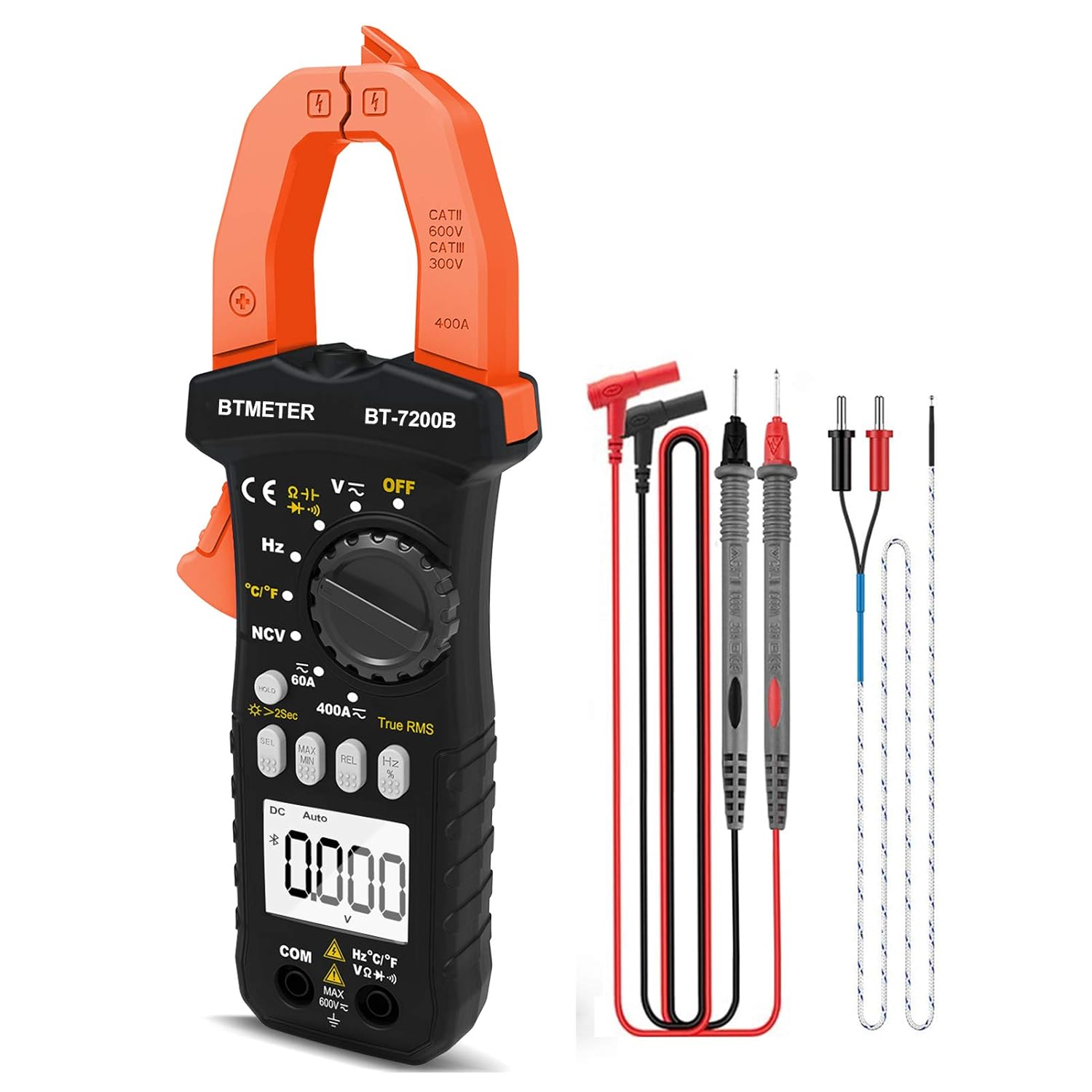
Figure 1.1: BTMETER BT-7200B Clamp Multimeter and included accessories.

Ffigur 1.2: Drosoddview of the BTMETER BT-7200B's main features.
2. Gosod
2.1 Cynnwys Pecyn
Before first use, verify all items are present in the package:
- BTMETER BT-7200B Clamp Amlfesurydd
- Gwifrau Prawf (Coch a Du)
- Thermocouple Temperature Probe
- Sgriwdreifer
- 1.5V AAA Batteries (x2)
- Achos Cario
- User Manual (PDF - external document)
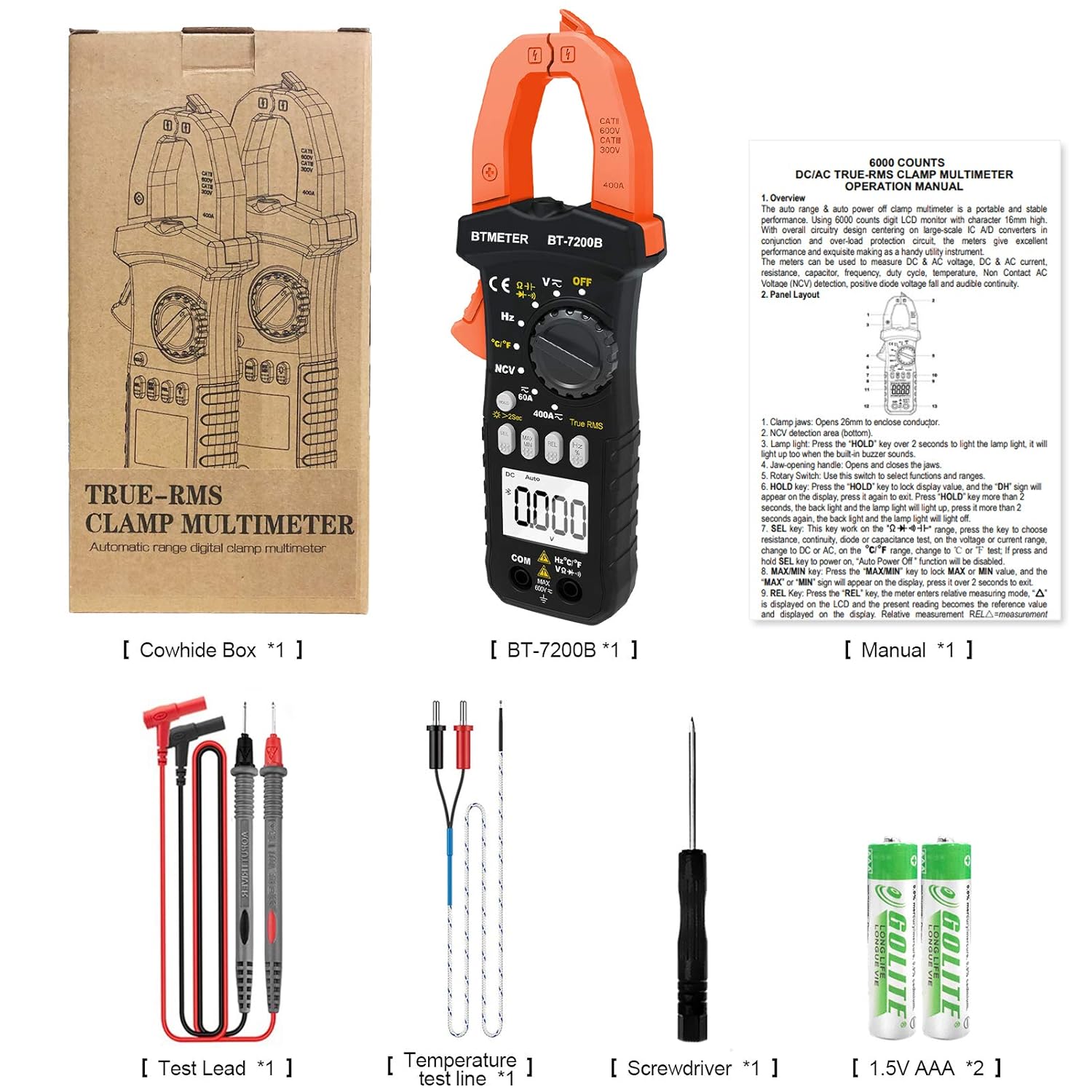
Figure 2.1: All items included in the BTMETER BT-7200B package.
2.2 Gosod Batri
The BT-7200B requires two AAA batteries for operation. To install or replace batteries:
- Lleolwch y compartment batri ar gefn y multimedr.
- Use the provided screwdriver to loosen the screw securing the battery cover.
- Tynnwch y clawr batri.
- Mewnosodwch ddau fatri AAA, gan sicrhau'r polaredd cywir (+/-).
- Amnewid gorchudd y batri a thynhau'r sgriw.
2.3 Cysylltu Gwifrau Profi a Chwiliedyddion
For most measurements, connect the test leads to the appropriate input jacks:
- Cysylltwch y du test lead to the COM jac (cyffredin).
- Cysylltwch y coch test lead to the VΩHzCapTemp jack for voltage, resistance, frequency, capacitance, and temperature measurements.
For temperature measurements, plug the thermocouple probe into the VΩHzCapTemp and COM jacks, observing polarity if applicable.
3. Cyfarwyddiadau Gweithredu
3.1 Pŵer Ymlaen/Diffodd a Dewis Modd
Turn the rotary dial to the desired measurement function to power on the multimeter. Select 'OFF' to power off the device. The multimeter features an auto shut-down function to conserve battery life.
3.2 Mesuriadau Sylfaenol
The BT-7200B offers various measurement modes:
- AC / DC Voltage & Cyfredol: Dewiswch y cyfrol briodoltage (V) or current (A) range on the rotary dial. Use the 'SEL' button to switch between AC and DC modes if necessary.
- Gwrthiant: Select the Ohm (Ω) symbol on the dial.
- Swniwr Parhad: Select the continuity symbol (speaker icon) on the dial. An audible beep indicates continuity.
- Prawf Deuod: Select the diode symbol on the dial.
- Cynhwysedd: Select the capacitance (Cap) symbol on the dial.
- Amlder/Cylch Dyletswydd: Select the Hz symbol on the dial.
- Tymheredd: Select the °C/°F symbol on the dial and connect the thermocouple probe.

Figure 3.1: Visual guide to common measurement types.
3.3 Clamp-on Amperage Measurement
I fesur cerrynt AC/DC gan ddefnyddio'r clamp:
- Dewiswch y 60A or 400A range on the rotary dial.
- Press the 'SEL' button to choose between AC or DC current measurement.
- Press the 'REL' button to zero the display before clamping, especially for DC current measurements, to ensure accuracy.
- Pwysig: For accurate current measurement, clamp o gwmpas only one live wire (e.g., the hot wire). Clamping around both hot and neutral wires will result in a zero reading as the currents cancel each other out. An AC Line Splitter can be used for convenience without stripping wires.

Figure 3.2: Correct method for clamp-on live wire measurement.

Ffigur 3.3: Clamp multimeter in action on an electrical panel.
3.4 Cyfrol Di-gyswllttage (NCV) Canfod
Mae'r swyddogaeth NCV yn caniatáu canfod cyfaint AC yn ddiogeltage without direct contact:
- Dewiswch y NCV mode on the rotary dial.
- Place the top of the clamp jaw near the wire or outlet you wish to test.
- The multimeter will beep and the NCV indicator light will illuminate if AC voltage yn cael ei ganfod.
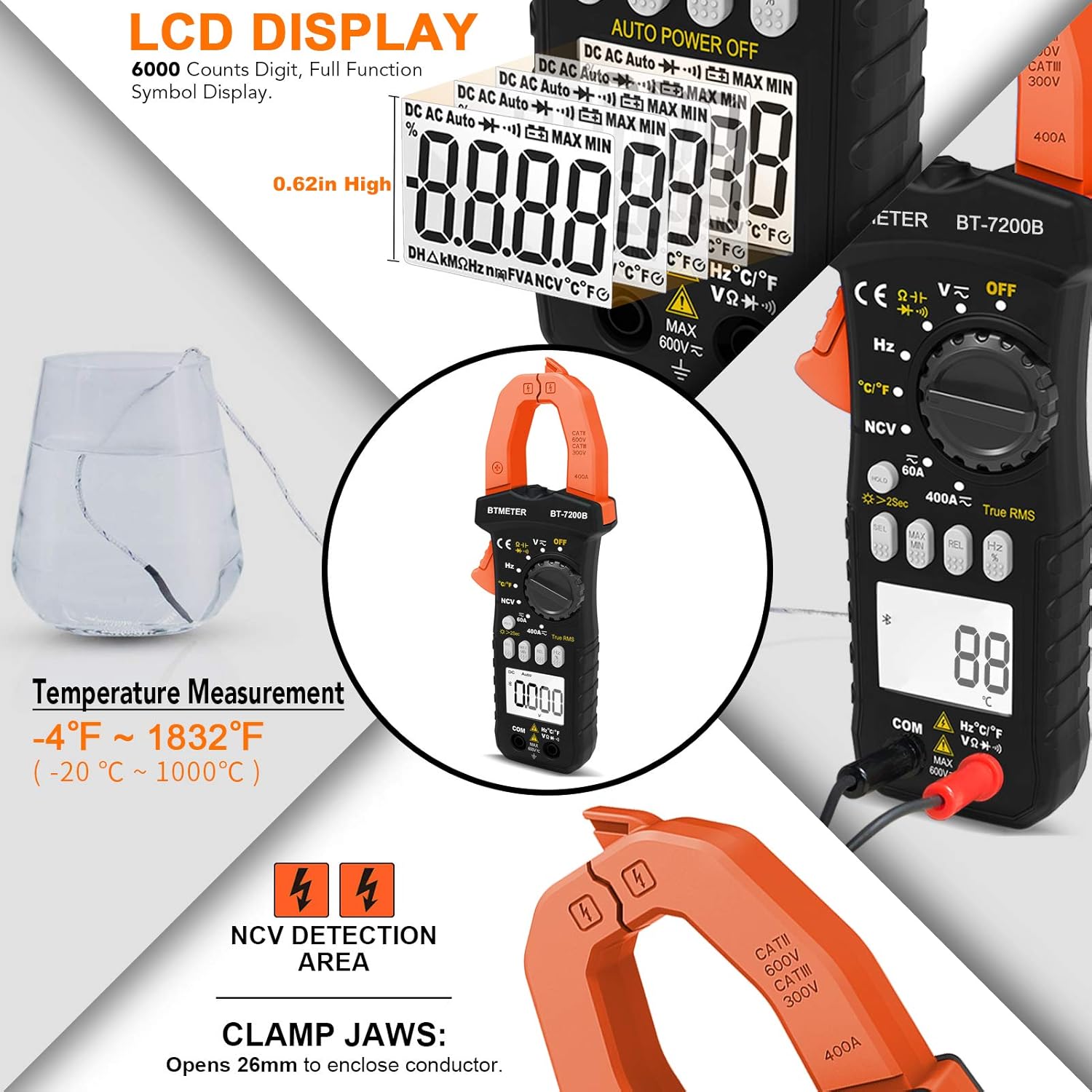
Figure 3.4: Non-Contact Voltage detection feature.

Figure 3.5: NCV detection on an electrical outlet.
3.5 Display and Backlight
The BT-7200B features a large 6000 counts digital display with a backlight for visibility in dimly lit areas. To activate the backlight, press and hold the 'HOLD' button for 2 seconds. A quick press of the 'HOLD' button will freeze the current reading on the display.

Ffigur 3.6: Manwl view of the LCD display and its features.

Figure 3.7: Multimeter display with backlight activated.
4. cynnal
4.1 Glanhau
Regularly clean the multimeter with a dry, soft cloth. For the temperature probe, especially after use in corrosive environments like saltwater, ensure to wash off any residue to prevent damage.
4.2 Batri Newydd
When the battery indicator appears on the display, replace the two AAA batteries as described in Section 2.2. The auto power-off feature helps extend battery life, but regular checks are recommended.
5. Datrys Problemau
Mae'r adran hon yn mynd i'r afael â phroblemau cyffredin ac yn cynnig atebion.
- Sero Amp Darllen: If measuring current with the clamp and the reading is zero, ensure you are clamping around only one live wire. Clamping around both hot and neutral wires will result in cancellation and a zero reading. Use the 'REL' button to zero the meter before measurement.
- Inaccurate Frequency Measurement: Some users have reported that the frequency measurement may be less precise compared to other functions. For critical frequency measurements, consider cross-referencing with a dedicated frequency meter.
- Darlleniadau ysbeidiol: If you suspect intermittent electrical issues, utilize the data logging feature of the multimeter. The companion app (if applicable to your model) can record data over time, allowing you to review charts and identify fluctuations or drops in readings.
- Arddangos Heb Goleuo: If the display backlight is not working, ensure batteries are properly installed and have sufficient charge. Press and hold the 'HOLD' button for 2 seconds to toggle the backlight.
6. manylebau
The following table outlines the technical specifications of the BTMETER BT-7200B Clamp Amlmedr:
| Paramedr | Gwerth |
|---|---|
| Rhif Model | BT-7200B |
| Dimensiynau Cynnyrch | 7.6 x 3.4 x 1.5 modfedd |
| Pwysau Eitem | 13.51 owns |
| Ffynhonnell Pwer | Wedi'i bweru gan fatri (2 x AAA) |
| Cyfrif Arddangos | 6000 o Gyfrifon |
| Ystod Cyfredol AC/DC | Hyd at 400A |
| AC / DC Voltage Ystod | Hyd at 600V |
| Amrediad Tymheredd | -4 i 1832°F (-20 i 1000°C) |
| Jaw Caliber Size | 1.77 modfedd (45mm) |
| Gwir RMS | Oes |
| Canfod NCV | Oes |
| Auto Shut-down | Oes |

Figure 6.1: BTMETER BT-7200B in an electrical measurement scenario.
7. Gwarant a Chefnogaeth
For detailed warranty information and customer support, please refer to the documentation included with your product packaging or visit the official BTMETER website. Additional protection plans may be available for purchase separately.
A comprehensive User Manual in PDF format is available for download: Llawlyfr Defnyddiwr (PDF)


