

Rhagymadrodd
This manual provides comprehensive instructions for the setup, operation, and maintenance of your MASTER & DYNAMIC MH40 Over-Ear Headphones. Please read this guide thoroughly to ensure optimal performance and longevity of your device.
Cynnwys Pecyn
Gwiriwch fod yr holl eitemau yn bresennol yn eich pecyn:
- MASTER & DYNAMIC MH40 Over-Ear Headphones
- Audio Cable with In-line Microphone
- USB-C Charging Cable (for Bluetooth functionality)
- Canvas Carrying Case
- Llawlyfr Defnyddiwr (y ddogfen hon)
Cynnyrch Drosview
The MH40 headphones are designed with premium materials for durability and comfort. Key components include:
- Forged Aluminum Body: Provides a robust and lightweight structure.
- Lambskin Ear Pads: Offer comfort for extended listening sessions.
- Custom Neodymium Drivers: Engineered for superior sound reproduction.
- Band pen addasadwy: Yn sicrhau ffit diogel a chyfforddus.
- Ceblau datodadwy: For both audio and charging.

Figure 1: MASTER & DYNAMIC MH40 Over-Ear Headphones, showcasing black metal and camo leather design.
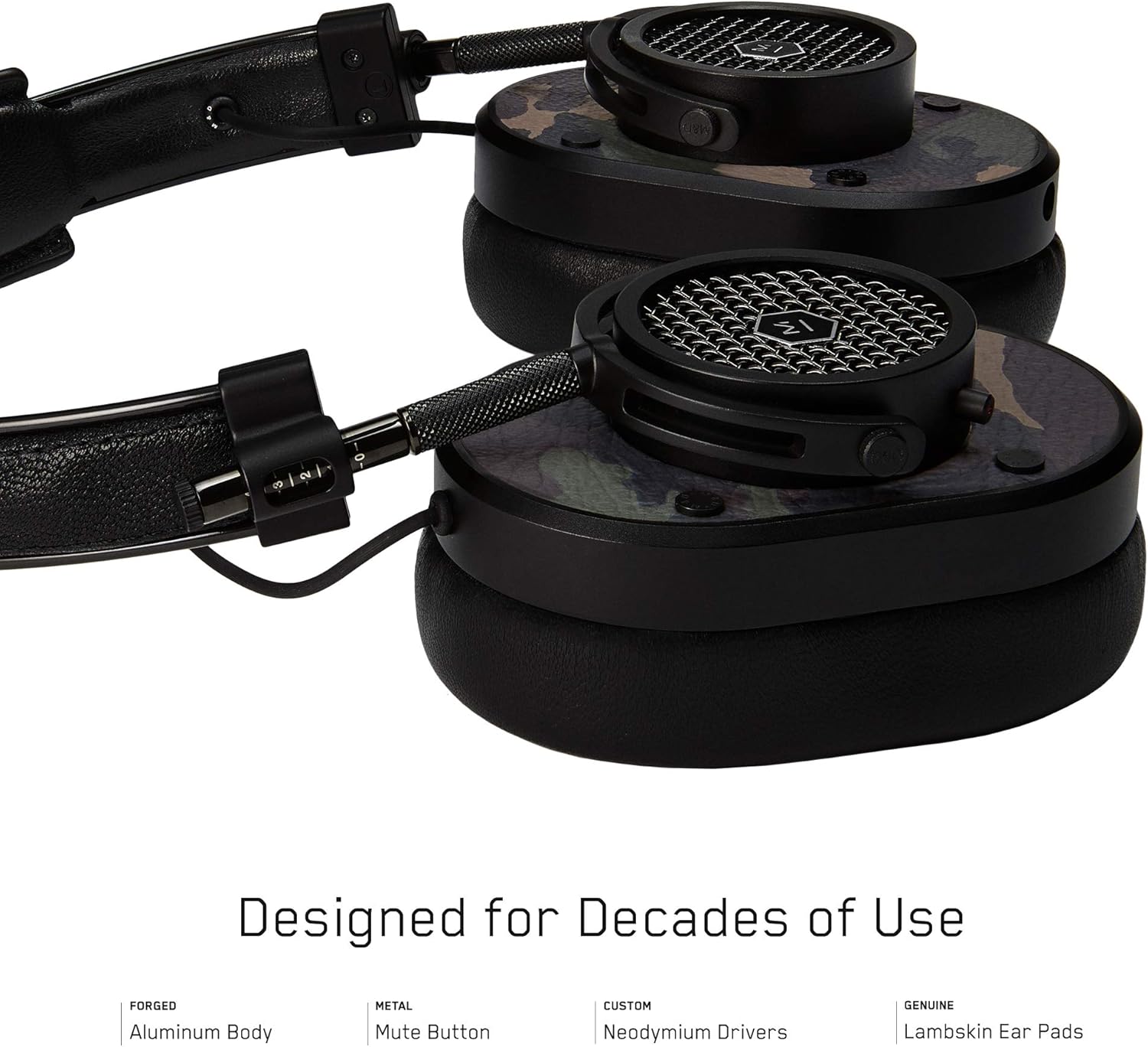
Ffigur 2: Manwl view of the MH40 headphone earcups, highlighting the lambskin ear pads, metal grille, and adjustable hinge.
Gosod
1. Addasu'r Ffit
- Gently extend or retract the metal arms on each side of the headband to adjust the height.
- Position the earcups so they fully cover your ears, ensuring a comfortable and secure fit.
- The lambskin ear pads are designed to conform to your head shape for optimal sound isolation and comfort.
2. Cysylltiad Wired
- Locate the audio input port on the left earcup.
- Insert one end of the provided audio cable into the headphone's audio input.
- Connect the other end of the audio cable to your audio device's 3.5mm jack.
3. Bluetooth Pairing (Wireless Connection)
The MH40 headphones support Bluetooth connectivity for wireless audio. Ensure the headphones are charged before pairing.
- Pŵer Ymlaen: Press and hold the power button (usually located on one of the earcups) until the indicator light flashes.
- Modd Pâr: Continue holding the power button or press a dedicated Bluetooth pairing button (if available) until the indicator light flashes rapidly, indicating pairing mode.
- Cysylltiad Dyfais: On your audio device (smartphone, tablet, computer), navigate to Bluetooth settings and select "MH40" from the list of available devices.
- Cadarnhad: The indicator light on the headphones will turn solid blue or green once successfully paired.
Note: The Bluetooth range is approximately 10 meters (33 feet).
Cyfarwyddiadau Gweithredu
Chwarae Sain
- Chwarae/Seibiant: Press the multi-function button (often on the in-line microphone or earcup) once.
- Trac Nesaf: Press the multi-function button twice rapidly.
- Trac Blaenorol: Press the multi-function button three times rapidly.
- Rheoli cyfaint: Use the volume up/down buttons on the in-line microphone or dedicated earcup controls.
Rheoli Galwadau
- Ateb / Diwedd Galwad: Pwyswch y botwm aml-swyddogaeth unwaith.
- Gwrthod Galwad: Pwyswch a daliwch y botwm amlswyddogaethol am tua 2 eiliad.
- Tewi meicroffon: The MH40 features a dedicated mute button, typically located on the earcup or in-line control. Press to mute/unmute during a call.
Cynnal a chadw
- Glanhau: Use a soft, dry cloth to wipe the headphones. For leather parts, use a specialized leather cleaner if necessary. Avoid harsh chemicals or abrasive materials.
- Storio: When not in use, store the headphones in the provided canvas carrying case to protect them from dust and scratches.
- Gofal Cebl: Handle cables gently. Avoid sharp bends or excessive pulling to prevent damage. The retractable cable feature helps manage cable length.
- Padiau Clust: The magnetic ear pads are removable for cleaning or replacement. Gently pull them off and reattach by aligning the magnets.
Datrys problemau
Dim Sain
- Gwifrog: Ensure the audio cable is securely connected to both the headphones and the audio source. Check the volume level on both the headphones and the source device.
- Bluetooth: Verify that the headphones are powered on and successfully paired with your device. Check the volume levels. Try re-pairing the headphones.
Methu paru drwy Bluetooth
- Ensure the headphones are in pairing mode (rapidly flashing indicator light).
- Gwnewch yn siŵr bod Bluetooth wedi'i alluogi ar eich dyfais ffynhonnell.
- Symudwch y clustffonau'n agosach at eich dyfais (o fewn 10 metr).
- Turn off and on both the headphones and your device, then attempt pairing again.
- If previously paired, try "forgetting" the device on your source and re-pairing.
Meicroffon Ddim yn Gweithio
- Check if the microphone mute button is engaged.
- Ensure the audio cable with the in-line microphone is fully inserted.
- Verify microphone input settings on your connected device.
Manylebau
| Enw Model | MH40 |
| Technoleg Cysylltedd | Wired, Bluetooth |
| Technoleg Cyfathrebu Di-wifr | Bluetooth |
| Deunydd | Copper (components), Lambskin (ear pads), Canvas (carrying case) |
| Math o Reoli | Call Control, Touch |
| Nodwedd cebl | Ôl-dynadwy |
| Pwysau Eitem | 0.36 cilogram (12.7 owns) |
| Math Gyrrwr Sain | Gyrrwr Dynamig |
| Amrediad Bluetooth | 10 o Fesurau |
| Siâp clustffon | Gor-glust |
| Nodweddion Arbennig | Carrying case included, Lightweight, Microphone Included, Noise Isolation, Wireless |
| Dimensiynau Cynnyrch | 7.48 x 6.3 x 2.76 modfedd |
| Gwneuthurwr | MASTER & DYNAMIC |
| Lliw | Black Metal / Camo Leather |
| Lleoliad Clust | Dros Glust |
| Rheoli Sŵn | Unigedd Sain |
| UPC | 858901007099 |
Gwarant a Chefnogaeth
For detailed warranty information and customer support, please refer to the official MASTER & DYNAMIC websafle neu cysylltwch â'u gwasanaeth cwsmeriaid yn uniongyrchol. Cadwch eich prawf prynu ar gyfer hawliadau gwarant.
Cymorth Ar-lein: www.masterdynamic.com/support (Example link, actual link may vary)