
Rhagymadrodd
Thank you for choosing the KROM Kernel TKL Mechanical Gaming Keyboard. This compact, tenkeyless (TKL) keyboard is designed for gaming enthusiasts, offering a responsive mechanical experience with customizable RGB backlighting and a Spanish layout. This manual provides detailed instructions for setup, operation, maintenance, and troubleshooting to ensure optimal performance and longevity of your device.
Cynnyrch Drosview
Nodweddion Allweddol
- Switsys Mecanyddol: Durable and responsive mechanical key switches for precise input.
- Tenkeyless (TKL) Design: Compact form factor without a numeric keypad, ideal for saving desk space and improving mouse movement.
- Goleuo Cefn RGB: Customizable LED backlighting with various effects and colors.
- Ymarferoldeb Macro: Assign macro functions to any key for personalized commands.
- Allweddi Amlgyfrwng: Dedicated or function-layer multimedia controls for convenience.
- Gwrth-Ghosting: Ensures all key presses are registered accurately, even during intense gaming sessions.
- Adeiladu Gwydn: Wedi'i adeiladu gyda deunyddiau o safon ar gyfer perfformiad hirhoedlog.
- Spanish Layout: Designed with a QWERTY Spanish key layout.
Cynnwys Pecyn
- KROM Kernel TKL Mechanical Gaming Keyboard
- Cebl USB (ynghlwm)
- Llawlyfr Defnyddiwr (y ddogfen hon)
- (Note: Additional accessories may vary by region or specific product bundle.)
Delwedd 1.1: KROM Kernel TKL Mechanical Gaming Keyboard packaging, showing the front and back of the box with product features and design.

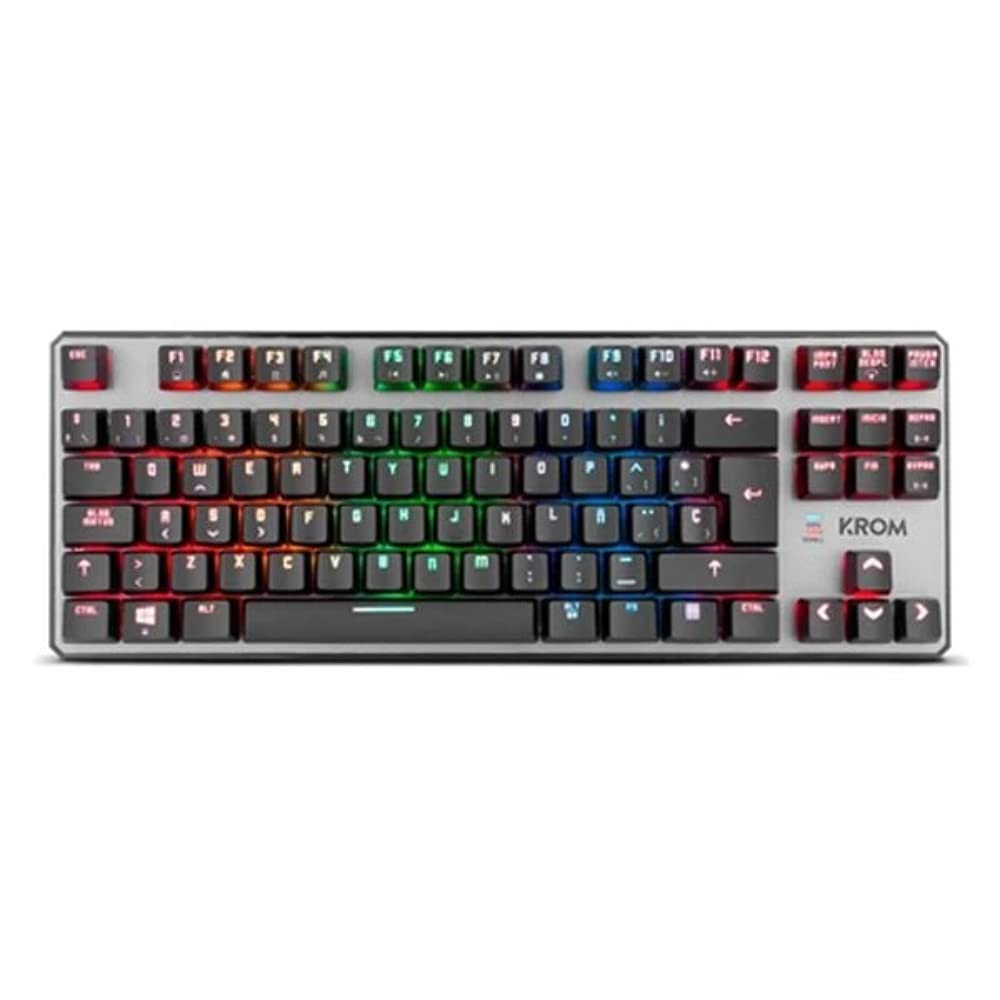
Delwedd 1.2: O'r brig i lawr view of the KROM Kernel TKL keyboard, showcasing its compact design and vibrant RGB backlighting across all keys.
Gosod
- Dadbacio'r bysellfwrdd: Carefully remove the KROM Kernel TKL keyboard from its packaging.
- Cysylltu â Chyfrifiadur: Locate the USB cable attached to the keyboard. Plug the USB connector into an available USB port on your computer (PC or laptop).
- Gosod Gyrrwr: The keyboard is plug-and-play. Your operating system (Windows 7/8/8.1/10) should automatically detect and install the necessary drivers. This process may take a few moments.
- Gwirio Ymarferoldeb: Once drivers are installed, test the keyboard by typing in a text editor or browser to ensure all keys are responsive.
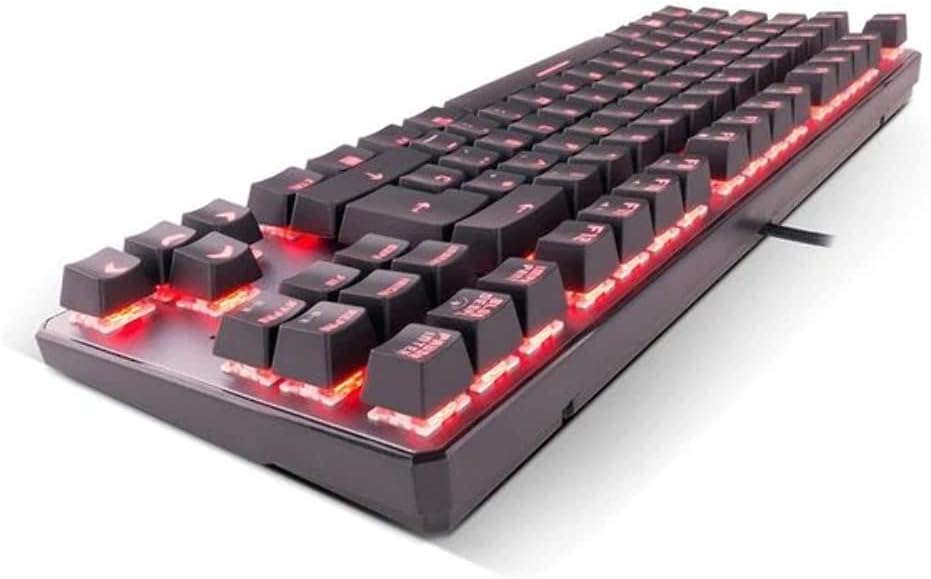
Delwedd 2.1: Ochr view of the KROM Kernel TKL keyboard, highlighting the red backlighting visible beneath the keycaps and the compact profile.
Cyfarwyddiadau Gweithredu
Rheoli Goleuadau Cefn RGB
The KROM Kernel TKL keyboard features dynamic RGB backlighting. Use the following key combinations to adjust lighting effects:
- Fn + [Key]: Specific function keys (often F1-F12 or dedicated keys) are used in combination with the Function (Fn) key to cycle through lighting modes, adjust brightness, change speed, or select colors. Refer to the keyboard's keycap legends for specific symbols indicating lighting controls.
- Addasiad Disgleirdeb: Typically Fn + Up/Down arrow keys or dedicated brightness keys.
- Effect Speed: Often Fn + Left/Right arrow keys to increase or decrease the speed of dynamic lighting effects.
- Newid Modd: Cycle through various pre-set RGB lighting modes (e.g., wave, ripple, breathing, static color) using a dedicated Fn combination.

Delwedd 3.1: The KROM Kernel TKL keyboard displaying its full RGB spectrum backlighting, enhancing the visual appeal during use.
Macro Function Assignment
The keyboard supports on-the-fly macro recording or software-based macro assignment. For on-the-fly recording:
- Initiate Recording: Press a specific Macro Record key (often labeled "MR" or a Fn combination).
- Select Target Key: Press the key you wish to assign the macro to.
- Record Sequence: Type the sequence of keys you want to record as the macro.
- Diwedd Recordiad: Press the Macro Record key again to save the macro.
Note: Detailed macro programming instructions may require specific software or refer to the full digital manual available on the KROM websafle.
Allweddi Amlgyfrwng a Byrlwybr
Access multimedia functions and system shortcuts using the Fn key in combination with the F-keys (F1-F12) or other designated keys. Common functions include:
- Rheoli cyfaint: Fn + Fx (e.g., F1-F3 for Mute, Volume Down, Volume Up).
- Chwarae Cyfryngau: Fn + Fx (e.g., F5-F8 for Play/Pause, Stop, Previous Track, Next Track).
- Llwybrau Byr Cymwysiadau: Fn + Fx (e.g., F9-F12 for Email, Web Browser, My Computer, Calculator).

Delwedd 3.2: A close-up view of the KROM Kernel TKL keyboard's keycaps, clearly showing the Spanish QWERTY layout and secondary functions.
Cynnal a chadw
Mae cynnal a chadw priodol yn sicrhau hirhoedledd a pherfformiad eich bysellfwrdd.
- Glanhau:
- Datgysylltwch y bysellfwrdd o'ch cyfrifiadur cyn glanhau.
- Defnyddiwch gan o aer cywasgedig i gael gwared ar lwch a malurion o rhwng y capiau bysellau.
- Sychwch gapiau'r bysellau ac wyneb y bysellfwrdd gyda lliain meddal, ychydig yn feddalamp, brethyn di-flwff. Osgowch leithder gormodol.
- Peidiwch â defnyddio cemegau llym, glanhawyr sgraffiniol, na thoddyddion.
- Storio: Store the keyboard in a dry, cool place away from direct sunlight and extreme temperatures.
- Trin: Avoid dropping the keyboard or exposing it to liquids. Do not attempt to disassemble the keyboard as this may void the warranty.

Delwedd 4.1: Pro ochrfile view of the KROM Kernel TKL keyboard, illustrating its ergonomic tilt and compact design.

Delwedd 4.2: A close-up image showing a mechanical switch on the KROM Kernel TKL keyboard, highlighting its design and potential for easy replacement (CIY Technology).

Delwedd 4.3: The CIY Technology logo, indicating that the keyboard features hot-swappable mechanical switches for easy customization or replacement.
Datrys problemau
If you encounter issues with your KROM Kernel TKL keyboard, refer to the following common solutions:
- Bysellfwrdd Ddim yn Ymateb:
- Gwnewch yn siŵr bod y cebl USB wedi'i blygio'n ddiogel i'r bysellfwrdd a'r cyfrifiadur.
- Rhowch gynnig ar blygio'r bysellfwrdd i borthladd USB gwahanol ar eich cyfrifiadur.
- Ailgychwyn eich cyfrifiadur.
- Profwch y bysellfwrdd ar gyfrifiadur arall i benderfynu a yw'r broblem gyda'r bysellfwrdd neu'ch system.
- Goleuadau Cefn Ddim yn Gweithio neu'n Anghywir:
- Check if the backlighting is turned off. Use the Fn key combinations to cycle through lighting modes and adjust brightness.
- Ensure no software conflicts are interfering with the lighting controls.
- Allweddi Ddim yn Cofrestru neu'n Teipio Dwbl:
- Clean the affected keys with compressed air to remove any debris.
- If the keyboard uses hot-swappable switches (like the "CIY Technology" mentioned in an image), try gently removing and re-inserting the switch for the problematic key.
- Ensure your operating system drivers are up to date.
- Macro Functions Not Working:
- Review the macro programming steps to ensure correct recording.
- Check if any software is overriding the keyboard's native macro functions.
Manylebau
| Nodwedd | Manylyn |
|---|---|
| Rhif Model | NXKROMKRNLTKL |
| Math Bysellfwrdd | Mecanyddol |
| Gosodiad | Spanish QWERTY (TKL) |
| Backlighting | RGB LED |
| Cysylltiad | Wired USB (Gold-plated) |
| Hyd Cebl | 180 cm (Braided) |
| Llu Actio | 60 +/- 10 g |
| Cyfradd Bleidleisio | 1000 Hz |
| Cof Mewnol | 64 KB (for macros/profiles) |
| Defnydd Presennol | 100-260mA |
| Cyftage | 5.0 +/- 0.25 V |
| Dimensiynau (L x W x H) | 361 x 133.5 x 22.5 mm |
| Pwysau | 950 +/- 30 g |
| Cydweddoldeb | Windows 7/8/8.1/10 |
| Nodweddion Arbennig | Macro function assignment, Multimedia keys, Shortcut keys |
Gwarant a Chefnogaeth
KROM products are designed for reliability and performance. This product comes with a standard manufacturer's warranty. For specific warranty terms and conditions, please refer to the warranty card included with your product or visit the official KROM websafle.
For technical support, driver downloads, or further assistance, please visit the KROM official support page or contact their customer service. Contact information can typically be found on the KROM websafle neu becynnu cynnyrch.
KROM Official Websafle: www.kromgaming.com (Nodyn: Mae hwn yn ddaliwr lle URL, please verify the actual KROM support websafle.)