
1. Rhagymadrodd
This manual provides instructions for the installation, operation, and maintenance of the Nexxt Solutions Naxos800 8-Port Fast Ethernet Network Switch. The Naxos800 is an unmanaged compact desktop switch designed for small office/home office (SOHO) environments, student dormitories, and small enterprises, offering reliable network connectivity.
2. Nodweddion Allweddol
- 8 Fast Ethernet Ports: Provides 8 UTP/STP 10/100Mbps ports with auto MDI/MDIX.
- Plygiwch a Chwarae: Simple setup requiring no software configuration.
- Switsh heb ei reoli: Operates without requiring complex management interfaces.
- Store-and-Forward Technology: Ensures efficient packet transmission.
- Dysgu Cyfeiriad MAC: Supports auto-learning and aging with a built-in 1000 MAC address table.
- Dyluniad Compact: Suitable for desktop or wall mounting.
- Arbed Ynni: Dyluniad defnydd pŵer isel.
- Rheoli llif: Full duplex and half duplex back pressure flow control.
- Gwydnwch: Integrated lightning protection and a sturdy metal case.
- Gweithrediad Tawel: Fanless design for silent performance.
3. Cynnwys Pecyn
Gwiriwch fod eich pecyn yn cynnwys yr eitemau canlynol:
- One (1) Nexxt Solutions Naxos800 8-Port Fast Ethernet Switch
- Un (1) Addasydd Pŵer

Image: The Nexxt Solutions Naxos800 switch, its power adapter, and product packaging.
4. Cynnyrch Drosview

Delwedd: Blaen view of the Naxos800 switch, showing the Nexxt logo and eight green LED indicators for port activity.
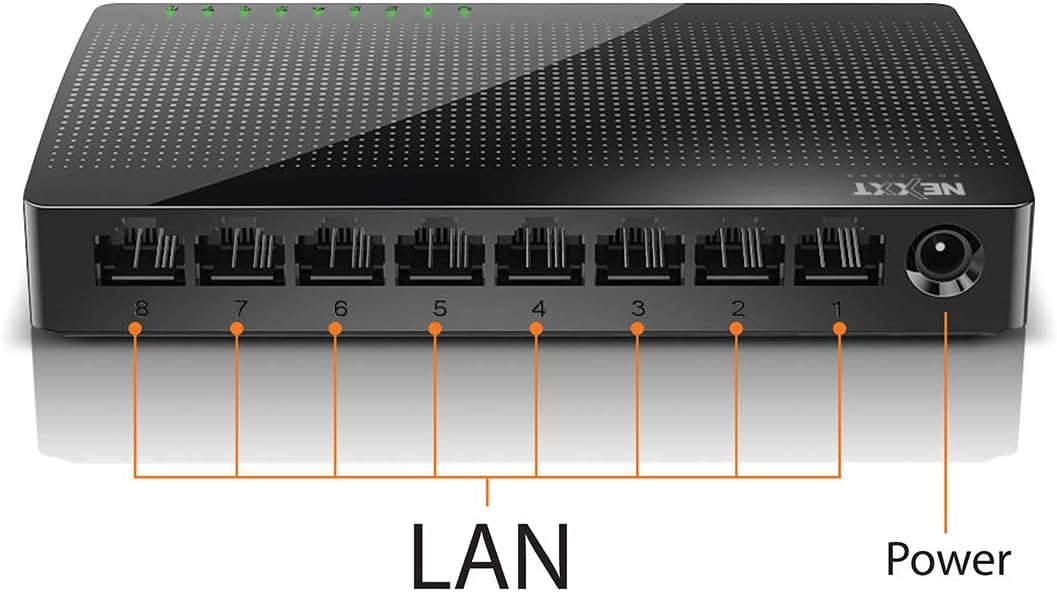
Delwedd: Cefn view of the Naxos800 switch, highlighting the eight LAN ports (numbered 1-8) and the power input port.
Dangosyddion LED
The front panel features LED indicators for each port, providing visual status:
- LED Gwyrdd (Solid): Indicates a stable link connection.
- LED Gwyrdd (Fflachio): Indicates data activity on the corresponding port.
- Diffodd LED: No link or connection detected.
5. Gosod a Gosod
The Naxos800 switch is designed for simple plug-and-play installation. No software or complex configuration is required.
- Lleoliad: Place the switch on a stable, flat surface or mount it on a wall using appropriate hardware (not included). Ensure adequate ventilation around the device.
- Cysylltu â Power: Connect the provided power adapter to the power input port on the switch and then plug the adapter into a standard electrical outlet. The power LED (if present, or the port LEDs will light up) should illuminate.
- Cysylltu â'r Rhwydwaith:
- Connect your router or modem to any of the 8 LAN ports on the Naxos800 switch using an Ethernet cable.
- Connect your network devices (e.g., computers, gaming consoles, IP cameras, Smart TVs, printers) to the remaining LAN ports on the Naxos800 switch using an Ethernet cable.
- Gwirio Cysylltiad: Once devices are connected, the corresponding LED indicators on the switch's front panel should light up green (solid for link, flashing for activity).

Image: Diagram illustrating a typical network setup. An ADSL or Cable Modem connects to a Router, which then connects to the Naxos800 switch. Various devices like laptops, media players, game consoles, IP cameras, Smart TVs, and IP phones are connected to the Naxos800 switch.
6. Gweithredu'r Switsh
The Naxos800 is an unmanaged switch, meaning it operates automatically without user intervention once connected. It functions as an internet splitter, expanding the number of wired network connections available from your router or modem.
- Canfod Cyflymder Awtomatig: Each port automatically detects the speed of the connected device (10Mbps or 100Mbps) and adjusts accordingly.
- MDI/MDIX Awtomatig: Eliminates the need for crossover cables; the switch automatically detects and corrects for straight-through or crossover cable types.
- Trosglwyddo Data: Data packets are forwarded between connected devices at Fast Ethernet speeds. The store-and-forward architecture ensures data integrity.
7. cynnal
The Naxos800 switch requires minimal maintenance.
- Glanhau: Defnyddiwch frethyn meddal, sych i lanhau tu allan y switsh. Peidiwch â defnyddio glanhawyr hylif na glanhawyr aerosol.
- Awyru: Sicrhewch nad yw'r agoriadau awyru wedi'u rhwystro i atal gorboethi.
- Cylchred Pwer: If the device experiences issues, a simple power cycle (unplugging and replugging the power adapter) can often resolve minor problems.
8. Datrys Problemau
If you encounter issues with your Naxos800 switch, refer to the following common problems and solutions:
| Problem | Achos Posibl | Ateb |
|---|---|---|
| Dim pŵer / Dyfais ddim yn troi ymlaen. | Addasydd pŵer heb ei gysylltu neu'n ddiffygiol; allfa bŵer ddim yn gweithio. | Gwnewch yn siŵr bod yr addasydd pŵer wedi'i gysylltu'n ddiogel â'r switsh ac allfa drydan sy'n gweithio. Rhowch gynnig ar allfa wahanol. |
| Dim golau cyswllt ar gyfer dyfais gysylltiedig. | Ethernet cable faulty or improperly connected; device not powered on or faulty; incorrect port. |
|
| Cyflymderau rhwydwaith araf. | Network congestion; faulty cable; device limitations. |
|
9. manylebau
| Priodoledd | Gwerth |
|---|---|
| Rhif Model | ASIDT084U3 |
| Porthladdoedd | 8 x 10/100Mbps Fast Ethernet (UTP/STP) |
| Lled Band Backplane | 1.6 Gbps |
| Tabl Cyfeiriad MAC | 1000 ymgais |
| Rheoli Mynediad | CDMA |
| Rheoli Llif | Full duplex and half duplex back pressure |
| Dimensiynau (L x W x H) | 12.4 x 5.9 x 2.3 cm |
| Pwysau | 140 g |
| Mewnbwn Pwer | Addasydd Pŵer Allanol (wedi'i gynnwys) |
Sylwer: Gall manylebau newid heb rybudd ymlaen llaw.
10. Gwarant a Chefnogaeth
The Nexxt Solutions Naxos800 8-Port Fast Ethernet Network Switch comes with a Gwarant cyfyngedig 5 mlynedd. For warranty claims or technical support, please contact Nexxt Solutions customer service. Refer to the official Nexxt Solutions website for the most current support information and contact details.
Nexxt Solutions is a US company committed to quality and customer service.

