
1. Rhagymadrodd
This manual provides essential instructions for the safe and efficient operation of your USCutter MH721 Vinyl Cutter and 15" x 15" Digital Heat Press Machine. Please read this manual thoroughly before initial use to ensure proper setup, operation, and maintenance. This combination system is designed for creating custom signs, decals, and heat transfers for apparel.

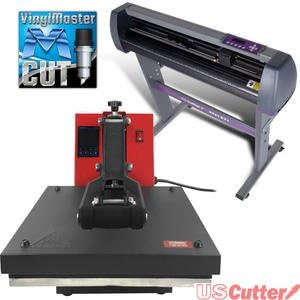
Image 1.1: The USCutter MH721 Vinyl Cutter and 15" x 15" Heat Press Machine.
2. Gwybodaeth Diogelwch
Dilynwch y rhagofalon diogelwch canlynol bob amser i atal anaf neu ddifrod i'r offer:
- Diogelwch Trydanol: Ensure the power supply matches the machine's requirements. Do not operate with damaged cords or plugs.
- Heat Press Safety: The heat platen reaches high temperatures. Avoid direct contact with the heated surfaces during operation and cool-down. Use caution when opening and closing the press.
- Vinyl Cutter Safety: The cutting blade is extremely sharp. Handle with care and keep fingers clear of the blade area during operation and blade changes.
- Awyru: Operate both machines in a well-ventilated area.
- Goruchwyliaeth: Do not leave the machines unattended during operation.
- Plant ac Anifeiliaid Anwes: Cadwch blant ac anifeiliaid anwes i ffwrdd o'r offer.
3. Cynnwys Pecyn
Gwiriwch fod yr holl eitemau yn bresennol yn y pecyn:
- USCutter MH721 Vinyl Cutter
- 15" x 15" Digital Heat Press Machine
- VinylMaster Cut Software (License Card/CD)
- Cordiau Pŵer
- Cebl USB
- Blade Holder and Blades
- Deiliad Pen
- Stand for Vinyl Cutter (assembly required)
- Llawlyfrau Defnyddwyr
Delwedd 3.1: Enghraifftample of product packaging and VinylMaster software card.
4. Cyfarwyddiadau Gosod
4.1. Vinyl Cutter Setup
- Dadbacio: Carefully remove the vinyl cutter and all components from the packaging.
- Cynulliad Stondin: Assemble the stand according to the separate assembly guide provided with the cutter. Ensure all screws are tightened securely.
- Lleoliad: Place the assembled cutter on a stable, level surface.
- Gosod Blade: Insert a blade into the blade holder, ensuring it is properly seated. Adjust the blade depth so only the tip is exposed. Insert the blade holder into the cutter carriage.
- Pwer Cysylltu: Plug the power cord into the cutter and then into a grounded electrical outlet.
- Cysylltu â Chyfrifiadur: Connect the cutter to your computer using the provided USB cable. Alternatively, a serial (COM) port connection can be used.

Image 4.1: The control panel of the USCutter MH721 Vinyl Cutter.

Image 4.2: Close-up of the vinyl cutter blade holder.

Delwedd 4.3: Cefn view of the vinyl cutter showing USB and COM ports.
4.2. Heat Press Setup
- Dadbacio: Remove the heat press from its packaging.
- Lleoliad: Place the heat press on a sturdy, heat-resistant surface. Ensure there is adequate clearance around the machine for ventilation and safe operation.
- Cysylltiad Pwer: Plug the heat press power cord into a grounded electrical outlet.

Delwedd 4.4: Blaen view of the 15" x 15" Digital Heat Press Machine.

Image 4.5: The heat press machine with the platen open.
5. Cyfarwyddiadau Gweithredu
5.1. Vinyl Cutter Operation
- Gosod Meddalwedd: Install the VinylMaster Cut software using the provided license key. Follow the on-screen instructions.
- Deunydd Llwytho: Place your vinyl material onto the cutter's feed rollers. Adjust the pinch rollers to hold the material firmly without creasing. Ensure the material is straight.
- Setting Origin: Move the cutter head to your desired starting point on the vinyl. Press the Tarddiad button on the control panel to set the origin point.
- Adjusting Speed and Pressure: Use the control panel to set the cutting speed and pressure appropriate for your material. Test cuts are recommended to find optimal settings.
- Creating and Sending Designs: Use VinylMaster Cut to create or import your design. Ensure the design is sized correctly. Send the design to the cutter from the software.
- Proses Torri: The cutter will begin processing the design. Monitor the cutting process.
- Dadlwytho Deunydd: Once cutting is complete, press Offline/Pause, then carefully remove the cut material.
Video: USCutter MH Vinyl Cutter Overview
Fideo 5.1: Mae'r fideo hwn yn rhoi trosolwgview of the USCutter MH Vinyl Cutter, demonstrating its capabilities and basic functions.
5.2. Heat Press Operation
- Pŵer Ymlaen: Turn on the heat press using the power switch.
- Gosod Tymheredd ac Amser: Use the digital control panel to set the desired temperature and pressing time according to your heat transfer material's specifications. Allow the machine to reach the set temperature.
- Addasu pwysau: Adjust the pressure knob to achieve the correct pressure for your material. A firm, even pressure is usually required.
- Pre-Press (Optional): For garments, pre-press the item for 5-10 seconds to remove moisture and wrinkles.
- Trosglwyddo Swydd: Place your heat transfer material onto the item (e.g., T-shirt) on the lower platen. Ensure it is correctly aligned.
- Pwyso: Close the heat press handle firmly. The timer will start automatically.
- Dileu Eitem: Once the timer alarms, open the press and carefully remove the item. Follow the transfer material's instructions for hot or cold peel.
6. cynnal
6.1. Vinyl Cutter Maintenance
- Glanhau: Regularly clean the cutter's surface and rollers with a soft, dry cloth. Remove any vinyl scraps or adhesive residue.
- Amnewid Llafn: Replace dull blades promptly to ensure clean cuts. Refer to the blade replacement guide for detailed steps.
- Pinch Rollers: Keep pinch rollers clean and free of debris to maintain proper material feeding.
6.2. Heat Press Maintenance
- Cleaning Platens: Clean the upper and lower platens regularly with a non-abrasive cleaner suitable for heated surfaces. Ensure the machine is cool before cleaning.
- Teflon Sheet: Use a Teflon sheet or parchment paper between the heat platen and your material to prevent residue buildup and protect the platen.
- Iro: Periodically check and lubricate moving parts as recommended by the manufacturer.
7. Datrys Problemau
7.1. Vinyl Cutter Troubleshooting
- Cutter Not Responding: Check USB/COM cable connection, power supply, and ensure the cutter is online. Verify driver installation on your computer.
- Ansawdd Torri Gwael: Adjust blade depth, speed, and pressure. Replace dull blades. Ensure vinyl is loaded correctly and pinch rollers are engaged.
- Vinyl Skewing: Ensure vinyl is loaded straight and pinch rollers are evenly spaced and applying sufficient pressure.
7.2. Heat Press Troubleshooting
- Gwres Anwastad: Allow sufficient time for the platen to heat up evenly. Ensure the platen is clean.
- Transfer Not Adhering: Verify correct temperature, time, and pressure settings for your transfer material. Ensure the garment is pre-pressed.
- Peiriant nad yw'n gwresogi: Check power connection and ensure the power switch is on. Consult the manufacturer if issues persist.
8. manylebau
8.1. USCutter MH721 Vinyl Cutter
- Lled porthiant: 28.3 modfedd
- Cut Width: 24.8 modfedd
- Pinch Rollers: 3 (fully adjustable)
- Meddalwedd wedi'i gynnwys: VinylMaster Cut
- Cysylltedd: USB, Serial (COM)
- Cydnawsedd: Windows OS (Not compatible with Apple/Mac computers)
8.2. 15" x 15" Digital Heat Press Machine
- Maint y Platen: 15" x 15"
- Tymheredd Uchaf: 350 °F
- Ffynhonnell Pwer: Addasydd AC
- Dimensiynau Cynnyrch: 23.5"H x 23.5"L x 15.5"U
9. Gwarant a Chefnogaeth
For technical assistance, troubleshooting, or warranty inquiries, please contact USCutter customer support. Free US-based technical support is available via phone and web-based resources.
USCutter Support: www.uscutter.com/support