
1. Rhagymadrodd
This manual provides essential information for setting up, operating, maintaining, and troubleshooting your CyberpowerPC Gamer Supreme SLC8820CPG Gaming PC. Please read this manual thoroughly before using your new computer to ensure proper functionality and longevity.
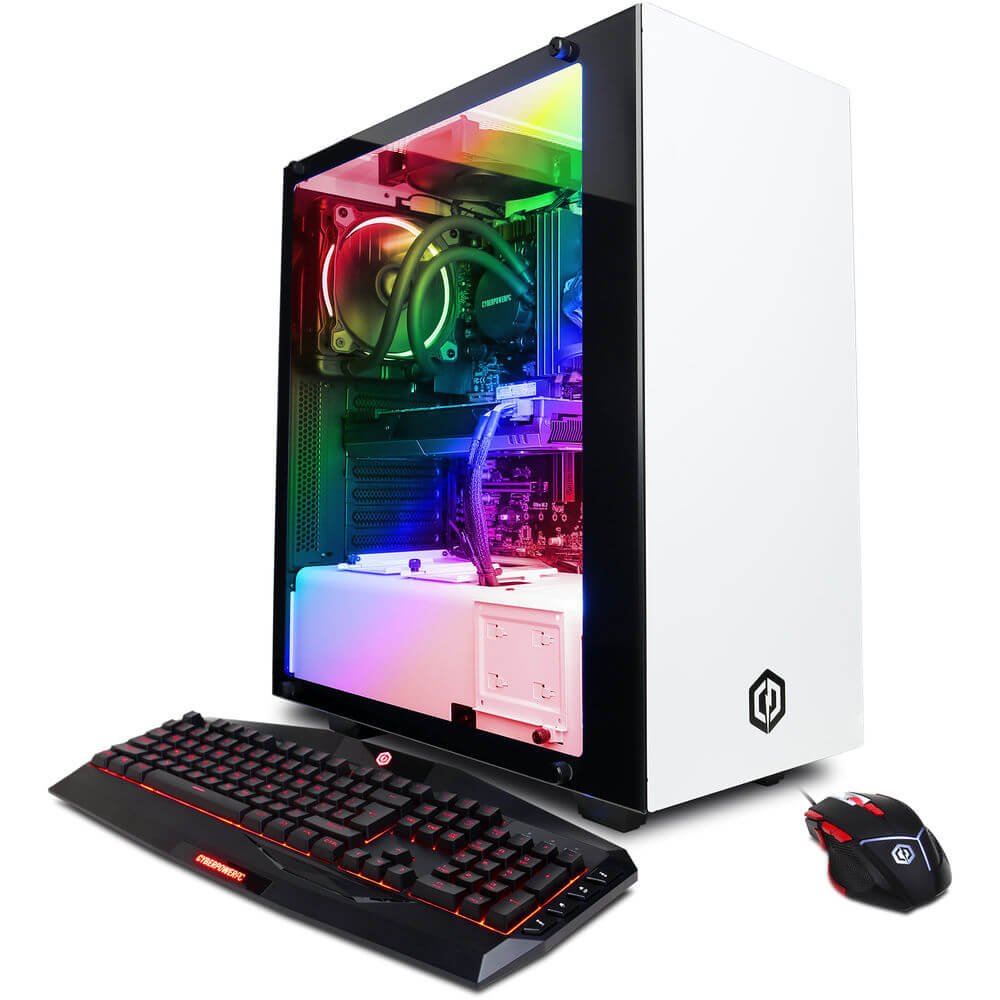
Figure 1.1: CyberpowerPC Gamer Supreme SLC8820CPG Gaming PC with included peripherals.
2. Cynnwys Pecyn
Gwiriwch fod yr holl eitemau a restrir isod yn bresennol yn eich pecyn:
- CyberpowerPC Gamer Supreme SLC8820CPG Gaming PC
- USB 7 Color Gaming Keyboard
- Llygoden Hapchwarae USB
- Driver Discs
- Cord Pŵer
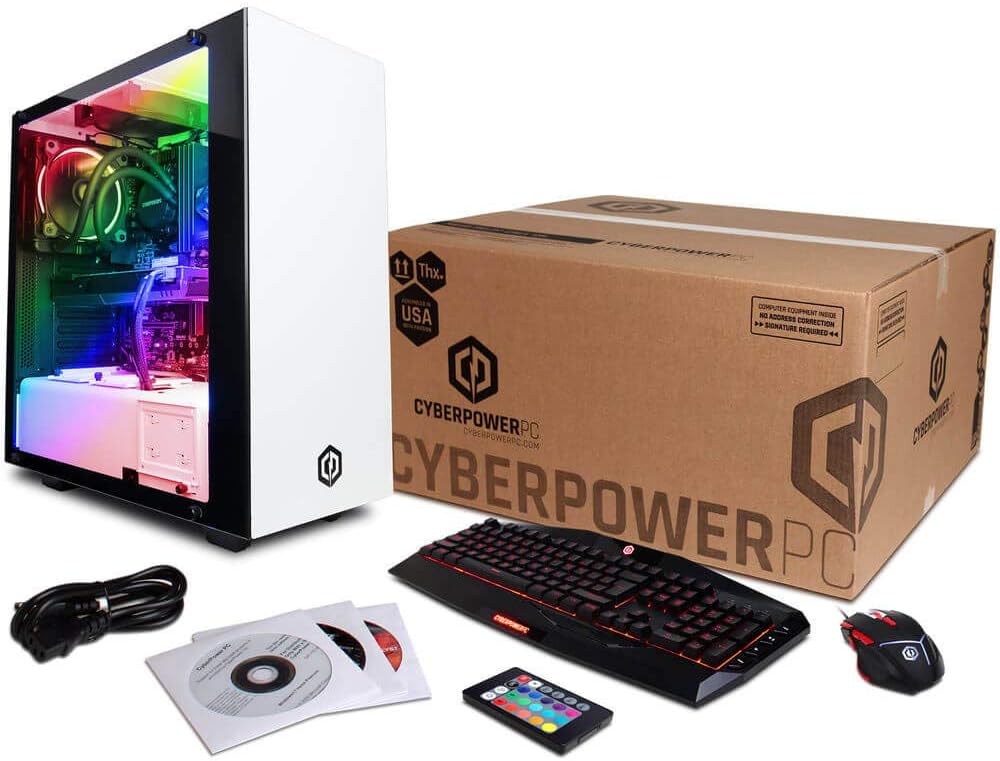
Figure 2.1: Contents of the CyberpowerPC Gamer Supreme SLC8820CPG package.
3. Canllaw Gosod
3.1 Dadbacio
- Carefully remove the PC and all accessories from the packaging.
- Retain all packaging materials for future transport or service needs.
- Place the PC on a stable, flat surface with adequate ventilation.
3.2 Cysylltu Perifferolion
Connect your monitor, keyboard, mouse, and other devices to the appropriate ports on the PC.
- Monitro: Connect your monitor to the NVIDIA GeForce GTX 1080 graphics card using an HDMI, DVI, or DisplayPort cable. Ensure the cable is securely fastened.
- Bysellfwrdd a Llygoden: Connect the USB gaming keyboard and mouse to any available USB ports. The PC features 6 x USB 3.1 ports and 2 x USB 2.0 ports.
- Rhwydwaith: For wired internet, connect an Ethernet cable to the RJ-45 port. For wireless internet, attach the included Wi-Fi antenna to the designated ports on the rear of the PC.
- Sain: Connect speakers or headphones to the audio output jacks. The system supports 7.1 Channel audio.
- Pwer: Connect the power cord to the PC's power supply unit and then to a grounded electrical outlet.
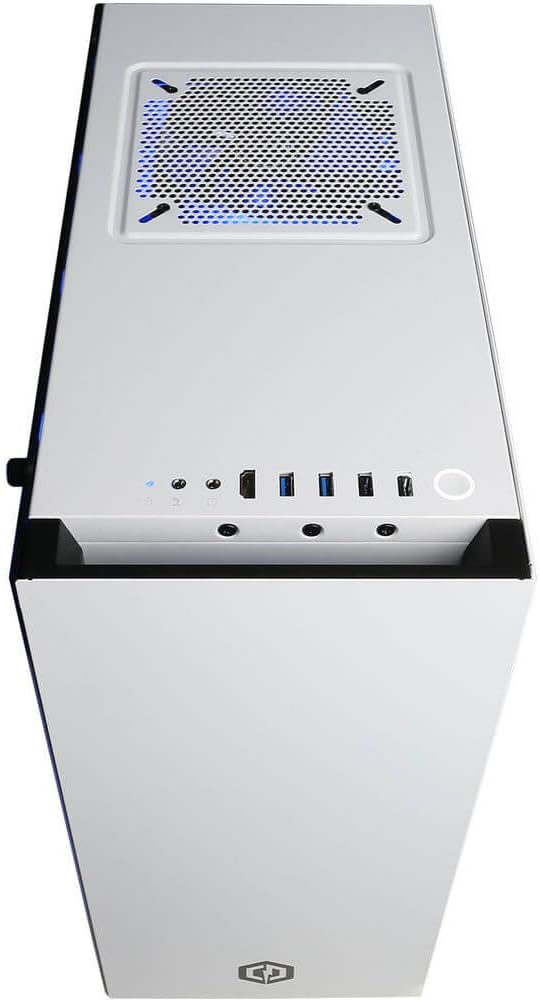
Figure 3.1: Top panel with USB ports, audio jacks, and power button.

Ffigur 3.2: Manwl view of front I/O ports for easy access.
3.3 Pŵer Cychwynnol
- After connecting all peripherals, press the power button located on the top panel of the PC.
- Follow the on-screen instructions to complete the Windows 10 Home 64-bit operating system setup.
4. Gweithredu Eich Cyfrifiadur Personol
4.1 Gweithrediad Sylfaenol
Your CyberpowerPC Gamer Supreme is pre-installed with Windows 10 Home. Utilize the keyboard and mouse for navigation. Refer to Microsoft's official documentation for detailed instructions on Windows 10 operation.
4.2 Rheoli Goleuadau RGB
The PC features custom RGB lighting. Use the included remote control to adjust the colors and lighting effects within the case. Ensure the remote has a clear line of sight to the PC's internal receiver for optimal control.
5. cynnal
5.1 Glanhau
- Tu allan: Defnyddiwch feddal, damp cloth to clean the exterior surfaces of the PC. Avoid abrasive cleaners.
- Tu mewn: Periodically clean dust from internal components using compressed air. Ensure the PC is powered off and unplugged before opening the side panel.
5.2 Diweddariadau Meddalwedd
Regularly update your operating system, drivers (especially graphics drivers), and security software to ensure optimal performance and protection.
5.3 System Oeri Hylif
The PC features a liquid cooling system for the CPU. This system is generally maintenance-free. However, monitor temperatures periodically using system monitoring software to ensure proper cooling performance. If you notice unusual noises or high temperatures, contact technical support.
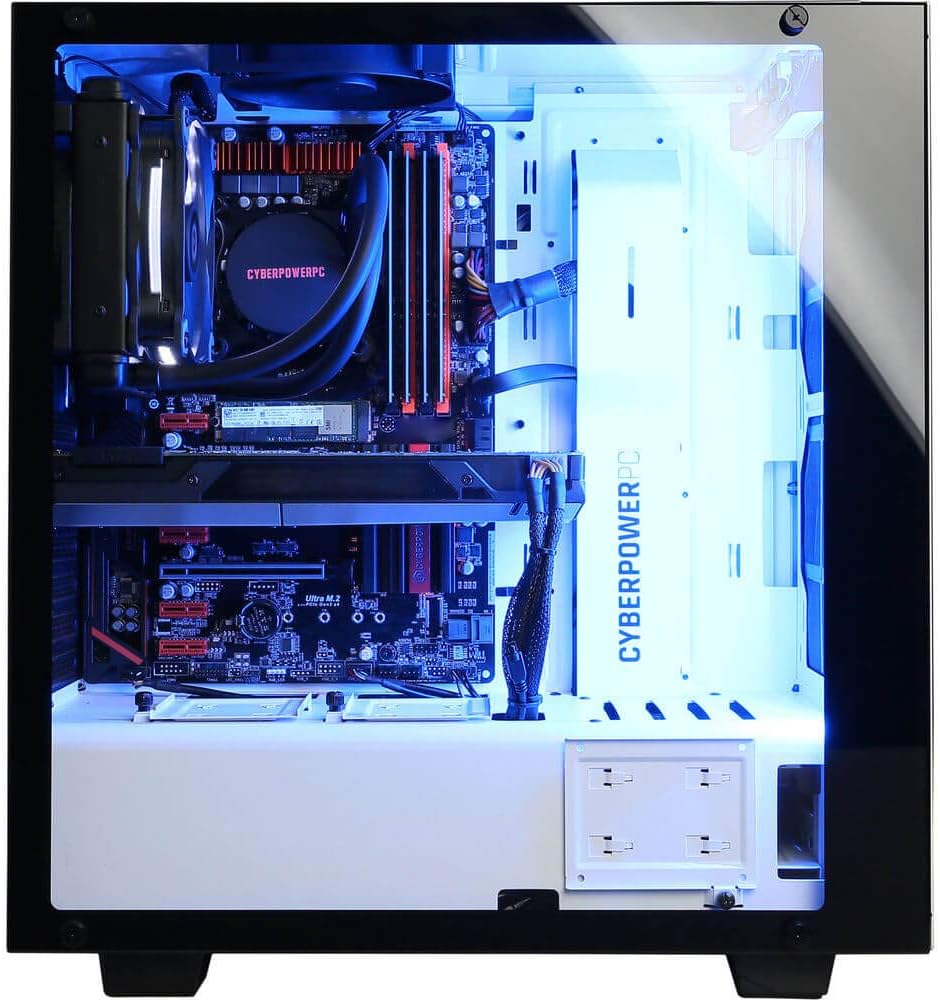
Figure 5.1: Internal components including the liquid cooling system.
6. Datrys Problemau
| Problem | Achos Posibl | Ateb |
|---|---|---|
| PC does not power on | Loose power cable, power supply issue | Ensure power cable is securely connected to PC and outlet. Check power switch on PSU. |
| Dim arddangosfa ar y monitor | Monitor cable loose, incorrect input selected on monitor | Verify monitor cable is connected to the graphics card (not motherboard). Check monitor input settings. |
| Dim cysylltiad rhyngrwyd | Wi-Fi antenna not connected, Ethernet cable loose, driver issue | Ensure Wi-Fi antenna is attached or Ethernet cable is secure. Check network adapter drivers in Device Manager. |
| System runs slowly or crashes | Overheating, outdated drivers, malware | Ensure proper ventilation. Update drivers. Run antivirus scans. |
7. manylebau
| Cydran | Manylyn |
|---|---|
| Prosesydd | Intel Core i7-8700K 3.7GHz (6 Cores) |
| Chipset | Intel Z370 Express |
| HWRDD | 32GB DDR4 |
| Storio | 480GB SSD + 3TB HDD (7200 RPM SATA III) |
| Cerdyn Graffeg | NVIDIA GeForce GTX 1080 8GB |
| Porthladdoedd Fideo | 1 x DVI, 1 x HDMI, 2 x DisplayPort |
| Porthladdoedd USB | 6 x USB 3.1, 2 x USB 2.0 |
| Rhwydwaith | RJ-45 Network Ethernet 10/100/1000, 802.11AC Wi-Fi |
| Sain | 7.1 Sianel |
| System Weithredu | Genuine Windows 10 Home 64-bit |
| Nodweddion Arbennig | Liquid Cooling, Tempered Glass Side Panel, Custom RGB Lighting |
| Dimensiynau (LxWxH) | 17.5 x 7.9 x 17 modfedd |
| Pwysau Eitem | 32 pwys |
8. Gwarant a Chefnogaeth
Your CyberpowerPC Gamer Supreme SLC8820CPG Gaming PC comes with a Rhannau Blwyddyn a Gwarant Llafur. Additionally, Free Lifetime Tech Support is provided. For technical assistance, warranty claims, or further inquiries, please contact CyberpowerPC customer support through their official websafle neu'r wybodaeth gyswllt a ddarparwyd gyda'ch dogfennaeth prynu.


