
1. Rhagymadrodd
This manual provides essential information for the safe and effective operation of your CEM LDM-100 Digital Laser Distance Meter. Please read this manual thoroughly before using the device and keep it for future reference. The LDM-100 is designed for precise distance, area, and volume measurements using laser technology.
2. Gwybodaeth Diogelwch
RHYBUDD: Ymbelydredd Laser
The LDM-100 emits Class 2 laser radiation. Do not stare into the laser beam or direct it at other people or animals. Avoid direct eye exposure. Use of controls or adjustments or performance of procedures other than those specified herein may result in hazardous radiation exposure.
- Peidiwch â cheisio addasu'r ddyfais.
- Cadwch y ddyfais allan o gyrraedd plant.
- Peidiwch â defnyddio'r ddyfais mewn amgylcheddau ffrwydrol.
- Amddiffynwch y ddyfais rhag lleithder a golau haul uniongyrchol.
- Gwnewch yn siŵr bod batris yn cael eu mewnosod gyda'r polaredd cywir.
3. Cynnyrch Drosview
The CEM LDM-100 is a compact and robust laser distance meter. Familiarize yourself with its components:

Ffigur 1: Blaen view of the CEM LDM-100 Digital Laser Distance Meter, showing the display, measurement buttons, and function keys.

Ffigur 2: Close-up of the LDM-100 display, showing measurement readings and icons for various functions like area, volume, and Pythagorean calculations.
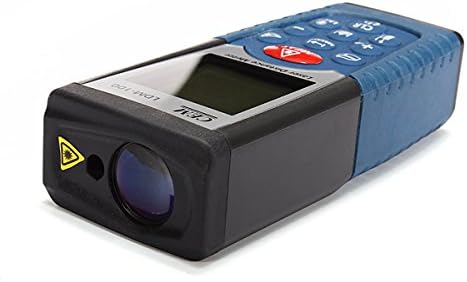
Ffigur 3: Ochr view of the LDM-100, highlighting the laser emission aperture and the receiving lens.
Cydrannau Allweddol:
- Laser Emission Aperture: Lle mae'r trawst laser yn dod allan.
- Receiving Lens: Yn canfod y trawst laser adlewyrchol.
- Sgrin Arddangos: Shows measurements, battery status, and function indicators.
- MEAS Button: Activates laser and initiates measurements.
- Botymau Swyddogaeth: For area, volume, Pythagorean calculations, and continuous measurement.
- Botwm yr Uned: Changes measurement units (m, ft, in).
- CLR/OFF Button: Clears current measurement or turns off the device.
- +/- Botymau: For adding/subtracting measurements or navigating menus.
4. Gosod
4.1 Gosod Batri
The LDM-100 requires batteries for operation. Batteries are not included with the device.
- Lleolwch glawr adran y batri ar gefn y ddyfais.
- Llithrwch neu ddadglipiwch y clawr i agor yr adran.
- Insert the required batteries (e.g., AAA batteries, refer to the compartment for specific type) ensuring correct polarity (+/-).
- Caewch y clawr adran batri yn ddiogel.
Nodyn: Tynnwch y batris os na fydd y ddyfais yn cael ei defnyddio am gyfnod hir er mwyn atal gollyngiadau.
5. Cyfarwyddiadau Gweithredu
5.1 Pŵer Ymlaen/Diffodd
- I droi ymlaen: Pwyswch y MEAS button. The laser will activate.
- I ddiffodd y pŵer: Pwyswch a daliwch y CLR/OFF button for a few seconds. The device will also automatically power off after a period of inactivity.
5.2 Mesur Pellter Sylfaenol
- Turn on the device by pressing MEAS.
- Pwyntiwch y laser at arwyneb y targed.
- Gwasgwch MEAS again to take a measurement. The distance will be displayed on the screen.
5.3 Newid Unedau Mesur
Gwasgwch y Uned button repeatedly to cycle through available units: meters (m), feet (ft), inches (in).
5.4 Mesur Arwynebedd
- Gwasgwch y Swyddogaeth button (often indicated by a square icon) until the area icon appears on the display.
- Mesurwch yr ochr gyntaf (e.e., hyd) drwy wasgu MEAS.
- Mesurwch yr ail ochr (e.e., lled) drwy wasgu MEAS eto.
- Bydd yr arwynebedd a gyfrifwyd yn cael ei arddangos.
5.5 Mesur Cyfrol
- Gwasgwch y Swyddogaeth button until the volume icon (cube) appears.
- Mesurwch yr hyd trwy wasgu'r MEAS.
- Mesurwch y lled trwy wasgu MEAS.
- Mesurwch yr uchder trwy wasgu'r MEAS.
- Bydd y gyfaint a gyfrifwyd yn cael ei arddangos.
5.6 Pythagorean Measurement (Indirect Measurement)
This function allows indirect measurement of heights or distances using the Pythagorean theorem.
- Gwasgwch y Swyddogaeth button until the Pythagorean icon appears (e.g., a triangle).
- Follow the on-screen prompts or diagram to measure the required sides (e.g., hypotenuse, base).
- The device will calculate and display the unknown side.
5.7 Mesur Parhaus (Olrhain)
- Pwyswch a dal y MEAS button or activate the continuous measurement function (often indicated by a MAX/MIN icon).
- Move the device slowly towards or away from the target. The display will update measurements in real-time, often showing current, maximum, and minimum distances.
- Gwasgwch MEAS eto i atal mesuriad parhaus.
6. cynnal
- Glanhau: Defnyddiwch feddal, damp cloth to clean the device. Do not use abrasive cleaners or solvents. Clean the laser lens with a soft cloth, similar to cleaning eyeglasses.
- Storio: Store the device in a dry, cool place, away from direct sunlight and extreme temperatures. If storing for extended periods, remove the batteries.
- graddnodi: The device is factory calibrated. If you suspect inaccuracies, contact customer support.
7. Datrys Problemau
| Problem | Achos Posibl | Ateb |
|---|---|---|
| Nid yw dyfais yn troi ymlaen. | Batris marw neu wedi'u mewnosod yn anghywir. | Amnewidiwch y batris neu gwiriwch y polaredd. |
| Mesuriadau anghywir. | Dirty laser lens; unstable measuring surface; extreme temperatures. | Clean lens; ensure stable position; operate within specified temperature range. |
| Laser ddim yn weladwy. | Bright ambient light; laser not activated. | Use in lower light conditions; press MEAS to activate laser. |
| Neges gwall ar yr arddangosfa. | Measurement out of range; internal error. | Ensure target is within measuring range; restart device. If error persists, contact support. |
8. manylebau
| Nodwedd | Manylyn |
|---|---|
| Model | LDM-100 |
| Brand | CEM |
| Ystod Mesur | Up to 50m (as per product title) |
| Sgôr Diogelu Rhyngwladol | IP54 |
| Pwysau Eitem | 0.31 pwys (tua 140.61 g) |
| Batris | Not included (type typically AAA, refer to device) |
| Dosbarth Laser | Dosbarth 2 |
9. Gwarant a Chefnogaeth
Am wybodaeth am warant neu gymorth technegol, cyfeiriwch at y ddogfennaeth a ddarparwyd ar adeg y pryniant neu cysylltwch â'ch manwerthwr. Cadwch eich derbynneb prynu fel prawf o brynu.