
1. Rhagymadrodd
This manual provides detailed instructions for the setup, operation, and maintenance of your Sony HT-CT290 Ultra-slim 300W Soundbar System. Please read this manual thoroughly before using the product to ensure correct and safe operation. Keep this manual for future reference.
Nodweddion Allweddol
- 300W total power output with 2.1 channel S-Force PRO Front Surround sound.
- Seamless music streaming via Bluetooth connectivity.
- Space-saving ultra-slim, wall-mountable design.
- Enhanced voice clarity with Voice Mode and optimized sound at low volumes with Night Mode.
- Control your television and soundbar with a single remote using HDMI ARC.
- Direct music playback from USB devices.
2. Canllaw Gosod
2.1 Dadbacio'r System
Tynnwch yr holl gydrannau o'r pecynnu yn ofalus. Gwnewch yn siŵr bod yr holl eitemau a restrir isod yn bresennol:
- Sony 2.1-Channel Soundbar System (HT-CT290)
- Subwoofer di-wifr
- Digidol Ampllewywr
- Batris (2 AA)
- Pad troed
- Cebl optegol
- Llawlyfr perchennog
- Wall hanging template
- Cerdyn gwarant
2.2 Adnabod Cydran

Image: The Sony HT-CT290 soundbar and its accompanying wireless subwoofer, showcasineu dyluniad cain.
2.3 Lleoliad
For optimal sound performance, position the soundbar centrally below your television. The wireless subwoofer can be placed anywhere in the room, ideally near the soundbar, for enhanced bass response.
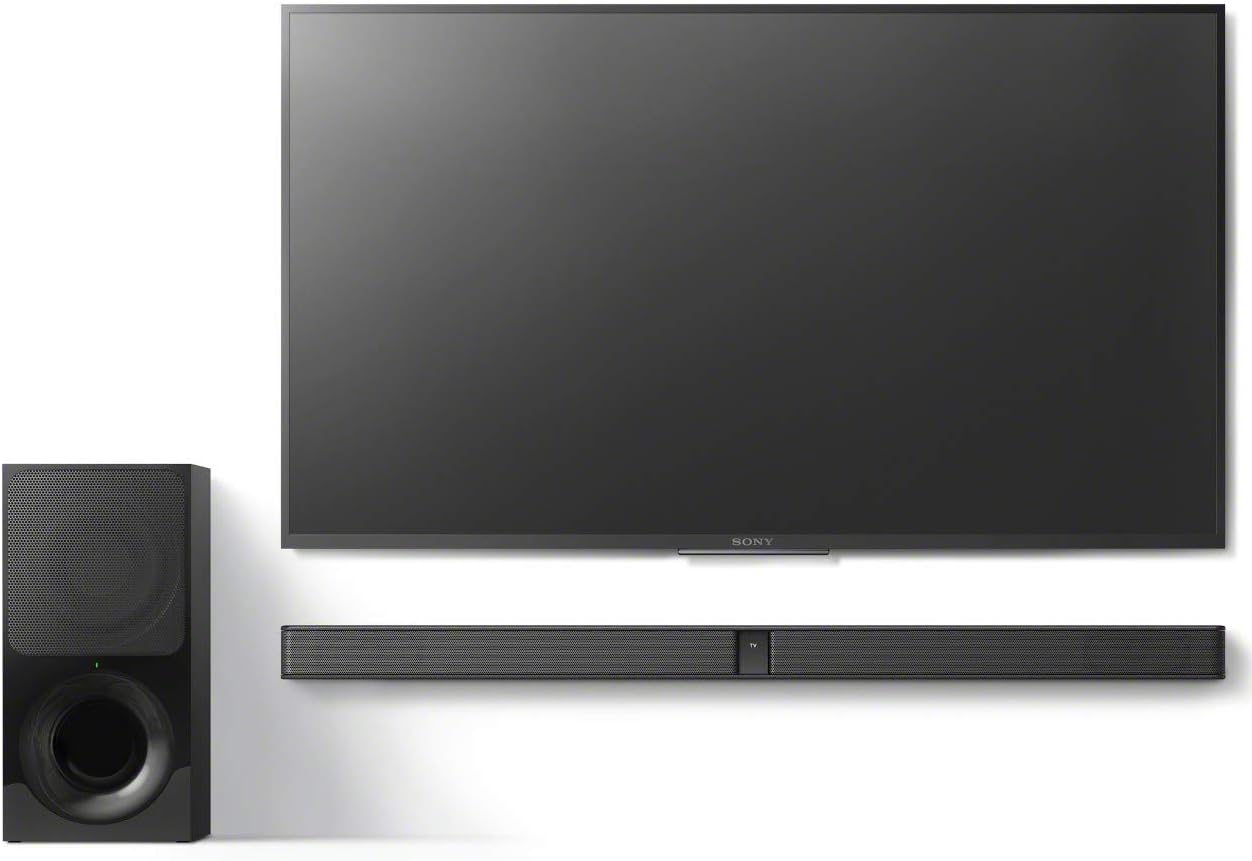
Image: A typical setup showing the soundbar positioned directly below a television and the wireless subwoofer placed to the side.

Image: The wireless subwoofer shown in both vertical and horizontal positions, demonstrating flexible placement options.
2.4 Cysylltiad
Connect the soundbar to your television using one of the following methods:
- HDMI ARC (Argymhellir): Connect an HDMI cable from the HDMI OUT (TV ARC) port on the soundbar to the HDMI ARC port on your TV. This allows for audio return channel functionality, enabling TV audio to be sent to the soundbar and control with a single remote.
- Optical Digital Cable: Connect the supplied optical cable from the OPTICAL IN port on the soundbar to the optical digital output port on your TV.
- Bluetooth: For wireless audio from compatible devices, pair your device with the soundbar via Bluetooth.
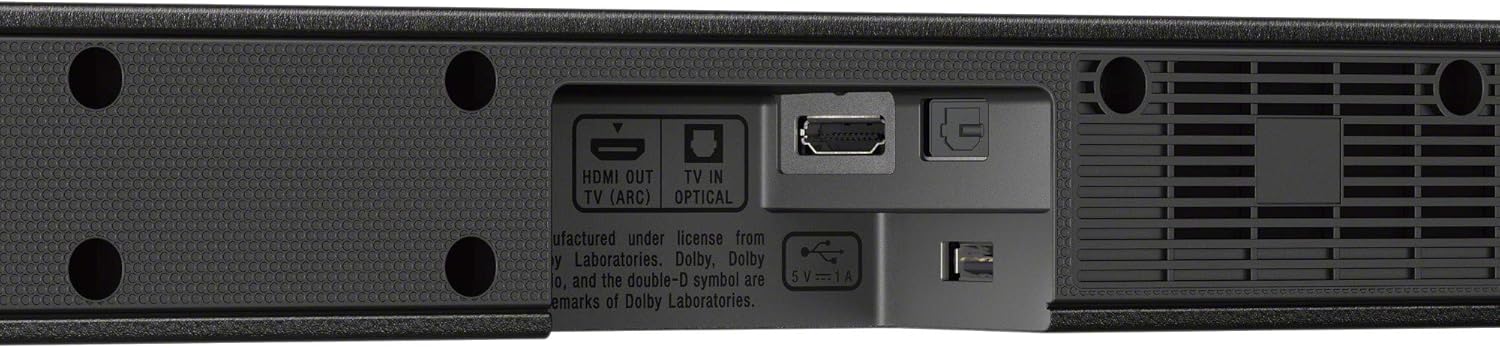
Delwedd: Llun agos view of the soundbar's rear panel, highlighting the HDMI OUT (TV ARC) and OPTICAL IN ports for television connection.

Image: The soundbar's rear panel, showing the USB port with a USB drive connected, indicating its media playback capability.
3. Gweithrediad
3.1 Pŵer Ymlaen/Diffodd
Gwasgwch y GRYM button on the remote control or the soundbar to turn the system on or off. If connected via HDMI ARC, the soundbar may power on/off automatically with your TV.
3.2 Dewis Mewnbwn
Gwasgwch y MEWNBWN button on the remote control to cycle through available input sources (TV, Optical, Bluetooth, USB).
3.3 Rheoli Cyfaint
Addaswch y gyfrol gan ddefnyddio'r CYFROL +/- buttons on the remote control. The subwoofer volume can also be adjusted independently.
3.4 Modd Sain
- Modd Llais: Enhances dialogue clarity, making voices easier to hear. Activate this mode for news or dialogue-heavy content.
- Modd Nos: Reduces dynamic range, allowing you to hear sound clearly at lower volumes, ideal for late-night viewheb aflonyddu ar eraill.
3.5 Pâr Bluetooth
To pair a new Bluetooth device, select the Bluetooth input on the soundbar. On your device, search for available Bluetooth devices and select "HT-CT290". Once paired, audio from your device will play through the soundbar.
Chwarae USB 3.6
Insert a USB storage device containing audio files into the USB port on the soundbar's rear panel. Select the USB input to begin playback. Supported audio formats include Dolby, Dolby Digital, and Dolby Dual Mono.
4. cynnal
To maintain the performance and appearance of your soundbar system, follow these guidelines:
- Glanhau: Wipe the surfaces of the soundbar and subwoofer with a soft, dry cloth. Do not use abrasive cleaners, waxes, or solvents.
- Awyru: Ensure adequate ventilation around the units to prevent overheating. Do not block any ventilation openings.
- Amgylchedd: Avoid exposing the system to extreme temperatures, humidity, direct sunlight, or excessive dust.
5. Datrys Problemau
If you experience issues with your Sony HT-CT290 Soundbar System, refer to the following common problems and solutions:
5.1 Dim Sŵn neu Gyfaint Isel
- Gwnewch yn siŵr bod y bar sain wedi'i droi ymlaen a bod y ffynhonnell fewnbwn gywir wedi'i dewis.
- Check that all cables (HDMI, Optical) are securely connected to both the soundbar and the TV.
- Verify the TV's audio output settings are configured to send audio to the external speaker system (e.g., PCM output for optical connection).
- Cynyddwch y gyfrol ar y bar sain a'ch teledu.
- Confirm the wireless subwoofer is paired and powered on.
5.2 Audio Delay/Lip Sync Issues
- Some TVs or source devices may introduce a slight audio delay. Check your TV's audio settings for a lip-sync adjustment or audio delay compensation feature.
- If using an optical connection, ensure the TV's audio output is set to PCM, not Bitstream or Dolby Digital, as some TVs may process these differently, causing delay.
- Try connecting directly to the soundbar from the source device if possible, bypassing the TV's audio processing.
5.3 Bluetooth Connection Problems
- Gwnewch yn siŵr bod y bar sain mewn modd paru Bluetooth.
- Dileu'r bar sain o restr Bluetooth eich dyfais a cheisiwch ail-baru.
- Move your Bluetooth device closer to the soundbar to rule out interference or range issues.
6. manylebau
| Nodwedd | Manyleb |
|---|---|
| Enw Model | CT290 |
| Rhif Model yr Eitem | HTCT290 |
| Brand | Sony |
| Math o Siaradwr | Bar sain |
| Llefarydd Uchafswm Pŵer Allbwn | 300 Wat |
| Ffurfweddiad Sianel Sain Amgylch | 2.1 |
| Technoleg Cysylltedd | Bluetooth, HDMI |
| Technoleg Cyfathrebu Di-wifr | Bluetooth |
| Amrediad Bluetooth | 10 o Fesurau |
| Technoleg Cysylltedd Subwoofer | Di-wifr |
| Fformatau Sain â Chymorth | Dolby, Dolby Digital, Dolby Dual Mono |
| Input Output Terminals | Optical In, USB: 1 (USB-A) |
| Dimensiynau Bar Sain (W x H x D) | 35.43 x 2.05 x 3.39 modfedd (900 x 52 x 86 mm) |
| Dimensiynau Subwoofer (W x H x D) | 6.69 x 13.46 x 14.25 modfedd (170 x 342 x 362 mm) |
| Pwysau Bar Sain | 5.07 pwys (2.3 kg) |
| Pwysau Subwoofer | 13.89 pwys (6.3 kg) |
| Ffynhonnell Pwer | Trydan Corded |
| Cydrannau wedi'u Cynnwys | Soundbar, Wireless Subwoofer, Digital Amplifier, Batteries, Foot pad, Optical cable, Owner's manual, Wall hanging template, Warranty card |
7. Gwarant a Chefnogaeth
7.1 Gwybodaeth Gwarant
Your Sony HT-CT290 Soundbar System comes with a limited warranty. Please refer to the included warranty card for specific terms, conditions, and duration of coverage. Retain your proof of purchase for warranty claims.
7.2 Cefnogaeth i Gwsmeriaid
For technical assistance, troubleshooting beyond this manual, or warranty service, please contact Sony Customer Support. Visit the official Sony websafle ar gyfer manylion cyswllt ac adnoddau cymorth.