
Rhagymadrodd
This manual provides detailed instructions for the setup, operation, and maintenance of your Hyperkin Knight Premium Controller. Designed for use with PlayStation 3 (PS3), PC, and Mac systems, this controller offers a versatile gaming experience with its ergonomic design and responsive controls. Please read this manual thoroughly before using the product to ensure optimal performance and longevity.
Nodweddion Cynnyrch
- Dual Analog Joysticks: Two wide-spectrum analog joysticks for precise control.
- Pressure-Sensitive D-Pad: An eight-way directional pad with pressure sensitivity.
- Pressure-Sensitive Buttons: Four shoulder buttons and four face buttons with pressure sensitivity for nuanced input.
- Adborth yr Heddlu: Integrated force feedback for immersive gaming experiences.
- Botwm Cartref: Dedicated button for system menu access.
- Cebl hir: A 6-foot (1.8 meter) cable for flexible positioning.
- Cydnawsedd Aml-lwyfan: Compatible with all PS3 models, as well as PC and Mac via USB.
Cynnwys Pecyn
- Hyperkin Knight Premium Controller (White)
- Integrated USB Cable (6 ft.)
Cyfarwyddiadau Gosod
Connecting to PlayStation 3 (PS3)
- Ensure your PS3 console is powered off or in standby mode.
- Locate an available USB port on your PS3 console.
- Plug the USB connector of the Hyperkin Knight Controller into the USB port on your PS3.
- Power on your PS3 console. The controller should be automatically recognized and assigned a player number.
- If the controller does not respond, try a different USB port or restart the console.
Cysylltu â PC/Mac
- Locate an available USB port on your PC or Mac computer.
- Plug the USB connector of the Hyperkin Knight Controller into the USB port.
- Dylai eich system weithredu (Windows, macOS) ganfod a gosod y gyrwyr angenrheidiol yn awtomatig. Gall y broses hon gymryd ychydig eiliadau.
- Once installed, the controller will be ready for use with compatible games and applications. You may need to configure controller settings within individual games or system preferences.
- Nodyn: Functionality may vary depending on the operating system and specific game titles.
Cyfarwyddiadau Gweithredu
The Hyperkin Knight Premium Controller features a standard layout for intuitive gameplay.
Cynllun y Rheolwr

Delwedd: Top view of the Hyperkin Knight Premium Controller, showing the D-pad, analog sticks, face buttons, and central buttons.
- D-Pad (Pad Cyfeiriadol): Located on the left, used for directional input.
- Ffon Analog Chwith: Below the D-Pad, for precise movement and camera control.
- Ffon Analog Dde: On the right side, typically for camera control or aiming.
- Face Buttons (Triangle, Circle, Cross, Square): On the right, used for actions within games.
- Shoulder Buttons (L1, L2, R1, R2): Located on the top edge of the controller, used for various in-game functions.
- Botwm SELECT: Typically used for menu access or specific game functions.
- Botwm DECHRAU: Typically used for pausing games or confirming selections.
- Botwm CARTREF: Central button to access the PS3 XMB (CrossMediaBar) or system menus on PC/Mac.
Adborth yr Heddlu
The controller features force feedback (rumble) functionality, which provides tactile sensations during gameplay, enhancing immersion. This feature is automatically enabled when supported by the game and system. If you wish to disable it, check your game's or system's controller settings.
Cynnal a chadw
- Glanhau: Defnyddiwch frethyn meddal, sych i sychu'r rheolydd. Ar gyfer baw ystyfnig, sychwch ychydigampgolchwch y lliain gyda dŵr. Osgowch ddefnyddio cemegau llym neu lanhawyr sgraffiniol.
- Storio: Store the controller in a cool, dry place away from direct sunlight and extreme temperatures. Avoid wrapping the cable too tightly to prevent damage.
- Gofal Cebl: Do not pull the controller by its cable. Always grasp the USB connector when plugging or unplugging.
Datrys problemau
Rheolydd Ddim yn Ymateb
- Gwirio Cysylltiad: Ensure the USB cable is securely plugged into both the controller and the console/computer.
- Rhowch Gynnig ar Borthladd USB Gwahanol: Connect the controller to another USB port on your system.
- Ailgychwyn y system: Power cycle your PS3, PC, or Mac.
- Driver Check (PC/Mac): On PC, check Device Manager to see if the controller is recognized and if there are any driver issues. On Mac, check System Information > USB.
Incorrect Button Mapping or Limited Functionality
- Gosodiadau Gêm: Many games allow for custom controller mapping. Check the in-game settings for controller configuration.
- System Settings (PC/Mac): For PC, some games or emulators may require specific controller configurations or third-party software. For Mac, check System Preferences > Game Controllers (if available) or specific application settings.
- Cydnawsedd PS3: While compatible with all PS3 models, some older games or specific PS3 system software versions might have unique controller handling. Ensure your PS3 system software is up to date.
Force Feedback Not Working
- Cefnogaeth Gêm: Verify that the game you are playing supports force feedback.
- Gosodiadau yn y gêm: Check the game's options menu to ensure force feedback (rumble) is enabled.
- Gosodiadau System: On PC, ensure rumble is enabled in your controller settings.
Manylebau
| Rhif Model | M07213-WH |
| Cydweddoldeb | PlayStation 3, PC, Mac (via USB) |
| Hyd Cebl | 6 troedfedd (tua 1.8 metr) |
| Math Mewnbwn | Pressure-sensitive buttons and D-pad, dual analog joysticks |
| Adborth | Force Feedback (Rumble) |
| Dimensiynau | 2.99 x 7.99 x 7.01 modfedd (tua 7.6 x 20.3 x 17.8 cm) |
| Pwysau | 12.5 owns (tua 354 gram) |
| Gwneuthurwr | Hyperkin Inc |
Gwarant a Chefnogaeth
For warranty information and technical support, please refer to the official Hyperkin websafle neu cysylltwch â'u gwasanaeth cwsmeriaid yn uniongyrchol. Cadwch eich derbynneb prynu fel prawf o brynu ar gyfer unrhyw hawliadau gwarant.
Gwneuthurwr: Hyperkin Inc
Websafle: www.hyperkin.com (Ewch i'r safle swyddogol websafle am y wybodaeth gymorth ddiweddaraf.)
Cynnyrch Drosview Delweddau
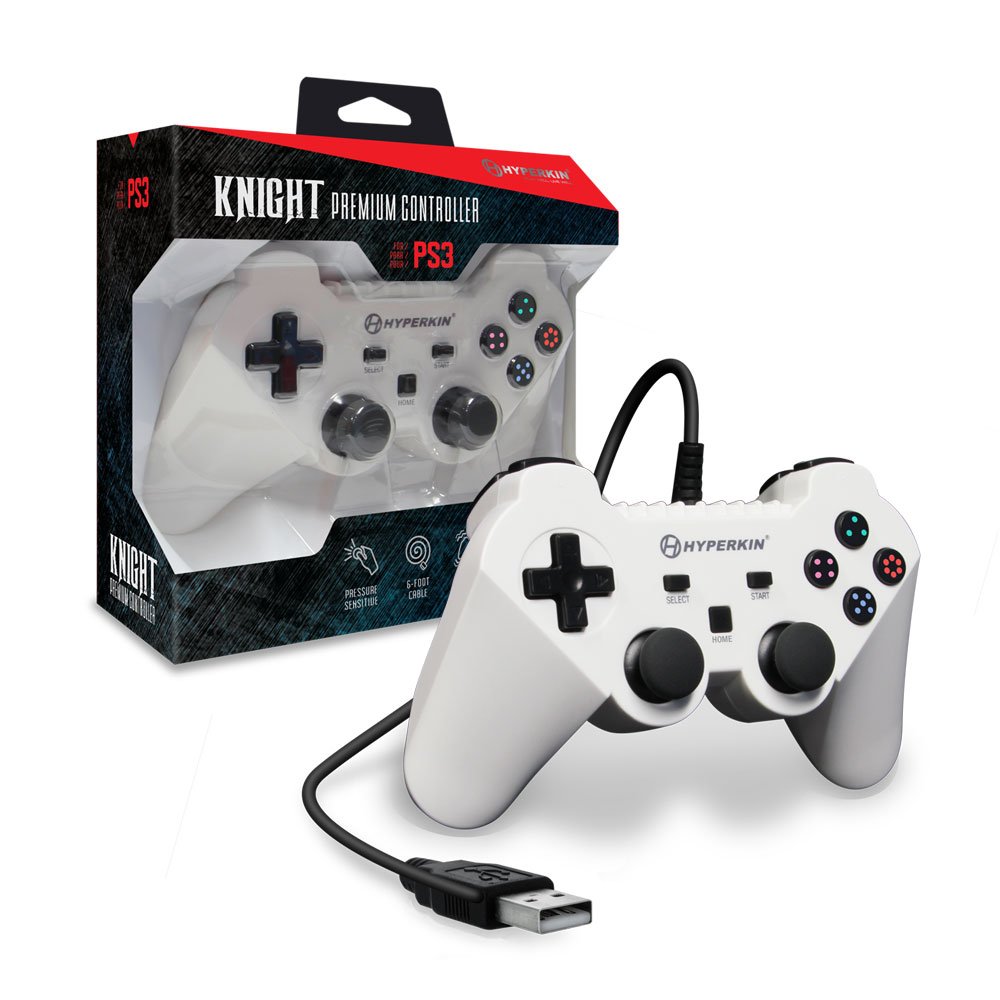
Image: The Hyperkin Knight Premium Controller displayed alongside its retail packaging, highlighting the product's design and branding.

Delwedd: Llun agos view of the Hyperkin Knight Premium Controller's retail box, showcasing key features and design elements.

Delwedd: Ongl view of the Hyperkin Knight Premium Controller, emphasizing its ergonomic shape and button placement.