
Rhagymadrodd
This manual provides comprehensive instructions for the setup, operation, and maintenance of your GPX Digital AM/FM Clock Radio, model C224B. Please read this manual thoroughly before using the device to ensure proper functionality and to maximize your user experience. Keep this manual for future reference.
Cynnyrch Drosview
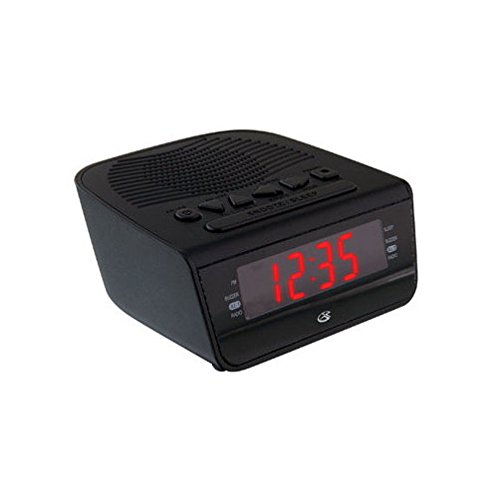
Ffigur 1: Blaen view of the GPX Digital AM/FM Clock Radio. This image shows the compact black unit with its digital display and control buttons.
The GPX Digital AM/FM Clock Radio (C224B) is designed for reliable timekeeping and audio entertainment. Key features include a clear multi-display clock, AM/FM radio tuner, dual alarm functionality, and a battery backup option to ensure continuous operation during power interruptions. Its compact and modern design makes it suitable for various indoor settings.
Gosod
1. dadbacio
Carefully remove the clock radio from its packaging. Ensure all components are present: the clock radio unit and the power adapter.
2. Cysylltiad Pwer
- Plug the power adapter into the DC input jack located on the back of the clock radio.
- Plug the other end of the power adapter into a standard wall outlet (AC 120V, 60Hz).
- The display will illuminate, indicating the unit is receiving power.
3. Gosod Batri Wrth Gefn (Dewisol)
Ar gyfer pŵer wrth gefn yn ystod y cyfnod allantages, install batteries (not included).
- Lleolwch yr adran batri ar waelod yr uned.
- Agorwch y clawr adran batri.
- Insert the required batteries (e.g., 2 x AAA, check unit for specific type) according to the polarity markings (+ and -).
- Caewch y clawr adran batri yn ddiogel.
Nodyn: Batteries are for backup only and will not power the display or radio functions continuously. They preserve time and alarm settings during a power interruption.
Cyfarwyddiadau Gweithredu
1. Gosod yr Amser
- Pwyswch a dal y SET AMSER botwm nes bod yr arddangosfa'n fflachio.
- Defnyddiwch y AWR a COFNOD botymau i addasu'r amser.
- Gwasgwch SET AMSER eto i gadarnhau ac ymadael â'r modd gosod amser.
2. Gosod Larymau (Larwm 1 a Larwm 2)
This unit features dual alarms, allowing you to set two independent wake-up times.
- Pwyswch a dal y ALARM 1 SET (neu ALARM 2 SET) button until the alarm time flashes.
- Defnyddiwch y AWR a COFNOD buttons to adjust the desired alarm time.
- Gwasgwch ALARM 1 SET (neu ALARM 2 SET) again to confirm the time.
- Immediately after confirming the time, use the MODD ALARM button to select the alarm source: SYNWR or RADIO.
- The alarm icon (e.g., AL1 or AL2) will appear on the display, indicating the alarm is active.
To turn off an alarm, press the corresponding ALARM 1 YMLAEN/DIFFODD (neu ALARM 2 YMLAEN/DIFFODD) button. The alarm icon will disappear.
3. Gweithrediad Radio AM/FM
- Gwasgwch y RADIO YMLAEN/DIFFODD botwm i droi'r radio ymlaen.
- Gwasgwch y BAND botwm i newid rhwng bandiau AM ac FM.
- Defnyddiwch y Tiwn+ or TIWN - botymau i diwnio â llaw i'r orsaf a ddymunir.
- To automatically scan for the next available station, press and hold Tiwn+ or TIWN - am ychydig eiliadau.
- Addaswch y gyfrol gan ddefnyddio'r CYFROL + or CYFROL - botymau.
- I ddiffodd y radio, pwyswch y RADIO YMLAEN/DIFFODD botwm eto.
4. Swyddogaeth Snooze
Pan fydd larwm yn seinio, pwyswch y SNOOZE botwm i dawelu'r larwm dros dro am tua 9 munud. Bydd y larwm yn canu eto ar ôl y cyfnod cysgu.
5. Swyddogaeth Cwsg
The sleep function allows the radio to play for a set duration before automatically turning off.
- Tra bod y radio yn chwarae, pwyswch y CYSGU botwm dro ar ôl tro i gylchu trwy'r amseroedd cysgu sydd ar gael (e.e., 90, 60, 30, 15 munud, OFF).
- Bydd y radio yn diffodd yn awtomatig ar ôl yr amser a ddewiswyd.
Cynnal a chadw
1. Glanhau
To clean the unit, wipe the exterior with a soft, slightly damp cloth. Do not use abrasive cleaners or solvents, as these may damage the finish. Ensure the unit is unplugged before cleaning.
2. Amnewid Batri
If the battery backup function is not working, or if the unit loses time during a power outage, the backup batteries may need replacement. Follow the "Battery Backup Installation" steps in the Setup section to replace them.
Datrys problemau
| Problem | Achos Posibl | Ateb |
|---|---|---|
| Nid yw'r uned yn pweru ymlaen. | Addasydd pŵer heb ei gysylltu neu soced diffygiol. | Gwnewch yn siŵr bod yr addasydd pŵer wedi'i blygio'n ddiogel i'r uned ac i soced wal sy'n gweithio. Rhowch gynnig ar soced wahanol. |
| Nid yw'r larwm yn canu. | Larwm heb ei osod, cyfaint y larwm yn rhy isel, neu larwm wedi'i ddiffodd. | Verify alarm time and source (buzzer/radio) are set correctly. Ensure alarm is activated (icon visible). Increase radio volume if alarm source is radio. |
| Derbyniad radio gwael. | Signal neu ymyrraeth wan. | Adjust the position of the unit or the antenna (if external). Move away from other electronic devices that may cause interference. |
| Amser/gosodiadau wedi'u colli ar ôl diffodd y pŵertage. | Mae batris wrth gefn wedi marw neu heb eu gosod. | Install fresh backup batteries or replace existing ones. |
Manylebau
- Model: C224B
- Ffynhonnell Pwer: AC 120V, 60Hz (main); Battery Powered (backup)
- Math Arddangos: Arddangosfa Ddigidol LED
- Bandiau Radio: AM/FM
- Dimensiynau (tua): 5.12" L x 5.12" U
- Pwysau (tua): 3 Bunt
- Lliw: Du
- Deunydd: Plastig
Gwarant a Chefnogaeth
For warranty information or technical support, please refer to the warranty card included with your product or visit the official GPX website. Do not attempt to repair this unit yourself, as this may void your warranty.
GPX Official Websafle: www.gpx.com


