Diolch am brynuasing the MUSE M-1600 SBT Soundbar. This manual provides important information regarding the installation, operation, and maintenance of your new soundbar. Please read it thoroughly before use and retain it for future reference.
The M-1600 SBT is designed to enhance your audio experience with its powerful 60W output, versatile connectivity options including Bluetooth, USB, AUX-in, RCA, and Optical inputs, and an integrated PLL FM radio.
2. Cyfarwyddiadau Diogelwch
Ffynhonnell Pwer: Sicrhewch y cyflenwad pŵer cyftage matches the rating label on the soundbar.
Awyru: Do not block any ventilation openings. Maintain adequate space around the unit for proper airflow.
Dŵr a lleithder: Do not expose the soundbar to rain, moisture, or dripping/splashing liquids. Do not place objects filled with liquids, such as vases, on the apparatus.
Ffynonellau Gwres: Cadwch yr uned i ffwrdd o ffynonellau gwres fel rheiddiaduron, cofrestri gwres, stofiau, neu offer arall (gan gynnwys amplifyddion) sy'n cynhyrchu gwres.
Glanhau: Glanhewch â lliain sych yn unig. Peidiwch â defnyddio glanhawyr hylif neu lanhawyr aerosol.
Gwasanaethu: Peidiwch â cheisio gwasanaethu'r cynnyrch hwn eich hun. Cyfeiriwch yr holl wasanaethu at bersonél gwasanaeth cymwys.
Lleoliad: Place the soundbar on a stable, flat surface. Avoid placing it in direct sunlight or near strong magnetic fields.
3. Cynnwys Pecyn
Carefully unpack your soundbar and ensure all items are present and in good condition. If any items are missing or damaged, contact your retailer immediately.
MUSE M-1600 SBT Soundbar
Rheolaeth Anghysbell
RCA Cable
Llawlyfr Defnyddiwr
Power Adapter (not explicitly listed but implied for a wired device)
4. Cynnyrch Drosview
Familiarize yourself with the main components and controls of your M-1600 SBT Soundbar.
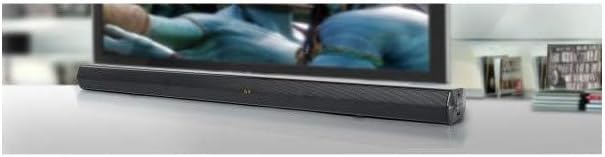
Delwedd 1: Blaen view of the Muse M-1600 SBT Soundbar, showcasing its sleek design and central display. The soundbar is positioned in front of a television.
Panel blaen
Arddangos: Shows current input mode, volume level, and radio frequency.
Botymau Rheoli: (Located on the right side) Power, Volume Up/Down, Input Source, Play/Pause.
Panel Cefn (Cysylltiadau)
Delwedd 2: Cefn view of the Muse M-1600 SBT Soundbar, highlighting the various input ports for external devices.
DC YN: Porthladd mewnbwn pŵer.
DEWISOL YN: For connecting devices via optical cable.
RCA IN (L/R): For connecting devices via RCA cables.
AUX YN: Jac 3.5mm ar gyfer cysylltu dyfeisiau sain cludadwy.
Porth USB: Ar gyfer chwarae sain files o yriant USB.
Rheolaeth Anghysbell
The included remote control allows for convenient operation of all soundbar functions from a distance. Ensure batteries are correctly inserted (not included).
5. Gosod
5.1 Lleoliad
Place the soundbar on a stable, flat surface, preferably directly in front of your television or monitor. Ensure there are no obstructions in front of the soundbar to allow for optimal sound projection.
5.2 Cysylltiad Pwer
Connect the power adapter to the DC IN port on the rear of the soundbar.
Plygiwch ben arall yr addasydd pŵer i mewn i allfa wal.
5.3 Cysylltu â Ffynonellau Sain
Choose one of the following methods to connect your soundbar to an audio source (e.g., TV, DVD player, smartphone).
Cysylltiad Optegol: For high-quality digital audio. Connect an optical cable (not supplied) from your TV's Optical Out port to the soundbar's OPTICAL IN port.
Cysylltiad RCA: Connect the supplied RCA cable to the RCA OUT ports (red for right, white for left) on your TV and to the corresponding RCA IN ports on the soundbar.
Cysylltiad AUX: Use a 3.5mm audio cable (not supplied) to connect the headphone jack or AUX Out port of your device to the soundbar's AUX IN port.
Cysylltiad Bluetooth: Refer to section 6.3 for Bluetooth pairing instructions.
6. Cyfarwyddiadau Gweithredu
6.1 Pŵer Ymlaen/Diffodd
Gwasgwch y GRYM botwm ar y bar sain neu'r teclyn rheoli o bell i droi'r uned ymlaen neu i ffwrdd.
6.2 Rheoli Cyfaint
Defnyddiwch y VOL+ a VOL- buttons on the soundbar or remote control to adjust the volume level. The current volume will be displayed on the soundbar's screen.
6.3 Dewis Ffynhonnell Mewnbwn
Gwasgwch y MEWNBWN button on the soundbar or remote control repeatedly to cycle through the available input sources: Bluetooth (BT), USB, AUX, RCA, OPTICAL, and FM Radio.
Gweithrediad Radio 6.4 FM
Switch the input source to Radio FM.
Pwyswch a dal y CHWARAE/SEIBIANT button on the remote control to initiate an automatic scan for FM stations. The soundbar will scan and save up to 30 preset stations.
Defnyddiwch y PREV / NESAF buttons on the remote to navigate through the saved preset stations.
7. Cysylltedd
7.1 Pâr Bluetooth
Switch the soundbar's input source to Bluetooth (BT) mode. The display will show "BT" and start flashing, indicating it's in pairing mode.
Ar eich dyfais sydd wedi'i galluogi gan Bluetooth (ffôn clyfar, tabled, ac ati), galluogwch Bluetooth a chwiliwch am ddyfeisiau sydd ar gael.
Select "M-1600 SBT" from the list of devices.
Once paired, the "BT" indicator on the soundbar's display will stop flashing and remain solid. You can now play audio from your device through the soundbar.
Chwarae USB 7.2
Mewnosodwch yriant fflach USB (wedi'i fformatio i FAT32) sy'n cynnwys sain gydnaws files (e.g., MP3) into the USB port on the soundbar.
Switch the input source to USB modd.
The soundbar will automatically begin playing the audio files. Use the remote control for playback functions (Play/Pause, Next/Previous Track).
8. cynnal
8.1 Glanhau
Wipe the exterior of the soundbar with a soft, dry, lint-free cloth. Do not use abrasive cleaners, waxes, or solvents as they may damage the finish.
8.2 Storio
If you plan to store the soundbar for an extended period, disconnect it from the power outlet and store it in a cool, dry place, away from direct sunlight and extreme temperatures.
9. Datrys Problemau
If you encounter any issues with your soundbar, refer to the following table for common problems and solutions.
Problem
Achos Posibl
Ateb
Dim pŵer
Cebl pŵer heb ei gysylltu; Allfa bŵer heb ei gweithredu
Gwnewch yn siŵr bod y cebl pŵer wedi'i gysylltu'n ddiogel. Gwiriwch a yw'r soced pŵer yn gweithio.
Soundbar not in pairing mode; Device Bluetooth off; Device too far
Ensure soundbar is in BT pairing mode. Enable Bluetooth on your device. Move device closer to soundbar.
Rheolaeth bell ddim yn gweithio
Batteries depleted; Obstruction between remote and soundbar; Incorrect angle
Replace remote control batteries. Remove any obstructions. Point remote directly at the soundbar's sensor.
Derbyniad radio FM gwael
Signal gwan; Ymyrraeth
Adjust the position of the soundbar. Avoid placing near other electronic devices that may cause interference.
10. manylebau
Enw Model
M-1600 SBT
Brand
AMGUEDD
Pŵer Allbwn
60 Wat
Technoleg Cysylltedd
Bluetooth, Wired & Wireless
Cysylltedd Siaradwr
Bluetooth, Optical, RCA, USB
Technoleg Cyfathrebu Di-wifr
Bluetooth
Modd Allbwn Sain
Stereo
Ffurfweddiad Sianel Sain Amgylch
2.0
Dull Rheoli
Rheolaeth Anghysbell
Ffynhonnell Pwer
Wired
Nifer y Porthladdoedd USB
1
Dimensiynau (L x W x H)
88.5 x 5.9 x 82.5 cm (34.8 x 2.3 x 32.5 modfedd)
Pwysau Eitem
1.8 cilogram (3.97 pwys)
Lliw
Du
Nodweddion Arbennig
Remote control, PLL FM Radio with 30 presets
Dyfeisiau Cydnaws
Game console, MP3 player, Laptop, Smartphone, Tablet, Television
11. Gwarant a Chefnogaeth
11.1 Gwybodaeth Gwarant
This product is covered by a legal manufacturer's warranty. Please refer to the warranty card included in your package or contact your retailer for specific terms and conditions regarding the warranty period and coverage in your region.
11.2 Cefnogaeth i Gwsmeriaid
For technical assistance, troubleshooting beyond this manual, or service inquiries, please contact your local retailer or the MUSE customer support service. Contact details can typically be found on the manufacturer's websafle neu ar becynnu'r cynnyrch.
Ask a question about this manual
Ask about setup, troubleshooting, compatibility, parts, safety, or missing instructions. Manuals+ will review the question and use this page’s manual context to help answer it.