
UNIC UC46 IDSP-011
UNIC UC46 Mini Projector User Manual
Model: UC46 IDSP-011
1. Rhagymadrodd
This user manual provides detailed instructions for the operation, setup, and maintenance of your UNIC UC46 Mini Projector. Please read this manual thoroughly before using the product to ensure proper and safe operation. Keep this manual for future reference.
Gwybodaeth Diogelwch
- Peidiwch ag edrych yn uniongyrchol i lens y taflunydd pan fydd y lamp yn ymlaen.
- Ensure proper ventilation around the projector to prevent overheating. It is recommended to rest the projector after 4-5 hours of continuous operation.
- Cadwch y taflunydd i ffwrdd o ddŵr neu unrhyw hylifau.
- Defnyddiwch yr addasydd pŵer a gyflenwir gyda'r taflunydd yn unig.
- Peidiwch â cheisio dadosod na thrwsio'r taflunydd eich hun. Cysylltwch â phersonél gwasanaeth cymwys i gael cymorth.
- This projector is designed for home entertainment and is not suitable for professional teaching, meetings, or business presentations.
2. Nodweddion Cynnyrch
- Dyluniad Symudol: Compact and lightweight, ideal for home use, camping, and outdoor parties.
- Disgleirdeb Uchel: 1200 lumens LED lamp for clear and vibrant images.
- Datrysiad Brodorol: 800x480 pixels, supporting up to 1920x1080 (Full HD) via input.
- Maint Rhagamcaniad Mawr: Projects images from 34 to 130 inches.
- Opsiynau Cysylltedd Lluosog: HDMI, VGA, USB, AV, SD Card, and IR.
- Cysylltedd Di-wifr: Supports WiFi, Miracast, and DLNA for seamless smartphone integration (iOS, Android, Windows).
- Bywyd LED hir: Lamp bywyd o tua 20,000 awr.
3. Cynnwys Pecyn
Ticiwch y blwch ar gyfer yr eitemau canlynol:
- UNIC UC46 Mini Projector
- Cebl Pŵer
- Cebl AV 3-in-1
- Rheolaeth Anghysbell
- Llawlyfr Defnyddiwr (y ddogfen hon)
4. Cynnyrch Drosview
Familiarize yourself with the different parts and controls of your UNIC UC46 Mini Projector.
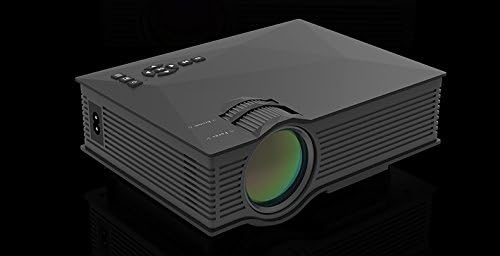
Ffigur 4.1: Blaen ac Ochr View of the UNIC UC46 Mini Projector. Shows the main lens, focus wheel, and ventilation grilles.

Ffigur 4.2: Cefn View of the Projector. Displays various input ports including HDMI, USB, AV, SD card slot, and audio output.

Ffigur 4.3: Uchaf View of the Projector. Shows the control panel buttons for navigation, power, and input selection.

Figure 4.4: Lens Focus and Keystone Adjustment Diagram. Illustrates the location of the lens focus and keystone correction wheels, along with a diagram of the remote control functions.
5. Gosod
5.1 Lleoliad
Place the projector on a stable, flat surface. Ensure there is adequate space around the projector for ventilation. The projection distance will determine the screen size. Refer to the specifications for recommended distances.
5.2 Cysylltiad Pwer
- Connect the power cable to the projector's AC power input port.
- Plug the other end of the power cable into a standard electrical outlet (100-240V, 50/60Hz).
- Bydd y golau dangosydd pŵer ar y taflunydd yn goleuo.
5.3 Pŵer Cychwynnol Ymlaen
- Pwyswch y botwm Pŵer ar y taflunydd neu'r teclyn rheoli o bell i droi'r ddyfais ymlaen.
- The projector will display the startup screen.
5.4 Addasu Delwedd
- Ffocws: Rotate the focus wheel (located near the lens) until the projected image is clear and sharp.
- Cywiriad Keystone: If the image appears trapezoidal, adjust the keystone correction wheel (usually next to the focus wheel) to square the image.
6. Cyfarwyddiadau Gweithredu
6.1 Cysylltu Dyfeisiau
The UNIC UC46 projector supports various input sources:
- HDMI: Connect a PC, laptop, DVD player, game console (PS3, PS4), or Smart TV box using an HDMI cable. Select "HDMI" as the input source.
- VGA: Connect a PC or laptop using a VGA cable. Select "VGA" as the input source.
- USB: Mewnosodwch yriant fflach USB i chwarae cyfryngau files (videos, photos, music, text). Select "USB" as the input source and navigate through the files.
- O: Use the included 3-in-1 AV cable to connect devices with AV output (e.g., older DVD players, VCRs). Select "AV" as the input source.
- Cerdyn SD: Insert an SD card into the slot to play media files. Select "SD" as the input source.
6.2 Wireless Connectivity (WiFi)
The projector supports WiFi connectivity for screen mirroring from smartphones (iOS, Android, Windows) and DLNA.
- Go to the "WiFi" or "Wireless" menu on the projector.
- Select your WiFi network and enter the password to connect the projector to your home network.
- For screen mirroring (Miracast/AirPlay):
- Ensure your smartphone and the projector are connected to the same WiFi network.
- On your smartphone, enable screen mirroring (e.g., "Screen Mirroring," "Smart View," "AirPlay," "Wireless Display").
- Dewiswch y taflunydd o'r rhestr o ddyfeisiau sydd ar gael.
- For DLNA:
- Ensure your smartphone and the projector are connected to the same WiFi network.
- Use a DLNA-compatible app on your smartphone to stream media to the projector.
6.3 Allbwn Sain
The projector has a built-in speaker. For enhanced audio, you can connect external speakers or a sound system via the 3.5mm audio output port.
7. cynnal
7.1 Glanhau'r Lens
Use a soft, lint-free cloth specifically designed for optical lenses to gently wipe the projector lens. Do not use abrasive cleaners or solvents.
7.2 Glanhau Corff y Taflunydd
Wipe the exterior of the projector with a soft, dry cloth. For stubborn dirt, a slightly damp gellir defnyddio brethyn, ac yna brethyn sych.
7.3 Awyru
Regularly check that the ventilation grilles are not blocked by dust or debris. Use a soft brush or compressed air to clean them if necessary. Proper airflow is crucial for preventing overheating and extending the projector's lifespan.
7.4 Lamp Bywyd
Mae'r LED lamp has an estimated life of 20,000 hours. To maximize lamp life, avoid frequent on/off cycles and allow the projector to cool down properly after use.
8. Datrys Problemau
| Problem | Achos Posibl | Ateb |
|---|---|---|
| Dim delwedd wedi'i thaflunio | Power cable not connected; Projector not turned on; Incorrect input source selected; Input device not connected or powered on. | Check power connection; Press power button; Select correct input source (HDMI, VGA, USB, AV, SD); Ensure input device is connected and powered on. |
| Mae'r ddelwedd yn aneglur | Lens out of focus; Incorrect projection distance. | Adjust the focus wheel; Adjust the projection distance. |
| Mae'r ddelwedd yn drapesoidaidd | Nid yw'r taflunydd yn berpendicwlar i'r sgrin. | Addaswch yr olwyn cywiro clofaen. |
| Dim sain | Volume too low; Muted; External audio device not connected or powered on; Audio format not supported. | Increase volume; Unmute; Check external audio connection; Ensure audio format is supported. |
| Rheolaeth bell ddim yn gweithio | Batteries dead or incorrectly inserted; Obstruction between remote and IR receiver. | Replace batteries; Ensure clear line of sight to the projector's IR receiver. |
| Overheating / Shuts down automatically | Blocked ventilation; Prolonged use. | Ensure ventilation grilles are clear; Allow projector to rest after 4-5 hours of use. |
9. manylebau

Figure 9.1: Detailed Specifications of the UNIC UC46 Mini Projector.
| Nodwedd | Manylyn |
|---|---|
| System Delwedd | LCD |
| Lamp | LED |
| Datrysiad Brodorol | 800 x 480 picsel |
| Cefnogir Datrysiad Uchaf | 1920 x 1080 picsel (HD Llawn) |
| Disgleirdeb | 1200 o Lumens |
| Cymhareb Cyferbyniad | 800:1 |
| Defnydd Pŵer | 50-55 Wat |
| Cyflenwad Pŵer | 100-240V, 50/60Hz |
| Lefel Sŵn | <25dB |
| Maint Tafluniad | 34 - 130 modfedd |
| Taflwch Pellter | 1.07 i 3.8 metr (3.51 i 12.47 troedfedd) |
| Cymhareb Agwedd | 4:3 / 16:9 |
| Pwysau Net | 1 kg |
| Lens | Multi-layer coated glass lens |
| Terfynellau Mewnbwn | USB, SD, HDMI, AV, VGA, IR |
| Terfynell Allbwn | Clustffon, Llefarydd |
| Di-wifr | WiFi 2.4G |
| Dimensiynau Cynnyrch | 201mm x 153mm x 67.5mm |
10. Gwarant a Chefnogaeth
For warranty information and technical support, please refer to the product packaging or contact your retailer. Keep your purchase receipt as proof of purchase.
Ask a question about this manual
Ask about setup, troubleshooting, compatibility, parts, safety, or missing instructions. Manuals+ will review the question and use this page’s manual context to help answer it.