
1. Rhagymadrodd
Thank you for choosing the UNIC UC18 Mini Projector. This compact and portable projector is designed to provide a versatile viewing experience for home entertainment, presentations, and more. Featuring an LED lighting system, built-in speaker, and multiple input options, the UC18 offers convenience and functionality. Please read this manual thoroughly to ensure proper setup, operation, and maintenance of your device.
2. Gwybodaeth Diogelwch
- Cyflenwad Pŵer: Defnyddiwch yr addasydd pŵer penodedig yn unig. Sicrhewch fod y cyfainttagmae e yn cyd-fynd â gofynion y taflunydd.
- Awyru: Peidiwch â rhwystro agoriadau awyru. Sicrhewch fod digon o le o amgylch y taflunydd ar gyfer llif aer priodol i atal gorboethi.
- Lleithder: Keep the projector away from water, rain, and excessive humidity. Do not operate with wet hands.
- Glanhau: Disconnect power before cleaning. Use a soft, dry cloth. Avoid liquid or aerosol cleaners.
- Trin: Handle the projector with care. Avoid dropping or subjecting it to strong impacts.
- Amddiffyn Llygaid: Peidiwch ag edrych yn uniongyrchol i lens y taflunydd pan fydd y lamp is on, as the bright light can cause eye strain or damage.
- Dadosod: Peidiwch â cheisio dadosod na thrwsio'r taflunydd eich hun. Cyfeiriwch bob gwasanaethu at bersonél cymwys.
3. Cynnwys Pecyn
Gwiriwch gynnwys y pecyn wrth ddadbocsio. Os oes unrhyw eitemau ar goll neu wedi'u difrodi, cysylltwch â'ch manwerthwr.
- UNIC UC18 Mini Projector
- Cebl Pŵer
- Cebl AV 3-in-1
- Remote Control (requires lithium battery, not included)
- Llawlyfr Defnyddiwr
4. Cynnyrch Drosview
Projector Layout
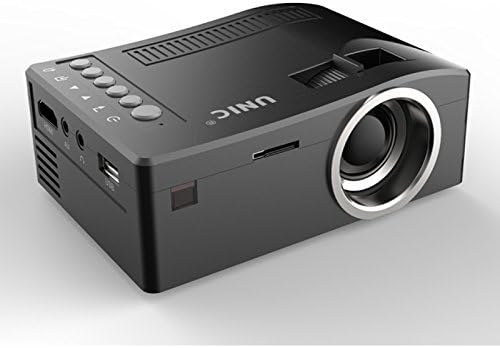
Blaen ac ochr view of the UNIC UC18 Mini Projector, showing the lens, ventilation, and various ports.
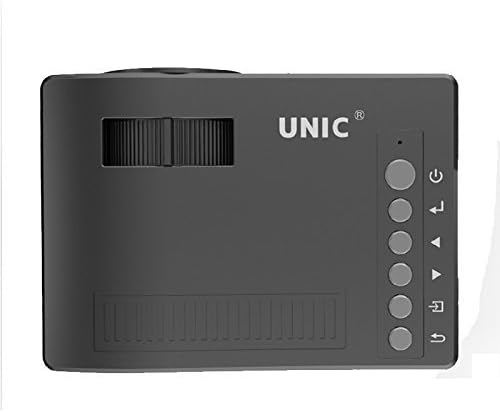
Brig view of the UNIC UC18 Mini Projector, highlighting the control buttons and focus wheel.
Porthladdoedd a Rheolaethau
The UNIC UC18 Mini Projector features a range of ports and controls for easy connectivity and operation:
- Lens: Yn taflunio'r ddelwedd ar y sgrin.
- Olwyn Ffocws: Manual adjustment for image clarity.
- Botwm Pŵer: Yn troi'r taflunydd ymlaen neu i ffwrdd.
- Botwm Dewislen: Yn cyrchu dewislen gosodiadau'r taflunydd.
- Botymau Llywio (I Fyny/I Lawr/Chwith/Dde): Fe'i defnyddir i lywio bwydlenni ac addasu gosodiadau.
- Botwm Iawn: Yn cadarnhau dewisiadau yn y ddewislen.
- Botwm Ffynhonnell: Selects the input source (HDMI, USB, AV, TF).
- Porth USB: Yn cysylltu dyfeisiau storio USB ar gyfer chwarae cyfryngau.
- Porthladd HDMI: Connects to HDMI-enabled devices like laptops, gaming consoles, or media players.
- Porthladd AV: Connects to devices using the included 3-in-1 AV cable.
- Slot Cerdyn TF: Inserts a TF (Micro SD) card for media playback.
- Jack clustffon 3.5mm: Connects external headphones or speakers.
- Derbynnydd IR: Yn derbyn signalau o'r teclyn rheoli o bell.
5. Gosod
5.1 Cysylltiad Pwer
- Cysylltwch y cebl pŵer â phorthladd mewnbwn pŵer y taflunydd.
- Plygiwch ben arall y cebl pŵer i mewn i allfa bŵer addas.
- Bydd y golau dangosydd pŵer ar y taflunydd yn goleuo.
5.2 Cysylltu Dyfeisiau Mewnbwn
- HDMI: Connect an HDMI cable from your source device (e.g., laptop, DVD player) to the projector's HDMI port.
- USB: Mewnosodwch yriant fflach USB i'r porthladd USB.
- O: Use the provided 3-in-1 AV cable to connect to devices with AV output. Match the yellow, white, and red connectors.
- Cerdyn TF: Insert a TF (Micro SD) card into the TF card slot.
5.3 Lleoli'r Taflunydd
Place the projector on a stable, flat surface. For optimal image quality, position the projector perpendicular to the projection surface (wall or screen). The throw distance can range from 0.48 to 2.43 meters, producing a picture size from 12 to 66 inches.
6. Cyfarwyddiadau Gweithredu
6.1 Pweru Ymlaen/Diffodd
Press the Power button on the projector or the remote control to turn the device on or off.
6.2 Addasu Ffocws
After powering on, if the image appears blurry, rotate the manual focus wheel located near the lens until the image becomes clear and sharp.

Close-up of the manual focus wheel on the UNIC UC18 Mini Projector, located near the lens.
6.3 Selecting Input Source
Press the 'Source' button on the projector or remote control. Use the navigation buttons to select your desired input source (HDMI, USB, AV, TF) and press 'OK' to confirm.
6.4 Llywio Dewislen
Press the 'Menu' button to access the projector's settings. Use the navigation buttons to browse options and 'OK' to select. Press 'Menu' again to exit.
6.5 Allbwn Sain
The projector has a built-in speaker. For private listening or connecting to external audio systems, plug headphones or external speakers into the 3.5mm headphone jack.
7. cynnal
7.1 Glanhau'r Lens
Defnyddiwch frethyn meddal, di-flwff sydd wedi'i gynllunio'n benodol ar gyfer lensys optegol. Sychwch y lens yn ysgafn i gael gwared â llwch neu staeniau. Osgowch ddefnyddio deunyddiau sgraffiniol neu gemegau llym.
7.2 Glanhau Corff y Taflunydd
Sychwch du allan y taflunydd gyda lliain meddal, sych. Peidiwch â defnyddio glanhawyr hylif na thoddyddion.
7.3 Storio
When not in use for extended periods, store the projector in a cool, dry place, away from direct sunlight and extreme temperatures. Cover the lens to protect it from dust.
8. Datrys Problemau
| Problem | Achos Posibl | Ateb |
|---|---|---|
| Dim delwedd yn cael ei harddangos | Power not connected; Incorrect input source; Loose cable connection | Check power cable; Select correct input source; Reconnect cables securely |
| Mae'r ddelwedd yn aneglur | Ffocws heb ei addasu; Taflunydd yn rhy agos/pell | Adjust the focus wheel; Reposition the projector within recommended throw distance |
| Dim sain | Volume too low; Muted; Audio cable not connected; Source device audio issue | Increase volume; Unmute; Check audio cable connection; Verify audio output on source device |
| Rheolaeth bell ddim yn gweithio | Batteries low/incorrectly inserted; Obstruction between remote and projector | Replace batteries (lithium battery required); Ensure clear line of sight to IR receiver |
| Taflunydd yn gorboethi | Awyru wedi'i rwystro; Defnydd hirfaith mewn amgylchedd poeth | Ensure ventilation openings are clear; Operate in a well-ventilated area; Allow to cool down |
9. manylebau
Manylebau Technegol
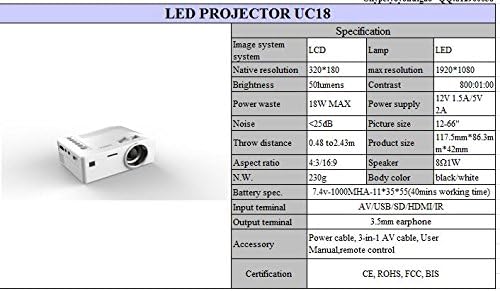
Detailed technical specifications for the UNIC UC18 Mini Projector, including resolution, contrast, and dimensions.
| Nodwedd | Manyleb |
|---|---|
| Brand | UNIC |
| Enw Model | UC18 |
| Technoleg Arddangos | QVGA (LCD) |
| Datrysiad Brodorol | 320 x 240 picsel |
| Datrysiad Mwyaf â Chymorth | 1920 x 1080 pixels (1080P) |
| Disgleirdeb | 50 o Lumens |
| Cymhareb Cyferbyniad | 500:1 |
| Cymhareb Agwedd | 16:9 (also supports 4:3) |
| Taflwch Pellter | 0.48m - 2.43m (1.57ft - 7.97ft) |
| Maint Llun | 12 - 66 modfedd |
| Terfynellau Mewnbwn | AV, USB, SD (TF), HDMI, IR |
| Terfynell Allbwn | Jack Clust 3.5mm |
| Nodweddion Arbennig | Siaradwr adeiledig, Symudol |
| Defnydd Pŵer | 24 Wat (Uchafswm 18W) |
| Cyflenwad Pŵer | 12V 1.5A / 5V 2A |
| Lefel Sŵn | <25dB |
| Dimensiynau Cynnyrch (L x W x H) | 117.5mm x 86.3mm x 42mm |
| Pwysau Net | 230g |
| Math Mowntio | Wal Mount |
| Rheolaeth Anghysbell | Yes (battery not included) |
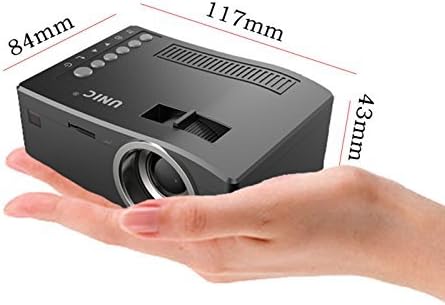
The UNIC UC18 Mini Projector held in a hand, illustrating its compact size and dimensions (117mm x 84mm x 43mm).
10. Gwarant a Chefnogaeth
Am wybodaeth am warant neu gymorth technegol, cyfeiriwch at y ddogfennaeth a ddarparwyd ar adeg y pryniant neu cysylltwch â'ch manwerthwr. Cadwch eich prawf prynu ar gyfer unrhyw hawliadau gwarant.