
1. Rhagymadrodd
This manual provides essential information for the safe and efficient operation of your Cotek SP-3000-112 High Frequency Pure Sine Wave Inverter. This device converts 12V DC power from batteries into 120V AC power, suitable for a wide range of electronic appliances. Please read this manual thoroughly before installation and use, and retain it for future reference.
2. Gwybodaeth Diogelwch
Failure to follow these safety instructions may result in electric shock, fire, serious injury, or death. Always exercise caution when working with electrical equipment.
- Darllenwch yr holl gyfarwyddiadau: Before operating the inverter, read all instructions and cautionary markings on the inverter, the batteries, and all appropriate sections of this manual.
- Personél Cymwys: Installation and servicing should be performed by qualified personnel familiar with batteries and inverters.
- Awyru: Ensure adequate ventilation around the inverter. Do not install in a zero-clearance compartment.
- Osgoi Dŵr: Do not expose the inverter to rain, snow, spray, or bilge water.
- Seiliau priodol: Rhaid i'r gwrthdröydd gael ei seilio'n iawn.
- Diogelwch Batri: Work near lead-acid batteries is dangerous. Batteries generate explosive gases during normal operation. Ensure proper ventilation and wear appropriate personal protective equipment.
- Pŵer Datgysylltu: Always disconnect the battery supply before performing any maintenance or troubleshooting.
- Cywir Voltage: Sicrhau bod y mewnbwn DC cyftage matches the inverter's specifications (12VDC for this model).


3. Cynnyrch Drosview
3.1 Nodweddion Allweddol
- Allbwn ton sin pur ar gyfer electroneg sensitif.
- Power ON / OFF remote control capability (Green Terminal).
- Input & output fully isolated for enhanced safety.
- Temperature & load controlled cooling fan for optimal performance.
- User-friendly interface with 3-color LED status indicators.
- Multiple protection features: Reverse Polarity (Fuse), Under Voltage / Dros Voltage, Output Protection (Short Circuit / Overload / Over Temperature).
- E-13 / UL / CE / FCC approved.
3.2 Cydrannau'r Gwrthdroydd

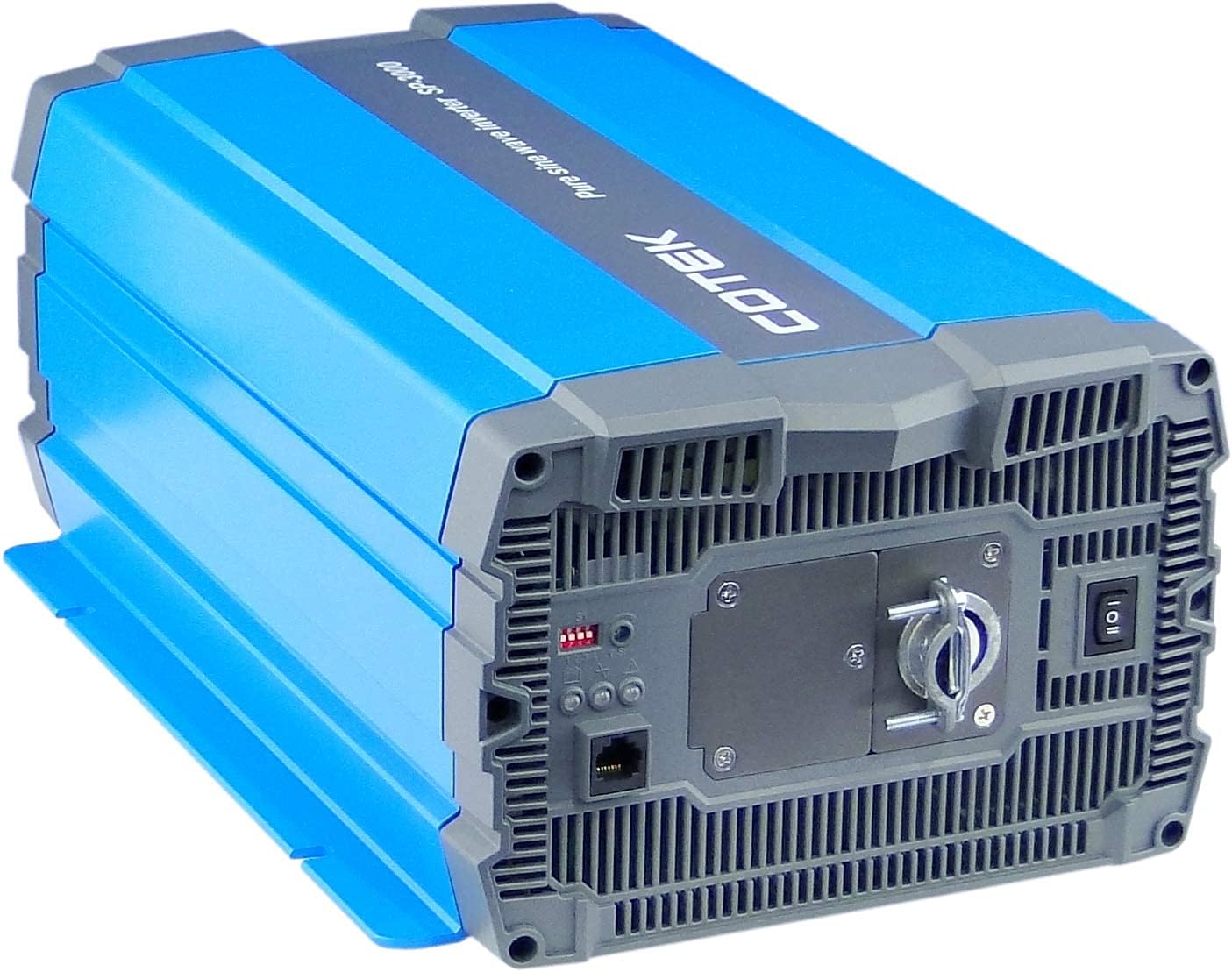
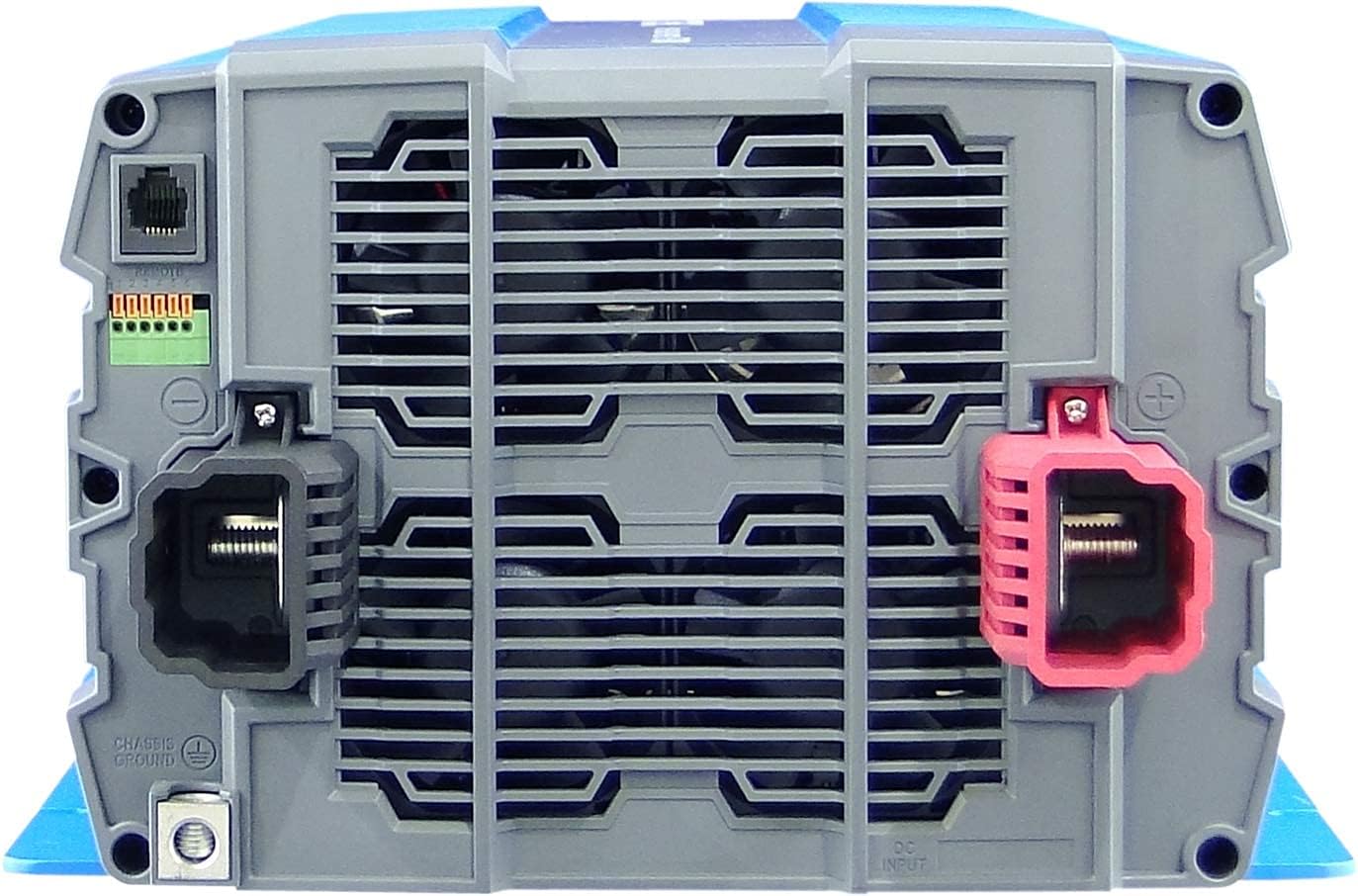
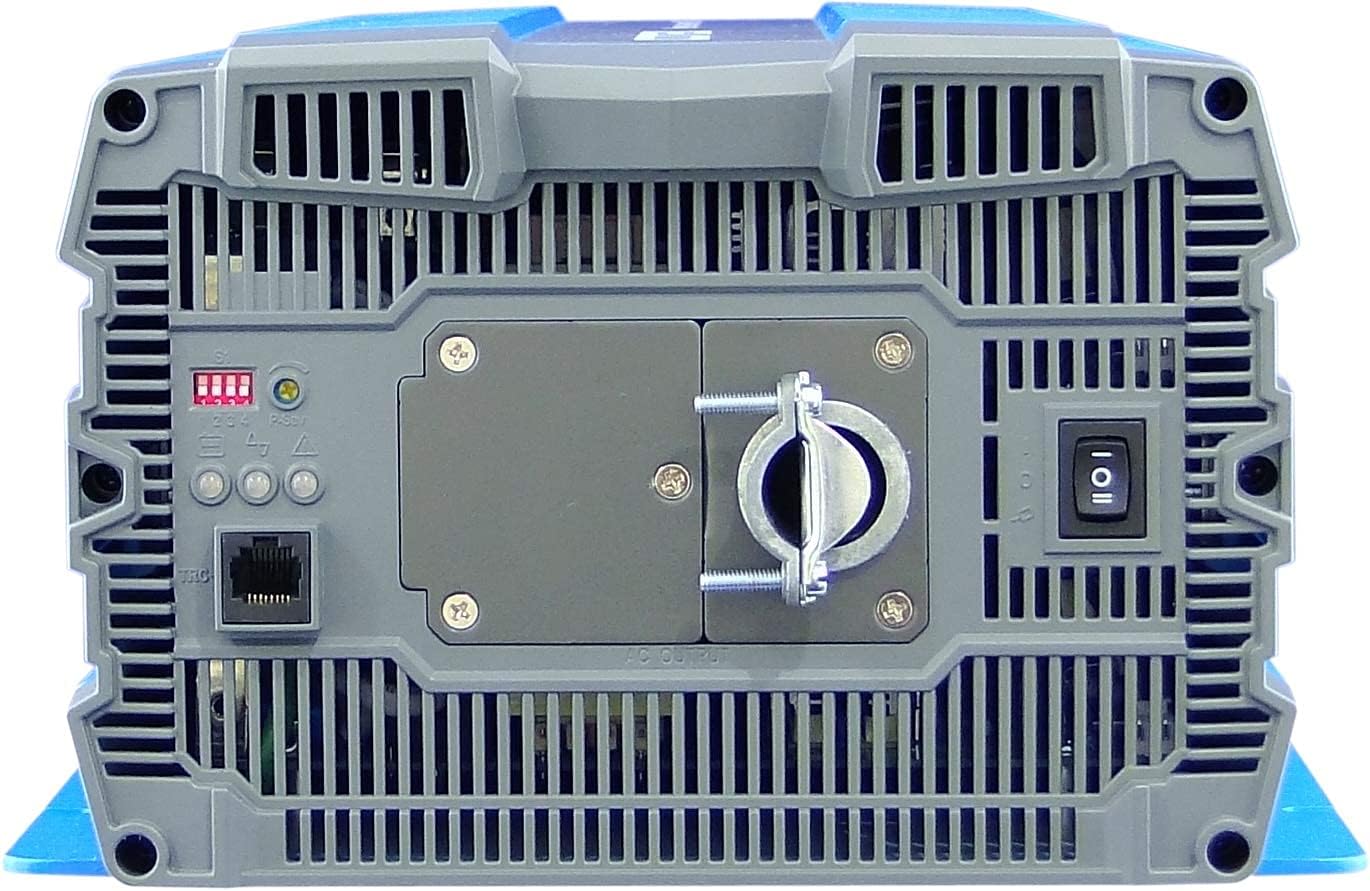
4. Gosod a Gosod
Proper installation is crucial for the safe and efficient operation of your inverter. Refer to local electrical codes and standards.
4.1 Lleoliad
- Install the inverter in a dry, well-ventilated area, away from direct sunlight, heat sources, and flammable materials.
- Ensure sufficient clearance around the inverter for proper airflow, especially around the cooling fan vents.
- Mount the inverter securely on a stable, non-combustible surface.
- Avoid areas where dust, moisture, or corrosive fumes are present.
4.2 Gwifrau
All wiring must comply with applicable electrical codes and be performed by a qualified electrician.
- Sylfaen: Connect the inverter's chassis ground terminal to a reliable earth ground using appropriate gauge wire.
- Cysylltiad mewnbwn DC:
- Ensure the battery bank voltage yw 12VDC.
- Use appropriately sized cables for the DC input to minimize voltage drop and ensure safety. Refer to cable sizing charts based on current and distance.
- Connect the positive (+) terminal of the battery bank to the red (+) terminal on the inverter.
- Connect the negative (-) terminal of the battery bank to the black (-) terminal on the inverter.
- Install a DC-rated fuse or circuit breaker between the battery bank and the inverter's positive terminal, as close to the battery as possible.
- Cysylltiad Allbwn AC:
- Connect your AC loads to the hardwire AC output terminal block.
- Ensure the total load does not exceed the inverter's continuous power rating (3000W).
- Rheolaeth Anghysbell (Dewisol): Connect the remote control unit to the RJ45 port or use the green terminal for external ON/OFF control if desired.
5. Cyfarwyddiadau Gweithredu
5.1 Pweru Ymlaen/Diffodd
- I Bweru Ymlaen: Ensure all DC and AC connections are secure. Flip the main power switch on the inverter's rear panel to the 'ON' position. The Power LED indicator should illuminate.
- I Bweru i ffwrdd: Disconnect all AC loads from the inverter. Flip the main power switch to the 'OFF' position.
5.2 Dangosydd LED
The inverter features 3-color LED status indicators on the control panel (refer to Figure 4) to provide operational feedback:
- Gwyrdd LED: Indicates normal operation and power output.
- LED melyn: Indicates a warning condition, such as low battery voltage or high temperature. The inverter may continue to operate but requires attention.
- LED Coch: Indicates a fault condition, such as overload, short circuit, or severe over/under voltage. The inverter will shut down to protect itself and connected devices.
5.3 Gosodiadau Switch DIP
The DIP switches on the control panel allow for customization of certain inverter parameters, such as output voltage, frequency, and power saving mode. Refer to the detailed specifications table (Figure 5) or the product datasheet for specific configurations. Always adjust DIP switches when the inverter is powered off.
6. cynnal
Mae cynnal a chadw rheolaidd yn sicrhau hirhoedledd a gweithrediad dibynadwy eich gwrthdröydd.
- Glanhau: Glanhewch du allan y gwrthdröydd o bryd i'w gilydd gyda lliain sych. Gwnewch yn siŵr bod agoriadau awyru yn rhydd o lwch a malurion. Peidiwch â defnyddio glanhawyr hylif.
- Cysylltiadau: Regularly check all electrical connections (DC input, AC output, ground) for tightness and corrosion. Loose connections can cause overheating and poor performance.
- Archwiliad batri: Inspect batteries for signs of damage, corrosion, or electrolyte leakage. Ensure battery terminals are clean and tight.
- Amgylchedd: Gwiriwch fod yr amgylchedd gweithredu yn aros o fewn yr ystodau tymheredd a lleithder penodedig.
7. Datrys Problemau
Mae'r adran hon yn darparu atebion i broblemau cyffredin y gallech ddod ar eu traws. Os yw'r broblem yn parhau, cysylltwch â chymorth cwsmeriaid.
| Problem | Achos Posibl | Ateb |
|---|---|---|
| Nid yw'r gwrthdröydd yn troi ymlaen. | No DC input power; Loose battery connections; Blown DC fuse/breaker; Inverter switch OFF. | Gwiriwch y batri cyftage; Tighten connections; Replace fuse/reset breaker; Turn inverter switch ON. |
| Dim allbwn AC. | Overload; Short circuit; Over-temperature shutdown; Low/High DC input voltage. | Reduce AC load; Check for short circuits in wiring/appliances; Allow inverter to cool; Check battery voltage. |
| Yellow LED illuminated. | Cyfrol batri iseltage warning; High temperature warning. | Recharge batteries; Ensure adequate ventilation, reduce load. |
| Red LED illuminated / Inverter shut down. | Overload; Short circuit; Over-temperature; Under/Over voltage. | Identify and correct the fault (e.g., reduce load, fix short, allow cooling, check battery voltage), then restart the inverter. |
| Cooling fan runs constantly or loudly. | High internal temperature due to heavy load or poor ventilation. | Reduce load; Improve ventilation around the inverter. |
8. manylebau
The following table outlines the technical specifications for the Cotek SP-3000 Series Pure Sine Wave Inverter, specifically for the SP-3000-112 model.

| Categori | Paramedr | SP-3000 112- |
|---|---|---|
| Allbwn | AC Cyftage | 100 / 110 / 115 / 120VAC ±5% |
| Pŵer â Gradd | 3000W | |
| Surge Power (1 Sec.) | 6000W | |
| Pwer Allbwn Uchaf (1 Munud) | 3450W | |
| Tonffurf Allbwn | Pure Sine Wave (THD<3%) | |
| Amlder | 50 / 60 Hz ±0.5% | |
| Mewnbwn | DC Cyftage | 12VDC |
| Cyftage Ystod | 10.5 ~ 16.5VDC | |
| Dim Llwyth Cyfredol | <3.0A@12VDC | |
| Modd Arbed Pwer | <0.4A@12VDC | |
| Effeithlonrwydd (Uchafswm.) | 90% | |
| Amddiffyniad | Input Under - Voltage Amddiffyn | 10.5 ±0.3VDC |
| Input Under - Voltage Larwm | 11.0 ±0.3VDC | |
| Input Under - Voltage Adferiad | 12.0 ±0.3VDC | |
| Input Over - Voltage Amddiffyn | 16.5 ±0.3VDC | |
| Input Over - Voltage Adferiad | 14.5 ±0.3VDC | |
| Gorlwytho Allbwn | Cyfrol allbwn Shutdowntage, ailgychwyn i adennill | |
| Allbwn Byr | Cyfrol allbwn Shutdowntage, ailgychwyn i adennill | |
| Amgylchedd | Gweithredu Dros Dro. | -20 ° C ~ +40 ° C |
| Tymheredd Storio. & Lleithder | -30°C ~ +70°C, 10 ~ 95% RH | |
| Cyffredinol | Dimensiynau (W x H x D) | 442 x 214 x 102 mm (17.4 x 8.4 x 4.0 modfedd) |
| Pwysau | 8.2kg (18.1 pwys) | |
| Oeri | Tymheredd a ffan oeri a reolir gan lwyth |

9. Gwarant a Chefnogaeth
9.1 Gwybodaeth Gwarant
The Cotek SP-3000-112 Pure Sine Wave Inverter comes with a Gwarant Gwneuthurwr 2 FlwyddynMae'r warant hon yn cwmpasu diffygion mewn deunyddiau a chrefftwaith o dan ddefnydd arferol. Cadwch eich prawf prynu ar gyfer hawliadau gwarant.
9.2 Cefnogaeth i Gwsmeriaid
For technical assistance, troubleshooting beyond this manual, or warranty inquiries, please contact Cotek customer support through their official website or your point of purchase. Provide your model number (SP-3000-112) and a detailed description of the issue to expedite service.