
1. Rhagymadrodd
This manual provides essential instructions for the safe and efficient installation, operation, and maintenance of your COTEK SP-3000-148 High Frequency Pure Sine Wave Inverter. Please read this manual thoroughly before attempting any installation or operation to ensure proper use and to prevent potential hazards. Keep this manual for future reference.
2. Cyfarwyddiadau Diogelwch
Dilynwch y rhagofalon diogelwch canlynol bob amser i leihau'r risg o sioc drydanol, tân neu anaf:
- Darllenwch yr holl gyfarwyddiadau: Before operating the inverter, read all instructions and cautionary markings on the inverter, the batteries, and all appropriate sections of this manual.
- Personél cymwys: All electrical work should be performed by qualified personnel familiar with battery and inverter systems and their installation.
- Awyru: Ensure adequate ventilation around the inverter. Do not install in a zero-clearance compartment.
- Osgoi lleithder: Do not expose the inverter to rain, snow, spray, or bilge water.
- Proper grounding: Rhaid i'r gwrthdröydd gael ei seilio'n iawn.
- Diogelwch batri: Work in a well-ventilated area when working with batteries. Wear eye protection and protective clothing. Avoid touching eyes while working near batteries.
- Datgysylltu pŵer: Before performing any maintenance or cleaning, disconnect all power to the inverter.

Image: Always use appropriate safety equipment when working with electrical systems.
3. Nodweddion Cynnyrch
The COTEK SP-3000-148 inverter offers the following key features:
- Allbwn ton sin pur ar gyfer electroneg sensitif.
- Power ON / OFF remote control capability via green terminal.
- Input & output fully isolation for enhanced safety.
- Temperature & load controlled cooling fan for optimal performance and longevity.
- User-friendly interface for ease of operation.
- Type 1 Indoor Aluminum Enclosure for durability and protection.
4. Cynnyrch Drosview
The COTEK SP-3000-148 is a high-frequency pure sine wave inverter designed to convert 48VDC battery power into stable 120VAC electricity, suitable for a wide range of applications.

Image: Overall view of the COTEK SP-3000-148 Pure Sine Wave Inverter.
4.1 Panel Cefn
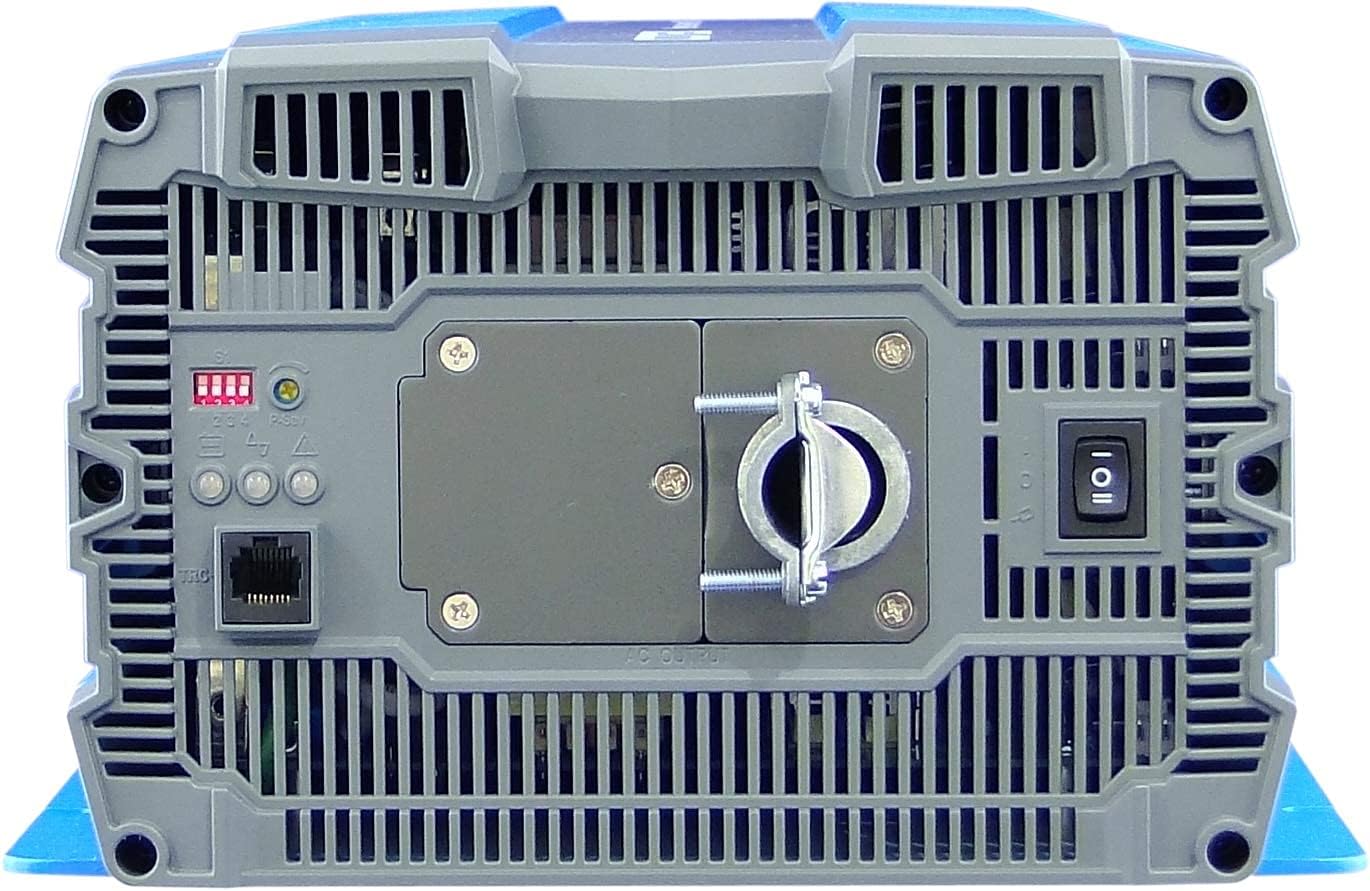
Image: Rear panel of the COTEK SP-3000-148 inverter.
- Terfynell Allbwn AC: Hardwire connection for 120VAC output.
- Switsys DIP: Used for configuring output voltage ac amlder.
- Remote Control Port (Green Terminal): Ar gyfer cysylltu switsh ON/OFF o bell dewisol.
- Newid Pwer: Main ON/OFF switch for the inverter.
- Dangosyddion LED: Display operational status and fault conditions.
4.2 Panel Blaen
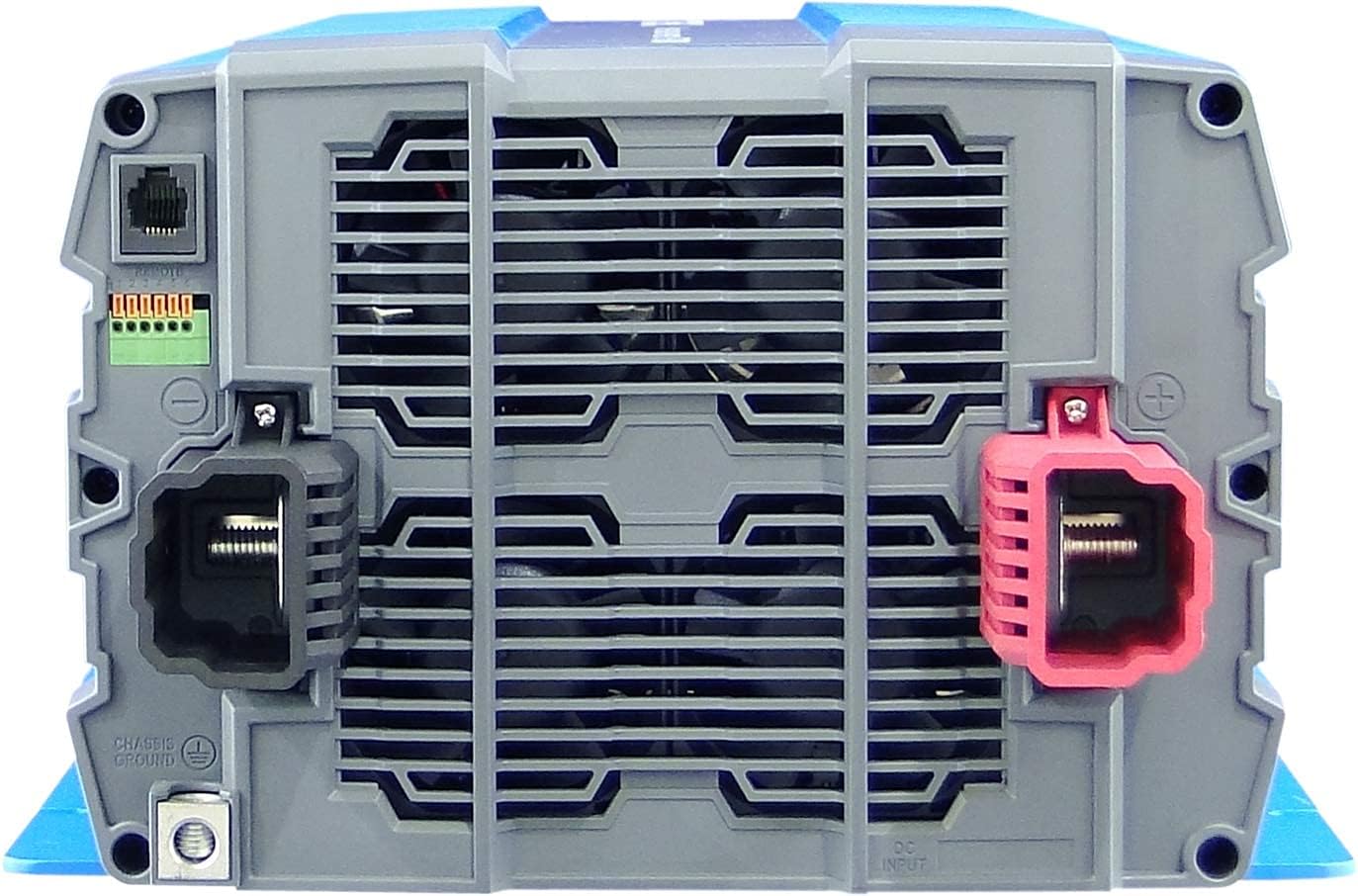
Image: Front panel of the COTEK SP-3000-148 inverter.
- Terfynellau Mewnbwn DC: Terfynellau positif (+) a negatif (-) ar gyfer cysylltiad batri 48VDC.
- Chassis Ground Terminal: For connecting the inverter to earth ground.
5. Gosod
Mae gosodiad priodol yn hanfodol ar gyfer gweithrediad diogel ac effeithlon eich gwrthdröydd.
5.1 Mowntio
- Lleoliad: Choose a dry, well-ventilated area, away from direct sunlight, heat sources, and flammable materials.
- Cyfeiriadedd: Mount the inverter horizontally on a flat, stable surface. Ensure adequate clearance around the unit for proper airflow.
- Mowntio Diogel: Use appropriate fasteners to securely mount the inverter to prevent movement or vibration.

Image: Mechanical drawings with dimensions for mounting the SP-3000 series inverter.
5.2 Gwifrau
Rhaid i bob gwifrau gydymffurfio â chodau trydanol lleol a chenedlaethol.
5.2.1 DC Input Connection (48VDC)
- Connect the positive (+) terminal of the inverter to the positive terminal of your 48VDC battery bank.
- Connect the negative (-) terminal of the inverter to the negative terminal of your 48VDC battery bank.
- Use appropriately sized cables and fuses/breakers for the DC input circuit to prevent overcurrent.
5.2.2 AC Output Connection (120VAC Hardwire)
- Connect your AC loads to the hardwire AC output terminal block on the rear panel.
- Ensure proper polarity (Line, Neutral, Ground) for all AC connections.
- Consult a qualified electrician for hardwiring AC circuits.
5.2.3 Seiliau
- Connect the chassis ground terminal on the inverter's front panel to a reliable earth ground.
- This connection is essential for safety and to minimize electrical noise.
5.2.4 Remote Control Connection
- Connect an optional remote ON/OFF switch to the green terminal block on the rear panel.
- Refer to the remote control's specific instructions for wiring details.
6. Gweithrediad
6.1 Pweru Ymlaen/Diffodd
- I Bweru Ymlaen: Ensure all connections are secure. Flip the main power switch on the rear panel to the 'ON' position. The LED indicators will illuminate to show operational status.
- I Bweru i ffwrdd: Flip the main power switch to the 'OFF' position. If using a remote switch, ensure it is also in the 'OFF' position.
6.2 Gosodiadau Switch DIP
The DIP switches on the rear panel allow configuration of the inverter's output voltage and frequency. Refer to the diagram below for specific settings. Always power off the inverter before changing DIP switch settings.

Image: COTEK SP-3000 series specifications and DIP switch settings.
6.2.1 Cynnyrch Cyftage Detholiad
The inverter supports various output voltages (100V, 110V, 115V, 120V AC). Adjust DIP switches according to the desired output voltage as indicated in the specifications diagram.
6.2.2 Output Frequency Selection
The inverter can operate at 50Hz or 60Hz. Set the DIP switches to match the required frequency for your region or application.
6.2.3 Modd Arbed Pwer
The inverter features a power saving mode (High Efficiency). Refer to the diagram for enabling or disabling this feature via DIP switches.
6.3 Dangosydd LED
The inverter is equipped with LED indicators to display its operational status and alert you to potential issues. Consult the specifications diagram for a detailed explanation of each LED's meaning.
7. cynnal
Mae cynnal a chadw rheolaidd yn sicrhau hirhoedledd a gweithrediad dibynadwy eich gwrthdröydd.
- Glanhau: Glanhewch du allan y gwrthdröydd o bryd i'w gilydd gyda lliain sych. Gwnewch yn siŵr bod agoriadau awyru yn rhydd o lwch a malurion. Peidiwch â defnyddio glanhawyr hylif.
- Cysylltiadau: Regularly check all DC and AC connections for tightness. Loose connections can cause overheating and poor performance.
- Archwiliad batri: Inspect your battery bank regularly for corrosion, damage, or signs of leakage.
8. Datrys Problemau
The SP-3000-148 inverter includes several protection features. If the inverter stops operating or indicates a fault, refer to the table below for common issues and solutions.
| Problem | Achos Posibl | Ateb |
|---|---|---|
| No AC Output / Inverter Off | Main switch off, low battery voltage, overload, internal fuse. | Check power switch, charge batteries, reduce load, check DC input fuse. |
| Mewnbwn Under-Voltage Larwm | Batri cyftage rhy isel. | Codi neu ailosod batris. |
| Mewnbwn Gor-Gyfroltage Larwm | Batri cyftage rhy uchel. | Check charging system, ensure correct battery voltage. |
| Gorlwytho Allbwn | Mae'r llwyth cysylltiedig yn fwy na chynhwysedd y gwrthdröydd. | Lleihau'r llwyth cyfan sy'n gysylltiedig â'r gwrthdröydd. |
| Dros Tymheredd | Inverter overheating due to poor ventilation or excessive load. | Ensure adequate ventilation, reduce load, allow inverter to cool. |
| Cylchdaith Byr | Short circuit detected on AC output. | Identify and clear the short circuit on the AC output wiring or load. |
9. manylebau
The following table details the technical specifications for the COTEK SP-3000-148 Pure Sine Wave Inverter:
| Nodwedd | Manyleb |
|---|---|
| Model | SP-3000 148- |
| AC Cyftage | 120VAC (Selectable via DIP switch) |
| Rheoliad AC | ±5% |
| Pŵer â Gradd | 3000W |
| Surge Power (1 Sec) | 6000W |
| Pwer Allbwn Uchaf (1 Munud) | 3450W |
| Tonffurf Allbwn | Pure Sine Wave (THD<3% at nominal load) |
| Amlder | 60Hz (Selectable via DIP switch) |
| DC Cyftage | 48VDC |
| Cyftage Ystod | 42.0 ~ 66.0VDC |
| Dim Llwyth Cyfredol | <1.0A @48VDC |
| Modd Arbed Pwer | <0.4A @48VDC |
| Effeithlonrwydd (Uchafswm.) | 92% |
| Mewnbwn Under-Voltage Amddiffyn | 42.0 ± 0.5VDC |
| Mewnbwn Under-Voltage Larwm | 44.0 ± 0.5VDC |
| Mewnbwn Under-Voltage Adferiad | 50.0 ± 0.5VDC |
| Mewnbwn Gor-Gyfroltage Amddiffyn | 66.0 ± 1.0VDC |
| Mewnbwn Gor-Gyfroltage Adferiad | 64.0 ± 1.0VDC |
| Gorlwytho Allbwn | Shutdown output, restart to recover. |
| Allbwn Byr | Shutdown output, restart to recover. |
| Dros Tymheredd | Shutdown output, auto-recovery after cooling. |
| Polaredd Gwrthdro Mewnbwn DC | Trwy ffiws |
| Gweithredu Dros Dro. | -20 ° C ~ +40 ° C |
| Tymheredd Storio. & Lleithder | -30°C ~ +70°C, 10 ~ 95% RH |
| Dimensiynau (W x H x D) | 442 x 239 x 102.5 mm (17.4 x 9.4 x 4.0 modfedd) |
| Pwysau | 8.2kg (18.08 pwys) |
| Gwarant | Gwneuthurwr 2 Mlynedd |
10. Gwybodaeth Gwarant
The COTEK SP-3000-148 Pure Sine Wave Inverter comes with a Gwarant Gwneuthurwr 2 Flwyddyn. This warranty covers defects in materials and workmanship under normal use. Please retain your proof of purchase for warranty claims. For detailed warranty terms and conditions, refer to the official COTEK warranty statement or contact customer support.
11. Cefnogaeth i Gwsmeriaid
If you encounter any issues not covered in this manual or require technical assistance, please contact COTEK customer support. Have your product model number (SP-3000-148) and purchase information ready when contacting support.